 TechFuel HQ
By LK Wood IV · 2026-06-15 · ~15 min read · St. Louis County, MO
Current cost — June 2026 (shortage-adjusted). The 2026 AI-driven DRAM/NAND shortage has hit this build’s memory and storage hard since these tables were priced: the 64GB DDR5-6000 kit now runs ~$600+ (was $130) and 32GB ~$420–$460 (was $75), and the 1TB NVMe drives have roughly doubled (
$120–$160). That pushes the real totals to roughly **$2,800 for the Maximum build and ~$1,550 for the Value build** (64GB figure per Tom’s Hardware’s RAM price tracker; 32GB live Amazon, June 2026). The build tables below are the pre-shortage reference — every non-memory/storage part is about what it was. See the 2026 RAM and SSD price crisis for why, and the budget AM5 build for a fully current-priced build.
The inflection point for local AI inference happened somewhere around late 2024. Quantized versions of capable large language models started fitting in 16GB of VRAM. Inference libraries matured to where CPU→GPU bottlenecks largely vanished. And cloud API costs for heavy users got expensive enough that the math started working in local hardware’s favor.
This is what a well-reasoned local AI workstation looks like at the $1,000–1,500 price point in 2026, what you can actually run on it, and an honest answer to whether it makes financial sense versus paying per token.
What “local AI workstation” means here
A dedicated machine (or a homelab node) running an open-weight LLM via llama.cpp, Ollama, LM Studio, or a similar inference runtime — available to you at zero per-token cost, with full privacy, no internet dependency, and the latency of your local network.
This is not a training rig. Training LLMs requires far more VRAM and takes weeks on consumer hardware. This is inference — loading and running a pre-trained model — which is tractable on consumer GPUs with the right quantization.
The GPU is the only constraint that matters
For local AI inference, VRAM is the primary constraint. Model performance scales with VRAM — not CPU speed, not RAM speed (mostly), not storage IO. The entire model weights need to fit in GPU VRAM for full-speed inference. If they don’t, layers fall back to system RAM or disk, and throughput drops by 5–20× depending on how much spills over. Two calculators take the guesswork out of this: the LLM VRAM calculator shows whether a given model and quantization fit your card, and the LLM speed calculator estimates the tokens/sec you’ll get from your GPU’s memory bandwidth.
RTX 5080: 16GB GDDR7. At 4-bit quantization (Q4_K_M, the standard for quality/size tradeoff — roughly 0.6 bytes per parameter, per the VRAM calculator), 16GB fits:
- Llama 3.1 8B — ~4.9GB, runs fast with giant context windows
- Phi-4 14B / Qwen2.5 14B — ~9GB, the current sweet spot for quality per gigabyte
- Mistral Small 24B — ~14GB, the largest class that fits with real context headroom
- Gemma 3 27B — the ceiling case: ~16GB at Q4_K_M, so it needs a Q3-class quant or partial offload
- What does NOT fit: the 70B class. Llama 3.3 70B at Q4_K_M is a ~42GB file, Qwen2.5 72B ~47GB, and Mixtral 8x7B ~26GB. Those run only with most layers offloaded to system RAM, at single-digit tokens/second.
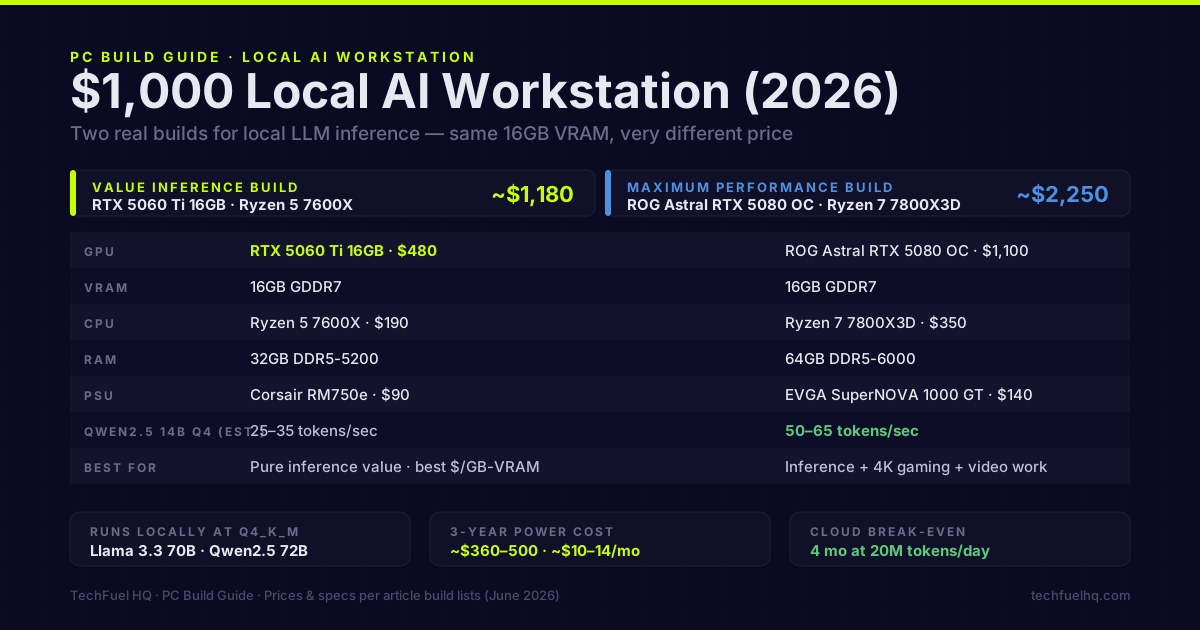
RTX 5060 Ti 16GB: same VRAM, 60% of the throughput on large models. At current pricing (RTX 5060 Ti 16GB ~$450–500, RTX 5080 ~$1,000–1,100), the 5060 Ti has a dramatically better AI inference $/GB-VRAM ratio. The 5080 makes sense if you also game at 4K, run video production work, or want the absolute fastest inference. Both are 16GB cards, so both live in the same VRAM tier for what fits; for the full map of which models each capacity actually runs — 8GB through 48GB+, with real GGUF file sizes — see which local LLM fits your GPU by VRAM.
Component build
This is the build I run: Ryzen 7 7800X3D + ROG Astral RTX 5080 OC. Not the most cost-efficient for pure inference, but the 7800X3D’s cache benefits gaming when the GPU isn’t running inference, and the 5080 handles everything I throw at it. Prices are approximate as of June 2026 and shift week to week.
Maximum performance build (~$2,800 today / ~$2,250 pre-shortage, GPU-heavy):
| Component | Part | ~Price |
|---|---|---|
| CPU | AMD Ryzen 7 7800X3D | $350 |
| Motherboard | ASUS ROG STRIX B650-A WiFi | $220 |
| RAM | 64GB DDR5-6000 (2×32GB) | $130 |
| GPU | ASUS ROG Astral RTX 5080 OC | $1,100 |
| Storage | Samsung 980 Pro 1TB NVMe | $90 |
| PSU | EVGA SuperNOVA 1000 GT | $140 |
| CPU Cooler | NZXT Kraken 360 AIO | $120 |
| Case | Fractal North / Meshify C | $100 |
| Total (pre-shortage ref.) | ~$2,250 · ~$2,800 at current RAM/SSD prices |
This is literally the system I’m running. The 7800X3D is overkill for inference — it’s there for gaming. A Ryzen 5 7600X at $200 would perform identically for LLM inference. To verify PSU sizing for your specific component selection, the PSU Wattage Calculator shows peak draw and efficiency headroom at a glance.
Value inference build (~$1,550 today / ~$1,180 pre-shortage):
| Component | Part | ~Price |
|---|---|---|
| CPU | AMD Ryzen 5 7600X | $190 |
| Motherboard | MSI B650 Tomahawk WiFi | $170 |
| RAM | 32GB DDR5-5200 (2×16GB) | $75 |
| GPU | RTX 5060 Ti 16GB | $480 |
| Storage | WD Blue SN580 1TB NVMe | $65 |
| PSU | Corsair RM750e | $90 |
| CPU Cooler | Thermalright Peerless Assassin 120 | $40 |
| Case | Fractal Pop Air | $70 |
| Total (pre-shortage ref.) | ~$1,180 · ~$1,550 at current RAM/SSD prices |
The 5060 Ti 16GB is the correct choice here. Same VRAM as the 5080, handles all the same models — just at about half the token rate (448 vs ~960 GB/s bandwidth): roughly 25–35 tokens/second on a 14B Q4 model against the 5080’s 50–65. For interactive use, you won’t feel the difference in a real conversation. For batch processing thousands of requests, you will.
What to install
Ollama is the fastest path to a working inference server. It handles model downloads, VRAM allocation, and exposes a local API compatible with OpenAI’s format:
# Install
curl -fsSL https://ollama.com/install.sh | sh

# Pull and run Qwen2.5 14B (Q4_K_M by default — a ~9GB fit in 16GB VRAM)
ollama pull qwen2.5:14b

# Start inference server
ollama serve
Ollama listens on port 11434. The OpenAI-compatible API endpoint is at /v1/chat/completions — configure any OpenAI SDK to point at http://localhost:11434/v1 and it works without code changes.
llama.cpp for more control over quantization, batch size, and GPU layers:
# Build with CUDA support
git clone https://github.com/ggerganov/llama.cpp
cd llama.cpp
cmake -B build -DLLAMA_CUDA=ON
cmake --build build -j$(nproc)

# Run with full GPU offload
./build/bin/llama-server \
  -m /models/mistral-small-24b-Q4_K_M.gguf \
  --n-gpu-layers 999 \
  --ctx-size 8192 \
  --host 0.0.0.0 --port 8080
The --n-gpu-layers 999 flag loads all layers to the GPU. If you exceed VRAM, layers fall back to CPU automatically — the number just means “as many as fit.”
Open WebUI for a ChatGPT-like interface over your local Ollama:
docker run -d --gpus all \
  -p 3000:8080 \
  -v open-webui:/app/backend/data \
  --add-host=host.docker.internal:host-gateway \
  ghcr.io/open-webui/open-webui:cuda
Open http://localhost:3000, connect to Ollama at http://host.docker.internal:11434.
The financial math
Cloud API pricing as of June 2026 (approximate, check current pricing):
- OpenAI GPT-4o: ~$2.50/1M input tokens, ~$10/1M output tokens
- Anthropic Claude 3.5 Haiku: ~$0.80/1M input, ~$4/1M output
- Meta Llama 3.3 via Groq: ~$0.59/1M tokens
For comparison: a local open-weight model (the 8B–24B class this card actually fits) at zero marginal cost per token.
Break-even analysis at different usage levels:
| Daily usage | Cloud cost/month (Llama via API ~$0.60/1M) | Local electricity/month | Break-even on $1,200 build |
|---|---|---|---|
| 100K tokens | ~$1.80 | ~$15–20 | Never (cloud cheaper) |
| 1M tokens | ~$18 | ~$15–20 | Effectively never — electricity alone eats the savings |
| 5M tokens | ~$90 | ~$15–20 | 17 months |
| 20M tokens | ~$360 | ~$15–20 | 4 months |
The tipping point is somewhere around 2–3M tokens per day for a non-GPU-optimized cloud model. If you’re running summarization pipelines, document processing, coding assistants, or anything generating volume, local inference wins quickly.
Privacy factor. If your workload involves sensitive documents — contracts, medical records, proprietary code, personal communications — local inference isn’t just cheaper past the break-even point; it’s the only option that keeps data off external servers. That value is real even if you can’t put a dollar figure on it.
Power cost over 3 years
Using the Power & Cost Calculator for the full build:
- Idle (no inference): ~85W
- Under inference load: ~280–380W depending on model size, batch size, and GPU utilization
- At 4 hours/day inference load + 20 hours idle, $0.13/kWh: roughly $10–14/month
Over 3 years: ~$360–500 in electricity for the GPU workstation. That’s the operating cost to factor into your break-even calculation. At $1,200 hardware + $480 electricity = $1,680 total 3-year cost. Compare to how much you’d spend on tokens. For a closer look at how draw and throughput behave under continuous load, the breakdown of RTX 5080 performance per watt running AI 24/7 measures where the power actually goes during inference.
What a build like this earns its keep on
The workload mix a 16GB local-inference box handles well:
- Coding assistance — Qwen2.5-Coder-14B via the Continue.dev extension in VS Code. Fits in VRAM with room for context, no token costs, no code leaving the machine. (The 32B coder variant is a ~20GB file — it runs only with partial offload and a real speed penalty.)
- Document summarization — batch-processing PDFs through a local API endpoint at zero marginal cost.
- Image generation — ComfyUI with FLUX.1 models. The 16GB VRAM handles full-res generation without offloading.
- Research drafting — a long-context 14B with 8K+ context for drafting sections with citations.
A setup like this doesn’t replace cloud APIs entirely — frontier models still win where answer quality matters more than volume. But the bulk-token workloads (summarization, coding autocomplete, drafts) are exactly the ones that move local — and once the LLM is running, the rest of a self-hosted AI stack (image generation, speech, a coding backend) drops onto the same box.
Want to see the RTX 5080’s specs and photos up close? The dataset page has the full breakdown. For keeping this workstation running efficiently, see the undervolt guide. Running a lower-cost GPU for local AI? The RTX 5060 local LLM setup tutorial covers Ollama, llama.cpp, and Open WebUI from scratch.
Frequently asked questions
What AI models can I run locally on an RTX 5080?
How fast is RTX 5080 inference compared to cloud API?
Is an RTX 5060 Ti a better buy than the 5080 for local AI?
What CPU and RAM does a local AI workstation need?
Does local AI inference make financial sense vs cloud API?
Evidence ledger
- Last updated
- Methodology
- This guide was written and edited by Lowell K. Wood IV in St. Louis County, MO. Specs, prices, commands, and version numbers are drawn from the official vendor, reseller, and project documentation current on the date above, and were verified before publishing. First-person hardware claims appear only where the article shows a verifiable artifact — a photo, receipt, or measurement — or links to the TechFuelHQ Open Bench Datasets. Every fact is human-verified against its cited source before publishing; AI assists with first-draft structure and source-gathering, not with the verdict. Full editorial standard: methodology.
- Update log
- 2026-07-25 — Last reviewed and updated.
- Corrections
- Spotted an error or stale price? Email hello@techfuelhq.com. Confirmed corrections are added to the update log above.