 TechFuel HQ
By LK Wood IV · Published 2026-07-04 · St. Louis County, MO
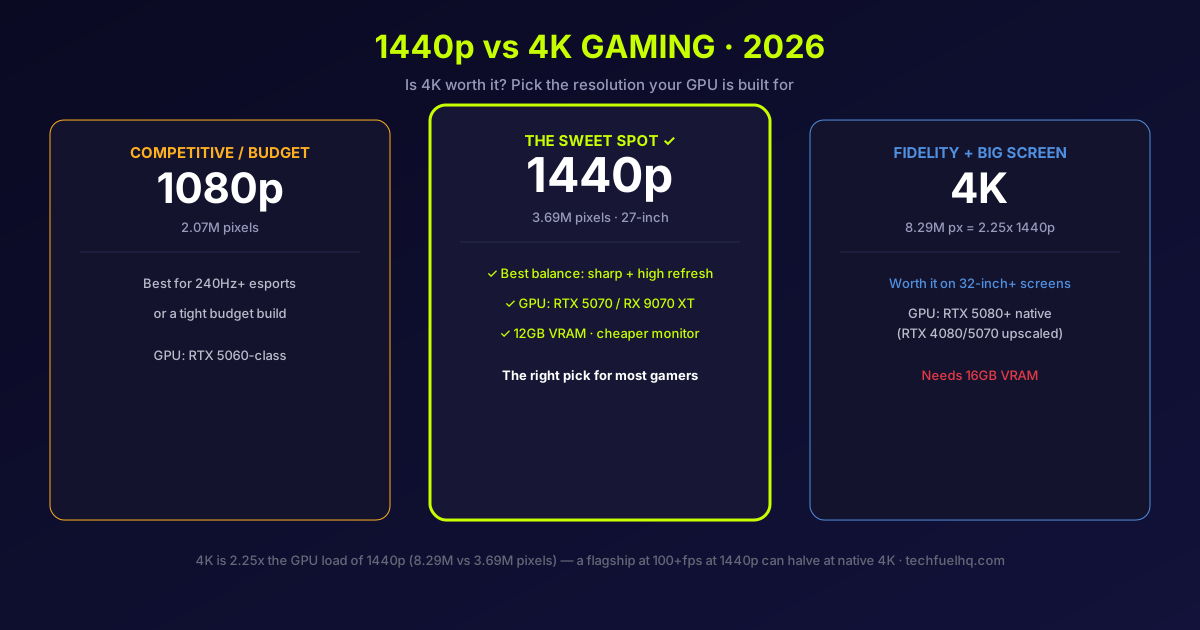
The short answer: 1440p is the sweet spot for most gamers in 2026, and 4K is worth it only if you have both a flagship GPU and a big screen. 1440p at 27 inches gives you sharp image quality that a mainstream card can actually drive at high frame rates; 4K rewards a 32-inch-plus panel and an RTX 5080-class GPU. This guide gives the real pixel math behind the gap, the GPU you need for each resolution, and exactly when 4K earns its cost.
Why 4K is so much harder to run
Start with the numbers, because they explain everything downstream:
- 1080p = 1920 x 1080 = 2.07 million pixels
- 1440p = 2560 x 1440 = 3.69 million pixels (1.78x of 1080p)
- 4K = 3840 x 2160 = 8.29 million pixels (2.25x of 1440p, 4x of 1080p)
Your GPU has to shade every one of those pixels every frame, so 4K asks for roughly 2.25 times the graphics work of 1440p for the same frame rate. That’s not a small tax - it’s the difference between a card cruising and a card struggling. In practice a demanding ray-traced game that a flagship like the RTX 5080 runs at well over 100 fps at 1440p can fall to roughly half that at native 4K on the very same card. The resolution alone - not a slower GPU - is what moved the frame rate.
The GPU you need for each resolution
This is where most “which resolution” advice goes wrong: it treats the monitor as the decision when the GPU is the real gate. Here’s the 2026 mapping:
| Resolution | GPU class you want |
|---|---|
| 1440p high-refresh | RTX 5070 / RX 9070 XT (the sweet spot) |
| 4K upscaled (DLSS 4 / FSR 4) | RTX 4080 / RTX 5070 and up |
| 4K native, high frame rate | RTX 5080 or better |
Cards like the RTX 4070 and RX 7800 XT are fundamentally 1440p GPUs - they can output a 4K signal, they just can’t hold the settings and frame rates most players want there. Pair a mid-range card with a 4K monitor and you’ll end up either dropping settings hard or leaning entirely on upscaling. To see where a specific card lands, the GPU Comparison Tool and the best GPUs for 4K gaming guide put the raw performance next to the resolution it’s meant for.
When 4K is worth it - and when 1440p wins
Choose 4K if you:
- Own a flagship GPU (RTX 5080 or better).
- Use a 32-inch or larger screen, where the extra sharpness is clearly visible.
- Prioritize visual fidelity, HDR impact, and single-player immersion over maximum frame rate.
Choose 1440p if you:
- Have a mid-range GPU (RTX 5060-5070 class).
- Use a 27-inch monitor - the size where 1440p already looks sharp.
- Value high refresh rates and competitive frame rates, or want your GPU to last longer before it feels slow.
Screen size is the quiet deciding factor. On a 27-inch panel at a normal desk distance, 1440p’s pixels are already small enough that 4K’s upgrade is subtle; on a 32-inch-plus screen, 4K’s extra density is obvious. You can check the exact pixel density for any size and resolution with the PPI Calculator before you buy.
Upscaling changes the math (a bit)
DLSS 4 and FSR 4 render the game at a lower internal resolution and reconstruct it up to 4K, which cuts the GPU cost meaningfully and is what makes 4K practical on an RTX 4080/5070 rather than only a flagship. It’s genuinely good in 2026 - but it doesn’t erase the gap, and native 4K still asks for a top-tier card. If you’re counting on upscaling to make 4K work on a mid-range GPU, treat it as a helpful boost, not a magic fix; the DLSS vs FSR breakdown covers what each does well.
Don’t forget VRAM and the monitor cost
Two costs beyond the GPU core:
- VRAM. 4K’s high-resolution frame buffer and textures eat graphics memory - 16GB is the sensible minimum for 4K, where 1440p is comfortable on 12GB. A fast card starved of VRAM stutters at 4K; the how much VRAM you need guide has the full breakdown.
- The monitor. 4K panels cost more than equivalent 1440p ones, and a high-refresh 4K monitor plus the GPU to feed it is a serious combined spend. 1440p high-refresh is the value sweet spot on the display side too.
The verdict
- Most gamers: 1440p at 27 inches with an RTX 5070 / RX 9070 XT-class card. Best balance of sharpness, frame rate, and cost.
- Visual-fidelity-first, big screen: 4K at 32 inches-plus with an RTX 5080 or better (16GB+ VRAM). Worth it when the hardware matches.
- Competitive / budget: 1080p is still fine for 240Hz+ esports or a tight budget.
- The rule: pick the resolution your GPU is built for, not the biggest number. A 1440p card on a 4K screen is a worse experience than the same card on the 1440p screen it was made for.
4K is more attainable than ever in 2026, but “attainable” still means a flagship GPU and a big screen. For the money most people spend, 1440p delivers the better all-round result - which is exactly why it’s the resolution to beat.
Sources
- 2026 resolution/GPU-class guidance (1440p sweet spot, 4K GPU tiers, upscaling break-even) synthesized from current testing roundups. The ~2.25x 4K-over-1440p GPU cost is exact pixel-count arithmetic (8.29M vs 3.69M pixels); the real-world frame-rate hit scales roughly with it.
- First-party tools and guides: GPU Comparison, best GPUs for 4K gaming, how much VRAM you need, and the PPI Calculator.
Guidance is for mid-2026; GPU classes and monitor prices shift, so confirm current benchmarks for the specific card and games you play. Found an error? Email hello@techfuelhq.com with the article URL.
Frequently asked questions
Is 4K worth it for gaming in 2026?
Is 1440p or 4K better for gaming?
What GPU do you need for 4K gaming?
Is 1440p still worth it in 2026?
Can you actually tell the difference between 1440p and 4K?
Is 4K much harder to run than 1440p?
Evidence ledger
- Last updated
- Methodology
- This guide was written and edited by Lowell K. Wood IV in St. Louis County, MO. Specs and prices verified against vendor and project documentation current on the date above. Full editorial standard: methodology.
- Update log
- 2026-07-04 — Last reviewed and updated.
- Corrections
- Spotted an error or a stale number? Email hello@techfuelhq.com. Confirmed corrections are added to the update log above.