 TechFuel HQ
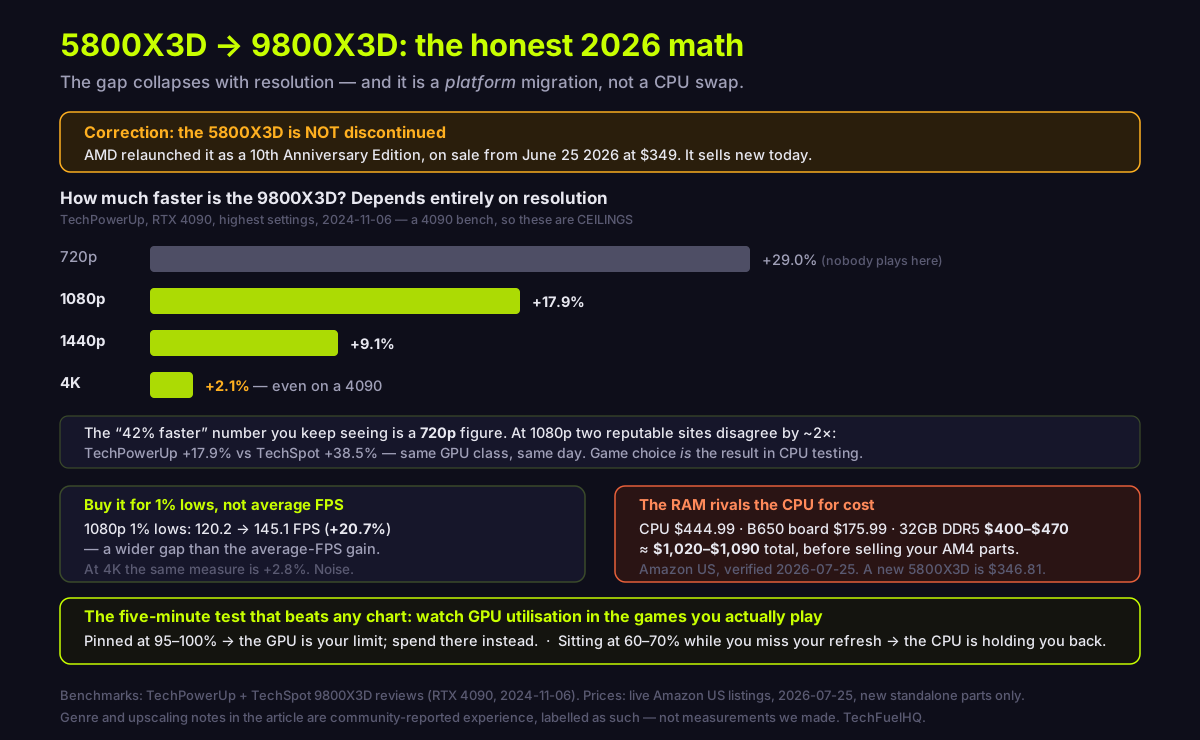
It depends on resolution and genre, not on the headline number. TechPowerUp measured the 9800X3D 17.9% faster at 1080p but only 2.1% at 4K. And it is not a CPU swap: AM4 to AM5 needs a new board and DDR5, so the real bill is roughly $1,020 to $1,090 in 2026.
By LK Wood IV · Published 2026-07-25 · Updated 2026-08-24 · ~12 min read · St. Louis County, MO
TL;DR · Two things almost every comparison gets wrong
- The 5800X3D is not discontinued. AMD relaunched it as a 10th Anniversary Edition in June 2026 at $349. It sells new today.
- The "42% faster" number is a 720p figure. At 1080p, two reputable sites disagree by 2× (+17.9% vs +38.5%). At 4K it is +2.1%.
- It is not a CPU swap. AM4 → AM5 needs a new board and DDR5: ≈$1,020–$1,090 at 2026-07-25 Amazon US prices, where a 32GB RAM kit costs about as much as the CPU.
- Upgrade if you play what upgraders commonly report as CPU-bound cases — MMO raids, sim racing grids, 4X/strategy, 240Hz shooters — or chase 1% lows at high-refresh 1440p.
- Don't if you play GPU-bound AAA games at native 4K. Put the money in a GPU instead — TechPowerUp says the same thing.
All prices verified on Amazon US 2026-07-25. Benchmark figures are from RTX 4090-class test benches, which makes them ceilings.
Correction first: the 5800X3D is not discontinued
The most-asked question about this chip is “why is the 5800X3D discontinued?” — it shows up in Google’s People Also Ask box for practically every related search. The premise is out of date.
AMD did retire the part, and for a stretch it was genuinely hard to buy new. Then it brought it back: the Ryzen 7 5800X3D 10th Anniversary Edition for Socket AM4. AMD’s own Computex 2026 post states it directly — “The Ryzen 7 5800X3D 10th Anniversary Edition will be available beginning June 25, with a suggested etail price of US $349 at launch” (AMD). It is the same 2022 silicon, not a redesign, and the boxed part sells new today: $346.81 on Amazon US from AMD’s own storefront (checked 2026-07-25).
That matters for your decision in a way the spec sheets miss: the platform you are being told to leave is one AMD just restocked. If your 5800X3D dies, you can replace it. If a friend wants your old parts, they are worth something. AM4 is in legacy status — in that same post AMD writes “we are extending support for the Socket AM5 platform through 2029” while speaking of AM4’s support in the past tense — but legacy is not dead.
The gap depends entirely on resolution
Here is the single most important table in this article. TechPowerUp publishes a full resolution sweep with both chips — the one cited here — all on an RTX 4090 at highest quality settings (review dated 2024-11-06):
| Resolution | 5800X3D (relative) | 9800X3D | 9800X3D advantage |
|---|---|---|---|
| 720p | 77.5% | 100% | +29.0% |
| 1080p | 84.8% | 100% | +17.9% |
| 1440p | 91.7% | 100% | +9.1% |
| 4K | 97.9% | 100% | +2.1% |
Source: TechPowerUp performance summary (relative-performance charts per resolution) and the direct 5800X3D head-to-head.
The gap shrinks sharply as resolution rises and effectively vanishes at 4K. TechPowerUp says so itself in its conclusion: “At the highly GPU-bound 4K scenario, even with an RTX 4090, the differences between the top processors are minimal… it might make sense to opt for a more affordable CPU and spend the savings on a faster graphics card, where you are getting more FPS for your money.”
About that “42% faster” number
You will see ~42% quoted constantly. Be precise about where it comes from: it is ComputerBase’s number, not TechPowerUp’s, and it is a 720p result. ComputerBase’s 15-game frametime (1% percentile) rating puts the 9800X3D at 103.76 against the 5800X3D’s 72.77 — +42.6% — and the site states plainly that its CPU test course runs at 720p on an RTX 4090 specifically to isolate the processor (ComputerBase).
That is a legitimate measurement of CPU capability at a resolution nobody plays at. It is not a prediction of what you will see, and it is not comparable to TechPowerUp’s +29.0% at the same 720p — different game sets and memory configurations produce different answers, which is the whole point of this section.
Worse for anyone hoping for one clean number: two reputable outlets disagree by roughly 2× at the same resolution. TechPowerUp measured +17.9% at 1080p. TechSpot/Hardware Unboxed, testing on the same GPU class and publishing the same day, measured 205 fps vs 148 fps — +38.5% across a 14-game average (TechSpot).
Neither is wrong. They picked different games and different settings, and in CPU testing that choice is the result. The honest takeaway is a range, not a number — and where you land inside it depends on what you play.
One more framing point that applies to every figure here: all of them come from RTX 4090-class benches. Those are ceilings. On many mid-range setups you will sit closer to the 4K column than the 1080p one — unless your games or settings are genuinely CPU-bound, which is the exception this article spends the next section on.
Where the upgrade actually pays: 1% lows and specific genres
Average FPS is the wrong metric for this decision. The upgraders who report being happy almost always cite frame-time consistency, and the data supports them: in TechPowerUp’s run the 1080p 1% lows go 120.2 → 145.1 FPS (+20.7%) — wider than that same review’s +17.9% average-FPS gain (minimum-FPS chart, 1080p). At 4K the same measure moves 75.7 → 77.8 FPS, +2.8%, which is noise — and notably the 9800X3D’s 4K 1% low sits below the 7800X3D’s there, i.e. the top chips are within noise of one another.

The other half of the answer is genre, and this is where review suites mislead. Benchmark sets lean on graphically heavy AAA titles; the CPU-bound genres get left out. Self-hosting and gaming communities consistently name the same list of “yes, upgrade” cases — treat these as community sentiment rather than measurements:
- MMO raid content (World of Warcraft is the most-cited example) — effectively unbounded CPU demand in dense raids.
- Escape from Tarkov, especially the worst-case maps.
- Sim racing with full grids — the delta appears at race starts, not hotlapping. Caveat from the sim crowd itself: triple 1440p is ~11 million pixels versus ~8 million for one 4K panel, so a triple-screen rig can be as GPU-bound as a 4K gamer.
- 4X and grand strategy, dense AI-driven city builders, and faster shader compilation.
- Competitive shooters at 240Hz+ where you are chasing frame-time floors.
The upscaling wrinkle that breaks the simple 4K rule
“4K means GPU-bound, so don’t upgrade” is a good rule with a real hole in it, and it is the sharpest point upgraders raise: many players are not rendering at native 4K. DLSS and FSR render internally at a lower resolution and upscale, which pushes work back onto the CPU. Add frame generation and heavy ray tracing and the CPU matters more again.
So the sharper version of the rule: native 1440p or 4K on a GPU-bound AAA title — stay put. Upscaling plus frame generation plus heavy RT plus fast asset streaming — the platform starts to matter.
The five-minute test that beats any benchmark chart
Do not buy from a chart. Run the games you actually play and watch GPU utilisation. This is a rough heuristic upgraders use, not a benchmark — but it is measured on your hardware, which no review can be:
- GPU pinned at 95–100% → the GPU is your limit. A CPU upgrade buys you very little. Spend on the graphics card.
- GPU sitting around 60–70% while you miss your monitor’s refresh → the CPU is holding you back, and this upgrade is aimed at exactly your problem.
That symptom is what upgraders describe as the thing that finally convinced them, and it costs nothing to check.
The part nobody prices: this is a platform migration
Everyone calls it a CPU upgrade. It is not. AM4 and AM5 are different sockets with different memory, so the 9800X3D needs a new motherboard and new DDR5. Priced from live Amazon US listings on 2026-07-25, new standalone parts only:
| Part | Example | Price |
|---|---|---|
| CPU | Ryzen 7 9800X3D | $444.99 |
| Motherboard | MSI MAG B650 Tomahawk WiFi | $175.99 |
| Memory | 32GB DDR5-6000 kit | $400 – $470 |
| Total | ≈$1,020 – $1,090 |
Read that memory row again. A 32GB memory kit now costs about as much as the CPU.
The band in that table is the mainstream one our DDR5 price guide verified a day earlier: about $400 for the cheapest in-stock DDR5-6000 kit, and $420–$470 for CL30-class kits from Lexar, Patriot, G.Skill’s Flare X5 and Corsair’s Vengeance line.
Brand tier matters more than usual right now, and it is worth knowing before you shop. Checking on 2026-07-25, every G.Skill Trident Z5 Neo kit at DDR5-6000 CL30 listed at $599.99 — roughly $130 above a Flare X5 or Vengeance kit at the identical DDR5-6000 CL30 spec. Within that same Trident Z5 Neo line, dropping to CL36 fell to $459.99. So the spread you see is a brand-and-binning premium, not a performance difference worth $130: our own DDR5 guide measures CL30 versus CL36 at 1–3% in CPU-bound cases. Buy the spec, not the heatspreader. (Totals are our arithmetic over separately verified prices, not a figure any source quotes.)
For context on how strange 2026 is: a new 5800X3D is $346.81 and a new AM4 B550 board is $99.99. The chip you already own costs less than the memory you would need to replace it.
You will recoup some of it — your 5800X3D, AM4 board and DDR4 kit all have resale value. Note that DDR4 is elevated in 2026 as well: a new 32GB DDR4-3600 kit was $219.99 on the same day we priced everything else, which suggests the memory you displace is worth more than it would be in a normal market. We have not verified secondhand prices, so we are not quoting you a resale number; check completed listings for your exact parts.
For the wider picture of what components cost right now, our verified 2026 PC part prices page tracks the same dataset these figures come from, with a last-verified date on every row.
So: upgrade, or not?
Stay on the 5800X3D if you play GPU-bound AAA games at native 1440p or 4K, your GPU already sits near 100% utilisation, or that ~$1,020–$1,090 would otherwise go toward a graphics card. TechPowerUp’s own advice points the same way. AMD relaunching the chip means staying put is a supported position, not a stubborn one.
Upgrade if your games are CPU-bound — MMO raids, sim racing grids, strategy simulations, 240Hz competitive shooters — or if you have watched GPU utilisation hover at 60–70% while missing your refresh rate. Buy it for the 1% lows, not the average FPS.
Wait if the memory price is what is stopping you. DDR5 at roughly $400–$470 for 32GB on 2026-07-25 was the binding constraint in this decision, not the CPU, and it is the one variable that could move meaningfully — our first-party DDR5 price index reading on 2026-08-13 found nothing below $449.99 across 26 direct-retailer observations, on a stricter acceptance rule than this page’s Amazon snapshot, so treat the low end of that band as the thing to re-check before you buy — our DDR5 price guide tracks where that market actually sits.
Already on AM5 and asking a narrower version of this question? The 7800X3D vs 9800X3D upgrade case is a different calculation entirely, because there is no platform cost — just the chip. And if you are weighing the 9800X3D against its bigger sibling for mixed gaming and production work, 9950X3D vs 9800X3D covers that split.
Related reading
- 7800X3D vs 9800X3D: should you upgrade? — the same question without the platform cost
- 9950X3D vs 9800X3D for gaming — when more cores actually help
- Ryzen 7 7800X3D review — the middle generation, measured
- 9800X3D undervolt guide — if you do upgrade, tune it
- Verified 2026 PC part prices — the dataset behind the cost table, with per-part verification dates
Sources
- https://www.techpowerup.com/review/amd-ryzen-7-9800x3d/27.html — relative-performance summary per resolution (RTX 4090, 2024-11-06)
- https://www.techpowerup.com/review/amd-ryzen-7-9800x3d/29.html — direct 9800X3D vs 5800X3D head-to-head
- https://tpucdn.com/review/amd-ryzen-7-9800x3d/images/minimum-fps-1920-1080.png — 1080p minimum-FPS (1% low) chart
- https://www.techpowerup.com/review/amd-ryzen-7-9800x3d/5.html — test methodology and bench configuration
- https://www.computerbase.de/artikel/prozessoren/amd-ryzen-7-9800x3d-test.90151/seite-2 — 15-game 720p frametime rating, source of the widely quoted ~42% figure
- https://www.techspot.com/review/2915-amd-ryzen-7-9800x3d/ — 14-game 1080p average (RTX 4090, 2024-11-06)
- https://www.amd.com/en/blogs/2026/amd-computex-2026-10-years-of-am4-am5-support-through.html — AMD Computex 2026: 5800X3D 10th Anniversary Edition ($349, June 25) and AM5 support through 2029
- https://www.amd.com/en/products/processors/desktops/ryzen/5000-series/amd-ryzen-7-5800x3d.html — official 5800X3D product page
- https://www.techpowerup.com/review/amd-ryzen-7-9800x3d/ — full review index
Prices were fetched from live Amazon US listings on 2026-07-25 (new, standalone, exact-model listings only; combo and renewed listings rejected). Memory pricing in particular moves week to week during the ongoing DRAM shortage — treat every figure here as a dated snapshot, not a quote, and check the current price before you buy. This article contains no affiliate or retailer links. Community observations — the genre list, the upscaling counter-argument and the GPU-utilisation test — come from public upgrade threads on r/buildapc, r/AMDHelp and the Overclockers UK forums; each is user-reported experience, not a measurement we made, and is labelled as such above.
Frequently asked questions
Why is the 5800X3D discontinued?
Is it worth going from 5800X3D to 9800X3D?
How much does the 5800X3D to 9800X3D upgrade actually cost?
Is the 5800X3D still good in 2026?
Will the 5800X3D bottleneck a modern GPU?
Does upscaling change the 4K answer?
Evidence ledger
- Last updated
- Methodology
- See our methodology for research and review standards.
- Update log
- 2026-08-14 — Dated two present-tense price framings. The page’s underlying figures are honestly captured and labelled ‘Priced on Amazon US on 2026-07-25’, but the TL;DR card and the closing ‘wait if’ paragraph restated the same numbers as ‘at today’s prices’ and ‘is the binding constraint’, which read as current 20 days later. Both now carry the 2026-07-25 capture date. The $400-$470 32GB DDR5-6000 band itself was NOT changed: TechFuelHQ’s first-party DDR5 price index found nothing below $449.99 on 2026-08-13, but that index accepts only DDR5-6000 from direct US retailers while this page priced Amazon US, so the two are not directly comparable and the Amazon figure could not be re-derived from this network. The first-party reading is now cited alongside as the cross-check rather than silently overriding the Amazon capture.
- Corrections
- Spotted an error or a stale number? Email hello@techfuelhq.com. Confirmed corrections are added to the update log above.