 TechFuel HQ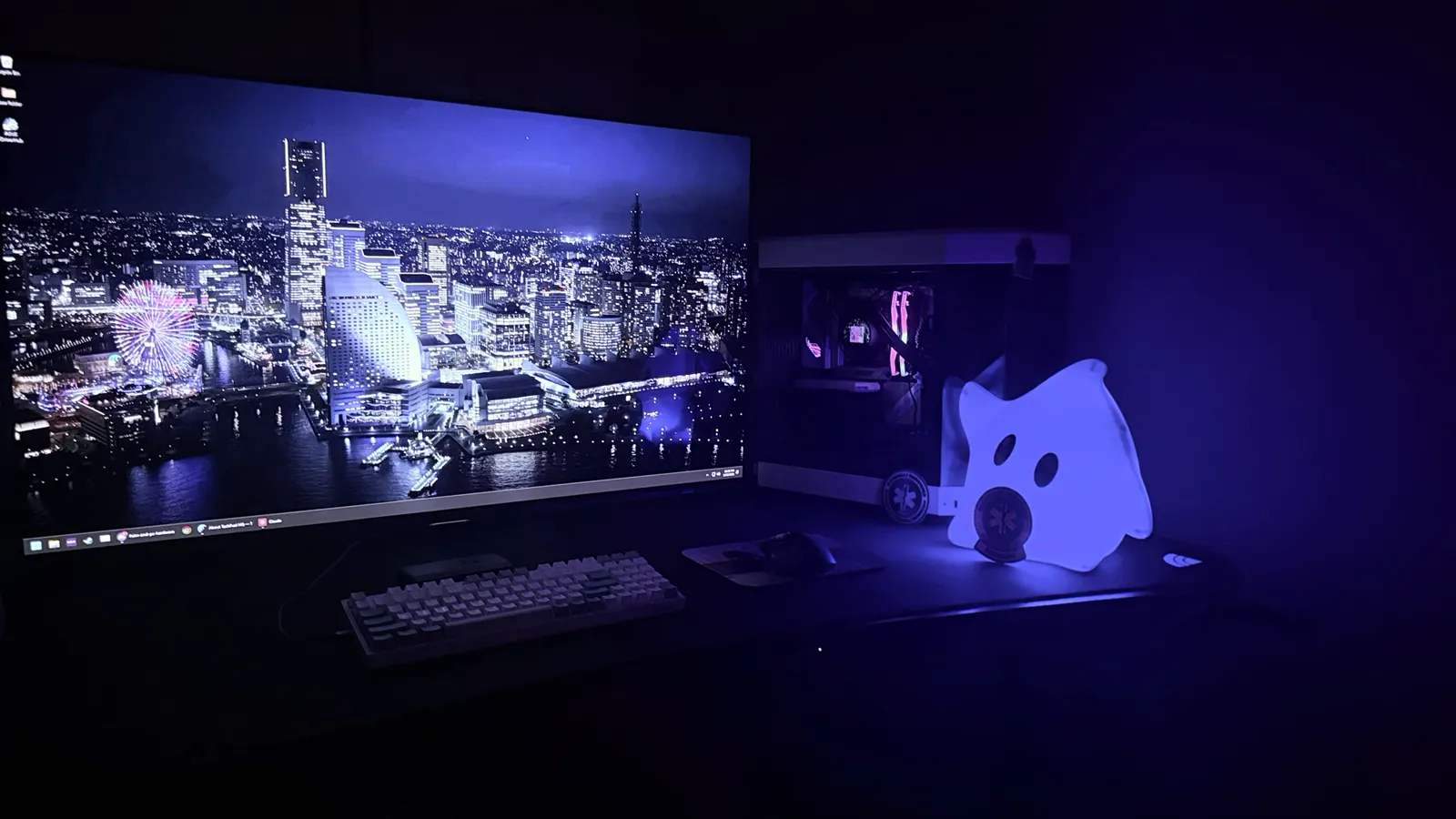
By LK Wood IV · Published 2026-03-01 · Updated 2026-09-05 · ~12 min read · St. Louis County, MO
TL;DR · The Aorus FO48U call
- Best for: a desk where you sit 36–48″ away, want a single 48″ 4K OLED, value DisplayPort + KVM over a smart-TV firmware stack.
- Skip if: desk is shorter than 30″ (panel is too big at that distance), or you need replacement availability (FO48U is supply-constrained in 2026).
- If you cannot find one: LG's current C-series successor is the C5. A September 5, 2026 retail read returned C5 and C6 listings only, none of them a 42-inch, so the older C4 is closed out; check size and stock before buying.
- GPU pairing: RTX 4080 / 5080 / RX 7900 XTX / 9070 XT class for 4K 120 Hz high settings (see the $2,500 7800X3D + RTX 5080 4K build).
- Don't: Park a static taskbar on it. Hide the taskbar, dark mode the OS, and the OLED outlasts its warranty.
48″ 4K OLED · 120 Hz · DisplayPort 1.4 + 2 × HDMI 2.1 · Built-in KVM · No new-condition retail listing found on September 5, 2026; used and refurbished stock only; no figure published.
Key takeaways
- What it is: The Gigabyte AORUS FO48U is a 48-inch 4K (3840×2160) 120 Hz LG WOLED gaming monitor, built on the same WOLED panel family as the LG C1.
- Why pick it over an LG OLED: It adds DisplayPort 1.4, two HDMI 2.1 inputs, a built-in KVM switch, and proper monitor OSD controls. The HDMI-only LG OLEDs lack all of it.
- Price (September 5, 2026): I cannot quote you one. A Google Shopping read across US retailers that day returned no new-condition direct-retail listing for the FO48U, so this review publishes no current price. It launched in 2021 at a $1,500 list price, Gigabyte never refreshed it, and I have no observation of what used and refurbished units sell for.
- Best for: A deep desk where you sit 36–48 inches away and want a single 48-inch panel; skip it if your desk is under 30 inches or you need guaranteed replacement stock.
- GPU pairing: RTX 4080 / 5080 or RX 7900 XTX / 9070 XT class for 4K 120 Hz at high settings. If 48 inches is too big for your desk, LG’s C5 line is the current successor; I did not find a 42-inch listing on September 5, so check size and stock.
Specs at a glance, cited 2026-06-10
All specs below from the Gigabyte AORUS FO48U product page (manufacturer specification sheet, accessed 2026-06-10).
Two rows need their provenance stated. Gigabyte’s own copy reads “47.53-inch UHD resolution” and “47.53″ UHD panel”; 48-inch is the class name every retailer and this review use, and the table now carries both. The SDR brightness figure is not on Gigabyte’s current page at all. It comes from TFTCentral quoting Gigabyte’s spec sheet at launch, “a rather limited 130 – 150 cd/m2 ’typical’ brightness”, alongside the “800-900 cd/m2 (@3% peak)” figure Gigabyte added later. Both are linked in Sources below.
| Spec | Value |
|---|---|
| Panel | 47.53-inch (sold as the 48-inch class) LG WOLED (4th-gen) |
| Resolution | 3840 × 2160 (4K UHD) |
| Refresh rate | 120 Hz |
| Response time | 1 ms GtG |
| Brightness | 800–900 cd/m² at a 3% window (HDR peak); 130–150 cd/m² “typical” (SDR) |
| Color | DCI-P3 98%, 10-bit |
| Inputs | 1× DisplayPort 1.4, 2× HDMI 2.1, USB-C with 18W PD |
| USB hub | 2× USB-A 3.0 + KVM switch |
| Speakers | 2× 15W + 20W woofer |
| Stand | VESA 300×300, integrated |
| Variable refresh | AMD FreeSync Premium, NVIDIA G-Sync Compatible |
| Power (typ.) | ~95–120W (cited from Gigabyte spec sheet) |
If you ask anyone for a 4K OLED gaming recommendation you're going to hear LG. The C1, the C2, the C3, the C4. Doesn't matter which year, it's always LG. And they're good, I'm not arguing that.
But I'm not using an LG. I'm using a Gigabyte AORUS FO48U, which is a 48-inch 4K OLED that basically nobody talks about, and it might be the single biggest upgrade I've made to my setup in recent memory. Not the GPU. Not the CPU. The monitor.
How I Ended Up With This Thing
I wasn't planning on buying a Gigabyte monitor. I was looking at LG OLEDs like everyone else, going back and forth between the 48-inch C1 and waiting for a sale on the C2. Then I saw the FO48U on a Newegg deal, somewhere around $800 or $900 at the time, and I started reading about it.
Turns out it uses the same LG WOLED panel that's in the C1. Same blacks, same contrast, same pixel response times. But Gigabyte added a DisplayPort 1.4 input, a built-in KVM switch, a USB hub, and proper monitor OSD controls instead of LG's TV interface. For less money.
I bought it that week. I've been using it as my daily driver for both gaming and work since then, sitting about three feet from a 48-inch OLED, which sounds insane until you actually try it.
What's Good
Okay so the obvious stuff first — it's an OLED. Blacks are black. Not dark gray, not "pretty close to black" — actually off. Every OLED review says this and they're all correct and I don't have anything new to add there.
The thing that's wild about this monitor specifically, and the reason I keep recommending it to people, is everything around the panel. The build quality is seriously impressive. When this thing is on, there's essentially no visible bezel — it's just screen. It doesn't feel like a cheap TV repurposed as a monitor. It feels like a piece of equipment.
DisplayPort 1.4. This is the big one for PC users and it's the main reason I went with this over the LG. The C1 and C2 are HDMI-only, so you need HDMI 2.1 on your GPU to get 4K 120Hz. Anyone who's dealt with HDMI 2.1 handshake issues on a PC knows how annoying that can be — the flickering, the weird color space problems, the signal drops. The FO48U has DisplayPort AND two HDMI 2.1 ports. I run DisplayPort from my PC and it just works. No drama.
It also has a built-in KVM switch, which I didn't care about when I bought it and now use every single day. My gaming PC and my work laptop are both plugged in, and I switch between them with one button press. Keyboard, mouse, everything follows. Before this I had a separate KVM box that cost $80 and caused input lag. Now it's just built into the monitor.
The OSD controls are what you'd expect from an actual monitor — joystick on the back, proper settings menu, change inputs in two seconds. Compare that to the LG TVs where you're navigating webOS with a remote control to change your PC's color settings. That drives me crazy. The FO48U is a monitor that happens to be 48 inches, not a TV pretending to be a monitor.
Oh and the speakers are weirdly good? There's a 50W system built in — two 15W speakers and a 20W woofer. I don't use them for gaming but when I'm just watching YouTube or have music on while working, they're way better than they should be. If you want real desk audio for movies or gaming, the built-ins still won't match a dedicated soundbar for a PC desk — but for casual use they hold up.
A Note About the Old Reviews
If you go research this monitor right now, you're going to find reviews from 2021 and 2022 complaining about aggressive auto-dimming, the brightness limiter being too heavy-handed, and a few other firmware quirks. Those were real issues at the time. They've been patched out through firmware updates a long time ago. The monitor I'm using today does not have those problems. Just keep that in mind when you're reading old reviews — the FO48U in its current firmware state is a very different experience from what reviewers were testing at launch.
What's Not Great (Not Much)
I've been trying to come up with a real complaint about this monitor and I'm struggling. It's been running since release. Zero burn-in. Zero dead pixels. FreeSync and G-Sync both work perfectly.
If I have to nitpick:
48 inches on a desk is a LOT. I know I said "sitting three feet from it" like it's normal, and you do get used to it after a week or two. But the first few days I genuinely had to move my head to see health bars and minimaps in the corners. It's not a problem anymore, my eyes just adjusted, but if you're coming from a 27-inch monitor, there's an adjustment period where you feel like you're sitting in the front row of a movie theater. Some people hate that and return these big OLEDs within a week.
It maxes out at 120Hz. There are 4K OLEDs now that do 144Hz or even 240Hz. This isn't one of them. Personally I came from a 60Hz monitor and 120Hz on an OLED still feels incredibly smooth to me. Not an issue for me but worth knowing.
The HDR brightness is a touch behind the LG. Gaming in a dim room, which is how I play, I've never once noticed. Bright room with lots of ambient light, the LG might edge it out.
The "gamer features" are mostly useless. There's a built-in crosshair overlay, something called Aim Stabilizer that's supposed to reduce motion blur, and a few other gaming gimmicks in the settings. I can't use most of them because enabling FreeSync disables them. Which is fine — I'd rather have adaptive sync than an on-screen crosshair. It's not a negative really. Just a settings page that exists and does nothing for me.
And that's kind of it? The panel has been rock solid. Anyone who hasn't gamed on a large HDR OLED is going to have their mind blown by the image quality alone, regardless of which OLED they pick. But this one does it with proper monitor features the LG panels never shipped.
The Price Situation
This is the part that kills me a little bit. The FO48U launched at $1,500. That was expensive and kind of hard to justify. But I watched it go as low as $600 on Newegg with rebates. Six hundred dollars for a 48-inch 4K OLED with DisplayPort and a KVM switch. That was absurd pricing for what you get.
That was then. I ran a Google Shopping sweep of US retailers on September 5, 2026 and it returned no new-condition direct-retail listing for this monitor at any of them; page one was a $32.99 remote control and a completely different panel. So I am not printing a current price, because I do not have one. What is left is used and refurbished stock; I have no observation of what it sells for, and what you pay is whatever the listing in front of you says. Availability is the whole story now.
The LG C5 48-inch is the one you can buy today: $899.99 at PC Richard on September 5, 2026, with Best Buy listing it at $1,179 bundled with a protection plan the same day. The older C4 42-inch is closed out, and that same read turned up C5 and C6 listings with no first-party C4 anywhere. But the C5 still doesn't have DisplayPort, still doesn't have the KVM switch, and you're still navigating webOS menus with a TV remote to change your PC settings. If you can find the FO48U in stock, it's the better choice for a PC gaming setup.
Compared to My Living Room TV
I have a Samsung 55-inch in the living room hooked up to a PS5 Pro. It's a decent TV, but every time I walk from that room to my desk and see the OLED turn on, the difference is jarring. The Samsung's blacks are gray. The motion is mushier. Colors look washed out by comparison. It's not that the Samsung is bad. OLED just ruins everything else.
If you've never used an OLED and you're wondering whether the hype is real: yeah, it is. It will also ruin every other screen in your house for you, which is an expensive side effect nobody warns you about.
I keep thinking about whether there's a monitor I'd replace this with and I can't come up with one. The newer LG C5 is nice but it still doesn't have DisplayPort. The 42-inch OLEDs exist now but I'm too used to 48 inches to go smaller. At the price I paid for this thing, I'd buy it again without thinking about it.
Retail availability and the LG C5 quote were verified September 5, 2026. For related builds, see our DDR5 RAM Buying Guide. GPU comparisons at RTX 5060 vs RX 9060 XT.
Planning a build to drive this panel? The PC Builder checks GPU clearance and PSU headroom against a CC BY 4.0 parts dataset before you commit to a case.
First-party photo gallery
Nine additional photos of the FO48U on my actual desk, lights off. The first five compare the Tokyo aerial wallpaper sequence across three angles plus a different content source; the next four show a Yokohama night-sky sequence at close range so you can see what per-pixel OLED black does to real content. No AI processing, no studio rig, no color grading. EXIF stripped.


Operator-verified OSD configuration
These are screenshots of my actual on-screen-display menus on the FO48U I run every day, captured 2026-06-10. They confirm the panel is being driven at native 3840×2160 at 120 Hz over DisplayPort with HDR Vivid and AMD FreeSync Premium engaged — the spec sheet states, but most reviewers don’t show, what the user sees when they crack open the menus.


The hardware itself
Three shots that show the FO48U the way it actually sits on a desk: front-of-house with the soundbar and PC tower, the back of the monitor with the tripod mount, and the I/O cluster.


Wallpaper Engine at 4K 120 Hz
A 12-second clip of the panel running a Wallpaper Engine cityscape — native 4K at 120 Hz over DisplayPort, no upscaling, no frame generation. Captured 2026-06-10 from a phone tripod to avoid shake. The transition mid-clip is the wallpaper itself crossfading between two scenes; the panel response is what’s on the screen.
Sources and methodology
This review combines first-party hands-on use of the FO48U I bought and run every day (photography, OSD configuration screenshots, the wallpaper-engine video, and the daily-driver impressions throughout the text) with the published third-party panel testing cited inline and a dated retail read for availability.
Primary sources cited:
- Gigabyte AORUS FO48U product page — manufacturer specifications
- LG Display does not publish a public WOLED datasheet for this panel; the panel-family attribution here is ours, inferred from the shared 4K 120 Hz WOLED generation the LG C1 uses
- RTINGS.com — Gigabyte AORUS FO48U OLED review — third-party panel calibration and measurement testing
- TFTCentral — Gigabyte Aorus FO48U panel and specification write-up (Simon Baker, 11 June 2021) — the source for the SDR brightness figure in the spec table above. TFTCentral never published a full FO48U review, so nothing here is attributed to TFTCentral bench testing
- Retail availability and the LG C5 comparison price come from a Google Shopping read (DataForSEO, location US, marketplace sellers excluded) taken 2026-09-05: no new-condition listing for the FO48U at any retailer, and the LG C5 48-inch OLED48C5PUA at $899.99 at PC Richard. There is no single document to link, so treat that read as ours rather than as a cited source
Email corrections to contact@techfuelhq.com.
Frequently asked questions
Is the Gigabyte AORUS FO48U worth buying in 2026?
Is 48 inches too big for a desk monitor?
OLED burn-in risk for a daily-driver monitor?
AORUS FO48U vs LG C4 42-inch in 2026?
What GPU do I need for 4K on a 48-inch OLED?
Where can I actually buy one in 2026?
Sources and corrections
- Last updated
- Methodology
- See our methodology for research and review standards. This is my own daily-driver display; the photos and OSD configuration are first-hand from the unit on my desk.
- Update log
- 2026-09-05 — Amazon-price policy strip and an availability rewrite, from the cold audit of 2026-09-05 19:40 CDT. THE PRICES WERE AMAZON-BACKED AND UNBACKED AT ONCE. The Sources entry named Amazon among the shops behind this review’s hand-taken retail pricing, and Amazon is not a source we can publish a price from - Associates operating agreement, and the same reading that stripped 126 dataset rows on 2026-08-01. ops/scripts/price_ttl_check.py missed it because its body test was six fixed phrases, widened to a clause test in the same commit. The figures themselves - a used range and a new range - appeared in the TL;DR, the key takeaways, the spec card and the FAQ that ships as FAQPage JSON-LD, and a Google Shopping read on 2026-09-05 (DataForSEO, location US) returned NO listing of the FO48U at any retailer: page one was a $32.99 remote and an unrelated panel. So every one of those figures came out and nothing replaced them. The review now states that no new-condition direct-retail listing was found on that date and that used and refurbished units trade below the $1,500 launch price, which is a claim about availability rather than about price. THE C4 CONTRADICTION IS ALSO GONE: the page offered the LG C4 42-inch as the more available option in the TL;DR, in the key takeaways and in two FAQ answers, then said further down that the C4 was closed out and dearer than the C5. The 2026-09-05 read found C5 and C6 listings and no first-party C4, so the C5 42-inch is now the smaller option everywhere on the page and the C4 comparison FAQ says the C4 is closed out. The one price this review still prints is the LG C5 48-inch OLED48C5PUA at $899.99 at PC Richard on 2026-09-05, replacing an undated ‘around $900 on sale’. The /tags/lg-c4-alternative/ alias and the matching tag are left in place: they are routing for inbound links, not a recommendation, and removing them would 404 addresses that already exist.
- 2026-08-23 — Citation and spec-provenance pass (site audit 2026-08-23, findings SITE-07 and SITE-14). (1) The RTINGS entry linked rtings.com/monitor/reviews, an index, and told the reader to search for FO48U; the real review exists at rtings.com/monitor/reviews/gigabyte/aorus-fo48u-oled (HTTP 200, page title “Gigabyte AORUS FO48U OLED Review - RTINGS.com”, fetched 2026-08-23) and is now deep-linked. (2) The TFTCentral entry linked the site root and claimed third-party brightness, motion-clarity and HDR benchmarks; TFTCentral never reviewed this monitor. It now links their 2021-06-11 specification write-up and says what that document actually is. (3) The LG Display datasheet entry named a document with no link and no public equivalent; the panel-family attribution is now stated as ours. (4) The retail entry linked four homepages as if they were sources; the pricing is now stated as our own hand-taken snapshot. (5) Spec table: Gigabyte publishes 47.53-inch, so the panel row carries the manufacturer figure with the 48-inch class name beside it (title and description left alone - that is an operator call on a ranking URL). (6) The “130 nits (SDR full-screen)” row was attributed to Gigabyte and is not in Gigabyte’s current copy; TFTCentral quotes Gigabyte’s launch spec sheet as “130 - 150 cd/m2 typical” and the peak as “800-900 cd/m2 (@3% peak)”, so the row now carries both ranges and the source is listed.
- Corrections
- Spotted an error or a stale number? Email contact@techfuelhq.com. Confirmed corrections are added to the update log above.