
RX 9070 XT: a -100 mV offset took one Sapphire NITRO+ from 58 to 64 FPS in Cyberpunk 2077. RTX 4090: 985 mV at 2,800 MHz cut one card from 398 to 358 W for under 1% FPS loss; a 60% power limit cost about 8% at 4K. RTX 5080: my stock baseline.
Contents
By LK Wood IV · Published 2026-07-24 · Corrected 2026-09-08 and 2026-09-26 · Updated 2026-09-28 · St. Louis County, MO
On XDA’s Sapphire NITRO+ RX 9070 XT, a -100 mV offset took Cyberpunk 2077 from 58 to 64 FPS; Der8auer’s Red Devil at -170 mV with a 110% power target went from 60 to 66 FPS. One RTX 4090 at 985 mV and 2,800 MHz dropped from 398 to 358 W for under 1% FPS lost in Cyberpunk 2077; Quasar Zone’s 60% power cap cost about 8% at 4K across five games. My RTX 5080’s stock baseline is 32,350 in Time Spy Graphics and 266 to 340 W while gaming.
The complete GPU undervolting guide has the method for both vendors, with walkthroughs for the RTX 5080 and the RX 9070 XT. On a Ryzen chip the same idea runs through Curve Optimizer, in the 9800X3D undervolt guide.
Settings and measured results
Read across a row. A Cyberpunk 2077 run at 4K Ultra, a 3DMark loop and a Topaz Video AI upscale are different loads, and their numbers do not stack into one average.
| GPU | Setting | Stock | Tuned | Change | Source |
|---|---|---|---|---|---|
| RTX 5080ASUS ROG Astral OC | Stock, no undervolt appliedNone: stock baseline, Astral OC Default profile | Time Spy Graphics 32,350; 2,784 MHz sustained in Time Spy; 266-340 W gaming, 360 W maximum under stress; 63-72 °C core while gaming | — | — | TechFuelHQ Jun 11, 2026, my bench |
| RTX 5070 TiASUS Prime OC | 935 mV @ 2955 MHz (+450 MHz core offset), +1500 memoryMSI Afterburner V/F curve | 300 W in 3DMark Steel Nomad; fans near 50% | 250 W in Steel Nomad, 170-200 W in most games; about +4% performance; fans 35-45% | +4%50 W less | Esports Tales Mar 14, 2025, owner's report |
| RX 9070 XTSapphire NITRO+ | -100 mV offsetAMD Adrenalin voltage offset | 58 FPS average, Cyberpunk 2077 high, RT medium | 64 FPS average | +10% | XDA Jan 17, 2026, owner's report |
| RX 9070 XTPowerColor Red Devil | -170 mV offset, 110% power targetAMD Adrenalin voltage offset and power limit | 60 FPS, 2.90 GHz, 339 W maximum; Cyberpunk 2077 4K Ultra, no RT | 66 FPS, 3.36 GHz, 358 W maximum | +10% | Tom's Hardware Mar 11, 2025, reviewer's test |
| RX 9070ASRock Steel Legend | -100 mV offset, -30% power limitAMD Adrenalin voltage offset and power limit | 54 FPS at 244 W, 2.6 GHz; Cyberpunk 2077 at 4K | 50 FPS at 171 W, 2.4 GHz | -7%73 W less | Club386 Mar 11, 2025, reviewer's test |
| RX 9070ASRock Steel Legend | -125 mV offset, 110% power targetAMD Adrenalin voltage offset and power limit | 54 FPS, 2.60 GHz, 244 W maximum; Cyberpunk 2077 4K Ultra, no RT | 60 FPS, 3.00 GHz, 270 W maximum | +11% | Tom's Hardware Mar 11, 2025, reviewer's test |
| RX 7900 XTX | 1100 mV on the voltage slider, driver 25.3.1AMD Adrenalin voltage slider (RDNA3 maximum voltage) | 300-400 W, hot spot in the 80-90s °C, Topaz Video AI upscaling (Adrenalin readout) | 200-something W, hot spot 65 °C; Topaz's Rhea model still 8-10 fps | — | Topaz Community forum Apr 5, 2025, owner's report |
| RTX 4090MSI Suprim X | 985 mV @ 2800 MHzMSI Afterburner V/F curve | Cyberpunk 2077 74.1 FPS average at 398 W average; Port Royal 12,162 | 73.4 FPS at 358 W; Port Royal 12,072 | -1%40 W less | Level1Techs forum Oct 26, 2022, owner's report |
| RTX 4090 | Power limit 60% (270 W of the 450 W default)Power limit only | 100% power limit (450 W); TechPowerUp's own stock gaming draw is around 340 W | About 8% slower at 4K, averaged across five AAA games at maximum settings | -8% | TechPowerUp Nov 30, 2022, reviewer's test |
Have results for your card? Add a row by pull request against data/undervolt_results.json. A GitHub account is required to submit a pull request to https://github.com/iBlessi/gpu-undervolt-db. Email contact@techfuelhq.com as an alternative. Include stock and tuned measurements from the same workload and a source; leave unmeasured values null. A setting nobody measured is not a row.
How to read it
- Compare stock and tuned within the workload the stock cell names; each row’s limits sit in its Sources entry, one click from the row. The RTX 5080 has no tuned result; the RTX 4090 power-cap report gives a performance change without a matched pair of power readings.
- The RTX 5090 has no row here yet. ComputerBase’s 575, 450 and 400 W Founders Edition results and two owners’ curve results, each with its source, are in the RTX 5090 undervolt guide.
- Change is rounded from the stock and tuned performance figures where both are given; otherwise it uses the source’s reported change. Notebookcheck calls the RX 9070’s drop from 54 to 50 FPS about 10%, and it is 7.4%.
- “W less” appears only where the source measured stock and tuned draw in one workload. The two RDNA 4 tunes with raised power limits draw more than stock, so their watts sit in the stock and tuned cells.
- An em dash means the source supplies no measurement for that comparison.
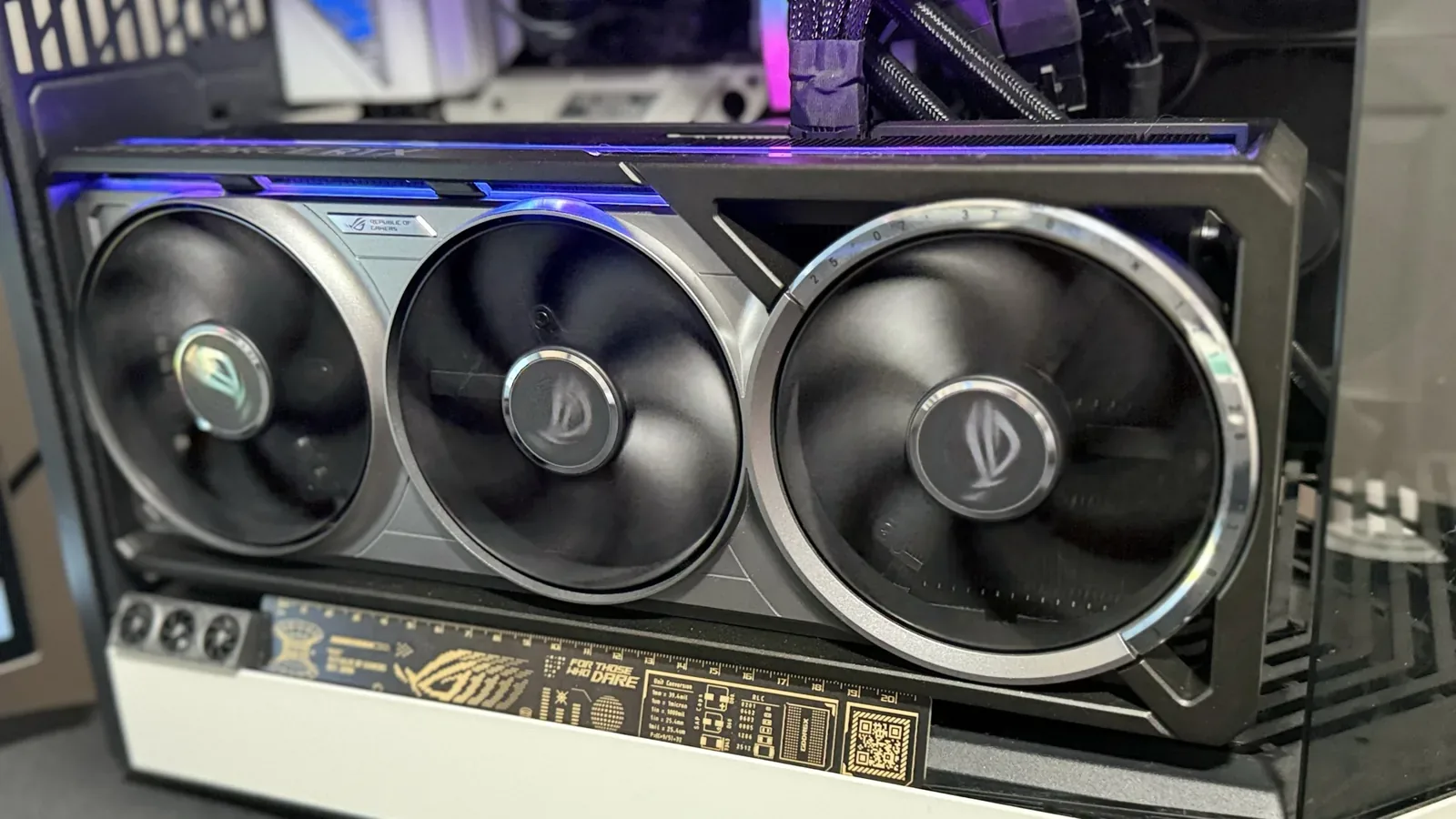
The RTX 5080 row is my card at stock
On its Astral OC Default profile, my ASUS ROG Astral RTX 5080 OC held 2,784 MHz sustained in Time Spy, scored 32,350 in Time Spy Graphics, gamed at 266 to 340 W and 63 to 72 °C, and peaked at 360 W under stress (3DMark and HWiNFO64, June 8 to 11, 2026). Flatten your curve at or above your own card’s stock clock and compare against numbers from the same test.
The roughly 271 W gaming and 400 W stress readings belong to its manual-overclock profile (the card ships at 400 W; 448 W is the +12% power target of my manual GPU Tweak III profile) and are excluded here. The ladder for the card, stock and then 900, 875 and 850 mV at the stock clock plus a power-limit row, is written up in the RTX 5080 guide.
What the other rows tell you
Alva Jonathan tested both efficiency and performance tunes on one RX 9070. At -100 mV with the power limit cut 30%, Cyberpunk 2077 fell from 54 to 50 FPS and board power from 244 to 171 W. At -125 mV and 110% it reached 60 FPS with a 270 W peak. Pick your end before touching either slider. Both RX 9070 XT rows sit at the performance end, and the Red Devil peaked 19 W higher to get its 10%.
Notebookcheck reports that 60 FPS tune at -100 mV. Tom’s Hardware’s table and Club386 both give -125 mV, so the row does too.
The RTX 4090 rows are the oldest, both from 2022. Azulath’s Suprim X at 985 mV and 2,800 MHz gave up under 1% in Cyberpunk 2077 and drew 40 W less. One Port Royal run returned no score and the PC froze once, and the poster could not rule out the curve. Quasar Zone’s 60% row caps power alone.
The RTX 5070 Ti went from 300 to 250 W in Steel Nomad on the author’s own Asus Prime, and the author puts the performance gain at about +4%. Ten more owner results for the same card, and the Afterburner steps with a test plan, are in the RTX 5070 Ti undervolt guide.
The RX 7900 XTX row comes from a Topaz Video AI user. At 1100 mV the card dropped from 300-400 W to 200-something W at the same upscaling speed, and games crashed on the same tune. A curve that holds in one load can fail in the next.
Nine rows cannot predict your card’s saving. Put your own measured difference into the power cost calculator with your hours.
Check a tune and roll it back
Save a stock profile first. Leave automatic startup application disabled while testing, change one setting at a time, and compare stock and tuned performance in the same workload. Include the games you actually play, and watch for visual errors and lower frame rates as well as crashes. Save other work before testing.
If problems appear, restore defaults in the tuning tool and disable its automatic profile loading. Confirm stock settings survive a restart. A reboot can reapply a saved tune: the Esports Tales Afterburner setup turns on “Apply overclocking at system startup”.
Contribute your card
The submission repository is github.com/iBlessi/gpu-undervolt-db. Opening a pull request requires a GitHub account. Email contact@techfuelhq.com with the same information if you prefer.
- Record the board, driver, tuning tool, settings and workload, with stock and tuned measurements from the same run and a screenshot or link.
- Add one object to the
resultsarray indata/undervolt_results.jsonand open a pull request. Leave unmeasured fieldsnull. - The automated checks catch malformed and implausible entries. They cannot tell whether a test happened, which is why a row needs its source.
Sources for each row
- RTX 5080 ASUS ROG Astral OC, Stock, no undervolt applied.
TechFuelHQ (LK Wood IV), ASUS ROG Astral RTX 5080 OC first-party bench dataset, June 11, 2026.
Thermals and board power captured with HWiNFO64 during sustained-load runs.
My own card on its stock profile, 3DMark and HWiNFO64, June 8-11, 2026. It is one card and stock only. The same dataset's 271 W gaming and 400 W stress figures are its manual-overclock profile, not stock. Read September 26, 2026. - RTX 5070 Ti ASUS Prime OC, 935 mV @ 2955 MHz (+450 MHz core offset), +1500 memory.
Esports Tales (Vincenzo Milella), How to undervolt the 5070 Ti with MSI Afterburner, March 14, 2025.
Power consumption: 250W in 3DMark Steel Nomad. (300W at default)
The author's own Asus Prime RTX 5070 Ti OC. The 50 W is Steel Nomad alone; the author puts the saving at 50-70 W across games and benchmarks. No stability duration given. Read September 26, 2026. - RX 9070 XT Sapphire NITRO+, -100 mV offset.
XDA (Ty Sherback), I undervolted my GPU and got the upgrade I actually wanted, January 17, 2026.
with a -100mv offset, I saw my average FPS jump from 58 to 64
The author's own Sapphire NITRO+ RX 9070 XT, one game. Power limit, board power and temperatures for this setting are not given, and neither is a stability duration. Read September 26, 2026. - RX 9070 XT PowerColor Red Devil, -170 mV offset, 110% power target.
Tom's Hardware (Sunny Grimm, reporting Der8auer's test), Undervolted RX 9070 XT beats RTX 5080 - RX 9070 and 9070 XT models with heavy coolers have massive OC headroom, March 11, 2025.
RX 9070 XT (OC) (source: Der8auer) 66 3.36 358 -170 110%
Der8auer's test of a PowerColor Red Devil, as Tom's Hardware tabulates it. A performance tune: it draws more power than stock, not less. Maximum power only; no temperatures or stability duration. Read September 26, 2026. - RX 9070 ASRock Steel Legend, -100 mV offset, -30% power limit.
Club386 (Fahd Temsamani, reporting Alva Jonathan's test), AMD Radeon RX 9070 maintains 93% of its performance at 171W, March 11, 2025.
This resulted in 50fps at 171W – down from 244W
Alva Jonathan's ASRock Steel Legend, as Club386 reports it. Notebookcheck calls the drop about 10%; 50 against 54 FPS is 7.4%. No stability duration given. Same test also at www.notebookcheck.net. Read September 26, 2026. - RX 9070 ASRock Steel Legend, -125 mV offset, 110% power target.
Tom's Hardware (Sunny Grimm, reporting Alva Jonathan's test), Undervolted RX 9070 XT beats RTX 5080 - RX 9070 and 9070 XT models with heavy coolers have massive OC headroom, March 11, 2025.
RX 9070 (OC) (source: Alva Jonathan) 60 3.00 270 -125 110%
The same tester and card as the -30% row, as Tom's Hardware tabulates it; Club386 gives the same -125 mV and 60 FPS. Notebookcheck gives this tune as -100 mV. A performance tune: it draws more power than stock. Same test also at www.club386.com. Read September 26, 2026. - RX 7900 XTX, 1100 mV on the voltage slider, driver 25.3.1.
Topaz Community forum (j.mcleod), 7900 xtx under volting suscess, 3-400 watts down to 200+, April 5, 2025.
I set the mV slider to 1100
One owner's forum report from Topaz Video AI upscaling, not games; the watts and temperatures are Adrenalin's readout, given as ranges. The poster sets normal settings for games because they crash on this tune. Read September 26, 2026. - RTX 4090 MSI Suprim X, 985 mV @ 2800 MHz.
Level1Techs forum (Azulath), Undervolting my RTX 4090, October 26, 2022.
2800Mhz @985mV
The poster's own MSI RTX 4090 Suprim X, averages of three to six runs per profile. One Port Royal run returned no score and the poster had a system freeze the day before, so they considered adding 5 mV. Read September 26, 2026. - RTX 4090, Power limit 60% (270 W of the 450 W default).
TechPowerUp (btarunr, reporting Quasar Zone's test), NVIDIA GeForce RTX 4090 with Nearly Half its Power-limit and Undervolting Loses Just 8% Performance, November 30, 2022.
lose just around 8% of performance at 4K UHD, averaged across five AAA games
Quasar Zone's test as TechPowerUp reports it. A power cap is not a curve undervolt; the tuned board power is not given. The same test's 850 mV undervolt is described only as similar, with no number. Read September 26, 2026.
The JSON carries the same fields under CC BY 4.0. Its update date records an edit to the dataset, not a test date.
The RTX 5080 row and the paragraph about my card give what my June 8 to 11 runs measured on the Astral OC Default profile (updated September 28, 2026).
Correction, September 26, 2026: removed three settings I could not trace to a measurement in their cited sources (RTX 4080 Super at 950 mV and 2,760 MHz, RTX 5090 at 900 mV and 2,800 MHz, RTX 4090 at 940 mV and 2,700 MHz); re-based the RX 7900 XTX row on the Topaz forum report and the RTX 4090 power-limit row on TechPowerUp’s report; replaced the RTX 5080 setting of 950 mV at 2,750 MHz with my stock baseline; added the Der8auer RX 9070 XT, the -125 mV RX 9070 and the Level1Techs RTX 4090 results.
Correction, September 8, 2026: removed outcome estimates from five setting rows and clarified the RTX 5070 Ti benchmark and the RX 9070 loss. Send corrections through the repository or by email with the row ID and a source.
Frequently asked questions
What voltage should I undervolt my GPU to?
How much power does undervolting a GPU save?
Does undervolting reduce FPS?
What are the best undervolt settings for an RTX 4090?
How do I add my own undervolt results?
Is undervolting a GPU safe?
Sources and corrections
- Last updated
- Methodology
- See our methodology for research and review standards.
- Corrections
- Spotted an error or a stale number? Email contact@techfuelhq.com. Confirmed corrections are recorded here with the date and change.