 TechFuel HQ
By LK Wood IV · Published 2026-07-04 · St. Louis County, MO
Some retailer links below are Amazon affiliate links; if you buy through them TechFuel HQ may earn a small commission at no extra cost to you. As an Amazon Associate I earn from qualifying purchases. Commissions never influence which products get recommended — see our disclosure.
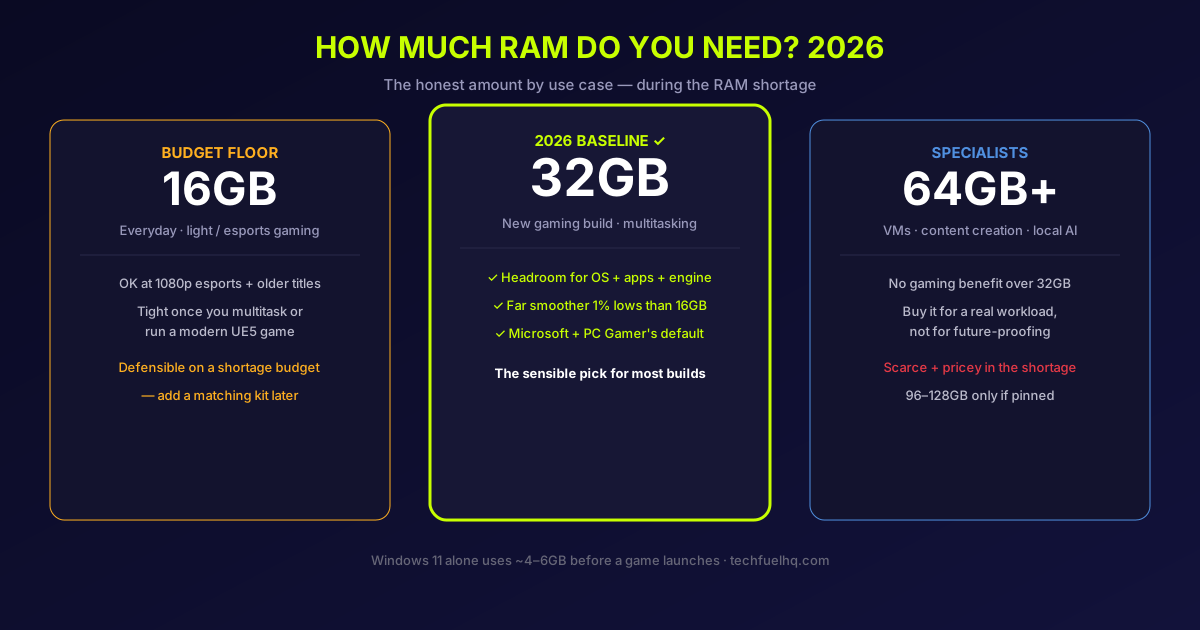
The short answer for a new PC in 2026: 32GB is the baseline, 16GB is the budget floor, and 64GB is for specific heavy workloads - VMs, serious content creation, or local AI. That is the same conclusion Microsoft, PC Gamer, and most of the build community landed on this year. The honest complication is that a DRAM shortage has tripled RAM prices, so the real question is no longer “how much can I afford” - it is “how much do I actually need, so I do not overpay for capacity I will never use.”
This guide answers that by use case, with the reasoning behind each number, so you can size RAM for your build instead of guessing. Here is the whole decision as a ladder — find the rung that matches what you actually do.
The 2026 baseline, and why it moved
For years the answer to “how much RAM do I need” was 16GB, and it was a comfortable answer. It stopped being comfortable in 2026 for three reasons that have nothing to do with raw frame rate:
- Windows got hungrier. A clean Windows 11 install idles at roughly 3 to 4GB with nothing open, and in normal use - a browser, Discord, a few tray apps - the OS and background overhead commonly sit around 4 to 6GB before you launch a game.
- Game engines got hungrier. Modern titles across every big engine now reserve well over 16GB at high settings. Testing outlets through 2026 have measured demanding releases such as Indiana Jones and the Great Circle (id Tech 7) and Dragon Age: The Veilguard (Frostbite) using comfortably past 16GB of system RAM at high settings and 1440p — and Unreal Engine 5 titles trend the same way.
- The messaging caught up. In 2026 Microsoft published a Windows gaming support doc calling 16GB the “practical starting point” and 32GB the “no-worries” upgrade for anyone running Discord, a browser, or a stream alongside their games - then removed it within days after backlash that pushing 32GB during a price spike was tone-deaf (Windows Latest). The recommendation was sound; the timing collided with the shortage.
So the baseline moved to 32GB not because games suddenly need double the frame-rate memory, but because the headroom math changed: subtract 4-6GB for the OS and 12-20GB for a modern game, and a 16GB machine is out of room while a 32GB machine still has slack. It is easier to see than to describe.
swap
How much RAM by use case
| Use case | Buy | Why |
|---|---|---|
| Office, web, streaming video, light use | 16GB | Comfortable for everyday tasks and the OS overhead. |
| Gaming (new build, 2026) | 32GB | The baseline. Absorbs the OS, background apps, and modern engines without swapping. |
| Gaming + streaming / heavy multitasking | 32GB | Streaming, a browser, and a game at once is exactly what fills 16GB. |
| Content creation (video, large photo catalogs) | 32-64GB | Editors and large projects benefit past 32GB; 64GB for 4K timelines and big catalogs. |
| Virtual machines / homelab workstation | 64GB+ | Each VM reserves real RAM; a homelab box fills fast. |
| Local AI models in system RAM | 64-128GB | Model weights live in RAM when they do not fit in VRAM. |
The pattern: gaming alone tops out its usefulness around 32GB, and everything above that is bought for a specific non-gaming workload, not for frames.
The 32GB kit to buy
For a gaming or all-round build, a 32GB (2 × 16GB) DDR5-6000 CL30 kit is the pick — the AM5 sweet spot that's also fine on Intel. Proven options on the AMD QVL:
- G.Skill Flare X5 32GB DDR5-6000 CL30 EXPO — the AM5 default pick. Check price on Amazon →
- Corsair Vengeance 32GB DDR5-6000 — broad compatibility, RGB option. Check price →
Prices move week to week in the 2026 RAM shortage, so check current pricing before buying. For 64GB, Intel-tuned kits, or the full breakdown, see the DDR5 RAM buying guide.
Is 32GB of RAM enough?
For almost everyone building or upgrading in 2026, yes. Gaming, everyday work, and heavy multitasking all sit comfortably inside 32GB, and it is the tier worth paying for even with the shortage inflating prices. The reason is headroom, not raw speed: after Windows 11 and background apps take their 4-6GB and a modern game reserves 12-20GB, a 32GB machine still has slack for Discord, a browser, and a stream at the same time - the exact load that pushes 16GB into swapping.
It also holds up over time. Because 16GB became the floor game developers design around, system-RAM demand from new titles has crept up slowly rather than doubling, so 32GB should stay comfortable for gaming for years. What actually pushes people past 32GB is not newer games - it is a change in workload: running several virtual machines, editing 4K video or large photo catalogs, or loading local AI models into system RAM. Those are the cases where 32GB stops being enough and 64GB earns its price (covered in the next section). If none of them describe you, 32GB is the ceiling worth buying - and the money above it is better spent on the GPU or a faster CPU.
Is 16GB enough for gaming in 2026?
It depends on what else is running. For pure gaming at 1080p in esports titles and older games, with a clean background, 16GB still plays fine. Two things break it:
- Modern AAA, especially Unreal Engine 5. These engines reserve more system RAM than older ones. On 16GB the system fills up and starts swapping to the SSD, which shows up as texture pop-in, micro-stutter, and “alt-tab lag” - not as a lower average FPS.
- Multitasking. Discord, a browser with tabs, a second monitor with a YouTube video, or a stream - each takes a bite, and on 16GB the game is competing for what is left.
This is the key nuance the benchmark headlines miss: 16GB and 32GB post similar average FPS in most games, but 32GB has clearly better 1% and 0.1% lows - the frame-time consistency you actually feel. If you want to see how your specific CPU and GPU balance out at your resolution, the PC Bottleneck Calculator shows which part limits you first; RAM headroom is the quiet third factor underneath it.
Bottom line: 16GB is enough to start, and it is a defensible budget choice in the shortage. It is not the comfortable choice for a new 2026 build.
32GB vs 64GB: where more stops helping
For gaming, 64GB shows essentially no benefit over 32GB - the extra capacity sits idle. 64GB earns its price only for workloads that genuinely reserve more than 32GB:
- Running several virtual machines at once (a Proxmox or homelab workstation).
- Video editing 4K timelines, or large Lightroom / photo catalogs.
- Compiling large codebases.
- Loading local AI models into system RAM when they do not fit in GPU VRAM.
If none of those describe you, 32GB is the ceiling worth paying for. And in 2026 specifically, 64GB kits carry a disproportionate shortage premium and are frequently out of stock, so “buy 64GB to be safe” is the expensive mistake this year - buy it for a real workload, not a hunch.
The part nobody wants to talk about: the price
Sizing RAM in 2026 is really a budgeting decision, because a DRAM shortage - the same one raising hard-drive and SSD prices - has pushed memory to roughly three to four times its 2024-2025 lows. A 32GB DDR5-6000 kit that ran around $95-130 in early 2026 now sits closer to $420-480, and 64GB kits are scarcer and pricier still (verified pricing and specific kit picks are in the DDR5 RAM buying guide).
That changes the advice in two practical ways:
- Do not over-buy. The old “just get 64GB for future-proofing” logic doesn’t hold when 64GB costs what a GPU used to. Buy the tier your workload actually uses.
- A staged 16-to-32 plan is legitimate. On a tight budget, a single 16GB stick now and a matching second stick later is a reasonable way to spread the cost - as long as you buy a board with a free slot and a kit you can match. (One caveat on AMD: four DIMMs can drop your stable memory speed, so prefer a 2x16GB kit over 4x8GB when you get to 32GB.)
If you are speccing a whole system around your RAM budget, the 2026 gaming PC build guide and the PC Builder balance the memory decision against the CPU and GPU so you don’t starve the parts that move frame rates most.
The verdict
- Everyday / office use: 16GB is comfortable.
- New gaming build in 2026: 32GB. It is the baseline for a reason - headroom for the OS, background apps, and modern engines, with far smoother 1% lows than 16GB.
- Tight budget: 16GB now is defensible in the shortage; plan a matching second kit later and leave a slot open.
- VMs, heavy content creation, local AI: 64GB, and only 96-128GB if a real workload pins it.
- Gaming and nothing else: 64GB is overkill - the money is better spent on the GPU or a faster CPU.
The 2026 twist is cost, not capability. RAM is expensive right now, so the win is buying exactly what your use case needs - which for most people building to game is 32GB, and for most people upgrading on a budget is a smart 16GB-to-32GB path - and putting the savings where you will actually feel them.
Sources
- Microsoft Windows gaming guidance (the 2026 “Gaming Features” support doc, later removed after backlash), as reported by Tom’s Hardware, Windows Latest (recommendation), and Windows Latest (removal).
- PC Gamer and TechSpot 2026 RAM testing (16GB vs 32GB average FPS vs 1% lows; UE5 memory use).
- First-party pricing and kit selection: the TechFuelHQ DDR5 RAM buying guide and 2026 RAM & SSD price crisis.
Guidance is for a US audience in mid-2026; RAM prices move week to week during the shortage - check current retailer pricing before buying. Found an error? Email hello@techfuelhq.com with the article URL.
Frequently asked questions
How much RAM do I need in 2026?
Is 16GB of RAM enough for gaming in 2026?
16GB vs 32GB RAM - is 32GB worth it?
Do you need 64GB of RAM?
How much RAM does Windows 11 use?
Is 32GB overkill for gaming in 2026?
Is 32GB of RAM enough?
Is 32GB of RAM enough for the next 5 years?
Is 32GB of RAM enough for video editing?
Evidence ledger
- Last updated
- Methodology
- This guide was written and edited by Lowell K. Wood IV in St. Louis County, MO. Specs and prices verified against vendor and project documentation current on the date above. Full editorial standard: methodology.
- Update log
- 2026-08-02 — Last reviewed and updated.
- Corrections
- Spotted an error or a stale number? Email hello@techfuelhq.com. Confirmed corrections are added to the update log above.