 TechFuel HQ
By LK Wood IV · Published 2026-07-04 · St. Louis County, MO
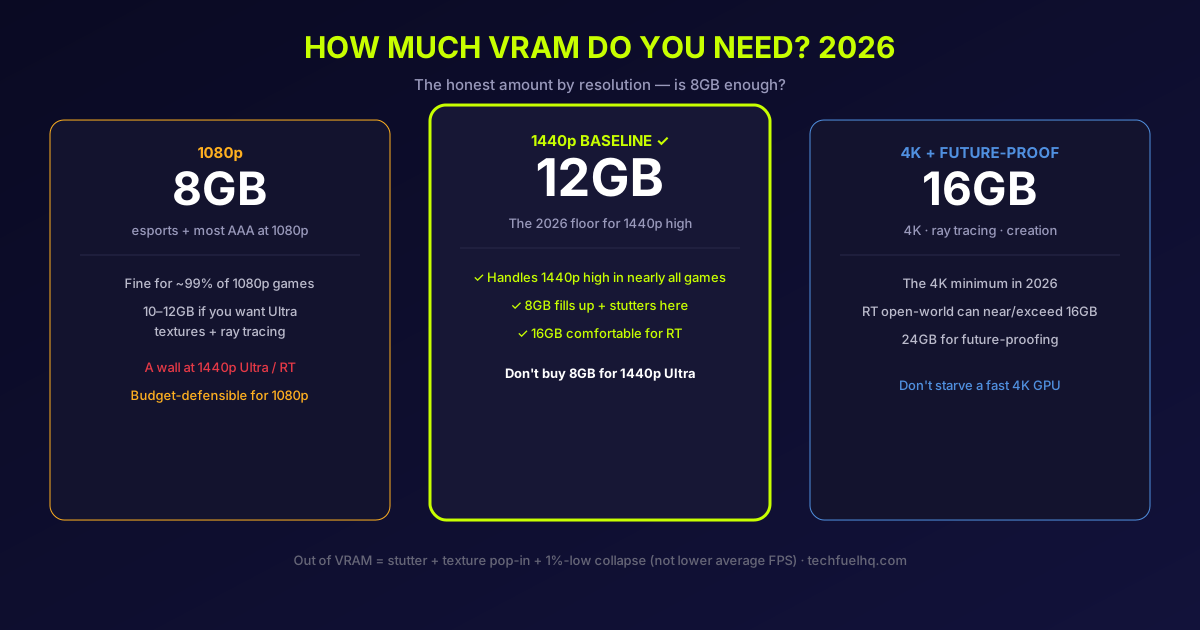
The short answer, by resolution: 8GB of VRAM for 1080p, 12GB for 1440p, 16GB for 4K. The endless “is 8GB enough” argument only makes sense once you attach a resolution to it - 8GB is genuinely fine at 1080p and genuinely a wall at 1440p Ultra. This guide gives the honest amount for your resolution, shows what actually breaks an 8GB card, and explains why running low on VRAM feels worse than the benchmark averages suggest.
VRAM is not the same as system RAM
Quick clarification, because the two get confused: VRAM is the memory on your graphics card, used for textures, frame buffers, and shaders. System RAM is separate - that’s the how much RAM you need question. A GPU can be plenty fast and still stutter if it runs out of VRAM specifically, because it then has to shuffle texture data over the slow PCIe bus to system memory. That’s the failure mode this whole debate is about.
How much VRAM by resolution (2026)
| Resolution | Buy | Notes |
|---|---|---|
| 1080p | 8GB (10-12GB for Ultra/RT) | Fine for the large majority of games; a wall only in a few unoptimized titles + RT at Ultra. |
| 1440p | 12GB minimum, 16GB comfortable | The 2026 baseline. 8GB cards fill up at Ultra and stutter. |
| 4K | 16GB minimum (24GB future-proof) | High-res textures + frame buffer eat memory; RT open-world can approach/exceed 16GB. |
That ladder - 8/12/16 by resolution - is the consensus across 2026 testing outlets, and it maps to how memory use actually scales: the processor-side work is fixed, but every step up in resolution and texture detail costs VRAM.
What actually breaks an 8GB card
8GB doesn’t fail everywhere - it fails in specific, predictable places. Multiple 2026 benchmark rundowns put several current AAA titles - Cyberpunk 2077, Monster Hunter Wilds, and Hogwarts Legacy among them - at or past 12GB of VRAM use at 1440p Ultra, and turning on full ray tracing on an 8GB card at 1440p tends to blow past the limit immediately (wccftech). At 4K, AAA open-world games with ray tracing can approach or exceed 16GB.
The pattern: it’s textures and ray tracing that eat VRAM, not raw resolution alone. You can often keep an 8GB card happy at 1440p by dropping texture quality one notch and skipping ray tracing - but that’s exactly the compromise a 12GB or 16GB card lets you avoid.
Why running out of VRAM feels worse than the numbers
This is the part benchmark headlines miss. When a card runs out of VRAM, it usually does not just post a lower average FPS. Instead it swaps texture data over the slow PCIe bus, and you get:
- Texture pop-in - surfaces load in blurry, then sharpen a beat later.
- Stutter and frame-time spikes - sudden hitches even when the average looks fine.
- Collapsing 1% lows - the smoothness metric craters while the average barely moves.
That’s why PC Gamer’s 2026 real-world testing found 8GB cards “still enough” on averages yet the 16GB versions “surprisingly faster” in practice (PC Gamer) - the gap shows up in frame-time consistency, not the average. If you only read the average-FPS bar chart, you’ll underestimate how much VRAM matters. The PC Bottleneck Calculator helps you see where the GPU sits relative to your CPU; VRAM is the quiet third factor that a pure FPS number won’t show.
8GB vs 16GB: bigger gap than the debate suggests
The “8GB is fine” and “8GB is dead” camps are both half right, and the honest read is in the middle: 8GB is fine for 1080p and a liability above it. Where people go wrong is treating it as a 1440p amount. In 2026, current 8GB cards like the RTX 5060 Ti 8GB and RX 9060 XT 8GB are strong 1080p performers but are the early casualties at 1440p with ray tracing or maxed textures. If you’re spending real money on a 1440p or 4K card, the VRAM number is not where to save - a fast GPU starved of VRAM spends its life stuttering. Size the whole card to your resolution; the GPU Comparison Tool and the best GPUs for 4K gaming guide put the raw performance next to the memory.
Upscaling and frame generation change the picture slightly but don’t erase it - DLSS and FSR render at a lower internal resolution, which trims VRAM use, while frame generation actually adds a little memory overhead. Neither turns an 8GB card into a 1440p-Ultra card.
The verdict
- 1080p gaming: 8GB is enough for most games in 2026; 10-12GB if you want Ultra textures and ray tracing headroom.
- 1440p gaming: 12GB is the floor, 16GB is the target - do not buy an 8GB card for 1440p Ultra.
- 4K gaming: 16GB minimum, 24GB if you want future-proofing or heavy ray tracing.
- The rule: match VRAM to resolution. A fast GPU with too little VRAM doesn’t run slower on average - it stutters, and that’s the worse experience.
VRAM is one of the few GPU specs where the marketing number genuinely matters, because the failure mode is invisible on an average-FPS chart and obvious the moment you play. Buy the amount your resolution needs, and put any savings toward a faster GPU core rather than shaving VRAM you’ll feel the lack of.
Sources
- 8GB VRAM benchmarks and the 1440p ceiling: wccftech (Sapphire Pulse 9060 XT 8GB testing; Hardware Unboxed podcast comments), PC Gamer real-world 8GB vs 16GB testing.
- VRAM-by-resolution consensus (8/12/16): 2026 testing roundups including Tech4Gamers on 12GB as the 1440p minimum.
- Related first-party guides: how much RAM you need, best GPUs for 4K gaming, and the GPU Comparison Tool.
Guidance is for mid-2026; game VRAM demands keep rising, so treat these as floors, not ceilings. Found an error? Email hello@techfuelhq.com with the article URL.
Frequently asked questions
Is 8GB of VRAM enough in 2026?
How much VRAM do I need for 1440p gaming?
Is 12GB of VRAM enough?
How much VRAM do I need for 4K gaming?
What happens when a GPU runs out of VRAM?
Is 8GB VRAM enough for 1080p gaming?
Evidence ledger
- Last updated
- Methodology
- This guide was written and edited by Lowell K. Wood IV in St. Louis County, MO. Specs and prices verified against vendor and project documentation current on the date above. Full editorial standard: methodology.
- Update log
- 2026-07-04 — Last reviewed and updated.
- Corrections
- Spotted an error or a stale number? Email hello@techfuelhq.com. Confirmed corrections are added to the update log above.