 TechFuel HQ
By LK Wood IV · Published 2026-06-10 · ~10 min read · St. Louis County, MO
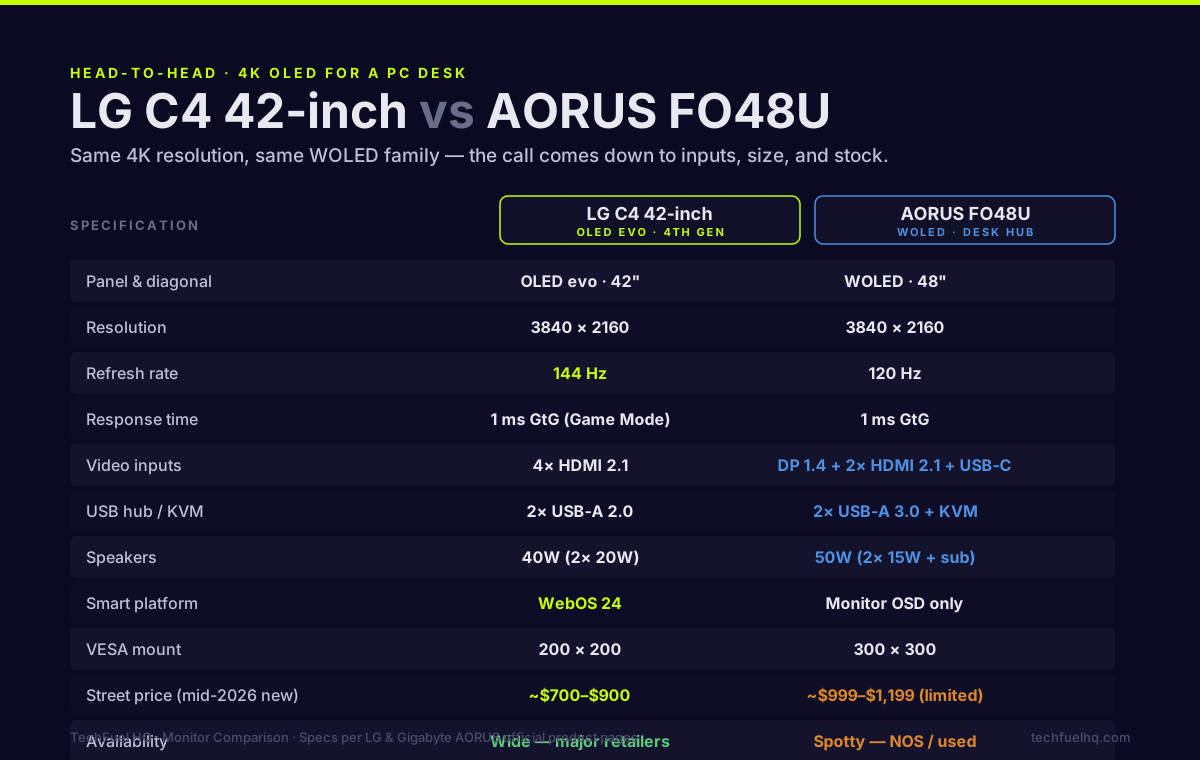
TL;DR · The call between these two
- Get the LG C4 42-inch if: you want the best available OLED panel right now, at 42 inches, from stock, and your GPU has HDMI 2.1 output.
- Get the AORUS FO48U if: you need DisplayPort 1.4, want a built-in KVM for multiple PCs, or specifically want 48 inches and can find one.
- Price in mid-2026: LG C4 42-inch runs $700–$900 new; FO48U runs $700–$900 used and $999–$1,199 new when in stock — supply is the constraint, not price.
- Panel winner: C4, on paper — newer OLED evo with higher peak brightness and 144Hz ceiling vs FO48U's 120Hz cap. In daily use the gap is smaller than the spec sheet implies.
The LG C4 42-inch is the answer when someone asks what OLED to buy for a PC desk in 2026. It’s available everywhere, the OLED evo panel is genuinely excellent, and at $800 new it undercuts most other 4K OLEDs at the same quality tier.
I own the FO48U, not the C4. I made that choice deliberately — and I’d make the same call again — but it was close enough that the comparison is worth doing properly. This is the side-by-side I couldn’t find when I was deciding.
Specs side by side
All figures from manufacturer spec sheets (LG product page accessed June 2026; Gigabyte AORUS product page accessed March 2026). Where specs differ by region, North American models are used.
| LG C4 42-inch | AORUS FO48U | |
|---|---|---|
| Panel type | OLED evo (4th gen) | WOLED (older gen) |
| Diagonal | 42 inches | 48 inches |
| Resolution | 3840 × 2160 | 3840 × 2160 |
| Refresh rate | 144 Hz | 120 Hz |
| Response time | 1 ms GtG (Game Mode) | 1 ms GtG |
| HDR | Dolby Vision IQ / HDR10 / HLG | HDR10 only (no Dolby Vision) |
| Inputs | 4× HDMI 2.1 | 1× DP 1.4, 2× HDMI 2.1, 1× USB-C (18W) |
| USB hub | 2× USB-A 2.0 | 2× USB-A 3.0 + KVM |
| Speakers | 40W (2× 20W) | 50W (2× 15W + sub) |
| Adaptive sync | G-Sync Compatible, FreeSync Premium | AMD FreeSync Premium Pro, G-Sync Compatible |
| Smart platform | WebOS 24 | Monitor OSD only |
| VESA | 200 × 200 | 300 × 300 |
| Street price (mid-2026 new) | ~$700–$900 | ~$999–$1,199 (supply constrained) |
| Availability | Wide — in stock at major retailers | Spotty — NOS, eBay, some B&H |
Panel: does the generation gap actually matter?
The FO48U uses an older WOLED panel. The LG C4 uses a newer OLED evo generation — though note LG fits the Brightness Booster hardware only to the 55-inch-and-up C4 sizes, so the 42-inch compared here is the dimmer variant of the line. Even so, on paper the 42-inch C4 is somewhat brighter in HDR than the FO48U and holds its colors better in mixed-ambient-light rooms.
In daily use at a desk with controlled lighting, this gap is real but not dramatic. OLED blacks are pitch black on both. DCI-P3 coverage is near-identical. The color accuracy difference requires a colorimeter to measure reliably. If you’re in a dark room or a controlled office — standard homelab desk setup, the kind that often pairs a big OLED with the best 27-32 inch monitor for a homelab as a second screen — both look exceptional.
Where the gap matters: HDR content in a bright room. The C4’s higher peak nits hold up better when sunlight is hitting the desk. If the desk faces a window and you work during daylight hours without blinds, the C4 wins noticeably.
If you’re in a dim office or run the desk lights on a warm bias light, the practical difference is minor.
Inputs: DisplayPort is the real story
This is where the comparison gets concrete for PC users.
The LG C4 has four HDMI 2.1 inputs and no DisplayPort. Four HDMI 2.1 ports support 4K 120Hz (with VRR) over each input — which is plenty for a gaming PC, console, and streaming box. If that’s your use case, HDMI-only is not a problem.
The FO48U has one DisplayPort 1.4 and two HDMI 2.1 inputs, plus a USB-C input with 18W power delivery. The DisplayPort matters in specific situations:
- GPU without HDMI 2.1 (RTX 20-series and older have HDMI 2.0 only — every desktop RTX 30-series card onward has HDMI 2.1 — use DP for 4K 120Hz on those older cards)
- KVM setup where the second PC connects via DP while the primary uses HDMI
- Daisy-chaining scenarios
- Any setup where you’ve already used all HDMI 2.1 ports on your GPU
If your current GPU is an RTX 4000 / 5000 / RX 7000+ / RX 9000+ series card with HDMI 2.1 output, DisplayPort is optional. If you’re on an older card, DP might be the only path to 4K 120Hz without buying a new GPU.
KVM: significant for multi-PC desks
The FO48U has a built-in KVM switch. One USB-B port goes to each PC. Swap between PCs by pressing a button on the monitor — keyboard, mouse, and USB hub follow automatically.
The LG C4 has no KVM. You’d add an external switch (Ugreen, Level1Techs, etc.) at $50–$200 depending on bandwidth requirements.
For a single-PC desk: doesn’t matter. For a desk with a work laptop and a gaming PC: the FO48U’s KVM is a real quality-of-life feature that saves cable management headaches and adds zero latency.
Size: 42 vs 48 at a desk
Six inches of diagonal is a bigger difference than it sounds. At 42 inches (C4), the panel fits more desk configurations — including standard 24-inch-deep desks with a monitor arm pushed to the back. At 48 inches (FO48U), you need a 30-inch-deep desk or an arm with enough throw to push the panel further back.
The 48-inch FO48U on a 24-inch desk at 24-inch viewing distance is too close. The math: 48 inches at 24 inches viewing distance puts it well inside the 1.5× screen-height recommendation. You’d be turning your head to follow content at the edges.
At 36 inches viewing distance the 48-inch works correctly. At 30 inches it’s still acceptable for most people.
The C4 at 42 inches is usable at 24–30 inch viewing distances on a standard desk without an arm. Closer is fine; the PPI (~104 PPI at 4K/42-inch) holds up.
If you don’t have a deep desk or a monitor arm with enough reach, get the 42-inch C4. It fits more setups.
Burn-in: same answer for both
Both panels use LG WOLED technology with built-in burn-in mitigations:
- Pixel Shifter: slight panel movement to prevent static-element burn
- Screen Saver: timeout after idle
- Pixel Refresher: automatic compensation cycle (runs at power-off)
- Logo Luminance Adjustment: reduces brightness of detected persistent logos
After two-plus years of real-world use from OLED monitor and TV owners across forums and Reddit, burn-in on these panels is not the catastrophic risk it was on early OLED TVs. The risk exists but it’s concentrated in specific use patterns: static Windows taskbars left on-screen for thousands of hours, bright persistent game HUD elements, or office apps with white backgrounds at maximum brightness all day.
Precautions that eliminate most burn-in risk on either panel:
- Hide the Windows taskbar (auto-hide, not always visible)
- Enable dark mode across OS and browser
- Let the Pixel Refresher cycle run (happens at power-off, takes 10–30 seconds)
- Drop brightness to 60–80% for standard desktop work
With those habits the expected lifespan for either display at a PC desk is long. Several FO48U owners are past three years of daily use with no visible retention.
Price and availability in 2026
This is where the C4 wins straightforwardly: you can buy it today, from Amazon, from Best Buy, from Costco, at $750–$900 new.
The FO48U is supply-constrained. Gigabyte has not announced a refresh or a successor. New units show up occasionally at B&H and AORUS direct at $999–$1,199. Used units on eBay and Facebook Marketplace go for $700–$900 depending on condition and included accessories (original box is worth asking about).
If you want to buy today and receive it this week: LG C4. If you’re willing to wait for a deal or check stock daily: FO48U is findable.
The actual decision
Buy the LG C4 42-inch if:
- You have a standard-depth desk (24–28 inches) with no room for a 48-inch panel
- Your GPU has HDMI 2.1 output and you don’t need DisplayPort
- You want to buy it today, in stock, with a warranty from a big retailer
- You’re in a room with significant ambient light and want the brightness advantage
Buy the AORUS FO48U if:
- You specifically want 48 inches and have the desk depth for it
- You connect multiple PCs to one monitor and want the built-in KVM
- Your GPU needs DisplayPort for 4K 120Hz (RTX 20-series and older — RTX 30-series onward has HDMI 2.1)
- You’re okay hunting used market or waiting on stock
Both are excellent panels. The C4 is the more available, slightly more capable panel in a smaller footprint. The FO48U is the better desk-hub with better input options in a larger panel. The right call depends on your desk depth and your connectivity requirements — not on which panel measures higher on a chart you’ll never see in daily use.
I picked the 48-inch FO48U. Sitting three feet from it doesn’t feel wrong; it feels like the right size. But if my desk was two feet shallower I’d have a C4 instead.
Specs from LG product page (LG C4) and Gigabyte AORUS product page (FO48U), both accessed June 2026. Street pricing from mid-June 2026 Amazon/B&H/eBay survey. No display measurements conducted by TechFuelHQ for this comparison — for calibrated measurements, see the independent reviews at RTings and TFT Central.
Frequently asked questions
Can you use the LG C4 42-inch as a PC monitor?
Is the LG C4 or AORUS FO48U better for gaming?
Which burns in faster — the LG C4 or AORUS FO48U?
Does the LG C4 42-inch have DisplayPort?
What size difference should I expect between 42 and 48 inches?
Evidence ledger
- Last updated
- Methodology
- This guide was written and edited by Lowell K. Wood IV. Specs, prices, commands, and version numbers are drawn from the official vendor, reseller, and project documentation current on the date above, and were verified before publishing. First-person hardware claims appear only where the article shows a verifiable artifact — a photo, receipt, or measurement — or links to the TechFuelHQ Open Bench Datasets. Every fact is human-verified against its cited source before publishing; AI assists with first-draft structure and source-gathering, not with the verdict. Full editorial standard: methodology.
- Update log
- 2026-06-10 — Last reviewed and updated.
- Corrections
- Spotted an error or stale price? Email hello@techfuelhq.com. Confirmed corrections are added to the update log above.