 TechFuel HQ
On our own 16GB RTX 5080 the MoE math is measured, not theoretical: gpt-oss 20B decodes at double a dense 14B’s speed — that piece walks the bandwidth arithmetic behind the tier ladder below.
Updated July 3, 2026 · file sizes verified against official Hugging Face model cards and GGUF repo listings.
“What’s the best model I can actually run on my card?” is the most-asked question in local AI, and it resets every time a new GPU or model drops. The answer is almost always decided by one number: VRAM. Get the tier right and a local LLM is fast and private; get it wrong and you’re either offloading to system RAM at a crawl or running a model too small to be useful. Here’s the 2026 map, tier by tier, with real GGUF file sizes and the memory math behind them.
TL;DR · What fits your card at Q4_K_M
- 8GB (3060 8GB / 4060 / 5060): a 7-8B dense model like Qwen3-8B (5.03GB file). Add 32GB system RAM and a small-active MoE model can offload to RAM and run above its weight.
- 12GB (3060 12GB / 5070): an 8B with long context, or a 14B at Q4.
- 16GB (4060 Ti 16GB / 4080 / 5080): a 14B comfortably, plus gpt-oss-20B (built to run in 16GB). A dense 27B spills to RAM here.
- 24GB (3090 / 4090 / 7900 XTX): the sweet spot. A 27B dense (Gemma-3-27B Q4_K_M is 16.55GB) with context, or a 32B.
- 48GB+ (2x 24GB / workstation / big unified memory): the only home path to a dense 70B (needs ~45-50GB).
Rule of thumb: total memory = weights (set by quant) + KV cache (grows with context) + compute buffers (~fixed). Default to Q4_K_M and match the model to the tier.
The rule of thumb: weights + KV cache + overhead
Total VRAM for inference breaks into three parts, and it helps to think about all three rather than a single number. The primary llama.cpp discussion on memory estimation lays it out cleanly: model data (the weights, fixed by quantization), a KV cache that grows with how many tokens of context you hold, and compute buffers that are roughly fixed. In its worked example, gpt-oss-20B needs 12.0GB of weights + 2.7GB of compute buffers + roughly 0.2GB of KV cache per 8,192 tokens of context — about 14.9GB at 8k, ~15.5GB at 32k, and ~17.9GB at the full 131,072 tokens — the same model, heavier purely from a longer context window. That KV-cache creep is the single most common reason a model that “fits” on paper still runs out of memory in practice.
For the weights themselves, the shorthand is:
- ~2 GB per billion parameters at FP16 (full precision).
- ~0.5 GB per billion at 4-bit, then add headroom for the KV cache and compute buffers on top.
One nuance worth internalizing: Q4_K_M isn’t true 4-bit. It’s mixed precision averaging about 4.83 bits per weight, so real GGUF files run a little larger than the clean 0.5 GB/B estimate — but it’s the everyday default, roughly half the memory of FP16 for a small quality drop. That’s why the tables below quote actual file sizes rather than the estimate. For a given card, fitting a bigger model at Q4_K_M usually beats a smaller one at Q8.
There’s one more concept that reshaped the 2026 tiers: Mixture-of-Experts (MoE). An MoE model activates only a slice of its parameters per token, so it computes like a small model but must still fit like a large one. OpenAI’s gpt-oss-20b card states “21B parameters with 3.6B active parameters” and says the MXFP4 quantization of its MoE weights is what makes the model “run within 16GB of memory.” Meta’s Llama 4 Scout card is starker: 17B active but 109B total across 16 experts — so its VRAM footprint is 70B-class despite the tiny active count. The takeaway for fit: MoE needs total params in memory, not active. The escape hatch is that llama.cpp can offload the inactive expert layers to system RAM (--n-cpu-moe), keeping the small active set on a modest GPU.
For an exact figure including your context length, run the numbers through the LLM VRAM Calculator; for how fast it’ll generate, the LLM Speed Calculator.
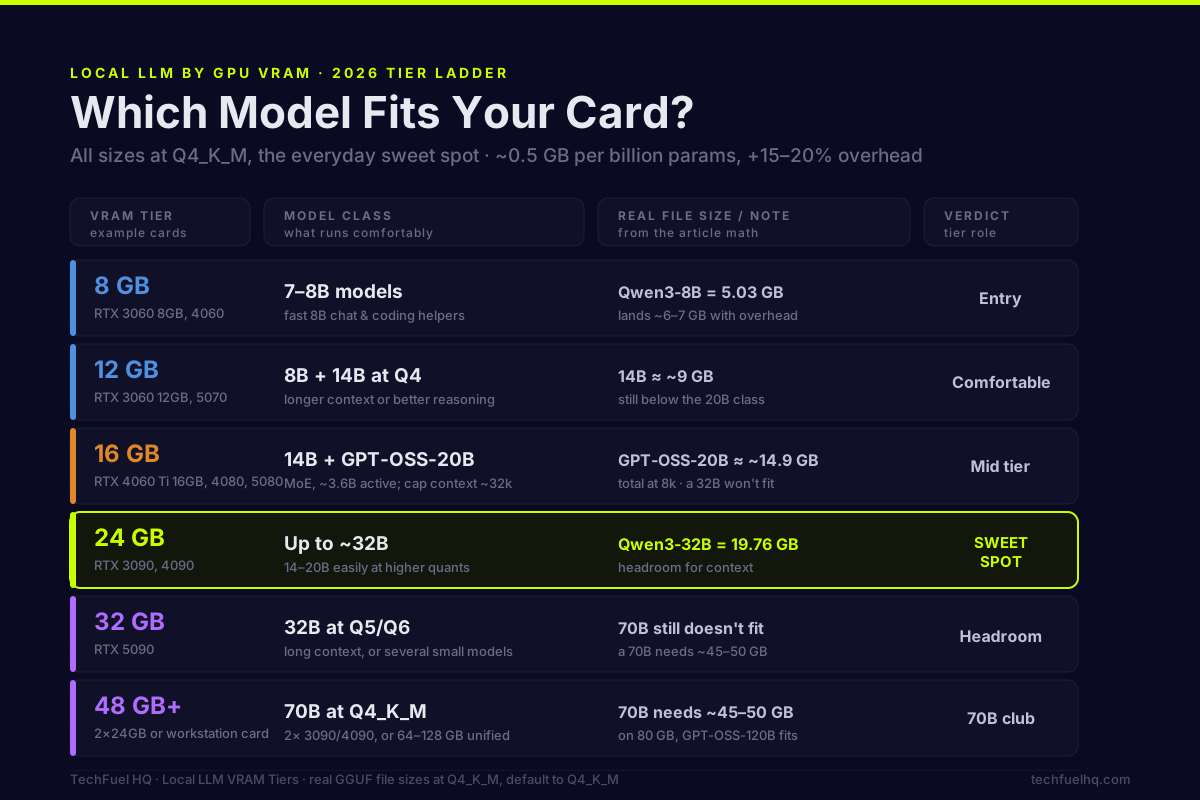
The tiers (all at Q4_K_M unless noted)
| VRAM | Example cards | Comfortable pick | Q4_K_M file size (anchor) |
|---|---|---|---|
| 8 GB | RTX 3060 8GB, 4060, 5060 | Qwen3-8B (dense) | Qwen3-8B = 5.03 GB |
| 12 GB | RTX 3060 12GB, 5070 | 8B long-context, or a 14B | Qwen3-8B Q8_0 = 8.71 GB |
| 16 GB | 4060 Ti 16GB, 4080, 5080 | 14B, or gpt-oss-20B (MoE) | gpt-oss-20B ~14.9 GB @ 8k ctx |
| 24 GB | RTX 3090, 4090, 7900 XTX | 27B dense, up to a 32B | Gemma-3-27B = 16.55 GB |
| 32 GB | RTX 5090 | 27-32B at higher quant / long ctx | 27B at Q6/Q8 + context |
| 48 GB+ | 2x 24GB, workstation, unified | Dense 70B | Llama-3.3-70B = 42.52 GB |
8 GB — entry (RTX 3060 8GB, 4060, 5060)
A 7-8B dense model. Qwen3-8B is a dense 8.2B model per its official card, and the bartowski Qwen3-8B GGUF listing puts Q4_K_M at 5.03 GB; with the KV cache and overhead it lands ~6-7 GB, comfortable at moderate context. This is the fast-8B-chat-and-coding tier.
The change since 2025 is the MoE-offload path. A small-active MoE model (like gpt-oss-20B, 3.6B active) keeps its active layers on the 8GB card and pushes the rest to system RAM via --n-cpu-moe, so with 32GB of system RAM an 8GB card can run models it could never fit whole. It’s slower than pure-GPU, but usable — and it’s the community’s default trick for stretching an 8GB card in 2026.
12 GB — comfortable small (RTX 3060 12GB, 5070)
8B with room for long context, or a 14B at Q4. The extra 4GB over the 8GB tier mostly buys KV-cache headroom: you can hold a much longer context on an 8B, or step up to a dense 14B like Phi-4 (14B, though note its 16K context is short next to the Qwen/Gemma peers). The 3060 12GB is a genuinely good LLM card for its price precisely because capacity, not raw speed, decides what fits here.
16 GB — the mid tier (RTX 4060 Ti 16GB, 4080, 5080)
A 14B comfortably, plus gpt-oss-20B. OpenAI’s gpt-oss-20b is quantized so that it will, in OpenAI’s words, “run within 16GB of memory” — it’s an MoE with only 3.6B active params, natively MXFP4-quantized, about 14.9GB total at 8k context (rising to ~15.5GB at 32k) per the llama.cpp worked example. Cap the context to stay inside 16GB. A dense 27B does not fit here and spills to system RAM, which collapses throughput, so treat a 16GB card as a strong 14B / MoE-20B machine rather than a 27B one.
24 GB — the sweet spot (RTX 3090, 4090, 7900 XTX)
A 27B dense model, up to a 32B. Gemma-3-27B-it is a dense 27B with a 128K context window per its card, and the bartowski Gemma-3-27B GGUF listing puts Q4_K_M at 16.55 GB, leaving real headroom for KV cache. Mistral-Small-3.2-24B is another dense pick that fits here. This is the best single-card tier for serious local work. What it can’t do comfortably is a dense 70B at Q4 — that needs ~45-50GB.
32 GB — headroom (RTX 5090)
A 27-32B at higher quant (Q5/Q6) or with a long context, and gpt-oss-20B with room to spare. This is the tier where a dense 27B stops spilling under real workloads and you can run it productively without fighting for every megabyte. A dense 70B at Q4 (~45-50GB) still doesn’t fit a single 32GB card — you’d be offloading — but for a comfortable 27B or several smaller models at once, this is plenty.
48 GB+ — the 70B club (2x 24GB, workstation cards, big unified memory)
A dense 70B at Q4_K_M needs roughly 45-50GB. The bartowski Llama-3.3-70B GGUF listing puts Q4_K_M weights at 42.52 GB (marked the recommended default), and KV cache plus overhead push the working total higher. So the paths are: two 24GB GPUs (48GB), a 48GB-or-larger workstation card, or a large unified-memory machine (Apple Silicon or similar) that treats system RAM as model memory and trades raw speed for capacity. The genuinely huge MoE models — DeepSeek-V3.1 at 671B total (37B active) — are data-center territory, useful mainly as the ceiling reference: even at low quant, the total must fit.
The models worth running in 2026
The first-party-confirmed open-weights lineup, by class:
- ~4B: Qwen3-4B (dense, 4.0B) and Gemma 3 4B — both fit even 4-6GB cards; Qwen3-4B Q4_K_M is 2.50 GB per its GGUF listing.
- 7-9B: Qwen3-8B (dense, 8.2B) — the 8GB workhorse.
- 12-14B: Phi-4 (dense, 14B) and Gemma 3 12B.
- 24-32B: Mistral-Small-3.2-24B and Gemma-3-27B, both dense — the 24GB-tier models.
- MoE: gpt-oss-20b (21B total / 3.6B active, runs in 16GB) and Llama 4 Scout (17B active / 109B total).
What changed since 2025 — the freshness moat: the Gemma 3 family ships in 1B/4B/12B/27B with 128K context on the larger sizes, gpt-oss brought a genuinely 16GB-friendly MoE, and Meta’s Llama 4 moved to native MoE. Qwen’s newer generations are live too — the Qwen3.5-27B and Qwen3.6-27B cards are 27B-class multimodal models (image-text-to-text) using a hybrid attention + sparse-MoE architecture, with a 262K native context window — a real KV-cache consideration on top of the weights, and a different fit profile than the plain dense text models above. Beyond that, community users on the low-VRAM tiers increasingly reach for small-active-param MoE models offloaded to RAM as the way to run bigger-feeling models on modest cards; treat the newest community model names as usage signal and verify the exact card before you commit VRAM to it.
A useful pattern holds across all of them: MoE models punch above their size for speed because only a few billion parameters activate per token — but they still occupy their full size in memory, so plan the fit around total params, not active.
Fit is half the question — speed is the other
A model fitting in VRAM doesn’t mean it runs fast. Generation speed is bound by memory bandwidth (each token reads the active weights once), so a big model on a modest card can fit yet feel sluggish, and the same reason is why a dedicated GPU beats CPU or unified memory on throughput even when all three technically “fit” the model. Check both before you commit to a model or a card: the VRAM calculator for fit and the speed calculator for tokens/sec. And if you’re building around a specific card, the single-RTX-5060 local-LLM walkthrough shows the full setup end to end, with real tokens/sec on one card, and the $1,000 local-AI workstation build pairs a parts list to the 16GB tier with the cloud-vs-local cost math. For coding work, fit is only the entry ticket. The tested coding picks by VRAM tier rank what each card earns from an eight-task eval on this site’s RTX 5080. For the bigger picture beyond chat models — image generation, speech, and coding assistants — see the self-hosted AI stack overview.
Bottom line
For most homelab GPUs, the practical pick is simple: an 8B at Q4_K_M on 8-12GB cards (with a small-active MoE offloaded to system RAM when you want more), a 14B-20B on 16GB, and a 27-32B at Q4_K_M on a 24GB card — the single-card sweet spot. Reach for 48GB+ only when a dense 70B is genuinely worth the cost and complexity. Match the model to the VRAM tier, remember that weights + KV cache + overhead all count, default to Q4_K_M, and you’ll get fast, private inference without fighting your hardware.
Sources and methodology
Every model name, size, and file figure above is grounded in the page that carries it — an official model card or a GGUF quant repo file listing — rather than a release announcement or a rehost.
Primary sources cited:
- Qwen3-4B card and Qwen3-8B card — dense parameter counts and context windows
- Gemma-3-27B-it card — Gemma 3 family sizes (1B/4B/12B/27B) and 128K context
- Phi-4 card — dense 14B, 16K context
- Mistral-Small-3.2-24B card — dense 24B
- gpt-oss-20b card — 21B total / 3.6B active MoE, MXFP4, “runs within 16GB”
- Llama 4 Scout card — 17B active / 109B total MoE
- DeepSeek-V3.1 card — 671B total / 37B active (ceiling reference)
- Qwen3.5-27B and Qwen3.6-27B cards — 2026 27B-class multimodal (image-text-to-text), hybrid attention + sparse MoE, 262K native context
- GGUF file-size anchors from the bartowski quant repos: Qwen3-4B (Q4_K_M 2.50GB), Qwen3-8B (Q4_K_M 5.03GB, Q8_0 8.71GB), Gemma-3-27B (Q4_K_M 16.55GB), Qwen3-32B (Q4_K_M 19.76GB), Llama-3.3-70B (Q4_K_M 42.52GB)
- llama.cpp memory-estimation discussion — weights + KV cache + compute buffers breakdown; gpt-oss-20B 14.9GB @ 8k (12.0 + 2.7 + ~0.2 KV per 8k tokens) rising to 17.9GB @ 131k context;
--n-cpu-moeoffload
Email corrections to contact@techfuelhq.com.
Frequently asked questions
What LLM can the RTX 4090 run?
What local LLM can I run on an 8GB GPU?
--n-cpu-moe), which lets an 8GB card punch above its weight if you have 32GB of system RAM. For pure on-GPU work, though, 8GB is the fast-8B-chat tier, not the 20B+ tier.How much VRAM does a 70B LLM need?
Is the RTX 3060 better than the 4060 for LLMs?
Is Q4_K_M quantization good enough, or should I run higher?
Do I even need a GPU to run a local LLM?
What are the best local LLMs to run in 2026?
Sources and corrections
- Last updated
- Methodology
- See our methodology for research and review standards.
- Update log
- 2026-08-23 — Quotation-accuracy fix. Two places put “designed to run within 16GB of memory” in quotation marks against OpenAI’s gpt-oss-20b card; the card never uses the word ‘designed’ of that 16GB figure. Re-read the card raw (huggingface.co/openai/gpt-oss-20b/raw/main/README.md, retrieved 2026-08-23), which reads ‘(21B parameters with 3.6B active parameters)’ and ‘MXFP4 quantization: The models were post-trained with MXFP4 quantization of the MoE weights, making … the gpt-oss-20b model run within 16GB of memory.’ Both passages now quote only what the card says. The llama.cpp discussion-15396 figures were re-verified in the same pass and are exact: its table lists gpt-oss 20B at 12.0 GB model data, 2.7 GB compute buffers, 0.2 GB KV per 8,192 tokens, and totals of 14.9 / 15.5 / 17.9 GB at 8k / 32k / 131,072 tokens. Meta’s Llama-4-Scout card is gated (HTTP 401 without accepted terms), so its 17B-active / 109B-total / 16-expert figures could not be re-read here and were left untouched.
- 2026-07-03 — 2026 SERP-intent refresh + primary-source verify pass. Grounded every model/size figure to its official Hugging Face card or GGUF repo file listing (Qwen3-4B/8B, Gemma-3-27B, Phi-4, Mistral-Small-3.2-24B, gpt-oss-20b, Llama-4-Scout, DeepSeek-V3.1, and the bartowski GGUF listings for Qwen3-4B 2.50GB / Qwen3-8B 5.03GB / Gemma-3-27B 16.55GB / Llama-3.3-70B 42.52GB). Replaced the loose 0.5GB/B rule-of-thumb framing with the primary llama.cpp weights + KV-cache + compute-buffer breakdown (discussion 15396). Added the MoE-offload /
--n-cpu-moepath for small cards and a card-centric FAQ set matching live People-Also-Ask (RTX 4090, 70B VRAM, 3060-vs-4060, do-I-need-a-GPU). Added a VRAM-tier comparison table and a visible Updated date. Community model names newer than the verified first-party roster (Qwen 3.6, Gemma 4) are attributed as community usage, not re-asserted as fact. - 2026-06-17 — Initial publish: rule-of-thumb + tier ladder + models + speed section.
- Corrections
- Spotted an error or a stale number? Email contact@techfuelhq.com. Confirmed corrections are added to the update log above.