 TechFuel HQ
By LK Wood IV · Published 2026-05-01 · Corrected 2026-09-08 · 15 min read · St. Louis County, MO
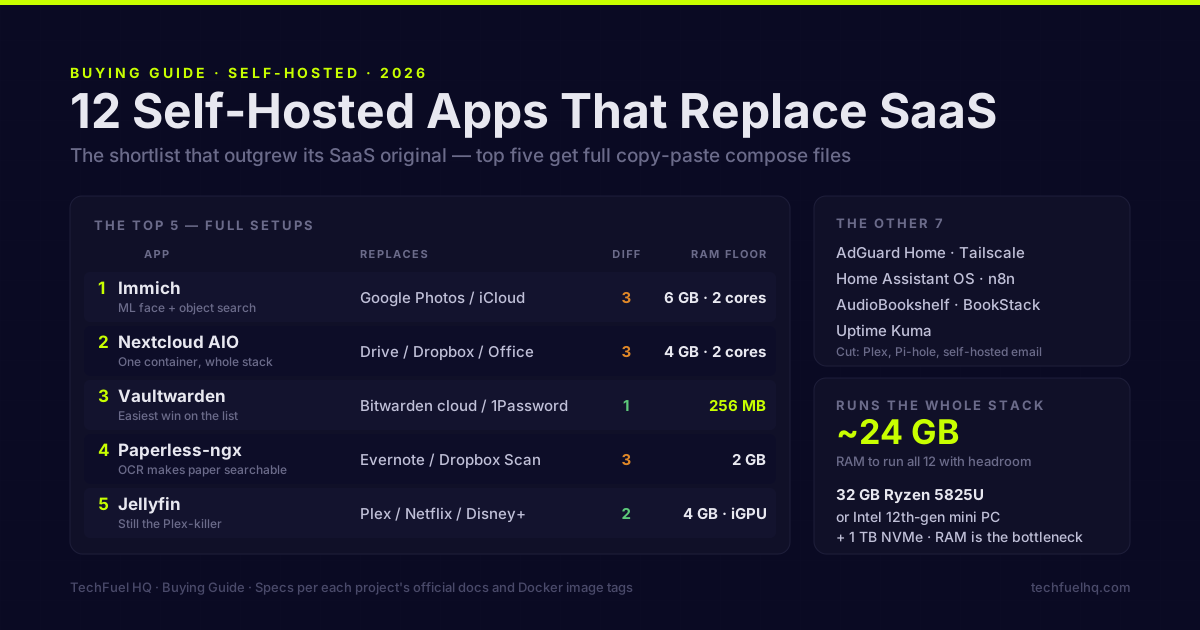
Here is the entire argument on one screen. On the left, the recurring bills you can stop paying. On the right, the open-source app that does the same job — for the one-time cost of a little RAM instead of a monthly charge.
TL;DR · The 12-app stack at a glance
- Photos: Immich (replaces Google Photos)
- Files / sync: Nextcloud AIO (replaces Dropbox + Google Drive + Office)
- Passwords: Vaultwarden (replaces 1Password / LastPass)
- Documents: Paperless-ngx (replaces filing cabinet + scanner cloud)
- Media: Jellyfin (replaces Netflix-style streaming)
- DNS / ad blocking: AdGuard Home
- Remote access: Tailscale (free tier: 6 users, unlimited devices)
- Smart home: Home Assistant OS
- Audiobooks: AudioBookshelf
- Workflow automation: n8n (replaces Zapier)
- Notes / wiki: BookStack (replaces Notion / Confluence)
- Monitoring: Uptime Kuma
Full stack runs on a 32 GB Ryzen 5825U or Intel 12th-gen mini PC + 1 TB NVMe. RAM is the bottleneck — Immich + Nextcloud + HA in a VM eats 12–14 GB before any user load.
Correction, September 8: the Immich v3.1.0 setup now uses /data and matching auxiliary files. Tailscale can use encrypted relays. Existing installations should check their mounts before importing more photos.
TL;DR — The 12 picks, voted
The shortlist for the best self hosted apps 2026 is small on purpose. Twelve services that have outgrown their SaaS originals, not fifty half-finished forks. Pi-hole gets demoted for AdGuard Home. Plex gets cut. Mail-in-a-Box does not make the list — self-hosted email in 2026 is still a bad idea for almost everyone. Most entries use Docker; Home Assistant OS belongs in a VM. The top five include setup examples. Tags vary: Immich uses a fixed release here, while Nextcloud AIO uses its supported moving entry point.
The scannable table — 12 apps, what they replace, what they need
| # | App | Replaces | Difficulty (1–5) | Hardware floor | Killer feature | Verdict |
|---|---|---|---|---|---|---|
| 1 | Immich | Google Photos / iCloud Photos | 3 | 6 GB RAM, 2 cores, Docker | ML face + object search that genuinely beats Google’s UI | Ship it. The 2026 release cadence finally slowed and breaking changes are rare. |
| 2 | Nextcloud AIO | Google Drive / Dropbox / Workspace | 3 | 4 GB RAM, 2 cores | One container manages the whole stack including backups | Use AIO. Skip the manual compose. |
| 3 | Vaultwarden | Bitwarden cloud / 1Password | 1 | 256 MB RAM | Bitwarden-compatible, runs on a potato, end-to-end encrypted | Easiest win on the list. |
| 4 | Paperless-ngx | Evernote / Dropbox Scan / paper | 3 | 2 GB RAM, OCR is CPU-hungry | Tika + OCR + tagging makes paper actually searchable | Replace your filing cabinet. |
| 5 | Jellyfin | Plex / Netflix / Disney+ | 2 | 4 GB RAM, Intel iGPU for transcode | No subscriptions, no phoning home, hardware transcoding works | Still the Plex-killer. AMD GPUs remain weak for transcode. |
| 6 | AdGuard Home | Pi-hole / NextDNS | 1 | 256 MB RAM | DNS-over-HTTPS upstream + per-client rules in a clean UI | Picked over Pi-hole for the better UI. |
| 7 | Tailscale (or Headscale) | Tailscale itself, ZeroTier, paid VPN | 1 (Tailscale) / 4 (Headscale) | Negligible | WireGuard mesh that punches NAT and “just works” | Tailscale free tier is enough for most. Headscale if you want to host the control plane. |
| 8 | Home Assistant OS | Apple Home / Google Home / SmartThings | 4 | 2 GB RAM, 32 GB disk, x86-64 | Local control, no cloud dependency, every protocol | Run it as a VM, not a container. |
| 9 | AudioBookshelf | Audible / Libby | 2 | 1 GB RAM | Tracks progress per-user across devices, podcast support included | Drop-in for an Audible library you already own. |
| 10 | n8n | Zapier / Make / IFTTT | 3 | 1 GB RAM | 400+ integrations, queue mode for real workloads | Beats Zapier for anything serious. Tax: you maintain it. |
| 11 | BookStack | Notion / Confluence (read-mostly) | 2 | 1 GB RAM | Books → Chapters → Pages structure that doesn’t fight you | Picked over Outline for simpler hosting. |
| 12 | Uptime Kuma | UptimeRobot / Better Stack | 1 | 256 MB RAM | Self-hostable status page for friends and family | The first thing every homelab should add after DNS. |
Below are the alternatives I would skip, followed by installation examples for the top five.
What got cut and why
- Plex — not a SaaS replacement; it is the SaaS. Jellyfin replaces Plex.
- Pi-hole — voted out for AdGuard Home. The DNS-over-HTTPS upstream and per-client rules in AdGuard’s UI are meaningfully better, and the Docker deploy is identical in difficulty. Pi-hole still works fine if you already run it. One deliberate disagreement inside this site: the self-hosting starter order still opens on Pi-hole, because for someone’s first container the smaller footprint and the mountain of beginner documentation matter more than DoH. Both guides are pointing at the same job. This is a preference, not a correctness call.
- Seafile — solid block-sync, but Nextcloud AIO has closed the gap and the ecosystem (calendar, contacts, office) is broader.
- Plausible CE / Umami / Mealie / FreshRSS / Linkding — all good, all on the bench. They didn’t beat the 12 above on either daily use or obvious SaaS replacement. If a self-hosted bookmark manager is specifically what you’re after, Linkding is fine but the two strongest options get their own head-to-head in Karakeep vs Linkwarden. If what you actually want is somewhere to read saved articles rather than file links — the job Pocket used to do before Mozilla shut it down — that is a different category, covered in self-hosted read-it-later apps.
- Mail-in-a-Box / Mailcow — explicitly cut. Self-hosted outbound email in 2026 still gets your IP scored as suspicious by Microsoft and Google more often than not, and inbound MX is fine until your dynamic IP changes or your ISP blocks port 25. Use a paid relay (Fastmail, Migadu, Proton) and move on. The community’s own long-form version of this argument is the r/selfhosted email wiki, linked as further reading rather than as a source: Reddit blocks the automated re-check this site runs on every citation, and its Wayback capture renders empty, so nothing here rests on it.
- Matrix / Mattermost / Rocket.Chat — a self-hosted chat server is its own category, not a general SaaS swap, so it sits outside this list. There is also no drop-in clone of Discord’s text-plus-voice bundle in 2026, and the voice/video story is the part most roundups skip. If replacing a Discord community or a team chat is what you actually want, the self-hosted Discord alternatives comparison breaks down which tool fits and the voice/video reality. Worth knowing before you pick: Mattermost gates production SSO behind paid plans, and Rocket.Chat moved its advanced identity sync to paid tiers in 2021 — the self-hosted SSO tax tracker documents both with verified receipts and free-SSO alternatives.
A difficulty score of 1 is “single container, defaults work, ten-minute deploy.” A 5 is “you’ll read documentation for a weekend and read it again at the next major upgrade.” Most of the 12 land at 1–3 — the apps that survive in homelabs are the ones where the 80% case is boring.
Where to actually start
Twelve services is a to-do list that stalls before it starts. It shouldn’t. The stack has a natural order — you do not stand up Immich and Home Assistant on day one. You stand up the ten-minute wins first, get the dopamine hit of a working service, then climb. This is the sequence I recommend.
The top 5 — full setups
1. Immich — the Google Photos replacement that finally works
Immich is the reason a lot of people built their first homelab in 2025. The mobile app uploads from iOS and Android in the background, the ML stack identifies faces and objects locally, and the timeline UI beats Google Photos for most operations. The catch is RAM — the ML container alone wants ~2 GB at idle, and library import will pin a couple of cores for hours on a fresh install.
This setup uses the v3.1.0 Compose file. Keep its files together; mixing releases can break the setup. For an upgrade, follow the Immich installation guide and the target release’s instructions.
Save the YAML below as docker-compose.yml in a dedicated directory. Download v3.1.0 example.env into that directory and rename it to .env. Also save v3.1.0 hwaccel.transcoding.yml under that exact filename. The extends block reads it even when you select cpu.
Edit .env before starting:
- Set
UPLOAD_LOCATIONto your media directory (./libraryin the example). It mounts at/datainside the server. - Set
DB_DATA_LOCATIONto local database storage (./postgresin the example). The database does not support network shares. - Replace
DB_PASSWORD=postgreswith a random password using onlyA-Za-z0-9, as the release’s example instructs. - Keep
DB_USERNAME=postgresandDB_DATABASE_NAME=immich. SetIMMICH_VERSION=v3.1.0to match the explicit image pins below. - Optionally set
TZto your timezone.
The example selects cpu for software transcoding. On an Intel iGPU host with /dev/dri available, change it to quicksync; both services exist in the linked file. That selects device access for the container; configure hardware transcoding in Immich using its transcoding guide.
Critical detail: Immich is not a backup. The database can corrupt. Use Immich’s official backup guide and keep originals on a separate disk from the Immich Postgres.
# docker-compose.yml - Immich v3.1.0
name: immich

services:
  immich-server:
    container_name: immich_server
    image: ghcr.io/immich-app/immich-server:v3.1.0
    extends:
      file: hwaccel.transcoding.yml
      service: cpu # use quicksync for a compatible Intel iGPU host
    volumes:
      # Do not edit the next line. If you want to change the media storage location on your system, edit the value of UPLOAD_LOCATION in the .env file
      - ${UPLOAD_LOCATION}:/data
      - /etc/localtime:/etc/localtime:ro
    env_file:
      - .env
    ports:
      - '2283:2283'
    depends_on:
      - redis
      - database
    restart: always
    healthcheck:
      disable: false

  immich-machine-learning:
    container_name: immich_machine_learning
    # For hardware acceleration, add one of -[armnn, cuda, rocm, openvino, rknn] to the image tag.
    # Example tag: v3.1.0-cuda
    image: ghcr.io/immich-app/immich-machine-learning:v3.1.0
    # extends: # uncomment this section for hardware acceleration - see https://docs.immich.app/features/ml-hardware-acceleration
    #   file: hwaccel.ml.yml
    #   service: cpu # set to one of [armnn, cuda, rocm, openvino, openvino-wsl, rknn] for accelerated inference - use the `-wsl` version for WSL2 where applicable
    volumes:
      - model-cache:/cache
    env_file:
      - .env
    restart: always
    healthcheck:
      disable: false

  redis:
    container_name: immich_redis
    image: docker.io/valkey/valkey:9@sha256:8e8d64b405ce18f41b8e5ee20aa4687a8ed0022d1298f2ce31cdcf3a76e09411
    healthcheck:
      test: redis-cli ping || exit 1
    restart: always

  database:
    container_name: immich_postgres
    image: ghcr.io/immich-app/postgres:14-vectorchord0.4.3-pgvectors0.2.0@sha256:bcf63357191b76a916ae5eb93464d65c07511da41e3bf7a8416db519b40b1c23
    environment:
      POSTGRES_PASSWORD: ${DB_PASSWORD}
      POSTGRES_USER: ${DB_USERNAME}
      POSTGRES_DB: ${DB_DATABASE_NAME}
      POSTGRES_INITDB_ARGS: '--data-checksums'
      # Uncomment the DB_STORAGE_TYPE: 'HDD' var if your database isn't stored on SSDs
      # DB_STORAGE_TYPE: 'HDD'
    volumes:
      # Do not edit the next line. If you want to change the database storage location on your system, edit the value of DB_DATA_LOCATION in the .env file
      - ${DB_DATA_LOCATION}:/var/lib/postgresql/data
    shm_size: 128mb
    restart: always
    healthcheck:
      disable: false

volumes:
  model-cache:
From this directory, run docker compose config to check interpolation, then docker compose up -d. Before importing your library, upload a disposable photo, recreate the containers, and confirm it remains available. Keep backups of both the media directory and database; container recreation is only a persistence check.
2. Nextcloud AIO — file sync, calendar, contacts, in one container
The official Nextcloud All-in-One project ships everything — Apache, PHP, the database, Redis, the office stack, Talk, the backup container — managed by a single mastercontainer that you talk to over a web UI on port 8080. It is the right answer for new self-hosters and for experienced ones who got tired of debugging PHP-FPM at 1 a.m.
# One-liner from the official AIO README
sudo docker run \
  --init \
  --sig-proxy=false \
  --name nextcloud-aio-mastercontainer \
  --restart always \
  --publish 80:80 \
  --publish 8080:8080 \
  --publish 8443:8443 \
  --volume nextcloud_aio_mastercontainer:/mnt/docker-aio-config \
  --volume /var/run/docker.sock:/var/run/docker.sock:ro \
  ghcr.io/nextcloud-releases/all-in-one:latest
The latest tag here is the AIO mastercontainer, which the project explicitly maintains as the supported entry point — the actual Nextcloud server image underneath gets pinned by AIO to a tested release. That’s the one place I make an exception to the “no :latest” rule. If you want full version control, watch the Nextcloud AIO releases page and use a digest pin instead.
AIO turns on file sync, CalDAV, CardDAV, and Collabora office editing by default. The performance ceiling on a budget mini PC with 16 GB of RAM is around 4–5 active users on a 2.5 GbE network. Beyond that, tune Redis cache before blaming the box.
For the complete setup — NPM reverse proxy config, Office activation, CalDAV/CardDAV client setup, and AIO backup — see the Nextcloud AIO Docker setup guide.
3. Vaultwarden — Bitwarden, on a potato
Vaultwarden is a Rust reimplementation of the Bitwarden server API by dani-garcia. The current stable line is 1.37.x as of August 2026 (1.37.2, 22 Aug 2026), per the Vaultwarden releases. Do not deploy 1.36.x: 1.37.0 shipped fixes for ten GitHub security advisories (eight listed issues), including two SSRF issues on the icon endpoint, cross-organization cipher access, and an organization-policy bypass on directory import, and the maintainers state it “is required for support with clients with version 2026.7.0+.” Take the newest 1.37.x patch rather than 1.37.0 — 1.37.1 repaired organization invites that 1.37.0 broke, and the maintainers say 1.37.2 “is required for support with clients with version 2026.8.0+.” It is fully compatible with the official Bitwarden mobile, browser, and desktop clients, which is the whole point — your phone doesn’t know it’s not talking to Bitwarden’s cloud. For the server-choice decision behind that — the official Bitwarden server’s eleven-container stack versus this single container, and exactly which features you trade away — see Vaultwarden vs Bitwarden.
# docker-compose.yml — Vaultwarden, version-pinned
services:
  vaultwarden:
    image: vaultwarden/server:1.37.2-alpine
    container_name: vaultwarden
    restart: unless-stopped
    environment:
      DOMAIN: "https://vault.example.lan"
      SIGNUPS_ALLOWED: "false"      # flip to true for first user, then back
      ADMIN_TOKEN: "${ADMIN_TOKEN}" # generate with: openssl rand -base64 48
      WEBSOCKET_ENABLED: "true"
    volumes:
      - ./vw-data:/data
    ports:
      - 8222:80
Two things people miss. Vaultwarden needs a real TLS cert for mobile clients — put it behind Caddy or Traefik with Let’s Encrypt, or use Tailscale Funnel for a zero-config TLS path. And back up ./vw-data somewhere off the host — a vault you can’t restore is a vault you don’t have. The Vaultwarden on Proxmox setup guide covers Caddy reverse proxy, the Tailscale-only setup path, and an automated SQLite backup script with online backup API support.
4. Jellyfin — Plex without the company
Jellyfin is the mature fork of Emby. It does what Plex does — library scanning, transcoding, mobile and TV apps — without phoning home, without watching your viewing history, and without a “Pass” subscription gating hardware acceleration.
# docker-compose.yml — Jellyfin with Intel Quick Sync transcoding
services:
  jellyfin:
    image: lscr.io/linuxserver/jellyfin:10.11.11
    container_name: jellyfin
    environment:
      - PUID=1000
      - PGID=1000
      - TZ=America/Chicago
      - JELLYFIN_PublishedServerUrl=http://192.168.1.50:8096
    devices:
      - /dev/dri:/dev/dri   # Intel iGPU passthrough for QSV
    volumes:
      - ./config:/config
      - /srv/media:/data/media:ro
    ports:
      - 8096:8096
    restart: unless-stopped
Intel Quick Sync is what makes Jellyfin viable on a budget mini PC. N100 and 12th-gen-or-newer iGPUs handle 4K HEVC decode without breaking a sweat. AMD GPUs remain the weakest transcode option in 2026 — Jellyfin’s own hardware selection guide calls AMD “the least preferred choice” for its sub-par H.264 encoders before RDNA 4 (RX 9000) and says the poor encoder quality and driver support apply “even on Linux” — so if your homelab is AMD-only, plan for direct-play clients (NVIDIA Shield, Apple TV, a recent smart TV). The Jellyfin team also keeps a clear hardware acceleration matrix; read it before you buy a box.
5. Home Assistant OS — local-first smart home
Home Assistant is on this list because it replaces Apple Home, Google Home, and SmartThings simultaneously, and because the cloud-dependency stories from those vendors keep getting worse. It is not on this list because it is easy. It is rated 4/5 on difficulty for a reason: deep automation requires real time investment.
The recommended path in 2026 is still Home Assistant OS running as a VM, not the Docker container. Per the official installation docs, the container variant loses the Supervisor and the add-on ecosystem, and the add-on ecosystem (Mosquitto, Zigbee2MQTT, ESPHome, the official Z-Wave stack) is most of what makes HA worth running.
For a Proxmox host, the tteck Proxmox Helper Scripts (now community-maintained at community-scripts/ProxmoxVE) install HA OS as a VM in about three minutes. That’s the path. Allocate 2 GB RAM, 2 vCPUs, 32 GB disk, and pass through a USB Zigbee/Z-Wave coordinator if you have one. See the Proxmox vs TrueNAS vs Unraid comparison for which hypervisor fits your situation.
The Home Assistant 2026.3 release notes confirmed the move to zstd-compressed container images; the notes put the floor at Docker 23.0.0 / containerd 1.5.0, so a Docker host that has not been updated past those versions will fail to pull the image, while any modern Docker is fine. Read release notes before every monthly upgrade. HA breaks integrations a few times a year — upgrades are not background tasks.
The other 7 — short notes
AdGuard Home (replaces Pi-hole, NextDNS, your router’s bad ad blocker)
Pin adguard/adguardhome:v0.107.x. Run it on the same box as Uptime Kuma. Point your router’s DHCP DNS at the AdGuard container IP and every device on your network — phones, smart TVs, the IoT garbage — gets DNS-level filtering with zero per-device setup. The DoH/DoT upstream config is in the UI; switch it to Quad9 or Cloudflare 1.1.1.1 and you’ve also leaked less DNS to your ISP than you did last week.
The AdGuard Home + Local DNS on Proxmox tutorial covers the LXC setup from scratch: port 53 in an unprivileged container, OISD and Steven Black blocklists, local A records for pve.lan / nas.lan, and an optional Unbound recursive resolver that cuts upstream providers out entirely.
Tailscale (replaces Tailscale, ZeroTier, paid commercial VPN)
Yes, Tailscale is technically a SaaS for the coordinator. The free personal tier (6 users and unlimited user devices) is enough for almost every homelab, and direct connections are preferred. When a direct path fails, DERP servers or peer relays can carry the traffic; all three paths remain end-to-end encrypted with WireGuard. See Tailscale connection types. The right way to read this is: Tailscale replaces commercial OpenVPN/WireGuard services and ZeroTier, both of which are also SaaS. If you are choosing between those last two, see ZeroTier vs Tailscale. If you genuinely refuse the coordinator, Headscale is the open-source alternative — but plan for a difficulty score of 4, not 1. And if the real question is how to reach these services from outside your LAN at all, Tailscale vs Cloudflare Tunnel covers the private-network-versus-public-tunnel split and the current free-tier limits.
AudioBookshelf (replaces Audible)
If you already own audiobooks (legitimately, ideally), AudioBookshelf gives you per-user progress sync, mobile apps, and podcast support. Single container, no companion services, about 100 MB idle RAM — the lightest useful self-hosted app on this list. The iOS and Android apps are official and free. Podcast RSS auto-download is built in. Pin ghcr.io/advplyr/audiobookshelf:2.36.0 (current as of 27 Jul 2026) rather than :latest, per the no-:latest rule above. Full setup with library directory structure, mobile app config, metadata matching, and Tailscale remote access is in the AudioBookshelf Docker guide.
n8n (replaces Zapier, Make, IFTTT)
400+ integrations, a real queue mode for production workloads, and the ability to drop into JavaScript when the visual builder won’t do what you need. Pin to a specific tag — n8n’s latest has shipped breaking workflow changes inside a single major release before. The n8n Docker image page maintains tags per release; pick the current stable on install day.
For the full setup — PostgreSQL backend, Nginx Proxy Manager HTTPS, queue mode with Redis, and backup strategy — see the n8n self-hosted Docker guide.
BookStack (replaces Notion as a wiki / docs site)
For pure note-taking, Obsidian beats every self-hosted option. For a team or family wiki — recipes, runbooks, “how the network is set up” — BookStack is the right answer. Outline is also good but the hosting story is harder. The stack is two containers (BookStack + MySQL) with about 180 MB idle RAM — the lightest wiki option on this list. Pin lscr.io/linuxserver/bookstack:26.05.3 (current as of 29 Jul 2026) rather than :latest, per the no-:latest rule above, and configure LDAP if you’re already running Authentik or Keycloak for unified auth. Full setup with MySQL, NPM HTTPS, LDAP, and backup is in the BookStack Docker guide.
Uptime Kuma (replaces UptimeRobot, Better Stack)
Already covered in the self-hosting essentials guide. It belongs here because once you have 12 services running, you need to know which one died at 2 a.m. before your family tells you the internet is “broken.” Pin louislam/uptime-kuma:2 (2.5.3 shipped 22 Aug 2026); the 1.x line is a major behind.
Paperless-ngx (replaces Evernote scan, Dropbox Scan, paper)
Drop a PDF in the consume folder, OCR runs, the document is tagged, you can full-text-search five years of mail in seconds. Pin ghcr.io/paperless-ngx/paperless-ngx:3.0.5 (current release, 2026-08-01; the project publishes no bare :3 tag, so use a full release tag or the floating :3.0. On v3 set PAPERLESS_DBENGINE: postgresql explicitly, because v2 inferred the engine from PAPERLESS_DBHOST and v3 no longer does) and run PostgreSQL next to it — not SQLite, which write-locks under concurrent requests. Add Tika and Gotenberg containers alongside; without them, Word and Excel files ingest silently with no searchable text. The full compose stack with correspondent auto-tagging, subdirectory tag mapping, and NPM HTTPS is in the Paperless-ngx setup guide.
What hardware actually runs all 12
Rough memory budget: ~24 GB RAM if you run everything simultaneously with realistic headroom. CPU is less of a problem than people think — Immich’s ML is the spike, and the rest idle hard.
The Proxmox vs TrueNAS vs Unraid comparison covers the OS choice. For hardware, Best Mini PCs for a Homelab in 2026 lands on a 32 GB Ryzen 5825U or Intel 12th-gen-or-newer box, NVMe boot, separate disk for media. If you’re starting from a single mini PC and have never set up Proxmox, the Proxmox mini PC setup walkthrough is the next read. If you have an old gaming PC sitting in a closet, the repurpose-as-server guide skips the hardware purchase entirely. For the complete Docker Compose stack — NPM + Portainer + Uptime Kuma + Watchtower + Gitea with working compose files and a shared proxy network — the Docker Compose starter stack tutorial has everything wired together.
Does it actually save money?
The Self-Hosting Break-Even Calculator answers this for your specific situation — add your subscriptions, set your hardware budget, and see exactly when self-hosting pays for itself. Spoiler: replacing $30–50/month in SaaS with a $170 mini PC usually breaks even in under 6 months.
Pick the box that runs the stack
The 12-app stack needs a real host. The TechFuelHQ PC Builder checks socket / RAM / PSU / GPU clearance compatibility for the AM4, AM5, and Intel platforms that pair well with Docker stacks. For mini-PC turnkey picks, the mini-PC homelab guide covers Minisforum MS-01 (10GbE for storage-heavy stacks) and the cheap used-OptiPlex path. If your stack outgrows a single 2.5GbE link, the 10GbE homelab networking guide covers the cheap switch options.
Sources and methodology
App recommendations synthesize maintainer documentation, deployment guides, and the maintained Docker image tags as of 2026-06-10. RAM and CPU footprint figures are taken from each project’s published documentation.
Primary sources cited:
- Immich docs — official Immich documentation
- Nextcloud AIO docs — official Nextcloud All-In-One reference
- Vaultwarden wiki — official documentation
- Jellyfin docs — official Jellyfin reference
- AdGuard Home — project documentation
- Tailscale docs — official documentation and free-tier limits
- Home Assistant docs — official OS installation guide
- r/selfhosted — background reading only. It is a subreddit rather than a document, so no claim on this page is sourced to it
Email corrections to hello@techfuelhq.com.
Frequently asked questions
What are the best self hosted apps in 2026?
Can a single mini PC run all twelve?
Is Jellyfin really better than Plex in 2026?
Should I self-host email?
How do I back up these self-hosted services?
Is Tailscale really self-hosted?
Evidence ledger
- Last updated
- Methodology
- See our methodology for research and review standards. It draws on 18 cited sources, listed below, each checked against the original page on 2026-05-02.
- Sources
- Immich docker-compose template accessed 2026-05-02
- Immich releases accessed 2026-05-02
- Immich backup and restore accessed 2026-05-02
- Nextcloud All-in-One accessed 2026-05-02
- Nextcloud AIO releases accessed 2026-05-02
- Vaultwarden releases accessed 2026-05-02
- Tailscale Funnel accessed 2026-05-02
- Jellyfin hardware acceleration accessed 2026-05-02
- LinuxServer Jellyfin tags accessed 2026-05-02
- Home Assistant installation accessed 2026-05-02
- Home Assistant 2026.3 release notes accessed 2026-05-02
- Community-maintained Proxmox helper scripts accessed 2026-05-02
- AdGuard Home image accessed 2026-05-02
- AdGuard Home releases accessed 2026-05-02
- Headscale accessed 2026-05-02
- n8n Docker image accessed 2026-05-02
- Paperless-ngx setup docs accessed 2026-05-02
- Nextcloud system requirements accessed 2026-05-02
- Update log
- 2026-09-08 — Corrected the Immich v3.1.0 storage target and matched its setup files and Compose values. Corrected Tailscale relay routing in prose and both FAQ representations. No deployment test or general version refresh was performed.
- 2026-08-23 — Cross-page consistency (site audit 2026-08-23, finding SITE-13). This page votes Pi-hole out for AdGuard Home while /articles/self-hosting-essentials/ heads its first section “Pi-hole - Deploy This First, Period”, with no cross-reference either way. Both pages now say the disagreement exists, say why each pick wins its own question, and link to each other. Neither recommendation was reversed.
- 2026-08-23 — Machine-date consistency: the hand-maintained inline Article JSON-LD carried dateModified 2026-08-19T03:50 while the front-matter lastmod read 2026-08-22T16:19, so the page markup and the sitemap handed Google two different modification dates for the same URL. Both now carry the same stamp. Site audit 2026-08-23, finding SITE-02.
- 2026-08-22 — Cross-cite sweep: the Uptime Kuma line still told readers to pin louislam/uptime-kuma:1.23.x while this site’s Uptime Kuma guide and Docker starter stack both pin :2, and 2.5.3 is the current release per the GitHub releases API (published 2026-08-22). Corrected to :2.
- 2026-08-22 — Paperless-ngx pin brought to the current major: :2 -> :3 (v3.0.0 released 2026-07-22) with the v3 requirement to set PAPERLESS_DBENGINE explicitly (paperless-ngx docs/migration-v3.md). Cross-cite found by Goal-5 segment 8; the linked setup guide carries the full compose.
- 2026-08-24 — CORRECTION to the 2026-08-22 entry above: that pin was wrong. paperless-ngx publishes no bare major tag — GHCR manifest queries return 404 for both :3 and :2, and 200 for :3.0, :3.0.5 and :latest. The compose block here and the two in the linked setup guide would have failed to pull with ‘manifest unknown’. All three now pin :3.0.5 (GitHub releases/latest = v3.0.5, published 2026-08-01T21:59:04Z). The v3.0.0 date and the PAPERLESS_DBENGINE requirement above both re-verified and stand.
- 2026-08-22 — Cold claim-citation audit (Goal-5 segment 6); every external citation re-fetched 2026-08-22. (1) Immich currency: the page said the current stable is v3.0.3; the GitHub releases API shows v3.1.0 published 2026-07-29 as the newest non-prerelease, so the currency line and both compose pins moved to v3.1.0 (ghcr manifests for immich-server and immich-machine-learning v3.1.0 returned 200). (2) Vaultwarden: the 1.37.0 release notes carry no count; they list eight issues under ten distinct GHSA ids, so ’nine security advisories’ became ’ten GitHub security advisories (eight listed issues)’; 1.37.2 shipped 2026-08-22 and its notes say it is required for 2026.8.0+ clients, so the currency line and the compose pin moved to 1.37.2 (Docker Hub tag 1.37.2-alpine pushed 2026-08-22T12:21Z). (3) The Home Assistant 2026.3 notes say the zstd image change needs Docker 23.0.0 / containerd 1.5.0 and do not mention Synology; the Synology clause was an imported inference and now states the source’s own version floor. (4) The Jellyfin hardware-acceleration matrix does not call AMD weaker; Jellyfin’s hardware-selection guide does (’the least preferred choice’, ’even on Linux’), so the AMD sentence now cites that page and quotes it. (5) Tailscale’s live pricing page shows the Personal plan at up to 6 users and unlimited user devices, the same numbers this page states, so the clause claiming the limits had moved past them was removed.
- 2026-08-14 — Version-pin drift sweep. (1) The Vaultwarden section asserted ’the current stable line is 1.36.x as of early 2026’ and its compose block pinned vaultwarden/server:1.36.0-alpine. Verified against the GitHub releases API (retrieved 2026-08-14): 1.37.0 shipped 2026-07-24 with fixes for nine security advisories (two SSRF on the icon endpoint, cross-organization cipher access, organization-policy bypass on directory import, Send access-count bypass, unauthenticated WebSocket flooding, cross-organization secret sharing, organization import authorization, Manager-role data enumeration) and its notes state it ‘is required for support with clients with version 2026.7.0+’; 1.37.1 followed 2026-07-29 fixing organization invites that 1.37.0 broke. Handing readers a copy-paste compose file pinned to 1.36.0 was actively harmful for a password-manager server, and it contradicted our own Vaultwarden vs Bitwarden page, which already carried 1.37.1. Currency claim and compose pin both moved to 1.37.1. (2) This page declares a “no ‘:latest’” rule and names Nextcloud AIO as its single exception, then told readers to ‘Pin ghcr.io/advplyr/audiobookshelf:latest’ and ‘Pin lscr.io/linuxserver/bookstack:latest’ – two further ‘:latest’ uses beyond the stated exception, described with the word ‘Pin’, which is the opposite of what ‘:latest’ does. Both now name a real release tag (audiobookshelf 2.36.0, 2026-07-27; BookStack 26.05.3, 2026-07-29, both per the GitHub releases API retrieved 2026-08-14).
- 2026-05-06 — Content update: 2 draft placeholders replaced with finalized content.
- 2026-05-06 — Content update: Sources lifted into evidence ledger; inline duplicate Sources / Methodology blocks removed.
- Corrections
- Spotted an error or a stale number? Email hello@techfuelhq.com. Confirmed corrections are added to the update log above.