
NVIDIA’s required system power runs 650W for the RTX 5070, 750W for the 5070 Ti, 850W for the 5080, and 1000W for the 5090. Buy those numbers for typical builds. A factory-overclocked card or a 200W-plus processor moves each tier up one size, and on the 5090, itemized math says 1200W.
Contents
Buy NVIDIA’s number for your card, then check two things. The required system power runs 650W (RTX 5070), 750W (5070 Ti), 850W (5080), 1000W (5090) — and the two things that move it are which board you bought and which processor sits next to it. A factory-overclocked card or a 200W-plus CPU costs a full power-supply tier at every step of the range, and on the 5090 our own itemized math lands above NVIDIA’s floor, which happens nowhere else in the lineup.
Every card’s actual power specification
| Specification | RTX 5070 | RTX 5070 Ti | RTX 5080 | RTX 5090 |
|---|---|---|---|---|
| Total graphics power (TGP) | 250W | 300W | 360W | 575W |
| NVIDIA required system power | 650W | 750W | 850W | 1000W |
| Power connectors | 2x 8-pin or 300W Gen 5 cable | 2x 8-pin or 300W Gen 5 cable | 3x 8-pin or 450W Gen 5 cable | 4x 8-pin or 600W Gen 5 cable |
Two details matter more than the headline row. The TGP is the card; the required figure is the system, already carrying an allowance for processor, drives, and fans. And the connector count climbs with the tier — an older supply with two spare 8-pins runs a 5070 out of the box, needs a third cable for a 5080, and is realistically out of its depth on a 5090, where NVIDIA also recommends a PCIe CEM 5.1 compliant unit rather than just a wattage.
Which GPU power cable do those rows mean?
A PCIe 6+2-pin plug closes into an 8-pin GPU connector. It is not an eight-pin CPU/EPS lead. For a native 16-pin connection, use the PSU maker’s compatible 12VHPWR or 12V-2x6 cable. Feed NVIDIA’s included adapter the separate PCIe 8-pin leads the card specification calls for. Never move a modular cable between PSU brands just because the ends fit. Seasonic’s current guide labels CPU/EPS separately from 6+2-pin PCIe GPU cables. It also lists distinct families for 12VHPWR and 12V-2x6, and warns against mixing brands.
A 12-pin GPU cable is not a complete compatibility description
NVIDIA’s RTX 30-series reference specifications describe an adapter to a 12-pin connector for cards such as the RTX 3090 and RTX 3070. That older label should not be substituted for the modern connector’s name when ordering a cable.
Seasonic describes 12VHPWR and 12V-2x6 as 16-pin connections: twelve main contacts plus four sense contacts. Its cable guide also separates GPU PCIe and CPU/EPS leads. For an RTX 5080, match the card’s specified connector and power rating, then the PSU maker’s exact cable compatibility list. A matching pin count, plug shape or modular socket does not establish safe interchangeability. Keep the original approved cable or adapter until that model-specific check is complete.
The sizing method, stated once
Every table below sums real component draw the way our PSU wattage calculator does; the per-component coefficients and their sources are published there. The reference build — two RAM sticks, one M.2 drive, four fans, an AIO — adds 93W on top of card and processor. “Smallest that works” is peak draw plus a 20% margin, rounded up to a wattage actually sold; one size above that is the quieter, longer-lived choice. Whether a processor limits your frame rate rather than your power budget is a different question — that one takes a test in your own game, and the CPU and GPU benchmark lookup shows where each part sits in its own ranking.
RTX 5070: 650W, earned
| Your processor | Example | System peak | Smallest PSU that works | Comfortable choice |
|---|---|---|---|---|
| 65W | Ryzen 5 9600X | ~408W | 550W | 650W |
| 120W | Ryzen 7 7800X3D | ~463W | 650W | 750W |
| 170W | Ryzen 9 9950X | ~513W | 650W | 750W |
| 250W | Core i9-14900K, unrestricted | ~593W | 750W | 850W |
The mainstream gaming row lands exactly on NVIDIA’s 650W — a useful cross-check, though NVIDIA does not publish the build behind its figure. Go to 750W for a flagship CPU (the 250W row peaks at 91% load on a 650W unit, past the point where a supply gets loud and protection-trippy) or if a 5070 Ti upgrade is on the table, since the Ti asks for 750W anyway. A genuinely lean build — 65W chip, one drive, no AIO — sits on 550W by the arithmetic, but quality ATX 3.x units below 650W are thin on the ground, so if the two shelves are twenty dollars apart, take the 650W. Weighing the Ti now? The RTX 5070 vs 5070 Ti comparison covers what the extra 50W buys.
RTX 5080: which 5080 did you buy?
This is the tier where the board variant decides the answer. A Founders-class card is 360W; factory-overclocked models are sized nearer ~420W under sustained load, and that 60W is worth an entire supply tier at the top of the CPU range:
| Your processor | 360W Founders-class card | ~420W factory-OC card |
|---|---|---|
| 65W | 518W peak → 650W | 578W peak → 750W |
| 120W | 573W peak → 750W | 633W peak → 850W |
| 170W | 623W peak → 750W | 683W peak → 850W |
| 250W | 703W peak → 850W | 763W peak → 1000W |
Read across any row: the overclocked board costs you a tier on its own — same silicon, different power target. Our arithmetic for a Founders-class card with a mainstream CPU lands at 750W, below NVIDIA’s 850W; that is not a gap to exploit. Vendor minimums are worst-case by design — read the 850W as covering the bottom of the table rather than the middle, and buy it.
What our own overclocked 5080 actually drew
Our reference card is the overclocked kind, and we logged it: across roughly 26 logged minutes of gaming, captured in two segments, on the ASUS ROG Astral RTX 5080 OC — 308 HWiNFO64 samples on the hand-tuned profile — board power averaged 261W and peaked at 326W.
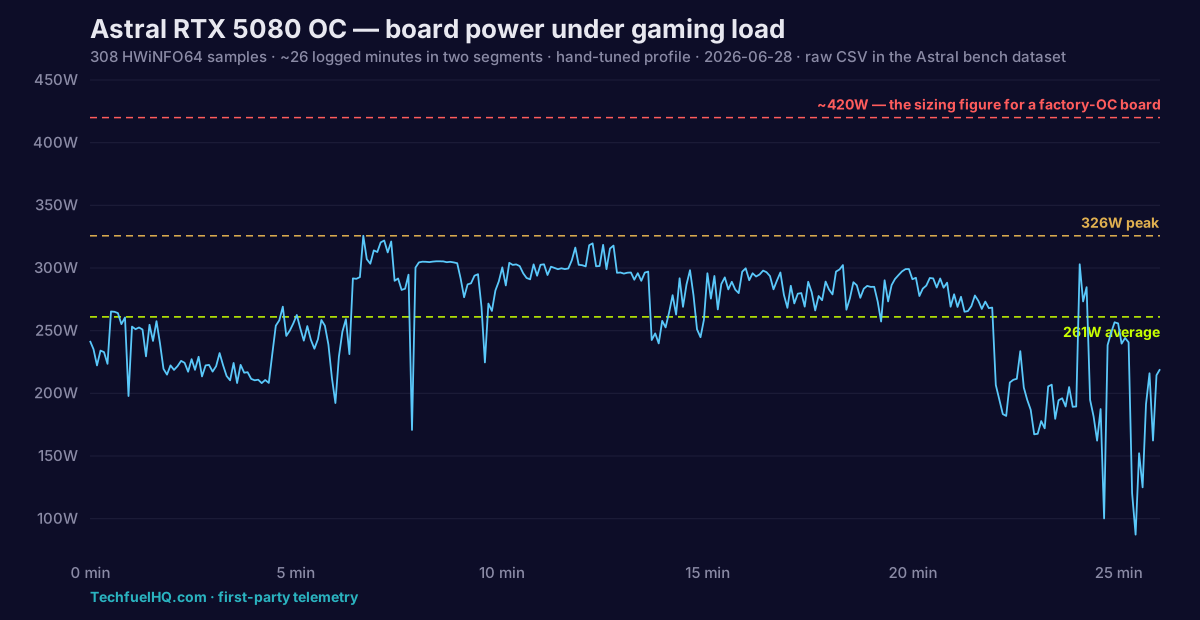
Both numbers sit comfortably under the ~420W the calculator uses for an overclocked board — which is the point. You size a supply for the worst case it must survive, not for the average it will usually see.
RTX 5090: the one card where the math flips
On the 5070 and 5080 our arithmetic comes out below NVIDIA’s minimum, and the advice is to buy the vendor number anyway. The 5090 inverts that. NVIDIA lists 1000W and states the assumption behind it: a system built around a Ryzen 9 9950X. Run the itemized math on exactly that pairing:
| Your processor | 575W Founders-class card | ~660W factory-OC card |
|---|---|---|
| 65W | 733W peak → 1000W | 818W peak → 1000W |
| 120W | 788W peak → 1000W | 873W peak → 1200W |
| 200W (the 9950X NVIDIA assumes) | 868W peak → 1200W | 953W peak → 1200W |
| 250W | 918W peak → 1200W | 1003W peak → 1500W |
Read the third row: on the exact processor NVIDIA cites, the rule says 1200W where they say 1000W. A 1000W unit is not wrong — 868W peak is 87% load, and it will run — but it sits above the 80% line where efficiency sags, and it leaves nothing for an overclocked board or a future card. 1000W is the floor. 1200W is the buy.
The 5090 is also where the connector stops being a preference. Four 8-pin adapters stacked behind a card is where cable management stops being cosmetic, so most 5090 builds end up on a native 12V-2x6 cable — and NVIDIA’s CEM 5.1 recommendation is a validation standard, not a wattage: a 1200W unit that predates it is a worse pairing than a compliant 1000W one. Our PSU tier list marks which current units carry a native 12V-2x6 header.
If you are buying the whole tower rather than the card, the best RTX 5090 prebuilt guide compares three current 9800X3D systems by the exact power supply, memory, cooling, seller, and price details each listing exposes.
Transient spikes
Graphics cards draw in bursts, and this is where PSU advice usually turns into “buy double.” It should not. Intel’s ATX 3.0 design guide requires a compliant unit to survive excursions to 200% of its rated wattage for 100 microseconds, with lower brackets for longer events — but only where both conditions hold: the unit is above 450W and ships a native 12VHPWR / 12V-2x6 connector. A compliant modern unit at the sizes in these tables already has spike headroom in the standard; size for sustained peak and stop padding. An older ATX 2.x supply was never designed against those brackets — leave more room, and the bigger the card, the less proportional margin a spike has above your peak.
Whichever connector you use, seat it fully until it clicks and avoid a sharp bend at the plug. The current 12V-2x6 design shortens the sense pins precisely so a partially seated plug fails to deliver full power instead of making high-resistance contact.
Undervolting: headroom you earn, not money you save
Curve undervolting cuts real watts at every tier — our results database records roughly 50W back on mid-range cards and around 100W on flagship-class boards, and the published range for the 5080 specifically is 30–70W depending on silicon. On the 5090’s 200W-CPU row, 100W off moves a 1000W unit from 87% load back to a comfortable 77%.
The caveat: you cannot bank it in advance. Silicon varies, and a supply has to cover the case where your card undervolts poorly. Buy for the stock figure, tune afterwards with the GPU undervolting guide, and treat the saving as headroom you gained.
If you already own the power supply
Check the label on the unit, not the case badge — most supplies report nothing to Windows, so the label’s continuous 12V rating is the number that counts, not the peak sticker. On a multi-rail unit, follow the manual’s rail distribution and give the card its own cables instead of daisy-chaining one pigtail. And a supply that is merely old is not automatically a problem, but one that is failing looks exactly like one that is undersized — random shutdowns under load, reboots in games. PSU failure symptoms covers telling those apart before you spend money on the wrong fix.
Once the wattage is settled, the which unit question is what the PSU tier list answers, with every placement sourced; for what each card buys you in frames, see the GPU hierarchy.
Sources
- NVIDIA GeForce RTX 5070 / 5070 Ti official specifications — TGP, required system power, and connectors — RTX 5070 family specifications, verified live 2026-07-25.
- NVIDIA GeForce RTX 5080 official specifications — RTX 5080 specifications, verified live 2026-07-25.
- NVIDIA GeForce RTX 5090 official specifications — including the stated Ryzen 9 9950X basis for the 1000W figure and the PCIe CEM 5.1 recommendation — RTX 5090, verified live 2026-07-25.
- Intel ATX 3.0 desktop power supply design guide — the excursion brackets and the wattage/connector conditions that qualify a unit (Intel ATX 3.0 PSU power excursion).
- Seasonic PSU cable compatibility guide — connector-family labels, modular compatibility, and the warning not to mix cables between PSU brands (Seasonic cable compatibility), verified live 2026-10-11.
- The ~420W (5080 OC) and ~660W (5090 OC) sizing figures are this site’s own conservative estimates from the GPU list in the PSU calculator — sizing peaks, not measured gaming draws.
- The 261W average / 326W peak figures are first-party telemetry: 308 HWiNFO64 samples across roughly 26 logged minutes (two segments) on the hand-tuned Astral 5080 profile, charted above; the raw CSV ships with the Astral bench dataset.
- The 30–70W (5080) undervolt range and the ~50W / ~100W tier figures are the published community numbers recorded in the undervolt results database.
- Component draw coefficients and sizing rules are this site’s own published figures, listed in full in the PSU calculator methodology.
Frequently asked questions
What are the RTX 5080’s PSU requirements?
What is the RTX 5070’s wattage?
What power supply do I need for an RTX 5090?
Is a Ryzen 7 5700X good with an RTX 5070?
Does buying a bigger PSU now cover a future 50-series upgrade?
Sources and corrections
- Last updated
- Methodology
- See our methodology for research and review standards.
- Update log
- 2026-08-13 — Merged the separate RTX 5070 and RTX 5090 PSU pages into this single 50-series guide (their URLs now redirect here). Each card keeps its own sizing table; the shared methodology is stated once. Added the first-party 5080 telemetry chart from the 308-sample HWiNFO64 log.
- 2026-07-25 — Published.
- Corrections
- Spotted an error or a stale number? Email contact@techfuelhq.com. Confirmed corrections are recorded here with the date and change.