
At stock my ROG Astral RTX 5080 OC games at 266 to 340 W and 63 to 72 °C, near-silent; tuned, it ran path-traced Cyberpunk 2077 at 4K at 135 FPS with DLSS Quality and MFG 4x. ASUS lists it at 357.6 mm and 3.8 slots; Newegg listed it at $2,099.99 on September 26, 2026. Buy it for 4K.
By LK Wood IV · Published 2026-06-12 · Updated 2026-10-10 · ~12 min read · St. Louis County, MO
Rating: 4.4 / 5
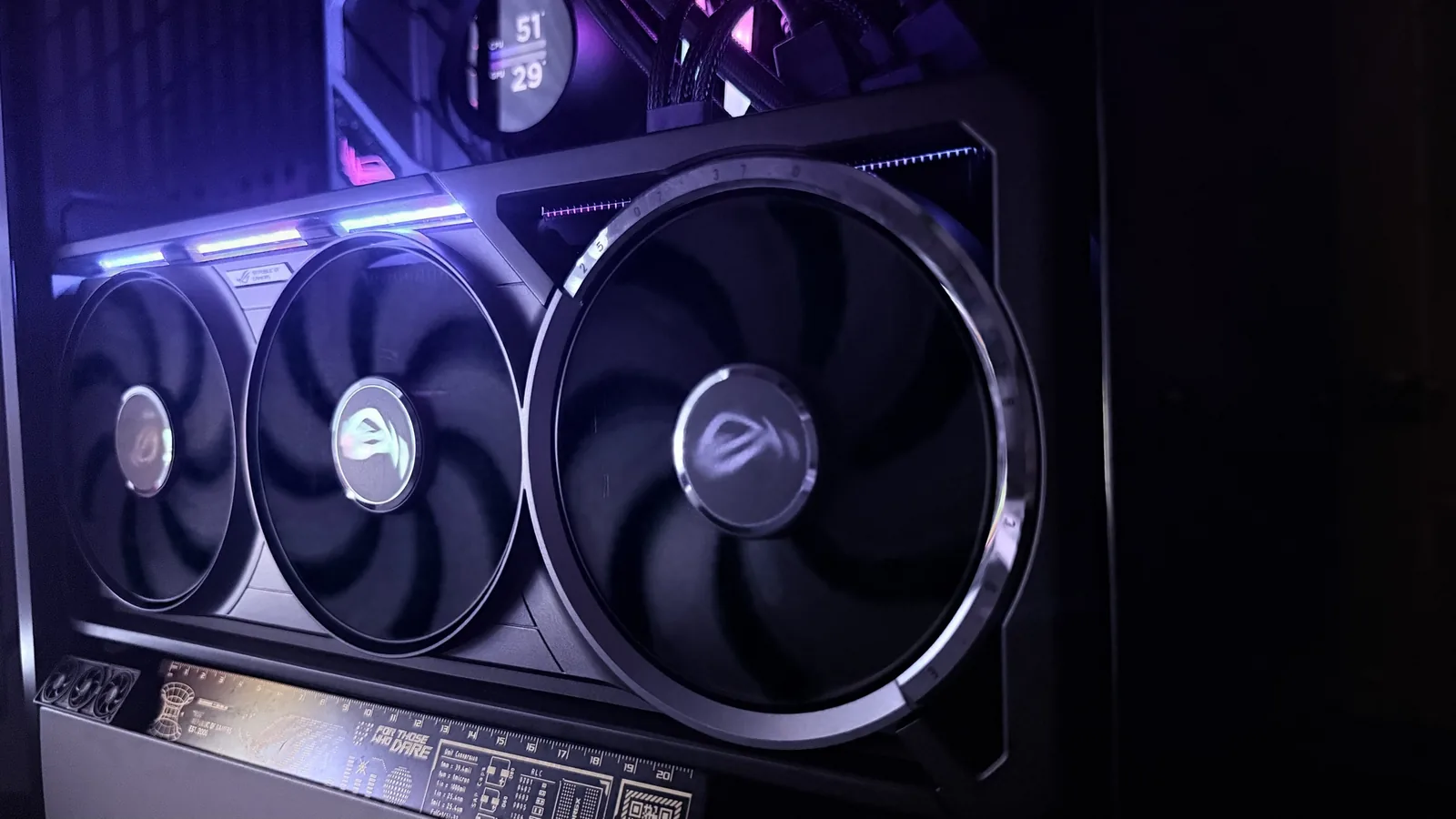
At stock my ASUS ROG Astral RTX 5080 OC games at 266 to 340 W and 63 to 72 °C with the fans near-silent. On my hand-tuned profile it ran Cyberpunk 2077 at 4K without ray tracing at 58 FPS (49 at the 1% low), Alan Wake 2 with RT Ultra and DLSS Quality at 49, and path-traced Cyberpunk at 135 FPS with DLSS Quality and MFG 4x. ASUS lists it at 357.6 mm long and 3.8 slots thick, HWCooling read its performance BIOS limit at 400 W, and Newegg listed it at $2,099.99 on September 26, 2026, more than twice the RTX 5080’s $1,000 launch MSRP (GamersNexus). Buy it for a 4K high-refresh screen. At 1440p it is the wrong card.
It is the card in my own rig, hung vertically on the riser of a HYTE Y60 next to a Ryzen 7 7800X3D, a ROG STRIX B650-A, 64 GB of DDR5-6000 and an NZXT Kraken 360, driving a Gigabyte AORUS FO48U 48-inch 4K OLED. I benchmarked it June 8 to 11, 2026. It links at PCIe 4.0 x16 in this system. All data in this review is first-party, measured on my own bench. The dataset behind my measurements is open under CC BY 4.0 at /data/gpu/rog-astral-rtx-5080-oc-2026-06-09/.
All numbers on this page are first-party. The Astral 5080 OC was measured on my current bench; the competitor points (RTX 4080, RTX 4080 Super, RTX 5080 FE) were measured on my retired 2024–2025 bench and normalized to my own baselines, as documented in the dataset.
The Astral 5080 OC in one table
My rows are my own card; TechPowerUp’s game results are its launch sample, tested at stock in its own scenes (TechPowerUp, January 30, 2025), for what I have not run.
| Question | Answer | Source |
|---|---|---|
| Cyberpunk 2077, 4K, no ray tracing | 58 FPS average, 49 at the 1% low, on my manual profile. TechPowerUp at stock: 76.2 | my bench, June 2026; TechPowerUp, January 30, 2025 |
| Cyberpunk 2077, 4K path tracing | 19 FPS native; 135 with DLSS Quality and MFG 4x at 62 ms PC latency, manual profile | my bench, June 2026 |
| Alan Wake 2, 4K | 49 FPS with RT Ultra and DLSS Quality on my manual profile. TechPowerUp at stock, no ray tracing: 65.2 | my bench, June 2026; TechPowerUp, January 30, 2025 |
| Starfield, 4K | 80.6 FPS at stock | TechPowerUp, January 30, 2025; not run on my card |
| Horizon Forbidden West, 4K | 90.2 FPS at stock | TechPowerUp, January 30, 2025; not run on my card |
| Silent Hill 2, 4K | 49.8 FPS at stock | TechPowerUp, January 30, 2025; not run on my card |
| Gaming temperature | 63 to 72 °C core and 72 to 82 °C memory at stock | my bench, June 2026 |
| Noise | near-silent at stock; up to about 51 dBA on my manual profile. TechPowerUp’s meter at 50 cm: 36.3 dBA on the performance BIOS, 25.8 dBA on the quiet BIOS | my bench, June 2026; TechPowerUp, January 30, 2025 |
| Gaming board power | 266 to 340 W at stock (HWiNFO64). TechPowerUp measured 388 W in gaming | my bench, June 2026; TechPowerUp, January 30, 2025 |
| Idle board power | 13 to 20 W at stock; 52 to 71 W at the Windows desktop across a week of August captures | my bench, June 2026; LLM power-efficiency dataset, August 2026 |
| Power limit | ships at 400 W; my manual profile’s +12% target is 448 W; the March 14, 2025 BIOS allows 450 W | Club386; my dataset |
| Size | 357.6 x 149.3 x 76 mm, 3.8 slots | ASUS spec page |
| PSU | 850W recommended; one 16-pin connector, 1-to-3 adapter in the box | ASUS spec page |
| Price | $2,099.99, sold by Newegg, on September 26, 2026 | Newegg |
| Coil whine | mild: only in uncapped game menus, gone with any frame cap | my card in the coil whine database |
What ASUS ships
From ASUS’s spec page (read 2026-09-26) unless a line says otherwise:
- GPU: GeForce RTX 5080, 10,752 CUDA cores, 16 GB GDDR7 on a 256-bit bus at 30 Gbps (30 Gbps x 256 bits / 8 = 960 GB/s)
- Boost clock: 2,760 MHz in default mode, 2,790 MHz in OC mode. NVIDIA’s reference boost is 2.62 GHz (NVIDIA spec page)
- Power: NVIDIA rates the RTX 5080 at 360 W Total Graphics Power. The Astral ships at 400 W, and ASUS’s March 14, 2025 BIOS raised its ceiling to 450 W (Club386)
- Connector: one 16-pin, with a 1-to-3 adapter cable in the box
- Recommended PSU: 850W, which ASUS bases on a fully overclocked GPU and CPU
- Size: 357.6 x 149.3 x 76 mm, 3.8 slots
- Outputs: three DisplayPort 2.1b and two HDMI 2.1b
- In the box: a ROG graphics card holder, a magnet, a PCB ruler and a keycap

Bench results: 3DMark synthetic
All numbers below are TechFuelHQ first-party. Three profiles on the same card, all scores dated 2026-06-11 in the dataset CSV. Stock is out-of-box defaults, Factory OC is the ASUS-shipped OC profile, and Manual OC is my hand-tuned GPU Tweak III profile: +328 MHz core, +2,996 MHz memory, +12% power target.
| Test | Stock | Factory OC | Manual OC | Manual vs stock |
|---|---|---|---|---|
| Time Spy (DX12, 1440p) | 32,350 | 33,200 | 34,500 | +6.6% |
| Time Spy Extreme (DX12, 4K) | 16,244 | 16,961 | 17,600 | +8.3% |
| Port Royal (ray tracing) | 20,300 | 21,673 | 22,500 | +10.8% |
| Speed Way (DX12 Ultimate) | 9,010 | 9,100 | 9,900 | +9.9% |
| Steel Nomad (4K, non-RT) | 8,150 | 8,400 | 9,200 | +12.9% |
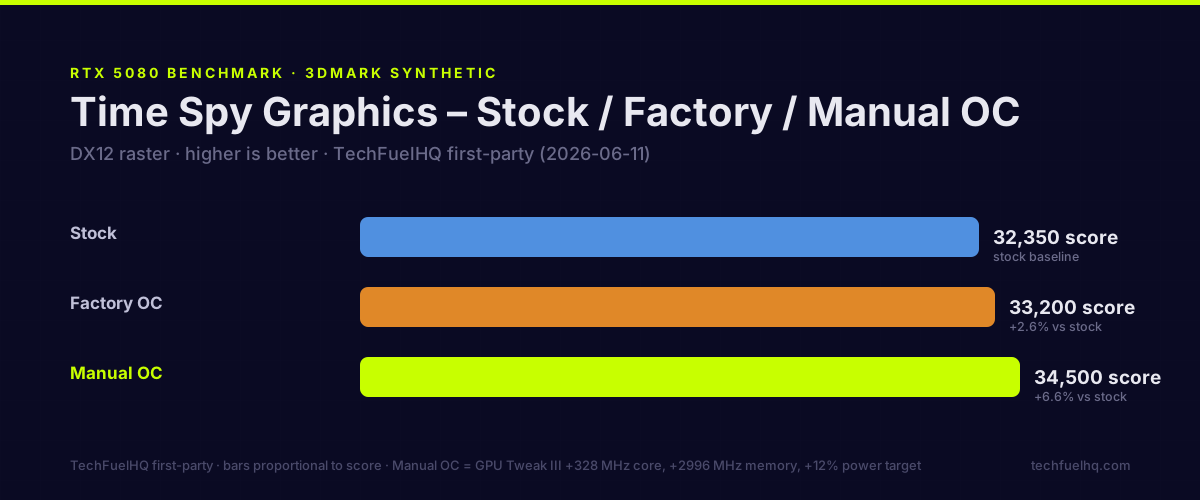
The factory profile adds 1.0 to 6.8 percent over stock depending on the test, and my manual profile adds 6.6 to 12.9. These are real gains — fully reproduced across multiple run cycles. Speed Way is the odd one. The factory profile barely moved it (+1.0%), and the manual profile moved it 9.9 percent. The manual gain is largest in Steel Nomad, the test UL released on May 21, 2024 to improve upon Time Spy; it runs at native 4K and UL rates it roughly three times heavier than Time Spy (UL).
Clock headroom
| Profile | Sustained boost clock in Time Spy |
|---|---|
| RTX 5080 FE reference | 2,671 MHz |
| Astral OC Default (factory) | 2,784 MHz |
| Astral OC Mode BIOS | 2,885 MHz |
| Astral Manual OC | 2,918 MHz |
The Astral’s default profile ran 113 MHz above my Founders Edition reference run, OC mode another 101 MHz, and my manual profile, hand-tuned in User Mode 2, 33 MHz more: 247 MHz in all. All of these are sustained boost clocks measured during Time Spy runs, not theoretical peak clocks. ASUS rates the card at 2,760 MHz in default mode and 2,790 MHz in OC mode. Both profiles ran above their rating. In my 25-minute manual-profile game log below, the core averaged 3,202 MHz against 2,918 MHz in Time Spy.
DLSS 4 Multi Frame Generation: the numbers
Cyberpunk 2077 · 4K path tracing · manual profile · my bench
| Mode | Avg FPS | PC latency (Reflex on) |
|---|---|---|
| Native PT | 19 | 95 ms |
| DLSS 4 Quality, no FG | 40 | 45 ms |
| DLSS 4 Quality + MFG 2x | 90 | 55 ms |
| DLSS 4 Quality + MFG 4x | 135 | 62 ms |
Native path tracing is unplayable at 19 FPS. DLSS Quality alone doubles the frame rate to 40 and halves the latency to 45 ms. Frame generation then adds frames and some latency back: MFG 2x reached 90 FPS at 55 ms (10 ms over DLSS Quality alone) and MFG 4x 135 FPS at 62 ms (7 ms more). Against native, that is 7 times the frame rate at two-thirds of the latency.
At 4x, three of every four frames on screen are generated from the rendered ones. On my 4K OLED, path-traced Cyberpunk at 135 FPS with Reflex on is the most visually convincing gaming experience I’ve seen on consumer hardware. The input still responds at 62 ms.
4K gaming results (five tests)
4K, manual profile, my bench.
| Game | Avg FPS | 1% Low |
|---|---|---|
| Cyberpunk 2077 Ultra Raster | 58 | 49 |
| Cyberpunk 2077 RT Ultra (DLSS-Q) | 50 | 41 |
| Cyberpunk 2077 Path Tracing native | 19 | 15 |
| Alan Wake 2 RT Ultra (DLSS-Q) | 49 | 38 |
| Black Myth: Wukong Cinematic | 34 | 27 |
The 1% lows sit at 78 to 84 percent of the average in every run, native path tracing included.
My 58 FPS in Cyberpunk 2077 without ray tracing is about a quarter below TechPowerUp’s 76.2 at stock. My run used the game’s built-in benchmark scene (the dataset’s method note) and TechPowerUp uses its own scene, so they are not the same test, but a gap that size is why a recorded stock re-run heads my list below. I have not run these games on the stock or factory profiles, or Starfield, Horizon Forbidden West and Silent Hill 2 at all; the table at the top carries TechPowerUp’s numbers for those.
Power and thermals
Both profiles measured on my bench, June 8 to 11, 2026 (HWiNFO64, board power at the GPU sensor); the power-limit row lists the shipping limit and my configured target.
| Metric | Astral Stock | Astral Manual OC |
|---|---|---|
| Power limit | 400 W (ships at) | 448 W (+12% power target) |
| Idle board power | 13–20 W | 20–30 W |
| Gaming board power | 266–340 W | ~271 W |
| Maximum board power under stress | 360 W | 400 W |
| Idle temperature | 30–42 °C | under ~50 °C |
| Gaming core temperature | 63–72 °C | ~58 °C |
| Memory junction temperature | 72–82 °C | 60–72 °C |
| Load noise | near-silent | up to ~51 dBA |
448 W is the +12% power target of my manual GPU Tweak III profile; the card ships at 400 W. The dataset lists a 450 W VBIOS ceiling. ASUS offered that ceiling in its March 2025 BIOS. At stock the highest draw I logged under stress was 360 W. On the manual profile it peaked at 400 W against its 448 W target. The card has two BIOSes on a switch, performance and quiet. On the launch firmware, HWCooling read the quiet BIOS’s limit at 360 W, adjustable to 400 W, and the performance BIOS’s at 400 W (HWCooling, February 3, 2025).
The manual profile ran cooler and louder. Its fans ran up to about 51 dBA, audible from a meter away, and held the core near 58 °C and the memory at 60 to 72 °C, against 63 to 72 °C and 72 to 82 °C near-silent at stock. For quiet, flip the switch. TechPowerUp measured 25.8 dBA on the quiet BIOS against 36.3 dBA on the performance BIOS, at 70 against 62 °C. If you want lower draw and heat at the same clocks, the RTX 5080 undervolt guide covers the curve method against this card’s stock numbers.
August 19 capture, stock 448 W power limit. Running four LLMs through ollama, the card drew a median 265 to 344 W at 3,060 to 3,266 MHz, and at the Windows desktop it drew 52 to 71 W across a week of captures (LLM power-efficiency dataset). The perf-per-watt writeup covers this card as an always-on inference node. In those desktop captures multi-monitor output held the card in P0.
Sustained-load telemetry: a 25-minute log
I logged board power, clocks, temperature, utilization and the throttle-reason register every five seconds across a 25-minute gaming session (HWiNFO64, June 28, 2026, on the hand-tuned profile). Across 308 samples:
| Metric | Min | Avg | Max |
|---|---|---|---|
| Power draw | 87 W | 261 W | 326 W |
| Core temp | 45 °C | 56 °C | 60 °C |
| SM (core) clock | 2,985 MHz | 3,202 MHz | 3,232 MHz |
| GPU utilization | 1 % | 85 % | 98 % |
Throttle events across the entire session: zero. The card held a roughly 3,200 MHz core the whole time, never hit a thermal or power cap, and averaged 261 W, well under the manual profile’s 448 W target, at a 56 °C average core temperature. That is the practical part a spec sheet can’t tell you: on this cooler, in this case, the 5080 is not temperature- or power-throttled in real gaming, so the clocks you see are the clocks you keep. The raw log, all 308 rows, is published in the open dataset.

Coil whine on my card is mild. It scores 1 in the site’s coil whine database, audible only in uncapped game menus and gone with any frame cap.
The card’s data package includes this observation as JSON and CSV, with its original submission and listening conditions. It is a subjective report from this unit, without a calibrated acoustic measurement.
Generational positioning
4K raster index, RTX 4080 Super = 100. All points TechFuelHQ first-party — the Astral on my current bench; the RTX 4080, 4080 Super and 5080 FE on my retired 2024–2025 bench, normalized as the dataset documents.
| Card | Index |
|---|---|
| RTX 4080 | 96 |
| RTX 4080 Super | 100 (baseline) |
| RTX 5080 FE | 114 |
| Astral 5080 OC (manual) | 123 |
On the manual profile the Astral lands 23% above the RTX 4080 Super and 8% above the 5080 FE in 4K raster.
The 5080 OC vs. 5090 question
The RTX 5090 ran 30% to 68.9% faster than the RTX 5080 at 4K in GamersNexus’s testing, commonly 45 to 55 percent, with Dying Light 2 at 56 in raster. GamersNexus gave the launch MSRPs as $1,000 for the 5080 and $2,000 for the 5090. If you need the most native 4K frame rate without frame generation, the 5090 is the card. For 4K at maximum raster settings, DLSS Quality with or without MFG, and RT at DLSS Quality, the 5080 does the job. The RTX 5090 vs RTX 5080 comparison has the full decision table.
The Astral’s own price changes that math. ASUS priced it at $1,500 at launch (TechPowerUp, January 30, 2025); Newegg listed it at $2,099.99 on September 26, 2026, more than the 5090’s launch MSRP. Budget for the Astral’s number, not the reference card’s.
The 1440p case
At 1440p this card is overkill. The RTX 5060 Ti vs RX 9060 XT review covers the cards that make sense at that resolution. At 1440p you would be buying the 5080 for Multi Frame Generation and ray tracing, and a quad-fan flagship at this price is the wrong way to buy either.
Build
ASUS lists the card at 357.6 mm long, 149.3 mm tall and 3.8 slots thick. Measure before you order. Mine hangs vertically on the HYTE Y60’s riser, which takes its weight off the slot; in a horizontal build use the ROG graphics card holder that ships in the box. For the complete rig this card runs in, see the $2,500 RTX 5080 + 7800X3D 4K build, and for power supply sizing the RTX 50-series PSU guide.

The ARGB top bar (ROG logo and stripe) runs through Aura Sync. Mine is a static purple to match the DDR5.
Is the Astral the best RTX 5080 graphics card?
That depends on what you are buying a 5080 for. On the measured side, the Astral gives an RTX 5080 more cooling and clock headroom than the Founders Edition. Its default profile sustained 2,784 MHz in Time Spy against 2,671 MHz for the reference run. The manual profile indexes 8 percent above the 5080 FE in 4K raster. At stock the card games near-silent at 63 to 72 °C, and the 25-minute log on the manual profile shows no throttle events.
Those gains cost money and space. Newegg listed the card at $2,099.99 on September 26, 2026, against the RTX 5080’s $1,000 launch MSRP, and ASUS lists it at 357.6 mm and 3.8 slots against the Founders Edition’s 304 mm and 2 slots. Only this board and the Founders Edition are compared on this page. Cards from other brands were not tested, so it cannot name one 5080 as the best for everyone. For a 4K screen and a case that fits it, the numbers above are the case for the Astral. For anything else, the RTX 5090 vs RTX 5080 comparison and the 1440p section above cover the alternatives.
The best-looking 5080 and the white edition
Looks are subjective, so here is what a second reviewer wrote. TechPowerUp, which reviewed the Astral OC, says ASUS positioned the Astral brand above its ROG Strix series for “premium aesthetics and powerful air cooling,” and that its RGB lighting “isn’t as flashy” as Strix lighting: “it’s subtle and neatly executed—but what draws your attention are the textured metal alloy surfaces” (TechPowerUp, January 30, 2025, re-read October 10, 2026).
Buyers who want a white card have a version of this one. ASUS lists a ROG Astral GeForce RTX 5080 White OC Edition with the same clocks, dimensions, slot width, recommended PSU and 16-pin connector as the standard card. The box swaps in white accessories and adds a ROG Ring. The measurements on this page are from the standard Astral. The page does not rank white cards from other brands, so the best white GPU for a given case is a question of fit and budget rather than frame rate.
Who should buy this
Buy it if:
- You game at 4K on a high-refresh display (120 Hz or faster, OLED or IPS)
- Multi Frame Generation and path tracing in games like Cyberpunk 2077 and Alan Wake 2 are why you are upgrading
- Your case clears 357.6 mm and 3.8 slots (ASUS’s figures)
- You have budgeted for $2,099.99, Newegg’s price on September 26, 2026
Skip it if:
- Your display is 1440p or 1080p: buy a 5060 Ti or RX 9060 XT
- You want an RTX 5080 at the lowest price: this is the ROG Astral, and the extra money buys cooling, noise and clock headroom, not a different GPU
To check PSU margin and case clearance for this exact card, load it in the PC Builder.
What I have not measured yet
- Cyberpunk 2077 at 4K without ray tracing at stock, every setting recorded, because my manual-profile run sits about a quarter below TechPowerUp’s stock result. Then the five 4K test cases on the stock and factory profiles; every game result from my card on this page uses my manual profile.
- Starfield, Horizon Forbidden West and Silent Hill 2 at 4K on my card, so those rows stop depending on TechPowerUp’s sample.
- Noise with a sound meter at a stated distance, stock and manual, with the fan speed beside it.
Verdict
Rating: 4.4/5. The ROG Astral RTX 5080 OC is the best GPU I have used — and the right one for my 48-inch 4K OLED. DLSS 4 Multi Frame Generation holds up under measurement: path-traced Cyberpunk 2077 at 135 FPS and 62 ms on my manual profile on a 4K panel plays better than the native 19 FPS. At stock it is near-silent at 63 to 72 °C, and the factory and manual profiles add 1 to 13 percent in 3DMark.
The price costs it the fifth point. At $2,099.99 at Newegg on September 26, 2026, this Astral costs more than the RTX 5090’s launch MSRP, and its value case is entirely 4K-specific. If the display and the game library justify it, buy it. Otherwise, buy a 5060 Ti and a better monitor.
The full first-party benchmark dataset, with the 25-minute telemetry CSV and the method notes, is at /data/gpu/rog-astral-rtx-5080-oc-2026-06-09/. The ROG STRIX B650-A review covers the motherboard in the same build.
Frequently asked questions
Is the ROG Astral RTX 5080 OC worth it?
What does DLSS 4 Multi Frame Generation do on the RTX 5080?
How does the ROG Astral OC compare to the RTX 5080 Founders Edition?
What PSU does the ROG Astral RTX 5080 OC need?
How hot and loud is the ROG Astral RTX 5080 OC?
Is the ROG Astral RTX 5080 OC the best RTX 5080 graphics card?
Does the ROG Astral RTX 5080 come in white?
Sources and corrections
- Last updated
- Methodology
- See our methodology for research and review standards. It draws on 12 cited sources, listed below, each checked against the original page on the date shown beside it. Every 4K figure here was measured on my own ASUS ROG Astral RTX 5080 OC and published in full as the linked open bench dataset – first-party, not a launch slide.
- Sources
- ASUS: ROG Astral GeForce RTX 5080 16GB GDDR7 OC Edition, specifications accessed 2026-09-26
- NVIDIA: GeForce RTX 5080 specifications accessed 2026-09-26
- Club386: Asus boosts ROG Astral GeForce RTX 5080 power limits to 450W via BIOS update accessed 2026-09-26
- UL: 3DMark Steel Nomad is out now (May 21, 2024) accessed 2026-09-26
- GamersNexus: NVIDIA GeForce RTX 5080 Founders Edition review accessed 2026-09-26
- Newegg: ASUS ROG Astral GeForce RTX 5080 16GB GDDR7 OC Edition (N82E16814126742), buy box accessed 2026-09-26
- Newegg: exact ASUS ROG Astral RTX 5080 OC model identity (N82E16814126742) accessed 2026-10-03
- Amazon: exact ASUS ROG Astral RTX 5080 OC model identity (ASIN B0DQSD7YQC) accessed 2026-10-03
- TechPowerUp: ASUS GeForce RTX 5080 Astral OC review (January 30, 2025) accessed 2026-09-26
- HWCooling: Asus ROG Astral GeForce RTX 5080 OC Ed. review (February 3, 2025) accessed 2026-09-26
- ASUS: ROG Astral GeForce RTX 5080 16GB GDDR7 WHITE OC Edition, specifications accessed 2026-10-10
- TechPowerUp: ASUS GeForce RTX 5080 Astral OC review, introduction page (design and cooling description) accessed 2026-10-10
- Update log
- 2026-10-10 — Added a section on whether the Astral is the best RTX 5080 graphics card, how it looks, and the White OC Edition, with two FAQs. The comparison uses figures already on this page; the White Edition’s specifications come from ASUS’s page, read 2026-10-10, and TechPowerUp’s design description is quoted from its review. No measurement, rating, price or first-party statement was changed. Title, SEO title and description are unchanged.
- 2026-10-07 — Removed the repeated score from the Where to buy panel; the 4.4/5 review score remains in the review summary and verdict. Corrected the Time Spy chart’s intrinsic height metadata to match its 1200 x 500 SVG; the artwork and data are unchanged.
- 2026-10-03 — Linked the downloadable coil-whine observation for this owned card, with the original submission, listening conditions, frame-cap response and measurement limits.
- 2026-10-03 — Replaced the opening panel’s retailer searches with exact Amazon and Newegg product routes after both untagged destination pages were opened and matched to ROG-ASTRAL-RTX5080-O16G-GAMING. This check verified product identity and destination only; it did not refresh the September 26 price, seller, stock, shipping, or availability claims.
- Corrections
- Spotted an error or a stale number? Email contact@techfuelhq.com. Confirmed corrections are recorded here with the date and change.