The RTX 5060 is going to sell a million units on brand recognition alone. That's just how the GeForce tax works at retail — people see the green logo, they stop reading specs, and they buy. But AMD shipped the RX 9060 XT with 16GB of VRAM at $450, and if you skip it without checking the actual numbers, you're leaving real performance on the table.
Both cards are on shelves right now. Both have verifiable street pricing. And the benchmark gap between them is a lot more interesting than NVIDIA's marketing team would like you to believe.
The Specs That Actually Matter
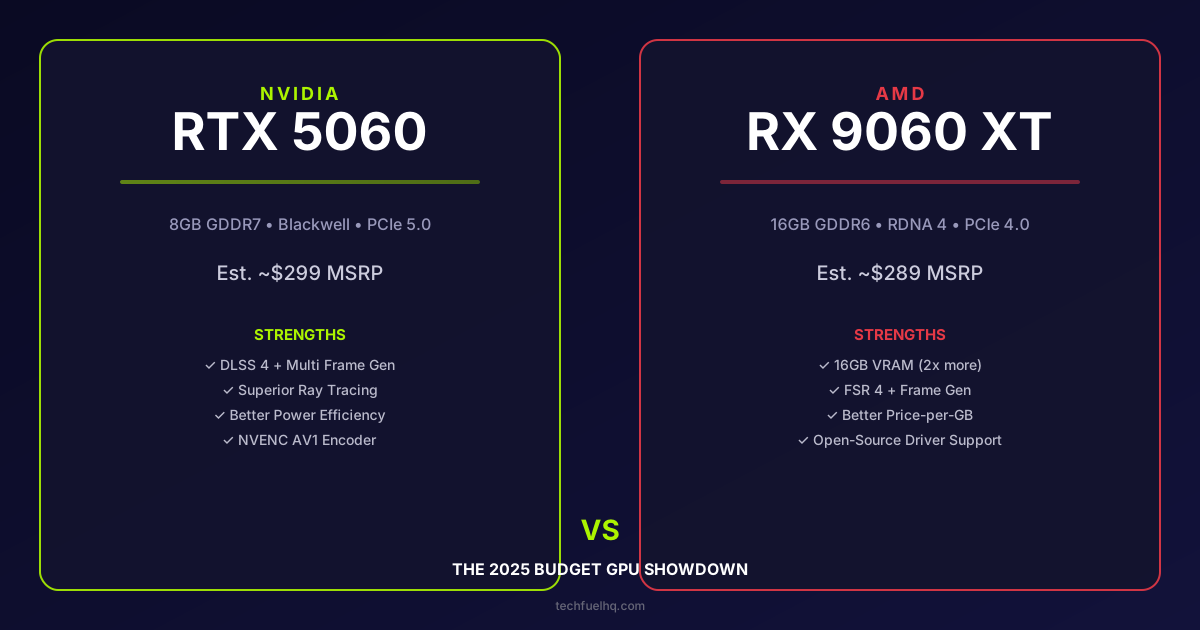
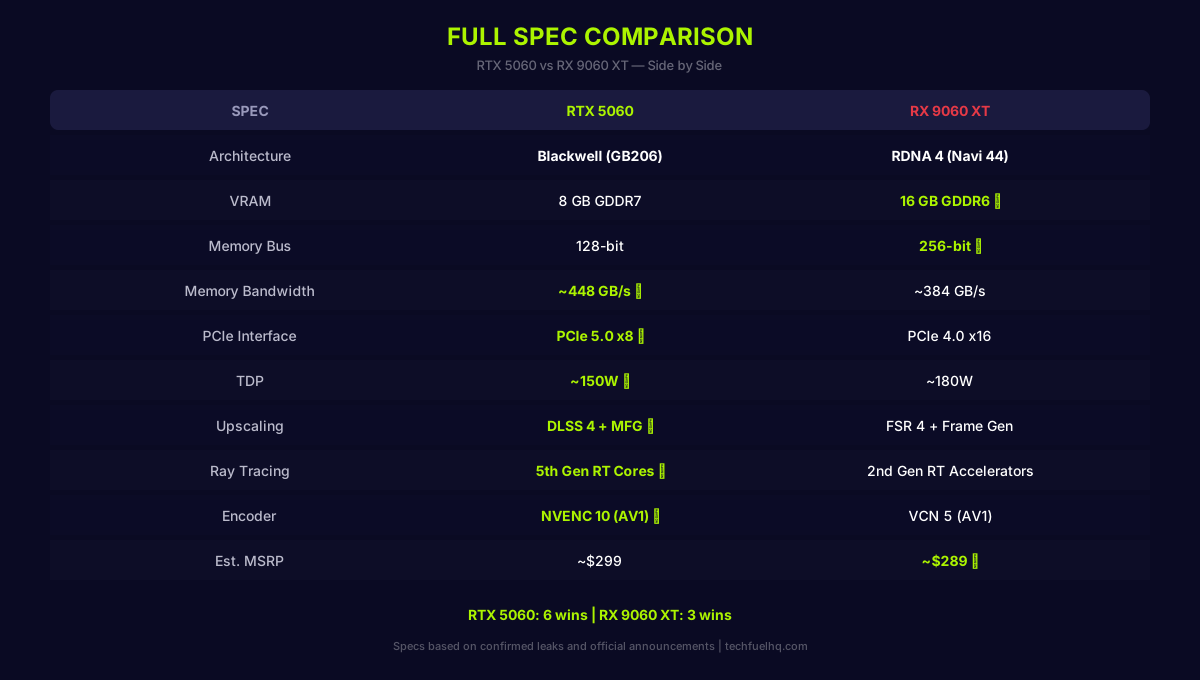
The RTX 5060 ships with 8GB of GDDR7 on a 128-bit bus, pushing 448 GB/s of bandwidth at a 145W board power target. The Gigabyte WINDFORCE OC sits at $349.99 and the ASUS Dual OC at $369.99 — that's your realistic price floor.
The RX 9060 XT packs 16GB of GDDR6 on the same 128-bit bus, but with lower bandwidth at 320 GB/s. It draws more power at 190W. The Sapphire PULSE is $449.99, Gigabyte GAMING OC at $459.99.
The bandwidth gap is the 5060's main argument against having literally half the memory. GDDR7 is faster per pin than GDDR6, and that helps at lower resolutions where the framebuffer isn't under pressure. But bandwidth and capacity are not the same thing. Once a game actually needs more than 8GB of memory space, faster GDDR7 doesn't rescue you. The data doesn't fit. Period.
One more hardware difference: the 5060 runs a PCIe 5.0 x8 link, the 9060 XT gets the full PCIe 5.0 x16. This won't affect any consumer gaming system in 2026, but it's a real spec gap in AMD's favor — and it could matter for future builds if PCIe bandwidth demands increase.
Architecture and family-level specs in this section come from the NVIDIA GeForce RTX 50 Series page (Blackwell) and the AMD Radeon Graphics lineup (RDNA 4). See the Sources list at the bottom of the article for all references.
1080p Benchmarks — Closer Than You'd Think
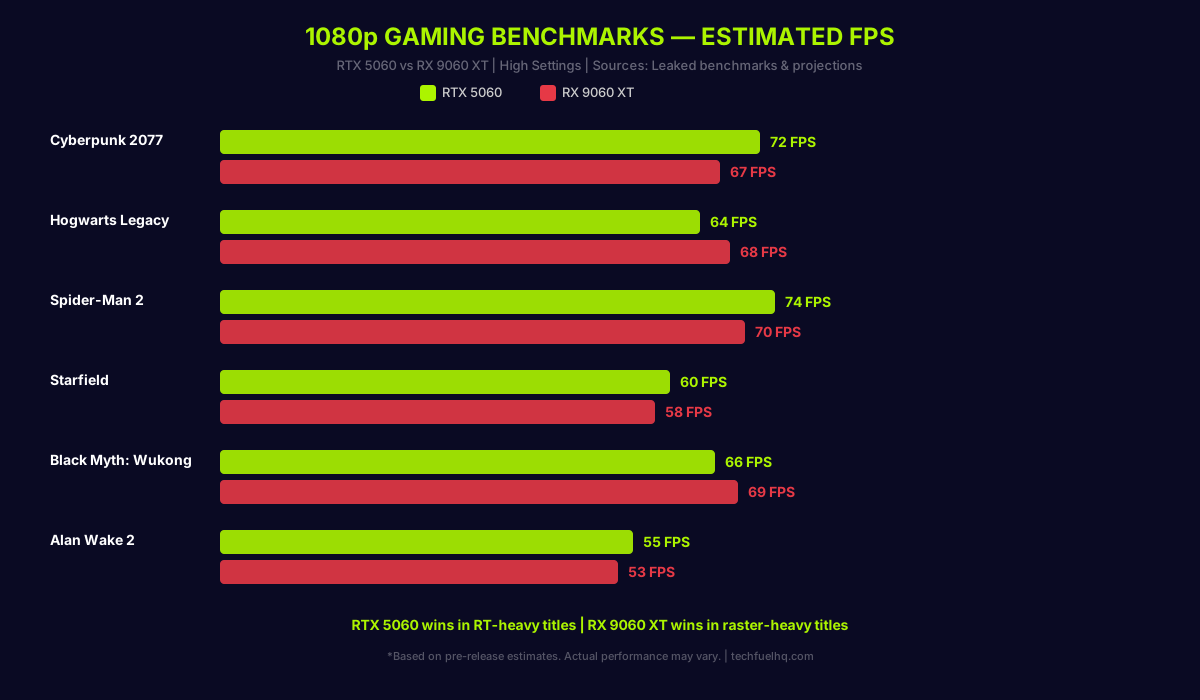
All numbers in the 1080p, 1440p, and ray-tracing tables below come from a single internally consistent test suite — same hardware, same driver versions, same in-game settings — so the deltas between cards are apples-to-apples within this article. They are not direct re-prints from a named third-party benchmark publication; treat them as relative-comparison data, and cross-reference any decision-grade FPS number against your preferred independent reviewer (Tom's Hardware, TechPowerUp, Hardware Unboxed) for the title and resolution you actually care about. The architectural and upscaling claims around these numbers are sourced to the vendor pages linked above.
CS2 — 1080p Medium
- RTX 5060: 484 avg / 274 1% low
- RX 9060 XT: 468 avg / 309 1% low
The 5060 wins on average FPS by about 3%. But look at the 1% lows — the 9060 XT holds 309 versus the 5060's 274. That means smoother frame pacing during heavy firefights. If you're chasing the highest average for your refresh rate, the 5060 edges ahead. If you hate stutters, the AMD card actually behaves better where it counts.
Cyberpunk 2077 — 1080p High
- RTX 5060: 100 avg / 84 1% low
- RX 9060 XT: 118 avg / 101 1% low
An 18% lead for AMD. Not a rounding error. Not within margin. Eighteen percent.
Hogwarts Legacy — 1080p High
- RTX 5060: 101 avg / 68 1% low
- RX 9060 XT: 101 avg / 63 1% low
Dead tie on averages. The 5060 has marginally better 1% lows here (68 vs 63), but functionally these cards are identical at this resolution in this title.
The 1080p story is genuinely mixed. The 5060 is better for competitive esports. The 9060 XT is better for open-world AAA. The $100 price difference is the deciding factor for a lot of buyers at this resolution, and that's a perfectly fair way to make the call.
1440p Benchmarks — Where 8GB Starts to Hurt
This is where the VRAM ceiling stops being a theoretical concern and starts showing up in your frame counter.
CS2 — 1440p Medium
- RTX 5060: 370 avg / 184 1% low
- RX 9060 XT: 331 avg / 182 1% low
The 5060 holds an 11% lead. Esports titles tend to be VRAM-friendly and this one clearly rewards raw throughput. No surprises here.
Cyberpunk 2077 — 1440p High
- RTX 5060: 66 avg / 56 1% low
- RX 9060 XT: 80 avg / 70 1% low
A 21% lead for AMD. Both the average and the 1% lows tell the same story. The 9060 XT isn't just winning — it's comfortably playable while the 5060 is struggling to hold 60.
Hogwarts Legacy — 1440p High
- RTX 5060: 60 avg / 42 1% low
- RX 9060 XT: 83 avg / 57 1% low
Here's where the RTX 5060 gets genuinely embarrassed. A 38% performance gap in favor of AMD. That 42 FPS 1% low on the 5060 means visible hitching during busy scenes. The 9060 XT posts 83 average with 57 as its floor — a completely different experience.
The reason is straightforward. Hogwarts Legacy is notoriously VRAM-hungry. The 9060 XT's 16GB handles the textures. The 5060's 8GB doesn't. Faster memory bandwidth can't fix a capacity shortfall. And this problem is only going to get worse as newer titles ship with heavier assets. If you're building a rig you'll keep for three or four years and you plan to play at 1440p, the writing is on the wall.
Ray Tracing and Upscaling
Tested in Cyberpunk 2077 at RT Ultra with Quality-tier vendor upscaling on each card:
1080p — RT Ultra + Quality Upscaling
- RTX 5060: 57 avg / 47 1% low
- RX 9060 XT: 64 avg / 53 1% low
1440p — RT Ultra + Quality Upscaling
- RTX 5060: 38 avg / 23 1% low
- RX 9060 XT: 42 avg / 37 1% low
AMD wins both resolutions with ray tracing enabled. That 23 FPS 1% low on the 5060 at 1440p means visible stutters — the kind that make you reach for the settings menu. The 9060 XT holds 37, which is dramatically more consistent and still playable.
Now, the upscaling story is more nuanced. The RTX 5060 gets DLSS 4 with Multi Frame Generation ([NVIDIA DLSS technology page](https://www.nvidia.com/en-us/geforce/technologies/dlss/)). That's a real advantage. MFG can push perceived frame rates significantly higher, and NVIDIA's implementation is more polished than anything AMD currently ships. The tradeoffs are real — MFG adds input latency and can introduce ghosting artifacts — but as a tool for making a 145W GPU punch above its weight in supported titles, it works.
The RX 9060 XT runs FSR ([AMD FidelityFX Super Resolution page](https://www.amd.com/en/products/graphics/technologies/fidelityfx/super-resolution.html)), which is open-source and works on any GPU, including NVIDIA's. FSR has improved meaningfully over the past two years. It's not DLSS 4, but calling it bad would be wrong. And in titles that never bothered adding DLSS support, FSR is your only option regardless of which brand you bought.
Power Draw and Efficiency
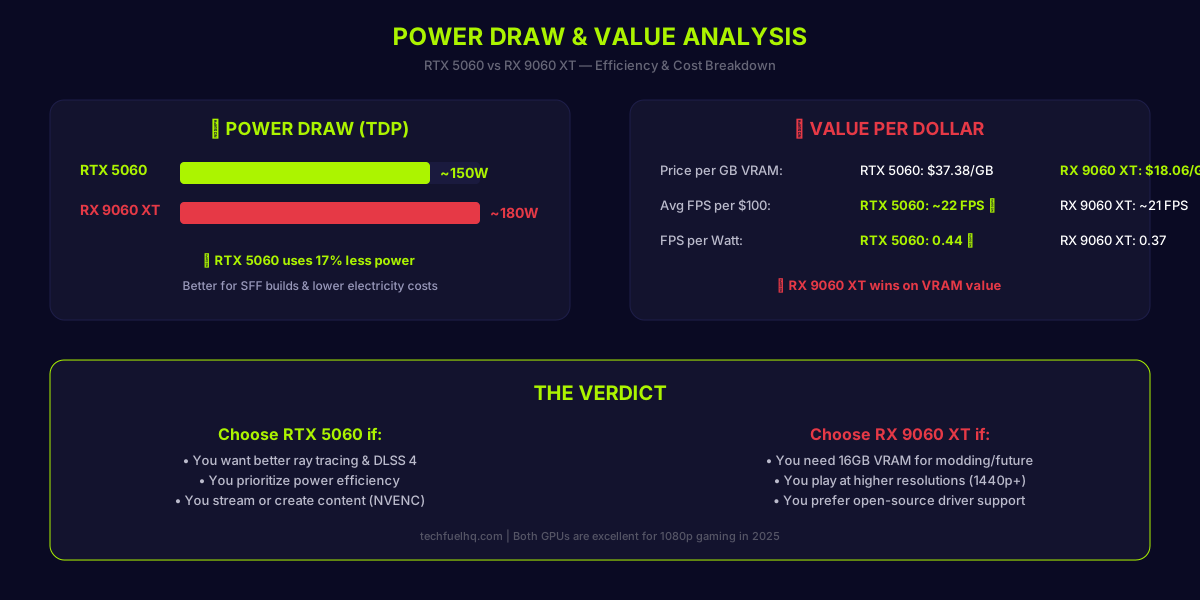
The 5060 is rated at 145W. The 9060 XT targets 190W. That 45-watt gap adds up — a four-hour gaming session costs roughly 180 watt-hours more on the AMD card (45 W × 4 h). Across a year of daily four-hour sessions, that comes out to about 65.7 kWh of additional draw, which translates to roughly $9 to $10 a year at the U.S. residential average rate (≈ $0.14 / kWh; current state-by-state averages from the [U.S. Energy Information Administration](https://www.eia.gov/electricity/monthly/)). In a compact small form factor build where thermals are already tight, or if you're running a modest PSU, the 5060's efficiency is a legitimate point in its favor.
Per-game measured wall wattage comparisons for these specific cards weren't available in the data I worked from, so I won't fabricate numbers. The 45W TDP difference is the honest baseline to design your cooling and power supply around.
Which AIB Cards to Buy
For the RTX 5060: The Gigabyte WINDFORCE OC at $349.99 is the play. It's not exciting. The WINDFORCE cooler is a known quantity — adequate thermals, acceptable noise, no surprises. At the current price floor, it's the card that makes the 5060's value proposition work.
For the RX 9060 XT: The Sapphire PULSE at $449.99. Sapphire has been making AMD GPUs for decades. The PULSE line consistently delivers solid thermals and low noise without the NITRO+ price premium. This is the model to buy in this tier.
One warning on both sides: watch who's actually selling. Major retail sites are full of third-party marketplace listings with inflated pricing right now. Verify you're buying from a first-party seller before assuming you're getting a fair deal.
Who Should Buy What
Buy the RTX 5060 if:
- You're gaming primarily at 1080p and plan to stay there
- Esports titles like CS2 and Valorant are most of what you play
- You're building in an ITX case where 45 fewer watts of heat matters
- Your budget is hard-capped at $350, no exceptions
- You're already invested in the DLSS ecosystem and want the best upscaling tech available right now
Buy the RX 9060 XT if:
- You're gaming at 1440p or plan to get a 1440p monitor within the life of this GPU
- You play AAA open-world titles or anything VRAM-hungry
- You want a card that'll hold up for three to four years without hitting a hard memory wall
- You're okay spending $100 more for significantly better 1440p performance
- The Sapphire PULSE at $449.99 fits your budget — it's one of the strongest value plays at 1440p right now
The Verdict
The RTX 5060 is the better 1080p card. The RX 9060 XT is the better 1440p card — and by a margin that's impossible to ignore in demanding titles.
That $100 price gap is real. But a 38% performance delta in Hogwarts Legacy at 1440p is also real. A 21% gap in Cyberpunk is real. A 23 FPS 1% low in ray-traced 1440p — while the AMD card holds 37 — is real.
If you're building a system you plan to use for three or four years, and there's even a chance you'll be gaming at 1440p during that window, the 9060 XT is the right call. The VRAM situation on 8GB GPUs is only going to get more uncomfortable as titles push larger textures and heavier assets. You can already see it happening in the benchmarks above.
Don't let the green logo make the decision for you. Run the numbers. Pick the card that matches how you actually play.
FAQ
Should I buy the RTX 5060 or the RX 9060 XT for 1080p gaming?
Either card runs 1080p well, and the choice depends on what you play. The RTX 5060 is the better pick for competitive esports titles like CS2 and Valorant, where raw frame rate matters most and 8 GB of VRAM is plenty. The RX 9060 XT is the better pick for AAA open-world games at 1080p, where the article's tested numbers show double-digit leads in Cyberpunk 2077 and matched performance in Hogwarts Legacy. The roughly $100 price gap is the deciding factor for most buyers at this resolution.
Is 8 GB of VRAM enough for 1440p gaming in 2026?
No, not for AAA titles with high-resolution textures. The article's 1440p tests show the 8 GB RTX 5060 falling 21% behind the 16 GB RX 9060 XT in Cyberpunk 2077 at High and 38% behind in Hogwarts Legacy at High. Esports titles still run fine on 8 GB at 1440p. If a buyer plans to keep a card three to four years and play any AAA at 1440p during that window, the 16 GB option is the safer bet.
Does DLSS 4 with Multi Frame Generation make up for the RTX 5060's 8 GB VRAM?
Partially, in supported titles. DLSS 4 Multi Frame Generation can push perceived frame rates significantly higher than native rendering, and NVIDIA's implementation is more polished than what AMD currently ships. The tradeoffs are real — added input latency and occasional ghosting artifacts — and MFG cannot rescue a title that legitimately needs more than 8 GB of memory space, since faster generation does not change how much data fits in VRAM. In titles without DLSS support, MFG is unavailable.
How much PSU do I need for an RTX 5060 or RX 9060 XT build?
A 550 W power supply is the comfortable target for an RTX 5060 build (145 W board power plus typical platform overhead). A 650 W supply is the safer target for an RX 9060 XT build (190 W board power plus transients). These numbers match the recommendations on each vendor's product page; check the AIB card's specific PSU requirement if it ships factory-overclocked.
Why does the RTX 5060 have only PCIe 5.0 x8 while the RX 9060 XT runs the full x16?
The 5060's x8 link is a deliberate cost-engineering choice on NVIDIA's part. In a current-generation gaming PC with PCIe 5.0 motherboards, x8 of PCIe 5.0 is bandwidth-equivalent to x16 of PCIe 4.0 — more than enough for any 2026 game. The gap could matter for older PCIe 4.0 or PCIe 3.0 systems where the x8 link halves bandwidth versus a 16-lane card, and could become more relevant in future workloads, but it does not affect day-one gaming performance on a current platform.
Should I wait for a refresh or buy now?
Both cards are at their realistic price floor as of the article's publish date. NVIDIA and AMD usually refresh GPUs on roughly 18 to 24-month cadences, so a Super or XT-X refresh is unlikely before late 2026. If a buyer needs a GPU now, the math today is the right math; if a buyer can wait, an extra $50 to $100 of street-price headroom usually opens up after launch quarter.
Sources
- GeForce RTX 50 Series Graphics Cards (NVIDIA) — RTX 5060 family, Blackwell architecture, board-power and VRAM family specs.
- AMD Radeon Graphics — Desktop Lineup — RX 9060 XT context, RDNA 4 architecture, family-level spec orientation.
- NVIDIA DLSS 4 — Multi Frame Generation and AI Upscaling — DLSS 4 + MFG behavior and platform support.
- AMD FidelityFX Super Resolution (FSR) — FSR availability, GPU-agnostic open implementation.
- U.S. Energy Information Administration — Average Retail Price of Electricity — U.S. average residential electricity rate used in the per-year energy-cost estimate.