 TechFuel HQ
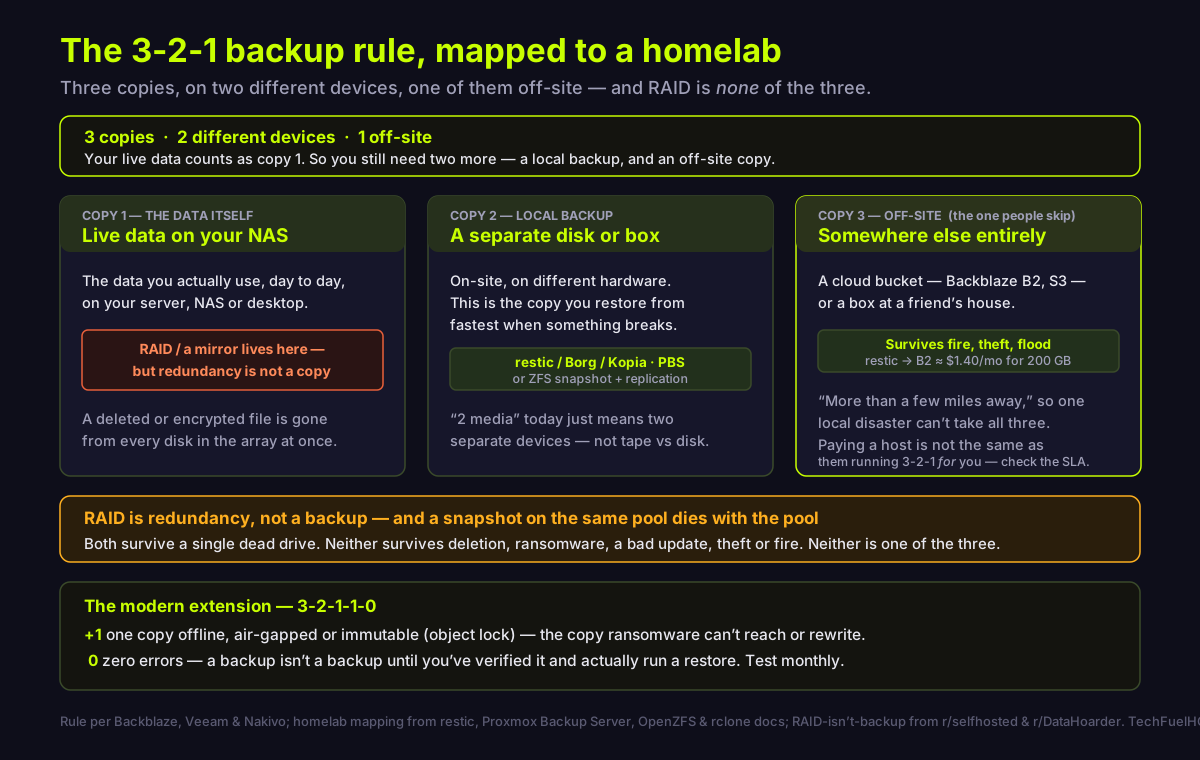
The 3-2-1 rule keeps three copies of your data, on two different devices, with one off-site. In a homelab that is live data on your NAS, a local backup on separate hardware, and an off-site copy in cloud storage or another building. RAID is not one of the three — it is redundancy, not a backup.
By LK Wood IV · Published 2026-07-24 · Updated 2026-08-24 · ~12 min read · St. Louis County, MO
TL;DR · 3 copies, 2 devices, 1 off-site — and RAID is none of them
- The rule. Three copies of your data, on two different devices, with one copy off-site. Your live data is copy 1, so you still need two more.
- RAID is not a backup. It is redundancy for uptime. A deletion, a ransomware run or a bad update hits every disk in the array at once.
- A snapshot on the same box is not a backup either. A ZFS snapshot lives in the same pool it protects — it dies with the pool.
- The off-site copy is the one people skip, and it is the one that survives fire, theft and flood. Cloud object storage (B2, S3) or a box at another building.
- 3-2-1-1-0 adds one immutable/air-gapped copy (defeats ransomware) and zero errors (verify and test-restore).
This page is the platform-agnostic strategy. The tool and per-platform how-tos live in the linked guides — pick your three copies here first, then go implement them.
The short version
The 3-2-1 rule is one sentence: keep three copies of your data, on two different media, with one copy off-site (Backblaze). It is usually traced to photographer Peter Krogh’s The DAM Book, though vendors hedge the attribution and even disagree on the year, so treat the origin as folklore and the rule as the point.
Almost every explanation of it online is written by an enterprise backup vendor selling immutable cloud storage. The rule is sound; the framing assumes a data center. This guide translates it for the machine in your basement — and spends most of its length on the two things those pages gloss over, because they are the two things homelabbers actually get wrong: RAID is not one of the three copies, and neither is a snapshot on the same box.
Get the three copies right conceptually first. The tool you use to move bytes is a later, smaller decision.
What the three numbers actually mean
3 — three copies, and your live data is one of them. Your three copies are your original production data plus two more (Backblaze). In a homelab, the files on your NAS or server that you use every day are copy 1. So you already hold one of the three — you need two more copies, not three from scratch. Enterprise framing counts differently: it treats the production data as the data rather than a copy at all — a distinction homelabbers argue over directly (r/DataHoarder). For a home lab, three copies including the original is the usual and reasonable target.
2 — two different media, which today means two different devices. The original rule said two media types — the classic example was disk plus tape. Modern guidance relaxes that: you store the data on two different storage media “such as a local drive and a cloud storage service” (Backblaze). So a local disk and a cloud bucket already satisfy the “2.” The reason the “2” exists at all is common-mode failure: two identical drives, bought together and run under identical conditions, tend to fail together. Nakivo puts it plainly — keeping all your backups “on the same type of storage media makes it more likely that both devices would fail at about the same time due to a defect or simple wear and tear” (Nakivo). The homelab-practical reading of the “2”: don’t put every copy on drives from the same batch.
1 — one copy off-site, far enough that one disaster can’t take all three. Keep one copy “off-site in a remote location, ideally more than a few miles away from your other two copies to protect against natural and physical disasters” (Backblaze). A NAS and a second backup disk in the same room are still one house fire away from total loss. This is the copy people skip, and it is the copy that matters most.
RAID is not a backup. Neither is a snapshot on the same box.
This is the heart of it, and it is where the homelab community is as close to unanimous as it ever gets.
RAID gives you redundancy for uptime — the array keeps serving while you swap a failed drive. That is genuinely valuable, and it is not a backup. On a fresh r/selfhosted thread asking exactly whether RAIDZ counts as one of the 3-2-1 copies, the original poster was downvoted to zero and the answers were blunt: “Raid is NOT a backup! Raid is a redundancy against a drive failure and nothing more” (r/selfhosted). The clearest statement of why came from someone actively replacing a dead drive: “raid is for uptime… But if I change a file or delete it on accident then it’ll still be gone from the entire system. Raid doesn’t help with that” (r/selfhosted).
The list of what RAID does not protect against is exactly the list of things that actually kill homelab data: “fat-fingering an rm -rf, ransomware encrypting the array, a bad update corrupting data, or the whole box getting stolen or fried in a fire. All of those replicate across every disk in the array instantly because RAID doesn’t know the difference between a good write and a mistake” (r/selfhosted). A mirror is the same trap: delete a file and it is deleted on the mirror too.
Snapshots are the subtler version of the same mistake. A ZFS snapshot is “a read-only copy of a file system or volume” (OpenZFS) — but it lives inside the same pool as the data it captures. It “initially consume[s] no additional space within the pool,” growing as the active data changes (OpenZFS). Because it shares the pool’s disks, it shares the pool’s fate: pool fails, snapshots gone. A snapshot protects against you deleting a file by accident. It does nothing about the disks themselves dying, or the machine being stolen. It is not one of your three copies until it has been sent somewhere else.
So: run RAID for availability if you want it, take snapshots for fast rollback — both are good. Just count zero of your three copies against either one.
Choose your three copies before you choose a tool
The mistake is starting from “which backup software should I use.” Start from where each copy physically lives, and the tool falls out of that almost automatically.
- Copy 1 — live data: already exists, on your NAS, server or desktop.
- Copy 2 — local backup: a separate disk or a separate box, on-site. This is the copy you restore from fastest when something breaks, because it is on your own network rather than at the far end of a home internet connection. One r/DataHoarder commenter framed the whole point of the on-site copy cleanly: “The primary backup is the one that provides the fastest data recovery” (r/DataHoarder).
- Copy 3 — off-site: cloud object storage, or a machine somewhere else.
Only once you know where a copy lands do you pick the software, and the destination decides it: a cloud bucket points you at restic or Kopia, an SSH box at Borg — that comparison picks the file-level tool by where the backup lands, and corrects the four-year-stale myth that restic has no compression. restic writes directly to Amazon S3 and Backblaze B2 (restic docs); Kopia targets S3-compatible storage, B2, GCS and Azure (Kopia docs); and rclone bridges to “over 70 cloud storage products” if you just need to push an existing backup set off-site (rclone).
The off-site copy: how to actually build copy 3
This is the copy most homelabs never finish, so make it the one you automate first.
For a file-level off-site copy, automated off-site backups with restic builds exactly this leg end to end — a Backblaze B2 repository on a systemd timer, client-side encryption and deduplication, a 7-daily / 4-weekly / 6-monthly retention policy, and monitoring on failure, at roughly $1.40/month for 200 GB (Backblaze B2 is $6.95/TB/month). It assumes copies 1 and 2 already exist and builds copy 3.
Two things the tutorials can’t decide for you, but this strategy layer should flag:
- If your backup client holds credentials that can delete, so can whatever compromises that client. If the machine being backed up is breached, unrestricted credentials sitting on it can wipe the repository — the exact scenario off-site backup exists to survive. Turn on object lock or versioning at the bucket, and scope the client’s key to write-and-list without delete. Hardening the off-site copy this way is also how most homelabs satisfy the “+1 immutable” of 3-2-1-1-0 — the same copy 3, made immutable, rather than a separate fourth copy.
- Egress costs at restore time. Cold-storage tiers are cheap to fill and expensive to empty. As one r/DataHoarder thread warned about Glacier specifically: “Before you store anything at all in Glacier make sure you understand the cost of getting your files out” (r/DataHoarder). The cheapest storage tier is not the cheapest backup if you ever have to restore from it in a hurry.
The per-platform how-tos
The strategy is platform-agnostic; the implementation is not. Two common homelab stacks have a native path:
Proxmox. If your data lives in VMs and LXC containers, Proxmox Backup Server in a 3-2-1 layout builds copies 2 and 3 for you — a deduplicated local datastore, incremental backups that read and send only the delta, SHA-256 verification, and an off-site leg via a sync job to a second PBS or restic to B2. PBS deduplication means “periodic backups produce large amounts of duplicate data… the deduplication layer avoids redundancy and minimizes the storage space used” (PBS docs), so retaining many restore points stays affordable.
ZFS. If you are on ZFS, Sanoid and Syncoid automate the snapshot policy and then replicate it off the box — Syncoid “facilitates the asynchronous incremental replication of ZFS filesystems” (sanoid). That replication step is the important one: it is what turns a same-pool snapshot (not a backup) into a genuine second or third copy on separate hardware.
Both are implementations of the same three copies. Neither replaces the strategy on this page; they execute two legs of it.
3-2-1-1-0: the modern extension, and why ransomware forced it
The classic rule predates ransomware that specifically hunts backups. So vendors extended it. Veeam’s version: “we extended the rule to 3-2-1-1-0. It adds one immutable copy, and results in zero recovery errors” (Veeam).
The extra 1 — one offline, air-gapped or immutable copy (Veeam community). This is the copy malware cannot reach or rewrite. One mechanism is write-once-read-many storage: immutable backups “cannot be modified or deleted” (Nakivo), which matters because “ransomware increasingly targets backups. If your only protection is connected to your network, it can be compromised” (Veeam). In a homelab this is typically your off-site copy 3 with object lock on a B2 or S3 bucket, or a copy you physically disconnect — you harden an existing copy rather than add a whole new one. Sync alone is not enough — if a device is compromised and its files are encrypted, “if you don’t notice in time then it will eventually propagate to ALL your backups being unreadable” (r/DataHoarder).
The 0 — zero errors, which means you verify and test-restore. A job that reported success is not a backup you can restore until you have proven it. For restic, run check regularly, and add --read-data so it verifies “the actual pack files on disk,” catching bit rot rather than only structural consistency (restic docs). For Proxmox Backup Server, “it is recommended that you reverify all backups at least monthly, even if a previous verification was successful” (PBS docs). And beyond automated checks, restore a real file on a schedule. The pointed r/DataHoarder version of this: “So… have you tested your restore processes?” (r/DataHoarder).
The gotchas that never make it into the diagram
Five things from real homelab setups that the clean vendor version omits:
- Two copies on drives from the same batch can fail as one. During the SanDisk Extreme SSD failures, people “were getting bitten by having all three copies of their data on three different Sandisk Extreme SSDs, all of which were from the defective batch” (r/DataHoarder). This is the real reason the “2” exists — mix brands or manufacture dates.
- The RAID rebuild is when the second drive dies. A real anecdote of a second disk failing mid-rebuild, twice: “The first time it was rebuilding a raid5 and everything was lost. The second time it was rebuilding a raid6 because I learned” (r/DataHoarder). Redundancy is most fragile exactly when you are leaning on it.
- Paying a cloud provider is not the same as them backing up your data. “Unless specified in the SLA for whatever you pay for, it’s better to assume that there is no backup of your data” (r/DataHoarder). Commodity object storage is durable, not versioned-for-you.
- On-site is usually the primary because it restores fastest, not because it’s safer. “restoring 100TB from a local backup takes me a couple days vs a few weeks to restore from an off-site backup over the internet” (r/DataHoarder). Bandwidth, not location, decides which copy you reach for first.
- A backup that doesn’t run automatically doesn’t run. Schedule it, monitor it, and alert on failure — the difference between a backup plan and a good intention is a timer and a notification.
Related reading
- restic vs Borg vs Kopia: which backup tool — pick the file-level tool by where the backup lands
- Automated off-site backups with restic — build copy 3 to Backblaze B2, scheduled and monitored
- Proxmox Backup Server in a 3-2-1 layout — copies 2 and 3 for VMs and LXCs, with dedup and verify jobs
- Sanoid and Syncoid for ZFS snapshots — the snapshot layer, and the replication that turns it into a backup
- Proxmox vs TrueNAS vs Unraid as a storage backend — picking the box these copies live on
- Best NAS hard drives — and why they shouldn’t all come from the same batch
Sources
- https://www.backblaze.com/blog/the-3-2-1-backup-strategy/
- https://www.backblaze.com/blog/whats-the-diff-3-2-1-vs-3-2-1-1-0-vs-4-3-2/
- https://www.veeam.com/blog/321-backup-rule.html
- https://community.veeam.com/cybersecurity-170/concepts-3-2-1-1-0-10369
- https://www.nakivo.com/blog/3-2-1-backup-rule-efficient-data-protection-strategy/
- https://openzfs.github.io/openzfs-docs/man/master/7/zfsconcepts.7.html
- https://restic.readthedocs.io/en/stable/030_preparing_a_new_repo.html
- https://restic.readthedocs.io/en/stable/045_working_with_repos.html
- https://kopia.io/docs/repositories/
- https://rclone.org/
- https://pbs.proxmox.com/docs/introduction.html
- https://pbs.proxmox.com/docs/maintenance.html
- https://github.com/jimsalterjrs/sanoid
- https://www.reddit.com/r/selfhosted/comments/1v2fhk3/
- https://www.reddit.com/r/DataHoarder/comments/1fp5txp/
- https://www.reddit.com/r/DataHoarder/comments/1tf2c9t/
- https://www.reddit.com/r/DataHoarder/comments/1agd73m/
Frequently asked questions
Does RAID count as a backup?
Is a ZFS or Btrfs snapshot a backup?
What are the ‘3 copies’ in a homelab?
Does cloud storage satisfy the ‘2 media’ and ‘1 off-site’ parts?
What is the 3-2-1-1-0 rule?
How often should I test a restore?
--read-data so it verifies the actual backed-up bytes rather than just the structure. Proxmox Backup Server recommends re-verifying all backups at least monthly, even after a previous success, to catch bit rot. Beyond automated verification, restore a real file or two on a fixed cadence — a backup you have never restored from is a backup you are only assuming works.Evidence ledger
- Last updated
- Methodology
- This homelab guide was written and edited by Lowell K. Wood IV in St. Louis County, MO. Specs and prices verified against vendor and project documentation current on the date above. Full editorial standard: methodology.
- Update log
- 2026-08-24 — Last reviewed and updated.
- Corrections
- Spotted an error or a stale number? Email hello@techfuelhq.com. Confirmed corrections are added to the update log above.