 TechFuel HQ
By LK Wood IV · 2026-06-01 · ~13 min read · St. Louis County, MO
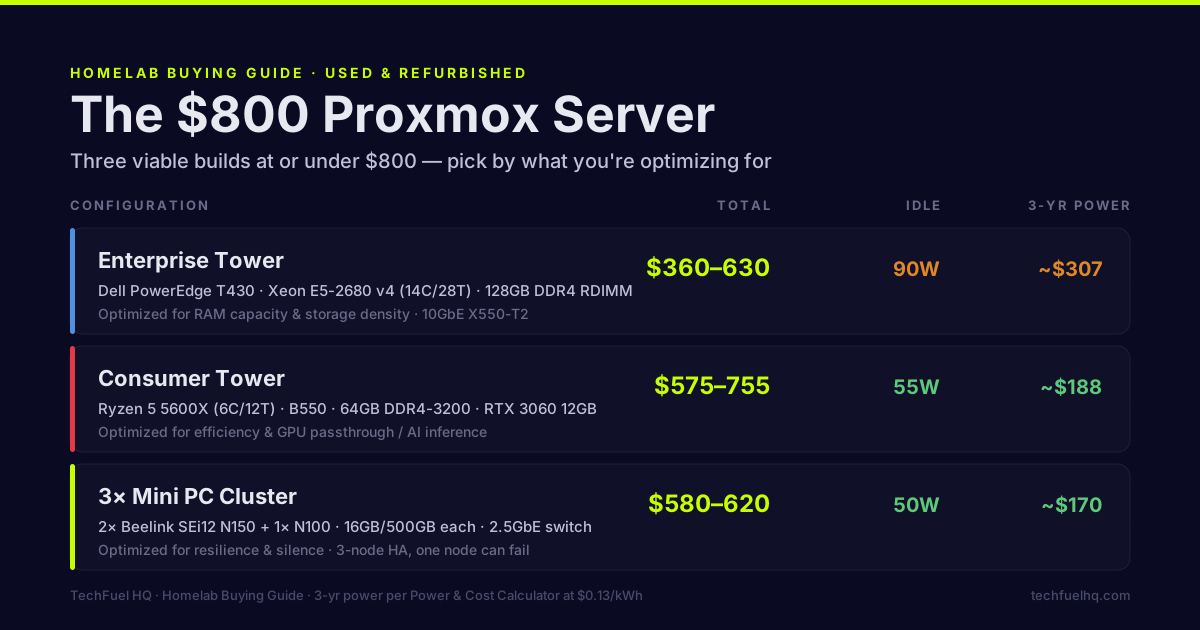
The argument for buying used is straightforward: someone else paid depreciation, and for server hardware that was running in a data center 24/7 for 5–7 years, “used” means proven reliability rather than a question mark. The $800 budget gives you several viable configurations depending on what you’re optimizing for — compute, RAM capacity, storage, or power efficiency.
This article covers three distinct builds at or under $800, where to source parts, and what to verify before committing.
Before the build: what Proxmox actually needs
Proxmox VE is a hypervisor, not a particularly demanding OS. What actually eats resources is your VM and LXC workload:
- RAM is the primary resource for VMs — each VM gets a dedicated allocation
- CPU cores matter for highly parallel workloads; most homelab VMs are not CPU-bound
- Storage IO matters for VMs doing heavy database or file operations
- NIC speed matters if you’re running a NAS or doing VM live migration
A server that looks underpowered on paper (Xeon E5-2620 v4, 6 cores) can comfortably run 10–15 lightweight VMs and LXC containers because homelab workloads are rarely CPU-saturated simultaneously. If you want the minimum-versus-recommended numbers before you shop, the Proxmox hardware requirements breakdown covers the official floor, the practical RAM and CPU targets by workload, and the ZFS RAM rule these builds have to plan around.
Build Option 1: Used enterprise tower server (~$350–500)
The Workhorse — HP ProLiant ML350 Gen9 or Dell PowerEdge T430
These are tower form-factor enterprise servers that run quietly enough for home use (no 1U blower fans), support large RAM configurations, and have been retired from businesses and sold at steep discounts.
| Component | Part | Price |
|---|---|---|
| Server | Dell PowerEdge T430 (1P, E5-2600 v4) | $150–300 |
| CPU upgrade | Intel Xeon E5-2680 v4 (14C/28T) | $15–25 |
| RAM | 4× 32GB DDR4 RDIMM (128GB total) | $80–120 |
| Storage (OS) | 256GB SATA SSD | $25–35 |
| Storage (VMs) | 2× used 4TB SATA HDD | $40–70 |
| 10GbE NIC | Intel X550-T2 dual-port | $50–80 |
| Total | $360–630 |
The E5-2680 v4 is a 14-core/28-thread Broadwell processor that runs $15–25 used in 2026 — absurd price for what it is. The T430 has 8 drive bays, hot-swap capability, iDRAC management, and PCI slots for NICs.
What to watch for:
- Verify the T430 has the T430 BIOS, not a custom OEM BIOS that locks features
- Check iDRAC license — Enterprise iDRAC has HTML5 KVM console; Express does not
- Power consumption: T430 single-CPU idles at 80–100W. Model it in the Power & Cost Calculator before buying
Where to buy: eBay, Bargain Hardware, local IT liquidators. Search “PowerEdge T430 CTO” for base units, then upgrade CPU and RAM separately. Buying with CPU/RAM pre-installed saves shipping but limits your configuration options.
Build Option 2: Consumer tower platform (~$350–500)
The Efficient Option — Ryzen 5 or 7 + AM5 platform
Used consumer hardware has gotten cheap enough that it competes with enterprise gear on price while dramatically winning on power consumption and noise.
| Component | Part | Price |
|---|---|---|
| CPU | AMD Ryzen 5 5600X (6C/12T) | $90–120 used |
| Motherboard | ASUS B550-A or MSI B550 Tomahawk | $80–110 used |
| RAM | 64GB DDR4-3200 (2× 32GB) | $60–80 |
| GPU (optional) | NVIDIA RTX 3060 12GB | $150–180 used |
| Storage (OS) | Samsung 970 EVO 500GB | $40–55 |
| Storage (VMs) | 2TB WD Blue NVMe | $65–80 |
| PSU | EVGA 650 GQ | $50–70 |
| Case | Fractal Define R5 (quiet, mid-tower) | $40–60 used |
| Total | $575–755 |
The RTX 3060 12GB is the interesting addition here — at $150–180 used, it gives you 12GB VRAM for local AI inference (Llama 3.1 8B fits with headroom; 34B models at Q4 fit), hardware transcoding for Jellyfin, and GPU passthrough capability for a gaming VM.
Advantages over enterprise gear:
- Idle power: ~45–65W vs 80–100W for the tower server
- Noise: consumer cases with good fans are much quieter than enterprise chassis
- GPU support: full PCIe ×16 slot for any consumer GPU, proper IOMMU groups
- Future upgrades: AM5 or AM4 platform has current driver support
Where to buy: Facebook Marketplace, Craigslist, eBay used listings. Consumer CPUs/GPUs post-depreciation are often sold by gamers upgrading to newer generations.
Build Option 3: 3× Used Mini PCs cluster (~$500–700)
The Resilient Option — budget mini PC Proxmox cluster
Three nodes gives you high availability: if one node fails, VMs migrate to the other two. At $160–200 per refurbished N100/N150 mini PC, a 3-node cluster is within the $800 budget.
| Component | Part | Price |
|---|---|---|
| Node 1 | Beelink SEi12 N150 (16GB/500GB) | $165 refurbished |
| Node 2 | Beelink SEi12 N150 (16GB/500GB) | $165 refurbished |
| Node 3 | Beelink SEi12 N100 (16GB/500GB) | $145 refurbished |
| Switch | TP-Link TL-SG108-M2 (8× 2.5GbE) | $65 |
| Shared storage | Used 4TB external USB (temporary) | $40–60 |
| Total | $580–620 |
The third node is deliberately slightly weaker — it handles the quorum and lighter workloads. All three have 2.5GbE built-in; the TP-Link switch connects them.
The shared storage gap: this configuration needs shared storage for VM live migration. A USB-attached HDD to one node works for a starter setup; the proper solution is a dedicated NAS or a Ceph cluster (which needs more nodes/resources to be practical). Plan the NAS upgrade separately or use local storage per node without live migration.
Advantages:
- 3-node HA: one node can fail completely and services keep running
- Lowest power consumption: ~50W total idle for all three nodes
- Silent: N100/N150 mini PCs are near-silent under typical VM load
- Physical footprint: three miniature boxes
Sourcing guide
eBay: Best for enterprise server hardware, specific CPU models, and server-grade NICs. Search with “Sold” filter to validate realistic prices before bidding. Verify seller feedback and return policy.
Facebook Marketplace / Craigslist: Best for consumer hardware — CPUs, GPUs, cases, PSUs. Local pickup avoids shipping risk for heavy items. Negotiate; sellers often accept 10–20% below asking for cash/local.
r/homelabsales: Reddit community for homelab gear. Many trusted regular sellers with established reputation. Good for complete server systems, networking gear, and storage.
ServerMonkey / Horizon Technology: Vendors of tested refurbished enterprise equipment with return policies. Higher price than eBay but lower risk — parts are tested and you get a warranty.
What to test when the hardware arrives
HDDs: Run a SMART extended test immediately: smartctl -t long /dev/sdX. Check Reallocated Sector Count, Current Pending Sector, and Offline Uncorrectable — any non-zero value is a red flag on a production drive.
RAM: Run memtest86+ (bootable from USB) for at least one pass. Server RAM rarely fails, but a known-good verification saves debugging later.
CPU: Proxmox’s install and a CPU-Z reading (via a live OS) confirms the CPU model and clock speeds. Verify it’s not a remarked or counterfeit chip — buy from established sellers.
iDRAC/iLO: If the enterprise server has iDRAC, verify you can access it via the dedicated management port. Resetting the iDRAC password is possible with racadm but takes extra time.
Power supply: On enterprise servers, the PSU is usually hot-swap and rated to server standards — reliable. On consumer builds, a failing PSU is a common failure point; buy known brands (Seasonic, EVGA, Corsair) and check for coil whine or instability.
TCO reminder
Used parts are cheaper upfront. Factor in:
- Power cost over 3 years — use the Power & Cost Calculator. The enterprise tower option at 90W idle costs ~$307 in electricity over 3 years at $0.13/kWh. The mini PC cluster at 50W total costs ~$170. The consumer tower at 55W idle costs ~$188.
- Noise and location — enterprise tower servers are not quiet office companions. Plan for basement/closet/garage.
- Future upgrade path — enterprise LGA2011-3 platform is dead-end (no new processors). AM4/AM5 consumer platforms have life ahead.
The $800 homelab is achievable several ways; the right configuration depends on what you’re optimizing for. Enterprise tower for RAM capacity and storage density. Consumer tower for efficiency and GPU support. Mini PC cluster for resilience and silence.
Want to compare the power consumption of these configurations before buying? The Power & Cost Calculator handles multi-node setups. The used enterprise vs mini PC comparison covers the broader tradeoffs. Once Proxmox is installed, the ZFS pool setup guide covers pool creation, ARC tuning for a host with VMs, and scrub scheduling. The Proxmox VM Capacity Planner calculates how many VMs you can run given your RAM and ZFS ARC allocation.
Frequently asked questions
Where do you buy used server and PC parts?
What's the risk of buying used server hardware?
Is ECC RAM necessary for Proxmox?
What CPU generation should I target for used server builds?
Can I run Proxmox on a desktop/consumer platform for $800?
Evidence ledger
- Last updated
- Methodology
- This homelab guide was written and edited by Lowell K. Wood IV in St. Louis County, MO. Specs, prices, commands, and version numbers are drawn from the official vendor, reseller, and project documentation current on the date above, and were verified before publishing. First-person hardware claims appear only where the article shows a verifiable artifact — a photo, receipt, or measurement — or links to the TechFuelHQ Open Bench Datasets. Every fact is human-verified against its cited source before publishing; AI assists with first-draft structure and source-gathering, not with the verdict. Full editorial standard: methodology.
- Update log
- 2026-06-01 — Last reviewed and updated.
- Corrections
- Spotted an error or stale price? Email hello@techfuelhq.com. Confirmed corrections are added to the update log above.