 TechFuel HQ
The best mini PC for a 2026 homelab is the Minisforum MS-01 (about $423 barebone, dual 10GbE) for a Proxmox host you plan to grow, or a used Dell OptiPlex 7060 Micro or Lenovo M720q Tiny near $180 to start cheap. With DDR5 prices tripled, a box that already includes RAM often beats a barebone.
By LK Wood IV · Published 2026-05-01 · Updated 2026-08-24 · 14 min read · St. Louis County, MO
Some links below are affiliate links; if you buy through them TechFuel HQ may earn a small commission at no extra cost to you. As an Amazon Associate I earn from qualifying purchases. Commissions never influence which products get recommended — see our disclosure.
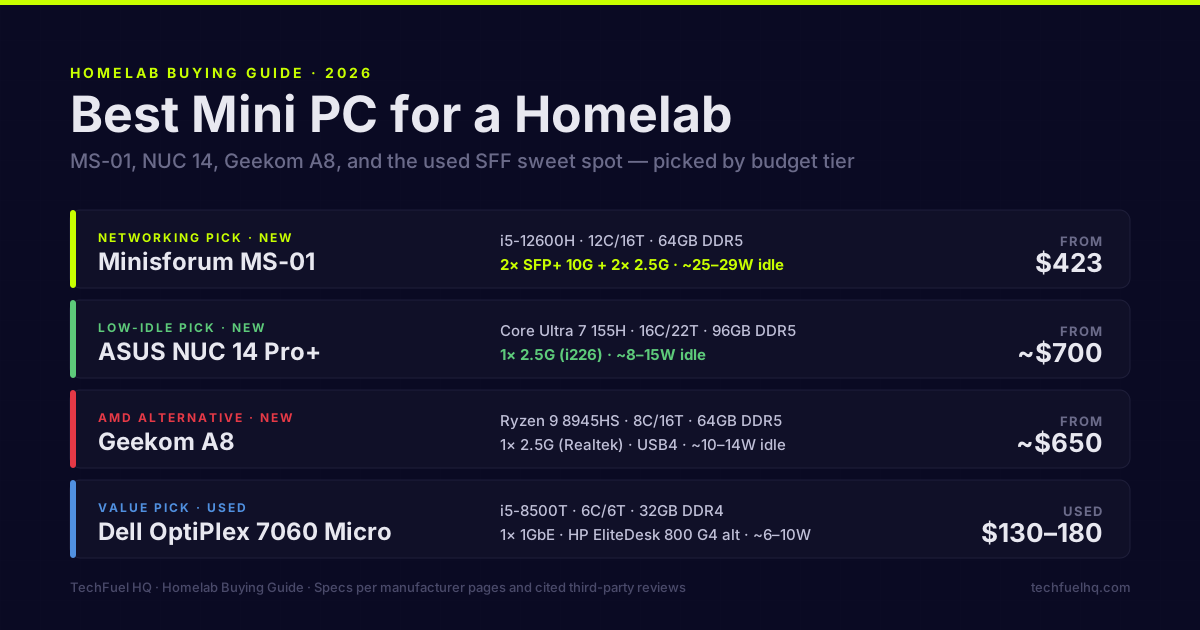
TL;DR · The picks at a glance
- Networking pick (new, ~$423 barebone): Minisforum MS-01 with i5-12600H. Dual SFP+ 10GbE + dual 2.5GbE in one box — nothing else at this price matches it. (Read the RAM-tax section before you assume $423 is the real cost.)
- Low-idle pick (new, ~$690 barebone): ASUS NUC 14 Pro+ with Core Ultra 7 155H. 8–9W idle, lowest in class under $1k.
- Value pick (used, ~$150–220): Dell OptiPlex 7060 Micro, HP EliteDesk 800 G4 Mini, or Lenovo ThinkCentre M720q Tiny with i5-8500T. Cheap DDR4, six real cores, eBay all day.
- Entry pick (complete, ~$170): a complete Intel N150 box (GMKtec G3 class) sold with RAM and an SSD. For Pi-hole, Home Assistant, and a light Jellyfin — sips ~6–10W.
- AMD alternative (~$650): Geekom A8 with Ryzen 9 8945HS. USB4, 2.5GbE.
- Skip: Anything with a single 1GbE NIC if you plan to cluster or virtualize a firewall. In 2026 that’s a deal-breaker for a growing hypervisor host.
All idle figures measured at the wall · Prices verified July 13, 2026 · 32 GB RAM minimum, 64 GB sweet spot · During the DDR5 shortage, a barebone’s sticker is a down payment — see below.
Which one fits you? The whole field on one map
There is no single “best” mini PC for a homelab — there is the one that matches how hard you’ll push it and how much you’ll pay to keep it running 24/7. The two axes that actually decide it are idle power (what it costs you every hour of every day) and capability (RAM ceiling, NIC count, expansion). Plot every option on those two axes and the field sorts itself into three zones. The bottom-right — power-hungry and limited — is empty on purpose: nothing good lives there.
One of these deserves its own look as a 24/7 node rather than a desktop: the MS-01 and what four independent NICs actually buy you.
The 2026 mini-PC lineup, ranked by what they’re for
Mini PCs aren’t picked like desktops. They run 24/7, so idle wattage matters more than peak performance. They host VMs and LXC containers, so RAM ceiling and NIC count matter more than single-thread benchmarks. Most ship as barebones — no RAM, no SSD — so the sticker price is the start of the bill, not the end. The shortlist below is five real options: three new, two used.
Minisforum MS-01 — the networking pick
The MS-01 broke the mini-PC pattern. Two 10Gbps SFP+ ports, two 2.5GbE RJ45 ports, three M.2 NVMe slots, U.2 support, and a half-height PCIe x16 slot — in a chassis you can hide behind a monitor (Minisforum). The networking spec is still unmatched at the $423 entry point (ServeTheHome forums).
CPU options run from i5-12600H to i9-13900H. The i5 barebone is what most people want. Power lands around 27W idle in VirtualizationHowto’s measured configuration, with peaks near 120W during simultaneous VM boot. Not great. Not terrible. The networking earns the watts. For a first home lab that you expect to grow into a real cluster, it is still the mini PC to beat in 2026.
If you’re weighing whether the newer AMD-based Minisforum MS-A2 is worth the premium over the MS-01, the 2026 homelab gear versus 2025’s picks breakdown puts the two side by side on cores, RAM ceiling, and price — and reaches the same conclusion for anyone who already owns an MS-01.
Best for: Anyone running pfSense or OPNsense as a VM, anyone moving NAS traffic between nodes, anyone who wants real network virtualization without buying a separate switch and second box.
ASUS NUC 14 Pro and Pro+ — the NUC torch keeps burning
Intel sold the NUC line to ASUS in 2023, and ASUS has actually shipped follow-up generations on schedule. The NUC 14 Pro+ runs Core Ultra 5/7/9 ARL-HX-class processors, supports 96GB DDR5-5600 across two SODIMM slots, ships with a 2.5GbE i226 NIC, and uses dual Thunderbolt 4 (ASUS NUC 14 Pro Plus tech specs). The base NUC 14 Pro caps at 48GB and uses a Core Ultra or Core 3 processor in a slightly smaller chassis (ASUS NUC 14 Pro).
What you get over the MS-01: lower idle power. ServeTheHome measured 8–9W idle on the NUC 14 Pro under load testing, with peaks around 88W. Better thermal headroom and tool-less serviceability come with the territory.
The trade is SFP+. A single 2.5GbE port is enough for most workloads, but if you wanted dual NICs for a router VM, you’re using Thunderbolt-to-2.5GbE adapters or shopping elsewhere.
Best for: A quiet, low-idle Proxmox host that runs a dozen LXC containers and a handful of VMs without making your office sound like a hair dryer.
Geekom A8 / A8 Max — the AMD compromise
If you want AMD in a NUC-class chassis, the Geekom A8 ships with a Ryzen 9 8945HS or Ryzen 7 8745HS, dual SODIMM up to 64GB DDR5-5600, USB4, 2.5GbE via a Realtek RTL8125BG, and a single M.2 2280 NVMe slot (CNX Software A8 review). Beelink’s SER8 is the closer comparison on idle power, but the A8 is the easier RAM upgrade path and the clearer spec sheet.
The Realtek 2.5GbE NIC is the one footnote here. It works, but Intel i226 is the part you actually want for a hypervisor — driver maturity matters, and Realtek 2.5GbE chips have a history of needing r8125-dkms or vendor-out-of-tree modules on Linux. Plan for thirty minutes of friction.
Best for: AMD-curious homelabbers who want strong multi-core performance and don’t need 10GbE.
The used SFF sweet spot — OptiPlex / EliteDesk / ThinkCentre Tiny
This is where the math gets fun — and in 2026, where it quietly wins. The “1-litre” TinyMiniMicro trio — Dell OptiPlex 7060 Micro, HP EliteDesk 800 G4 Mini, Lenovo ThinkCentre M720q Tiny — all run the same 8th-gen Intel platform (an i5-8500T is six cores at 35W TDP) and all take up to 32GB of DDR4 across two SO-DIMM slots plus one M.2 NVMe (icecat datasheet, PCLiquidations, Newegg M720q listing). Pricing has crept up as r/homelab discovered them — a bare unit runs roughly $150–$220 on eBay in mid-2026, and sellers increasingly strip the RAM and drive out of the listing. The M720q is the enthusiast favorite because a PCIe slot option lets you add a quad-port NIC; the OptiPlex 7060 Micro is the quietest.
Here is the part that matters more than ever in 2026: these boxes take DDR4, not DDR5. With the AI-driven memory shortage having roughly tripled DDR5 SO-DIMM prices, cheap used DDR4 (or a stick that came bundled with the machine) is a genuine cost advantage, not just a nostalgia tax. You give up 2.5GbE and modern USB4, and the weakness is gigabit ethernet — for a single-node Proxmox host running a few self-hosted apps, 1GbE is fine; cluster traffic between nodes wants a USB 2.5GbE dongle. But you get six real cores, a chassis engineered for office reliability, and an all-in price that undercuts a filled barebone by a wide margin (more on that below).
Best for: Cluster-curious homelabbers, the “what does Proxmox feel like” crowd, anyone who wants three nodes for HA testing without spending $1,500 — and anyone who would rather not pay 2026 DDR5 prices.
The entry tier — a complete Intel N150 box
For a first homelab that runs Pi-hole, Home Assistant, a couple of Docker containers, and maybe a light Jellyfin instance, you do not need any of the boxes above. A complete Intel N150 mini PC — the GMKtec G3 class, or similar from Beelink and others — sells for roughly $150–$200 with RAM and an SSD already installed, and idles around 6–10W. That “complete, with RAM” detail is the whole point in 2026: because the machine ships populated, you skip the DDR5 tax that turns a cheap barebone into an expensive one (the next section). The N150 (a four-core Alder Lake-N part) is the successor to the old N100, with a bump in clocks and, on most boards, a real 2.5GbE port.
The ceiling is real: single-channel-ish memory bandwidth and four small cores mean you will feel it the moment you ask it to transcode two Plex streams or run a stack of hungry VMs. But for the “smart-home hub plus ad blocker plus one media app” job that most first labs actually are, it is the right amount of computer — and the community agrees; the running joke on r/homelab is that a $150 mini PC quietly does everything a closet full of enterprise gear was bought to do.
Best for: First-timers, appliance roles (Pi-hole, AdGuard, Home Assistant), anyone who wants a silent 8W box that costs pennies a year to run.
What’s missing on purpose
No Raspberry Pi 5 — different category (ARM, no PCIe-class expansion, and in 2026 often no cheaper than a used x86 SFF once you add storage and a case). No DIY builds either — if you want a discrete GPU or desktop-class RAM, a Mini-ITX build is the next step up. And no tower servers or used enterprise 1U gear: a Dell R730 is a fine way to learn iDRAC, but it idles at 80–120W to do work a 10W mini PC now does in a drawer. Everything in this article is a small, quiet, low-idle x86-64 box — the shape a 2026 homelab actually wants. If you have not settled on that shape yet, the homelab server chooser puts all five classes side by side first.
The barebone trap: what a mini PC really costs in 2026
Every “$423” and “$690” price above is a barebone — no RAM, no SSD, no operating system. In a normal year that footnote barely mattered; a 32GB DDR5 SO-DIMM kit cost $80–$100 and you rounded up. In 2026 it is the single most important number on the page, because the AI-driven memory shortage has tripled DDR5 prices: a 32GB DDR5-5600 SO-DIMM kit now runs around $390 (verified against Amazon, July 13, 2026), and a 1TB NVMe adds roughly another $80–$100 during the parallel SSD squeeze.
Do the arithmetic and the “cheap” barebone stops being cheap. A Minisforum MS-01 is $423 as a bare box — but a working MS-01 with 32GB of DDR5 and a 1TB NVMe is closer to $900 all-in. Meanwhile a complete Intel N150 box ships for ~$170 with RAM and storage, and a used OptiPlex 7060 takes cheap DDR4 (or comes with a stick). The shortage has inverted the usual advice: the box you fill yourself is now often the expensive one.
Comparison table
| Model | CPU | RAM ceiling | NICs | Idle (published) | Price band | Best for |
|---|---|---|---|---|---|---|
| Minisforum MS-01 (i5-12600H) | Intel i5-12600H, 12C/16T | 64GB DDR5 SODIMM | 2× SFP+ 10G, 2× 2.5G | ~25–29W per third-party reviews | $423 barebone (~$900 all-in) | Network lab, pfSense VM, NAS uplink |
| ASUS NUC 14 Pro+ (Ultra 7 155H) | Intel Ultra 7 155H, 16C/22T | 96GB DDR5-5600 | 1× 2.5G (i226) | ~8–15W per third-party reviews | ~$690–$900 barebone | Quiet always-on Proxmox |
| ASUS NUC 14 Pro (Core 3) | Intel Core 3 100U, 6C/8T | 48GB DDR5-5600 | 1× 2.5G | <10W typical | ~$360–$450 barebone | Single-node home services |
| Geekom A8 | AMD Ryzen 9 8945HS, 8C/16T | 64GB DDR5-5600 | 1× 2.5G (Realtek) | ~10–14W per published reviews | ~$650–$850 configured | AMD homelab, Plex transcoding |
| Used Dell OptiPlex 7060 Micro | Intel i5-8500T, 6C/6T | 32GB DDR4 | 1× 1GbE | ~6–10W typical for 35W TDP SFF | $150–$220 used | Cluster nodes, learning Proxmox |
| Complete Intel N150 box (GMKtec G3 class) | Intel N150, 4C/4T | 16–32GB DDR4/5 | 1× 2.5G (most) | ~6–10W typical | ~$150–$200 with RAM + SSD | Pi-hole, Home Assistant, appliance roles |
Idle figures above are the published or third-party-measured numbers from the cited sources. Different RAM configurations, different NVMe firmware, and different BIOS power-management defaults can swing wall idle by 5–8W on the same chassis — treat the cited ranges as upper-bound estimates and assume your actual hardware will land somewhere inside the band. The barebone price bands are the bare box; add roughly $390 for 32GB of DDR5 in 2026 (see the barebone-tax section above).
Top picks by budget tier
Under $200 (complete) — a ready-to-run Intel N150 box
The cheapest legitimate entry: a complete N150 mini PC for roughly $150–$200 with RAM and an SSD already in it. Flash Proxmox or plain Debian, and it will happily host Pi-hole, Home Assistant, AdGuard, and a container or two at ~8W. It ships populated, so it sidesteps the 2026 DDR5 tax entirely. You will outgrow it if you get serious about VMs — but that is a next-year problem, and by then you will know exactly what to buy.
Under $220 (used) — Dell OptiPlex 7060 Micro, EliteDesk 800 G4, or M720q Tiny
For $150–$220 on eBay: six real cores at 35W TDP, room for 16–32GB DDR4, a chassis over-engineered for corporate desks. The verdict is an OptiPlex 7060 Micro (or a M720q Tiny if you want the PCIe-NIC option) with an i5-8500T and 16–32GB of cheap DDR4. A 500GB NVMe still puts you near $250–$300 all-in — and crucially, that RAM is DDR4, not shortage-priced DDR5. Pair two and you’ve got a small Proxmox cluster to learn live migration on.
$300–$500+ (new) — Minisforum MS-01 (i5-12600H)
The networking is the entire argument. Around $423 for a barebone with dual SFP+ 10GbE plus dual 2.5GbE is not a price that exists anywhere else (check the MS-01 i5-12600H barebone on Amazon for current pricing). Just budget for it: add 32GB of DDR5 (~$390 in 2026) and a 1TB NVMe (~$90), and the real all-in lands near $900 for a node that out-networks small-business gear from five years ago. It is still the best 10GbE-in-a-box deal on the market — the sticker just is not the whole story anymore.
If you’re going to run Proxmox versus TrueNAS or Unraid as your hypervisor stack, the MS-01’s NICs let you separate management, VM, and storage traffic on physical interfaces — which is a real architectural win, not a benchmark game.
~$690+ (new) — ASUS NUC 14 Pro+ with Core Ultra 7 155H
When idle wattage and acoustic profile matter more than dual SFP+, the NUC 14 Pro+ is the recommendation — around $690 barebone for the 155H as of July 2026. 96GB RAM ceiling, low-watt steady-state, tool-less serviceability. Pair it with a managed 2.5GbE switch and the box disappears into a bookshelf. If 10GbE on a budget becomes a priority later, Thunderbolt 4 to SFP+ adapters work — don’t expect mini-PCIe magic. ASUS has since shipped the NUC 15 Pro (Core Ultra 7 255H, Wi-Fi 7, ~$700 barebone); it is a modest bump and the 14 Pro+ remains the value pick, but if you are buying new anyway the 15 is worth a price check.
Best mini PC for Proxmox specifically
Proxmox rewards two things a mini PC is often short on: NIC count and RAM headroom. The picks above map cleanly onto how you plan to run it.
- The pick for most builds — Minisforum MS-01. For a Proxmox host you expect to grow, the MS-01 is the best mini PC for Proxmox in 2026. Its dual SFP+ 10GbE plus dual 2.5GbE let you split management, VM, and storage traffic across physical interfaces and run a virtualized pfSense or OPNsense firewall without a USB NIC — the limit that bites hardest on single-port boxes. $423 barebone, 64GB DDR5 ceiling.
- Best quiet, always-on — ASUS NUC 14 Pro+. When acoustics and idle watts matter more than SFP+, the NUC 14 Pro+ pairs a 96GB DDR5 ceiling with roughly 8–15W idle — real VM RAM headroom for a stack that never spins a fan up. You trade dual NICs for a single 2.5GbE port.
- Best budget, learning Proxmox — used OptiPlex 7060 Micro or EliteDesk 800 G4 Mini. Under $200 gets six cores that run Proxmox fine for a handful of LXC containers and a light VM or two. The single 1GbE port is fine for one node and limiting once you cluster — add a USB 2.5GbE dongle for node-to-node traffic.
The one rule that overrides the rest: for a Proxmox host, don’t buy a box you can only give a single 1GbE NIC if you intend to virtualize networking or run more than one node. Once you’ve picked hardware, the Proxmox mini PC setup guide walks the install from bare metal to first VM.
Where to check current prices
Mini-PC pricing moves week to week. Check before you buy:
- Minisforum MS-01 — Minisforum store Search NeweggLink checked 2026-08-15Search AmazonLink checked 2026-08-15
- ASUS NUC 14 Pro / Pro+ — ASUS USA Search NeweggLink checked 2026-08-15Search AmazonLink checked 2026-08-15
- Geekom A8 — Geekom direct Search NeweggLink checked 2026-08-15Search AmazonLink checked 2026-08-15
- Complete N150 box (GMKtec G3 class) Search AmazonLink checked 2026-08-17
- Used OptiPlex / EliteDesk / ThinkCentre Tiny: eBay, ServerSupply, PCLiquidations, r/homelabsales
If the listed price is more than 20% above the bands above, wait a week.
What this hardware should run
The standard stack: Proxmox VE on bare metal, a few LXC containers for lightweight services, one or two VMs for anything that needs its own kernel. The Proxmox mini PC setup guide walks through the install. The self-hosted apps shortlist covers what to actually run on it once it’s up. And if local-AI tooling is on the roadmap, budget its memory too: we measured eleven popular MCP servers at 178–422MB of RAM each, with a realistic five-server stack totaling just under a gigabyte — exactly the kind of always-resident load the 32GB-minimum rule is there to absorb.
A single NVMe boot drive is fine for hypervisor-only use. For bulk storage, the MS-01’s three M.2 slots and the NUC 14 Pro+’s two slots both leave room for a ZFS mirror — but for real capacity, run a separate box per the budget NAS builds guide. A 2.5GbE switch is the realistic minimum in 2026; SFP+ matters once you’re moving VM disks between nodes.
Frequently asked questions
What is the best mini PC for a homelab in 2026?
Is the Minisforum MS-01 still worth buying in 2026?
How much idle power does a mini PC actually draw?
Can I run Proxmox on a used OptiPlex Micro?
How much RAM do I need for a homelab mini PC?
Is a mini PC better than an old gaming PC for a homelab?
What is the best mini PC for Proxmox specifically?
Are barebone mini PCs still worth it with 2026 RAM prices?
What is the cheapest mini PC for a homelab in 2026?
Evidence ledger
- Last updated
- Methodology
- See our methodology for research and review standards. It draws on 11 cited sources, listed below, each checked against the original page on 2026-05-02.
- Sources
- Minisforum MS-01 product page accessed 2026-05-02
- ServeTheHome forum thread, MS-01 review accessed 2026-05-02
- VirtualizationHowto MS-01 review accessed 2026-05-02
- ASUS NUC 14 Pro product page accessed 2026-05-02
- ASUS NUC 14 Pro+ tech specs accessed 2026-05-02
- ServeTheHome ASUS NUC 14 Pro review accessed 2026-05-02
- CNX Software Geekom A8 review accessed 2026-05-02
- Geekom A8 product page accessed 2026-05-02
- Dell OptiPlex 7060 Micro datasheet (icecat) accessed 2026-05-02
- Dell OptiPlex 7060 Micro spec listing (PCLiquidations) accessed 2026-05-02
- Lenovo ThinkCentre M720q Tiny listing (Newegg) accessed 2026-05-02
- Update log
- 2026-05-06 — Content update: 2 draft placeholders replaced with finalized content.
- 2026-05-06 — Content update: Sources lifted into evidence ledger; inline duplicate Sources / Methodology blocks removed.
- Corrections
- Spotted an error or a stale number? Email hello@techfuelhq.com. Confirmed corrections are added to the update log above.