 TechFuel HQ
These four tools solve two different problems. Beszel is the low-overhead multi-server dashboard most homelabs should start with; Netdata adds per-second depth and anomaly detection on a single box; Glances is a quick one-machine glance. Uptime Kuma is separate: it watches whether a service is reachable, not how the hardware is doing.
Once you run more than a couple of services, you want to see your homelab — what’s hot, what’s full, what’s down. The lightweight monitoring conversation in 2026 centers on three resource monitors — Beszel, Netdata, and Glances — plus Uptime Kuma, which does a related-but-different job. They’re easy to confuse, so here’s what each actually is, verified against their repos and docs, and how to pick.
One key distinction up front: Beszel, Netdata, and Glances monitor resources (CPU, RAM, disk). Uptime Kuma monitors uptime (is a service reachable?). They’re complementary, not alternatives — most homelabs run one of each.
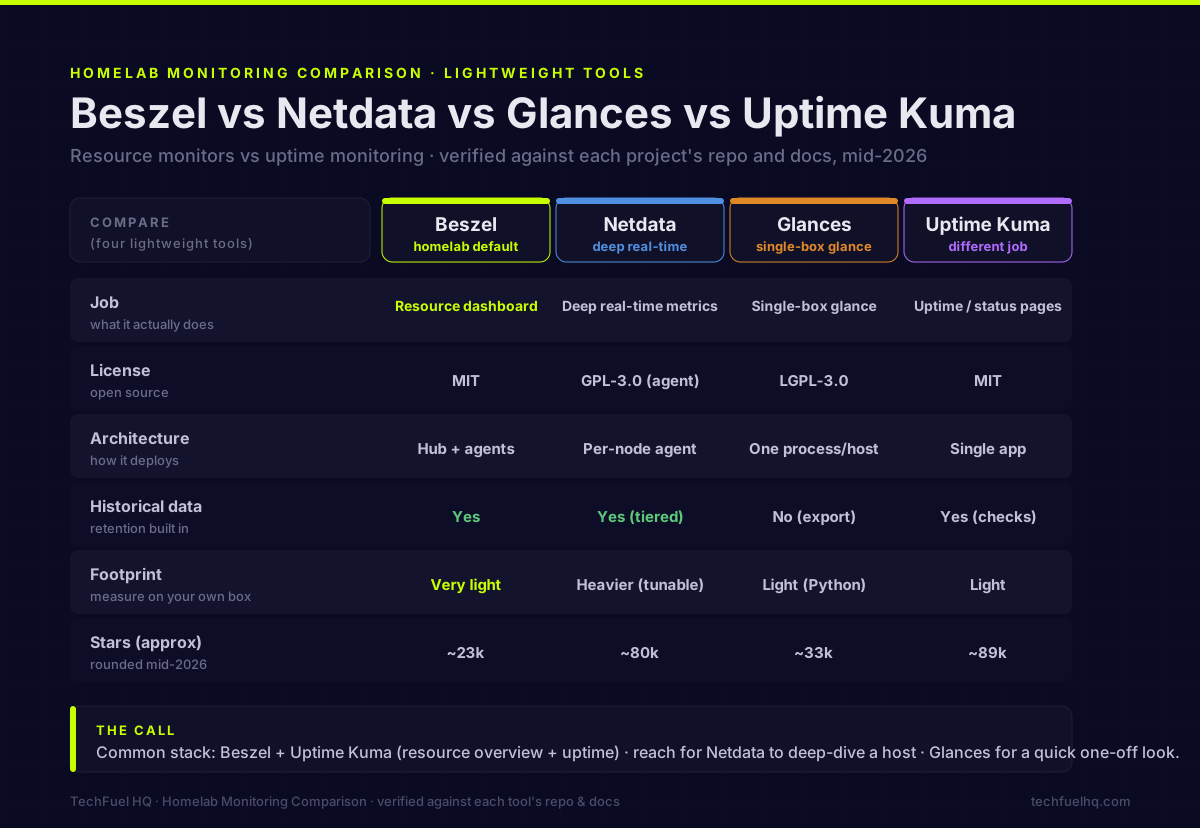
At a glance
| Beszel | Netdata | Glances | Uptime Kuma | |
|---|---|---|---|---|
| Job | Resource dashboard | Deep real-time metrics | Single-box glance | Uptime / status pages |
| License | MIT | GPL-3.0 (agent) | LGPL-3.0 | MIT |
| Architecture | Hub + agents | Per-node agent | One process/host | Single app |
| Multi-server dashboard | Yes | Yes (Cloud/Parent) | Per-host | Yes (checks) |
| Historical data | Yes | Yes (tiered) | No (export) | Yes (checks) |
| Footprint | Very light | Heavier (tunable) | Light (Python) | Light |
| Stars (approx) | ~24.5k | ~80k | ~33k | ~90k |
| Latest (22 Aug 2026) | v0.18.8 (pre-1.0) | v2.11.0 | v4.5.6 | 2.5.3 (stable) |
Star counts rounded; GitHub stars approximate. Star counts and release versions were both read on 2026-08-22 from each project’s GitHub API.
Beszel: the simple multi-server dashboard
Beszel (MIT, by henrygd) is the easy default for “show me all my boxes on one screen.” It’s a hub-and-agent design: the hub is a web dashboard built on PocketBase, and a tiny Go-binary agent runs on each host reporting CPU, memory, disk usage and I/O, network, load, temperature, GPU, Docker container stats, and S.M.A.R.T. disk health. It keeps historical data, sends configurable alerts (CPU, memory, disk, bandwidth, temperature, load), and supports multi-user, OIDC, and automatic backups to disk or S3.
It launched in 2024 and grew fast (~24.5k stars) because it nails the homelab sweet spot: low overhead, dead-simple setup, one clean pane of glass. Be clear about scope, though — it’s deliberately not a full observability platform. No per-second high-resolution metrics, no log aggregation, no APM/tracing, no PromQL. It’s a resource dashboard, and a very good one. (It’s still pre-1.0 (v0.18.8 as of 22 August 2026), so expect some churn, and verify current first-party Windows-agent support if you need it — that’s historically been community/fork territory.)
Pick Beszel if you want a low-overhead dashboard and alerts across several servers without running a heavier stack.
Netdata: depth and real-time diagnostics
Netdata is the opposite end: maximum depth out of the box. Its agent collects per-second metrics, auto-discovers thousands of metrics with little config, and runs unsupervised ML anomaly detection right on the agent. When you need to understand why a box is misbehaving in real time, nothing here competes. Licensing nuance worth knowing: the agent core is GPL-3.0 (open source), but the UI is closed-source-but-free and Netdata Cloud is closed-source (free and paid tiers) — the self-hosted agent works fully without Cloud.
On the perennial “is Netdata heavy?” debate, be fair: it does far more per node than the lightweights, so it uses more — but it’s tunable. Netdata’s own docs cite roughly 150 MiB RAM and ~5% CPU by default, dropping to ~100 MiB and under 1% CPU with ML and alerts off and ephemeral storage. (You’ll see third-party “200–500 MB/node” claims; those aren’t Netdata’s stated default and depend heavily on config — treat them as unverified.) Its free Cloud tier caps at 5 nodes; a non-commercial Homelab plan is $90/year, and Business is $4.50/node/month.
Pick Netdata if you want deep, real-time metrics and anomaly detection and don’t mind a heavier (but adjustable) footprint.
Glances: the quick single-box look
Glances (LGPL-3.0, by nicolargo) is a Python-based top/htop alternative for a single machine, runnable as a terminal UI, a web UI, or a REST API. It shows live CPU, memory, disk, network, sensors, processes, and containers (Docker/Podman/LXC, even Kubernetes pods) at a glance. The key caveat: it’s not historical by default — you get a live snapshot with only short in-memory history. For real retention you export to InfluxDB, Prometheus, PostgreSQL, and others, then chart it in Grafana (see how Grafana and Prometheus divide that work). Alerting is basic threshold coloring, not a full notification engine.
Pick Glances if you want an instant rich overview of one box for ad-hoc diagnostics, or a lightweight metrics source to feed a bigger stack — not a standalone multi-server dashboard.
Uptime Kuma: a different job
Uptime Kuma (MIT, by Louis Lam, the Dockge creator) is uptime/status-page monitoring, not resource monitoring. It runs HTTP, TCP-port, ping, DNS, and keyword checks to tell you whether a service is up, down, or slow, with 90+ notification channels and public status pages. Its 2.x line is now stable (v2.4, released mid-2026, added MariaDB support and a UI refresh — older “2.x is beta” advice is outdated). Run it alongside a resource monitor: Kuma answers “is it reachable?”, the others answer “why is the host struggling?”
Which should you run?
- Simple resource dashboard + alerts across all hosts → Beszel. The homelab default.
- Deep real-time metrics + anomaly detection on a box → Netdata. Heaviest but most powerful.
- Quick single-box glance or a metrics source → Glances.
- Service uptime + status page + notifications → Uptime Kuma (run it alongside the above).
A sane, common stack is Beszel + Uptime Kuma — resource overview plus uptime/status — reaching for Netdata when you need to deep-dive a specific host and Glances for one-off terminal inspections. If you’re deploying these in containers, the Docker Compose starter stack guide pairs well, and you’ll likely front the web UIs with a reverse proxy.
A note on footprint numbers
The whole appeal of “lightweight” monitoring is low overhead — but precise RAM/CPU figures are the most-fabricated numbers in this space. Beszel is genuinely tiny (a single small Go agent), Glances is light (a Python process), and Netdata is heavier-but-tunable per its own docs. Beyond Netdata’s published defaults, exact figures vary by version, host, and what you’re collecting — so measure on your own hardware with docker stats rather than trusting a blog’s number, including this one.
Sources
- Beszel repo & docs: https://github.com/henrygd/beszel · https://beszel.dev/guide/what-is-beszel
- Netdata repo & resource-utilization docs: https://github.com/netdata/netdata · https://learn.netdata.cloud/docs/netdata-agent/resource-utilization
- Netdata Cloud pricing: https://www.netdata.cloud/pricing/
- Glances repo & docs: https://github.com/nicolargo/glances · https://glances.readthedocs.io/en/latest/
- Uptime Kuma repo: https://github.com/louislam/uptime-kuma
Frequently asked questions
What is the most lightweight homelab monitoring tool?
What is Beszel and why is it popular?
Beszel vs Netdata — which should I use?
Does Glances store historical data?
Is Uptime Kuma a resource monitor like Netdata?
What’s a good lightweight monitoring stack for a homelab?
Beszel vs Netdata vs Glances — which is best for a homelab?
Beszel vs Uptime Kuma — what’s the difference?
Sources and corrections
- Last updated
- Methodology
- See our methodology for research and review standards.
- Update log
- 2026-08-22 — Star counts re-read from the GitHub API 2026-08-22: Beszel 24,546 (was quoted ~23k) and Uptime Kuma 90,473 (was ~89k) had drifted; Netdata 80,261 and Glances 33,406 still round to the published figures. The footnote now carries the exact date rather than ‘August 2026’.
- 2026-08-22 — Version row re-checked against the GitHub release APIs (retrieved 2026-08-22): Beszel v0.18.7 -> v0.18.8 (2026-08-17), Uptime Kuma 2.5.0 -> 2.5.3 (2026-08-22); Netdata v2.11.0 and Glances v4.5.6 unchanged. The pre-1.0 caveat in the Beszel section now names v0.18.8. No comparison verdict affected.
- 2026-08-15 — Meta-audit correction. The 2026-08-14 pass refreshed Netdata and Glances and relabelled this row’s header from ‘Latest (Jul 2026)’ to ‘Latest (Aug 2026)’, but did not re-check the Uptime Kuma cell, which still read 2.4.0. Uptime Kuma 2.5.0 shipped 2026-08-01, so the new header asserted August currency for a cell that was no longer current – the cell had been accurate under the old July header. Uptime Kuma corrected to 2.5.0 (GitHub releases API, retrieved 2026-08-15); the caption below the table, which still said ‘verified July 2026’ and contradicted the header, now reads August 2026. Re-confirmed unchanged the same day: Beszel v0.18.7, Netdata v2.11.0, Glances v4.5.6.
- 2026-08-14 — Re-checked the version row against the GitHub release APIs: Netdata v2.10 -> v2.11.0 (2026-08-12), Glances v4.5 -> v4.5.6 (2026-08-01). Beszel remains v0.18.7 (Apr 2026), which is why the pre-1.0 caveat stands unchanged. No comparison verdict affected.
- Corrections
- Spotted an error or a stale number? Email contact@techfuelhq.com. Confirmed corrections are added to the update log above.