 TechFuel HQ
Pick by how you like to configure, not by speed. Nginx Proxy Manager is the beginner pick: a point-and-click web UI over nginx. Caddy is config-as-code with the simplest automatic HTTPS in two lines. Traefik auto-discovers Docker containers from labels but has the steepest learning curve. All three are free, open source, and faster than any homelab needs.
By LK Wood IV · Published 2026-06-17 · Updated 2026-08-24 · ~9 min read · St. Louis County, MO
A reverse proxy is the front door to a homelab. It puts clean hostnames and automatic HTTPS in front of all your services, so jellyfin.home.lab just works instead of everyone memorizing 192.168.1.14:8096. Three names dominate the choice in 2026: Caddy, Nginx Proxy Manager (NPM), and Traefik. They’re all free, all open source, and all solve the same problem, but they have genuinely different personalities, and picking well is mostly about matching one to how you like to work. Everything below is verified against each project’s own repos and docs, with the community’s real-world consensus folded in.
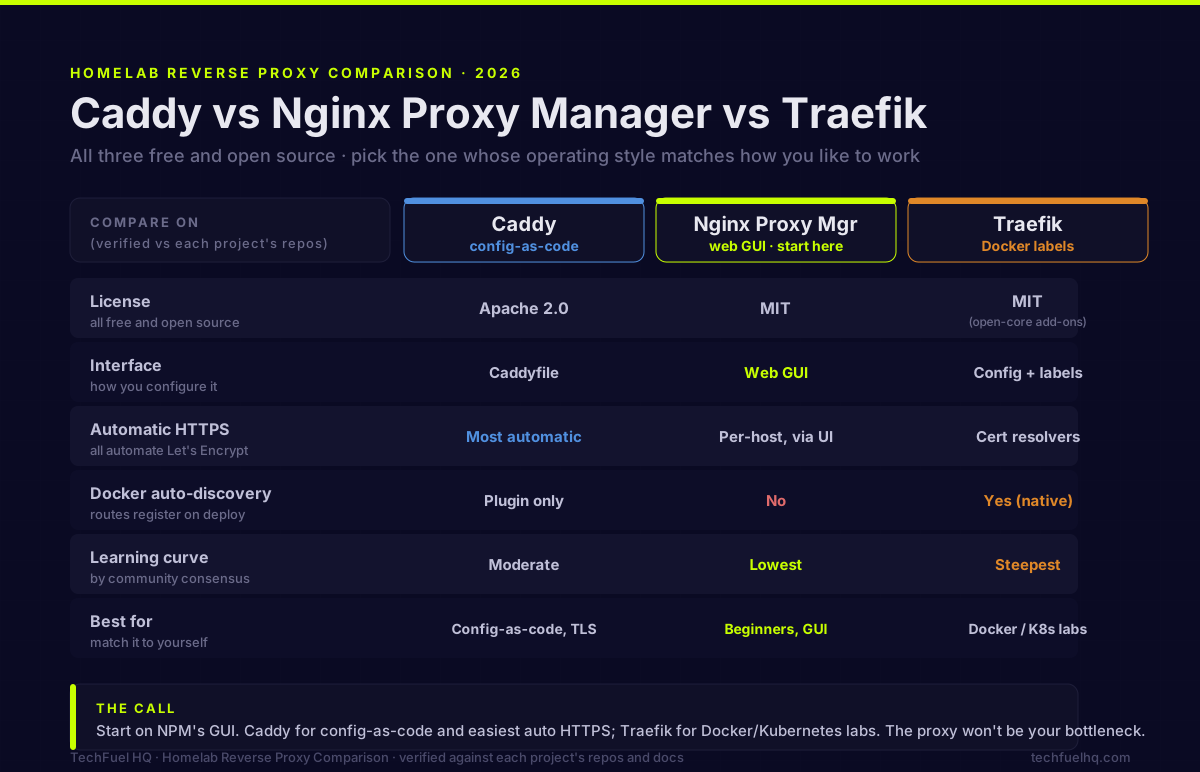
The choice in one screen
Skip to the section that fits you, or read the whole thing. Here is the shape of the decision before the details.
| Caddy | Nginx Proxy Manager | Traefik | |
|---|---|---|---|
| License | Apache 2.0 | MIT | MIT (open-core add-ons) |
| Interface | Caddyfile (config-as-code) | Web GUI | Config + Docker labels |
| Auto HTTPS | Most automatic (LE + ZeroSSL) | Per-host, via UI | Cert resolvers (config) |
| Docker auto-discovery | Plugin only | No | Yes (native) |
| Learning curve | Moderate | Lowest | Steepest |
| Written in | Go (single binary) | nginx + OpenResty + Node UI + DB | Go (single binary) |
| GitHub stars (approx, 2026-08-22) | ~75k | ~34k | ~64.5k |
| Latest stable (2026-08-23) | 2.11.4 | 2.15.1 | 3.7.11 |
| Best for | Config-as-code, easiest TLS | Beginners, GUI lovers | Docker/K8s dynamic labs |
Star counts and latest-release tags were read from each project’s GitHub API on the dates shown and drift over time; check each repo for today’s numbers.
The single most useful way to feel the difference is to watch each one do the exact same job. Here is what it takes to put HTTPS in front of one service in all three:
Caddy: the simplest automatic HTTPS
Caddy is a Go-based web server and reverse proxy under Apache 2.0, fully open source with no paid tier, shipped as a single static binary (~75k GitHub stars, latest 2.11.x). Its headline feature is automatic HTTPS: the moment Caddy knows a hostname, it obtains and renews certificates in the background, using Let’s Encrypt and ZeroSSL with automatic failover, redirects HTTP to HTTPS, and even issues self-signed certs from an internal CA for local names. A working HTTPS reverse proxy is about three lines of Caddyfile, which is exactly why so many people who “just wanted it to work” ended up here. As one r/selfhosted user put it, it’s “brain dead easy… a reverse proxy in as little as 4 lines and 2 of them are the curly brackets.”
The trade-offs: there’s no built-in GUI (config is a text file), and Caddy core doesn’t natively auto-discover Docker containers. The third-party caddy-docker-proxy plugin adds that if you want it, and notably a Caddy maintainer confirms it’s “supported and a recommendation of the Caddy maintainers.” One bit of history worth knowing: Caddy briefly sold commercial licenses in 2017-2019, but permanently moved everything to open source under Apache 2.0 in October 2019, so today it’s unambiguously free. It’s the most-starred of the three and actively maintained.
Pick Caddy if you like config-as-code, want the least-fuss automatic HTTPS on the market, and don’t need a GUI.
Nginx Proxy Manager: the beginner’s favorite
NPM is a web GUI wrapped around nginx + OpenResty + Certbot, distributed as a Docker image, under the MIT license (verified against its raw LICENSE file; despite some secondhand claims that it’s GPL, it is not). You add proxy hosts in a browser, click to request a Let’s Encrypt cert, and it generates the nginx config for you. It has the lowest learning curve of the three by universal consensus, which is why it’s the standard “start here” recommendation, and it currently sits around 34k stars on the 2.15.x line. If you go this route, our Nginx Proxy Manager homelab setup guide walks the full install and wildcard-SSL flow.
Two caveats. First, its state lives in a database and generated config rather than portable code, so it isn’t naturally version-controlled; keep your own backups. Second, because NPM bundles its own stack (nginx/OpenResty, Certbot, a Node.js UI, and a database), that bundle can lag upstream security fixes, and there have been notable CVEs. The most-cited is CVE-2025-50579 (CVSS 5.3), a CORS-misconfiguration flaw reported against v2.12.3 that lets a malicious website steal an admin’s JWT token and take over the panel; it was still open on the project tracker into the 2.15.x line. The fix is discipline: keep it updated and never expose the admin UI publicly. Recent releases added TOTP two-factor auth and more DNS challenge plugins, which help.
Pick NPM if you want a point-and-click workflow for a handful of services and would rather not touch config files.
Traefik: dynamic discovery for Docker labs
Traefik (MIT, ~64.5k stars, latest 3.7.x) is a modern, dynamic reverse proxy built for containers, shipped as a single Go binary. Its defining trait: it auto-discovers services and builds routes at runtime by reading provider APIs. Add a few Docker labels to a container and Traefik creates the route instantly, no restart, and it does the same for Kubernetes (including the Gateway API), Consul, Nomad, and more. This is the capability NPM lacks entirely and Caddy needs a plugin for.
The cost is complexity, and the community is split on how much. Traefik divides configuration into static (startup: entrypoints, providers, certificate resolvers) and dynamic (hot-reloaded routers, services, middlewares), and you need to understand that model plus “label discipline.” Some homelabbers find it “ridiculously convoluted… six labels on every container,” while others counter that with a good base config you can get down to “just traefik.enable=true” plus a single router rule. Either way it’s the steepest learning curve here. On licensing, Traefik runs open-core: the proxy is fully free, including its OWASP Coraza WAF integration added in v3, while Traefik Labs sells optional Hub/Enterprise API-management tiers you’ll never need at home. Traefik v3 (GA 2024) also brought HTTP/3, WebAssembly middleware plugins, OpenTelemetry, and a newer experimental FastProxy engine aimed at closing its throughput gap.
Pick Traefik if your lab is Docker- or Kubernetes-heavy, you want services to register themselves as you deploy them, and you’re comfortable with the configuration model.
Which should you run?
The most useful framing from the 2026 community: people rarely pick the wrong proxy; they pick one whose operating style doesn’t match their skill level or their stack. So match it to yourself:
- Beginner, few services, wants a GUI → Nginx Proxy Manager. Start here.
- Wants config-as-code and the easiest automatic HTTPS, no GUI → Caddy.
- Docker/Kubernetes-heavy, wants dynamic auto-registration → Traefik.
A common growth path is to learn on NPM, then migrate to Caddy (for config-as-code) or Traefik (for Docker discovery) as the lab matures, and that migration is easy because you can always read the generated config and copy it out. If you’re building out that Docker layer, the Docker Compose starter stack guide pairs naturally, and if you’re also choosing how to manage those containers, see Komodo vs Portainer vs Dockge.
On performance: the question everyone asks and no one needs
“Which is fastest?” is the first thing people ask and the last thing that should decide it. Real, reproducible 2026 community benchmarks do exist now, and they’re consistent about the order: nginx (the engine under NPM) leads, Caddy is a close second, and Traefik trails on raw requests-per-second and P95 latency. But look at the actual magnitudes against what a homelab does:
You’ll sometimes see idle-RAM figures too (rough ballparks like ~40-50 MB for the single-binary Caddy and Traefik, more for NPM once you count its bundled nginx, Node UI, and database). Treat those as directional, not gospel, since methodology and versions aren’t standardized. The bottleneck in your lab will be your services, not the proxy in front of them.
Sources
- Caddy repository & license (Apache 2.0): https://github.com/caddyserver/caddy · Automatic HTTPS docs: https://caddyserver.com/docs/automatic-https
- Caddy open-source move (issue #2786, Oct 2019): https://github.com/caddyserver/caddy/issues/2786 · caddy-docker-proxy: https://github.com/lucaslorentz/caddy-docker-proxy
- Nginx Proxy Manager repository & license (MIT): https://github.com/NginxProxyManager/nginx-proxy-manager
- Traefik repository (MIT) & configuration overview: https://github.com/traefik/traefik · https://doc.traefik.io/traefik/getting-started/configuration-overview/
- NPM CORS CVE-2025-50579 (CVSS 5.3, NVD): https://nvd.nist.gov/vuln/detail/CVE-2025-50579 · issue thread: https://github.com/NginxProxyManager/nginx-proxy-manager/issues/4509
- Community benchmark & consensus (r/selfhosted, Oct 2025): https://www.reddit.com/r/selfhosted/comments/1odh46j/nginx_vs_caddy_vs_traefik_benchmark_results/
Frequently asked questions
Which reverse proxy is easiest for a homelab beginner?
What’s the difference in how each handles automatic HTTPS?
Which reverse proxy auto-discovers Docker containers?
Are Caddy, Nginx Proxy Manager, and Traefik all free and open source?
Is Nginx Proxy Manager secure enough to use?
Which reverse proxy is fastest: Caddy, nginx, or Traefik?
Is Traefik better than Nginx Proxy Manager?
What is better for a homelab, Caddy or nginx?
Sources and corrections
- Last updated
- Methodology
- See our methodology for research and review standards.
- Update log
- 2026-09-14 — Page updated.
- Corrections
- Spotted an error or a stale number? Email contact@techfuelhq.com. Confirmed corrections are added to the update log above.