 TechFuel HQ
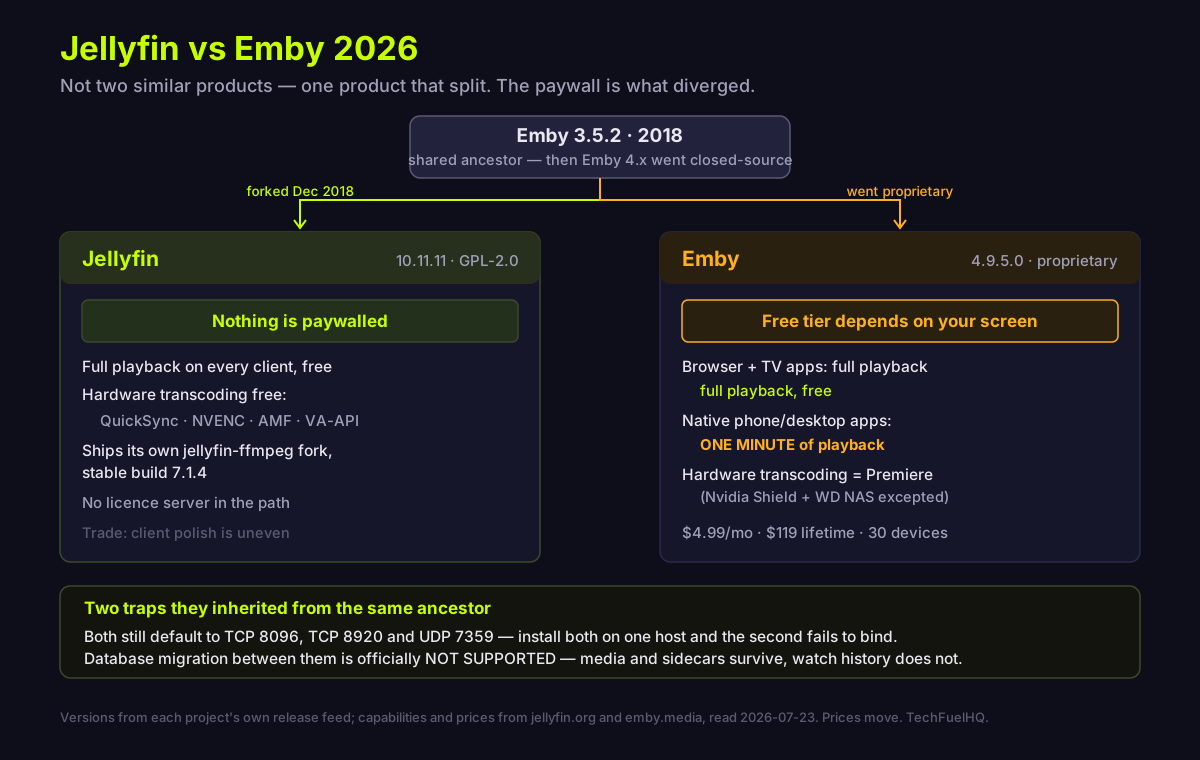
Jellyfin forked from Emby 3.5.2 in December 2018, after Emby closed its source, so they share ancestry and even the same default ports. What diverged is the licence: Emby plays free in a browser and on TV apps but caps its native phone and desktop apps at one minute, and gates Live TV and hardware transcoding. Jellyfin gates nothing.
By LK Wood IV · Published 2026-07-23 · Updated 2026-08-23 · ~12 min read · St. Louis County, MO
TL;DR · Shared ancestry, client-dependent freemium
- They share a codebase, and have diverged for eight years since. Jellyfin forked Emby 3.5.2 in December 2018 after Emby took 4.x closed-source. Emby's public repo stops dead on 20 September 2018, at a final commit labelled 3.5.3 that was never tagged.
- "Free Emby" depends on which client you open. Full playback is free in a web browser and on Roku/Apple TV/LG/Samsung TVs. The native iOS, Android, Windows, Linux and macOS apps stop after one minute. Live TV needs Premiere everywhere.
- Hardware transcoding is a Premiere feature (Nvidia Shield and WD NAS excepted). Jellyfin gates nothing — QuickSync, NVENC, AMF, VA-API and more are plain settings.
- Premiere in 2026: $4.99/mo, $54/yr, or $119 lifetime — single household, 30 devices, counted per app rather than per machine.
- Migration is officially unsupported. Jellyfin's docs say so in capitals. Your files and sidecar metadata survive; your watch history and users do not.
Versions re-verified against the projects' own release feeds on 2026-08-23: Jellyfin 10.11.11 stable (12.0 is still a release candidate, rc5), Emby Server 4.9.5.0 stable (4.10.0.x is still pre-release). Premiere pricing re-checked the same day on Emby's own page. Emby's prices and feature matrix move — re-check the linked pages before you buy.
The short version
Most comparisons of these two open on personality — Jellyfin is the free community one, Emby is the polished paid one — and stop there. That framing is not wrong, but it skips the two things that actually decide it: what the free tier of Emby does and does not let you do, and the fact that these are not two products that happen to be similar. They are one product that split.
Get the split straight and the rest follows.
They share a codebase, forked in 2018
Jellyfin’s own documentation is direct about the origin: the project “was started in early December 2018 primarily as a result of Emby’s decision to take their next release (4.x) closed-source” (about). On that announcement, the group “quickly gathered to fork as many repositories as (legally) possible and begin the process of renaming the project Jellyfin.”
The precise lineage matters, and almost nobody states it correctly: Jellyfin descends from Emby 3.5.2, not from 4.x, and was “ported to the .NET Core framework to enable full cross-platform support” (about). Jellyfin also cites reasons beyond the licence change — previously-reported GPL violations, a paywall added for gratis users in an early 3.x release, and the progressive removal of client and server source code.
Emby confirms the same event from its own side. Its developer blog states that “in 2018, Emby made a significant decision: it moved from being an open-source project to a proprietary, closed-source model” (Emby history). The hard corroboration is the repository itself: Emby’s public server repo is GPL-2.0 licensed, and its final commit is dated 20 September 2018 and carries the message 3.5.3. Be exact about that last part. 3.5.3 names the commit; the newest tag in the repo stops one release earlier, at 3.5.2.0, and a 3.5.3 tag was never pushed (MediaBrowser/Emby). No source for 3.6 or any 4.x release was ever published.
So the two projects diverged from adjacent commits. That shared ancestry explains a great deal of what follows — including a port collision nobody warns you about.
What “free Emby” actually means
This is the part the search results get wrong, and it is the single most useful thing on this page. Emby is free to install, and every comparison says so. What none of them say is that the free tier’s limits depend entirely on which screen you watch on.
From Emby’s own Premiere Feature Matrix (feature matrix):
| Client | Free tier | Needs Premiere |
|---|---|---|
| PC or mobile web browser | Full playback | Live TV, TV Mode |
| Roku, Apple TV, LG & Samsung smart TVs | Full playback | Live TV only |
| Android TV, Fire TV | Full playback, capped at 5 TV devices | Live TV, offline media |
| iOS, Android (native apps) | One-minute playback only | Full playback (or a one-off per-app purchase), offline downloads, CarPlay/Android Auto, Apple Watch, camera upload |
| Windows, Linux, macOS (native apps) | One-minute playback only | Full playback, Live TV, offline media (listed for Windows and macOS; the Linux row lists none) |
Read the first row, because it is the one no competing page mentions: the web browser is a fully unrestricted free client for playback. Your whole library, no licence, no time limit. Live TV and TV Mode are the only things it withholds — and Live TV is Premiere-gated on every client, so that is not a browser limitation.
The cap lands on the native apps. Open Emby’s iOS, Android, Windows, Linux or macOS application unlicensed and playback stops after one minute. Emby sells a per-app purchase that buys full playback on that one app, or Premiere covers everything at once.
So “free Emby” is a real, usable product — provided you watch in a browser tab or on a TV. What Premiere buys on a phone or desktop is the native app experience, offline downloads and Live TV on those clients. That is a defensible model, and considerably more nuanced than either “Emby is free” or “Emby is crippled.”
Jellyfin has no equivalent table, because it has no tiers. Its docs put it plainly: “There are no strings attached, no premium licenses or features, and no hidden agendas” (about), and the project has committed that features “will never be hidden behind a paywall” (10.6.0 release post).
Hardware transcoding is the expensive difference
Everything above is about convenience. This one is about whether your hardware copes.
Emby’s feature matrix lists hardware accelerated transcoding as a Premiere feature, with a footnoted exception: Nvidia Shield and WD NAS devices do not require Premiere for it. Everyone else transcodes in software until they pay.
Jellyfin documents hardware acceleration as a plain configuration option for all users, listing Intel QuickSync, NVIDIA NVDEC/NVENC, AMD AMF, Intel/AMD VA-API on Linux, Apple VideoToolbox on macOS, and Rockchip RKMPP (hardware acceleration). One honest scope note: Jellyfin documents full acceleration for a specific list — mainstream Intel and NVIDIA GPUs on Windows and Linux, AMD Polaris and newer on Linux, older AMD on Windows, RK3588, and Intel and Apple Silicon on macOS 12+. And it requires its own bundled FFmpeg: “using FFmpeg binaries downloaded from somewhere else will result in partial acceleration.”
If you run a low-power box — an N100 mini PC, a Pi-class board, an older NAS — this is the whole comparison. Software transcoding is what makes cheap servers stutter, and one product charges to avoid it. If you are choosing hardware around this, our GPU picks for Plex and Jellyfin transcoding cover what actually accelerates.
About that viral “Emby transcoding is 3x slower” thread
If you have researched this comparison, you have probably seen a thread on Emby’s own community forum titled roughly why is Emby’s transcoding engine so far behind Jellyfin, and why I’m switching back, claiming Jellyfin hits ~80 fps where Emby manages ~30. It surfaces high in search precisely because it sits on Emby’s own turf.
We read the whole thread, and its own contents defeat the claim. One problem is disqualifying on its own; the rest is context:
- It is self-refuting. The author’s own description establishes that Emby was performing a software transcode while Jellyfin used the GPU. That is a software-versus-hardware measurement, not an engine-efficiency comparison.
- There is a confound that explains it entirely. As a forum contributor pointed out and Emby’s docs confirm, hardware transcoding requires Premiere outside the Nvidia Shield and WD NAS exception. The author never stated whether the Emby install was licensed — and without a licence it could not have used the GPU at all.
- Context worth knowing, though it does not by itself refute a measurement: the post is not first-hand text. A responder flagged it as machine-generated and the author conceded it — “My English is not good, so I let AI help me express what I mean.” An Emby administrator rejected the post’s accuracy and requested diagnostics; the author never supplied any, and the thread died without resolution.
There is exactly one narrow corroboration: a later commenter reported that on Rockchip RK3588 hardware, “jellyfin hw transcodes 4k to 4k HEVC at 4.8x. Emby won’t even let me do this on rk3588.” That is one unverified single report, but it is at least consistent with something documented — see the next section.
We are flagging this because it is widely linked and worthless as a benchmark. Anyone repeating the fps figures is repeating an AI-written post that Emby staff rejected and nobody ever reproduced.
What is actually documented about transcoding
Discarding that thread leaves the performance question open — no public benchmark we found settles it. What we can document is not a performance result but a difference in release cadence, which is a narrower claim and worth stating as such.
Jellyfin does not use system FFmpeg. It ships and requires jellyfin-ffmpeg, its own maintained fork. Be precise about what that means today: the current stable build is v7.1.4-3 (2026-06-06), which is what stable Jellyfin 10.11.x installs. The fork’s 8.1.x line — v8.1.2-3 as of 2026-08-19 — is still flagged pre-release and pairs with the Jellyfin 12.0 release candidates (jellyfin-ffmpeg releases). That fork carries patches that matter for exactly the workloads people complain about: PGS and graphical subtitle overlay moved into hardware filters so subtitle burn-in stays on the GPU, hardware HDR tone-mapping across four vendor stacks, and a documented end-to-end hardware pipeline for Rockchip RK3588 — which is precisely the case the one corroborating commenter hit.
Emby also maintains its own patched FFmpeg fork rather than shipping stale vanilla binaries. But its announced base version lags: the last Emby release announcing an FFmpeg base upgrade is 4.7.0.60, dated 2022-05-17 (“Update to ffmpeg 5.0”), and no Emby release note we could find since then — through the 4.10.0.20 beta of 2026-07-17 — announces a further base bump (Emby releases). Emby backports fixes into its own fork, so the announced base version understates how current the shipped code actually is. Treat this as a base-version lag, not abandonment.
The fair summary: Jellyfin adopts new upstream FFmpeg capability faster. That is a documented difference in release cadence, not a measured performance gap, and we are not aware of a controlled benchmark that turns one into the other. On mainstream Intel or NVIDIA hardware, both products lean on the same vendor APIs and you are unlikely to see a difference. The one concrete case in evidence is Rockchip RK3588, where jellyfin-ffmpeg documents an end-to-end hardware pipeline and a user reported Emby would not hardware-transcode at all.
Two practical traps from the shared ancestry
They collide on the same ports. Jellyfin documents TCP 8096 for HTTP, TCP 8920 for HTTPS and UDP 7359 for LAN discovery. Emby’s connectivity documentation specifies the identical three. Both inherited them from the 3.5.2 fork point (Jellyfin networking, Emby connectivity). Install both on one host to compare them and the second fails to bind. Across the top-10 Google results for “jellyfin vs emby” that we checked on 2026-07-23, none mentions a port number at all.
Migration is officially unsupported. One competing guide tells readers that moving between these servers is straightforward because they read the same file structures. Jellyfin’s own migration doc contradicts it in capitals: “Direct database migration from Emby (of any version) to Jellyfin is NOT SUPPORTED” (migrate). It goes further and advises against migrating even Emby 3.5.2-era configuration — the one version the shared lineage would theoretically permit — “due to subtle and weird bugs reported after such attempts.”
The half-truth in the competing claim is that your media and any NFO and image sidecar files do carry over, because they live beside the files. What does not carry over is the database: watch history, user accounts, playback positions and server settings. Plan on a fresh library scan.
One more thing worth knowing before you buy
Emby Premiere requires online licence validation, and not only from the server. Emby documents that “each of your devices will need access to the internet and, specifically, mb3admin.com in order to validate the limit” (Premiere limits), and the server itself must reach the same host or the key reports as invalid.
The 30-device limit is contractual and counted per unique device ID per application, so one physical machine can consume several slots (Premiere terms). Premiere is keyed to the server rather than to a user account, and the device limit is counted per key across every server that key is used on.
If a fully offline or air-gapped setup is a requirement, that is the constraint to weigh. We found no Emby documentation describing offline activation. Jellyfin has nothing to validate.
Run Jellyfin if / run Emby if
Run Jellyfin if you want everything free with nothing gated, you want GPU transcoding without a subscription on hardware outside Emby’s Shield/WD-NAS exemption, you run newer or ARM-based silicon where FFmpeg cadence matters, or you simply want no licence server in the path. Accept the trade: client polish is uneven and you may end up pairing it with a third-party player on some platforms. Our Jellyfin Docker setup guide covers the build.
Run Emby free if your household watches your own library in a browser or on Roku, Apple TV or a Samsung/LG TV. Playback there is unrestricted and costs nothing — a genuinely viable setup that most comparisons write off.
Buy Emby Premiere if you additionally want Live TV, offline downloads, the native phone and desktop apps without the one-minute cap, or hardware transcoding on anything other than an Nvidia Shield or WD NAS (which are exempt). At $119 once, that is a real product for a real user, and the polish is not imaginary.
And if you have not committed to either, note that most of this decision is upstream of both: our Jellyfin vs Plex comparison covers the third option most people are actually choosing between, and the box matters more than the software — see the best NAS for Plex and Jellyfin.
What competing guides skip (our angle)
Five things — three that change which product you pick, two that change how you deploy it.
First, the free tier is client-dependent. Full playback free in a web browser and on TV apps; one minute in the native phone and desktop apps; Live TV behind Premiere everywhere. Across the top-10 results we checked on 2026-07-23, none published that split — and it is the difference between “free Emby works” and “free Emby is a demo.”
Second, the fork lineage is specific, and none of the pages we checked states it. Emby 3.5.2, December 2018, ported to .NET Core. Emby’s own repo stopping at 3.5.3 in September 2018 is the corroboration from the other side.
Third, the most-cited performance evidence is worthless. The viral Emby-forum thread is AI-written, self-refuting on its own description, and was rejected by Emby staff. The real difference is FFmpeg release cadence, which is a narrower and more honest claim.
Fourth, migration is officially unsupported, in capitals, in Jellyfin’s own docs — directly contradicting the one ranking page that addresses migration at all.
Fifth, they share default ports and collide on a single host, because they share an ancestor. None of the pages we checked mentions a port number.
Related reading
- Jellyfin vs Plex (2026) — the comparison most people actually need first
- Jellyfin setup with Docker — the build, end to end
- Best NAS for Plex and Jellyfin — the hardware that decides transcoding
- Best GPU for Plex/Jellyfin transcoding — what actually accelerates
- Best mini PC for a home server — sizing a low-power box
Sources
- https://jellyfin.org/docs/general/about
- https://jellyfin.org/docs/
- https://jellyfin.org/docs/general/administration/migrate/
- https://jellyfin.org/docs/general/post-install/transcoding/
- https://jellyfin.org/docs/general/post-install/transcoding/hardware-acceleration/
- https://jellyfin.org/docs/general/community-standards
- https://jellyfin.org/posts/jellyfin-10-6-0/
- https://api.github.com/repos/jellyfin/jellyfin/releases/latest
- https://raw.githubusercontent.com/jellyfin/jellyfin/master/LICENSE
- https://github.com/jellyfin/jellyfin-ffmpeg
- https://github.com/jellyfin/jellyfin-ffmpeg/releases
- https://jellyfin.org/docs/general/post-install/networking/
- https://emby.media/support/articles/Connectivity.html
- https://emby.media/premiere.html
- https://emby.media/premiereterms.html
- https://emby.media/support/articles/Premiere-Feature-Matrix.html
- https://emby.media/support/articles/Premiere-Limits.html
- https://emby.media/support/articles/Premiere-Key-Invalid.html
- https://emby.media/community/blogs/entry/576-the-history-and-evolution-of-emby/
- https://emby.media/community/topic/146152-hard-comparison-why-is-embys-transcoding-engine-so-far-behind-jellyfin-and-why-im-switching-back/
- https://github.com/MediaBrowser/Emby
- https://github.com/MediaBrowser/Emby.Releases/releases
Frequently asked questions
Is Emby free, and what do you actually get?
Is Jellyfin a fork of Emby?
Does Emby charge for hardware transcoding?
How much does Emby Premiere cost in 2026?
Can I migrate from Emby to Jellyfin?
Can I run Jellyfin and Emby on the same machine?
Evidence ledger
- Last updated
- Methodology
- This homelab guide was written and edited by Lowell K. Wood IV in St. Louis County, MO. Specs and prices verified against vendor and project documentation current on the date above. Full editorial standard: methodology.
- Update log
- 2026-08-23 — Last reviewed and updated.
- Corrections
- Spotted an error or a stale number? Email hello@techfuelhq.com. Confirmed corrections are added to the update log above.