 TechFuel HQ
If you run a Proxmox homelab, you have seen the one-liners. A forum post or a YouTube comment says “just paste this,” you copy a bash -c "$(curl ...)" command into your Proxmox shell, and ninety seconds later you have a fully configured LXC container running Jellyfin, AdGuard, or Home Assistant. They are the community-scripts ProxmoxVE helper scripts — the project formerly known as tteck’s Proxmox scripts — and they are some of the most-used tools in the entire homelab ecosystem.
The question people quietly type into a search bar before pasting that command is the right one: is this actually safe?
The answer is “mostly, with conditions”, and the conditions matter more than most write-ups admit. I read the current source to write this, and the part that changes the calculus is that the script you paste is not the only code that runs. Here is what these scripts actually do as root, where the real risk lives, and a practical way to use them without gambling your node.
The short answer
- These are legitimate, reputable, community-maintained scripts under the MIT license, built on tteck’s original work. They are not malware.
- They run as root on your Proxmox host, and they download more code from GitHub while they run — so reviewing the one file the command points at does not show you everything.
- The trust model changed when tteck passed away and the project moved to community maintainers. That is a reason to re-examine your assumptions, not to panic.
- For a test node, the risk is low. For a host you cannot afford to lose, read the script and snapshot or back up first.
What the helper scripts actually are
The project lives at community-scripts/ProxmoxVE and powers a catalog of hundreds of one-command installers for self-hosted services — media servers, home automation, databases, networking tools, monitoring. You browse the catalog at community-scripts.org, find your service, copy the install command from its page, and paste it into the Proxmox host’s root shell. The repo’s own requirements line says it plainly: you need “root shell access on the Proxmox host.”
The provenance matters. The scripts began as tteck’s personal project (tteck/Proxmox). After tteck passed away, the work was carried forward by a community team as community-scripts/ProxmoxVE, licensed MIT and footnoted “In memory of tteck.” That is a genuinely good outcome for an orphaned project — but it is also the crux of the safety question, which is really a trust question.
What actually runs as root (the part most guides skip)
When you paste a helper-script one-liner, it fetches a script from GitHub and executes it as root. That much is obvious. What is less obvious is what that script does next.
Reading the shared framework that nearly every container script relies on — misc/build.func — one of the first things it does is pull more code from the internet and execute it in the running shell:
_FUNC_BASE="https://raw.githubusercontent.com/community-scripts/ProxmoxVE/main/misc"
_bootstrap_source "$_FUNC_BASE/api.func" post_to_api
_bootstrap_source "$_FUNC_BASE/core.func" load_functions
_bootstrap_source "$_FUNC_BASE/error_handler.func" catch_errors
_bootstrap_source is the project’s own loader: it fetches the file with curl (falling back to wget), aborts if the download is empty, sources the text into the running shell, and then checks that an expected function actually got defined before continuing. That hardening is worth crediting — an earlier revision used the blunter source <(curl -fsSL ...) process-substitution form, which swallows the download’s exit code and would silently source an empty stream on a failed fetch. That hardening is real but partial: it covers the three bootstrap files above, not every remote fetch in the framework. The script’s own entry point, start(), still loads tools.func with the old source <(curl -fsSL ...) form, and the dev-mode debugging path loads install.func the same way.
What the hardening does not change is the security property that matters here: three files are still downloaded from the main branch at runtime and executed as root. So a single “review the script” step is misleading: the file you read is a loader that, at runtime, pulls in several more files (api.func, core.func, error_handler.func, tools.func, install.func, and the per-app installer under install/) from main. You are trusting the current state of the repository at the moment you run it, not the static text you skimmed.
From there, build.func does exactly what you would expect a capable installer to do — and it is a lot:
- Creates an LXC container with the CPU, RAM, and disk you choose.
- Configures networking — DHCP or static IP, IPv6, VLAN tags, MTU, bridge selection.
- Selects storage for the container rootfs and templates.
- Sets security-relevant options — SSH keys, the root password, GPU passthrough, container nesting, FUSE/TUN.
- Applies host/system settings — timezone, hostname, DNS, APT caching, tags, protection flags.
It walks you through all of this with a whiptail wizard (roughly 29 configuration steps in the current code). None of that is malicious. But every one of those actions happens with full root authority on your hypervisor, driven partly by code fetched live from the internet.
So where is the real risk?
It is not “the maintainers are bad actors.” The repo is public, popular, MIT-licensed, and reviewable. The risk is structural, and it is the same risk as any curl-to-bash-as-root workflow:
- You are trusting a moving target. The one-liner pulls from
main. Code that was clean last week is not guaranteed to be the code you run today. There is no review step between “a commit lands” and “it executes as root on your box.” - The trust handover is real. As one homelabber put it bluntly after the maintainer change: “Ever since tteck passed away, I stopped using them. He was the guy who wrote those scripts and I trusted him.” That is not an accusation against the new maintainers — it is an acknowledgment that “I trust this project” is a decision you should make consciously, not inherit.
- Supply-chain compromise is a documented pattern. The 2024
xz-utilsbackdoor showed that even long-trusted open-source tooling can be subverted by the people maintaining it. A widely-used script repo that runs as root on tens of thousands of hypervisors is exactly the kind of high-value target that history says to treat carefully. - The blast radius is your whole node. Running as root, a bad or buggy script can wipe data, misconfigure the host, or install something unintended. As the community guides say without sugar-coating: you could end up with “malware, a wiped drive, or a compromised Proxmox node.”
To be clear about proportion: there is no known incident of these scripts shipping malware, and millions of installs have gone fine. The point is that “it has been fine so far” and “it is safe to run blind on my production host” are two different statements.
How to vet a helper script (the workflow I’d use)
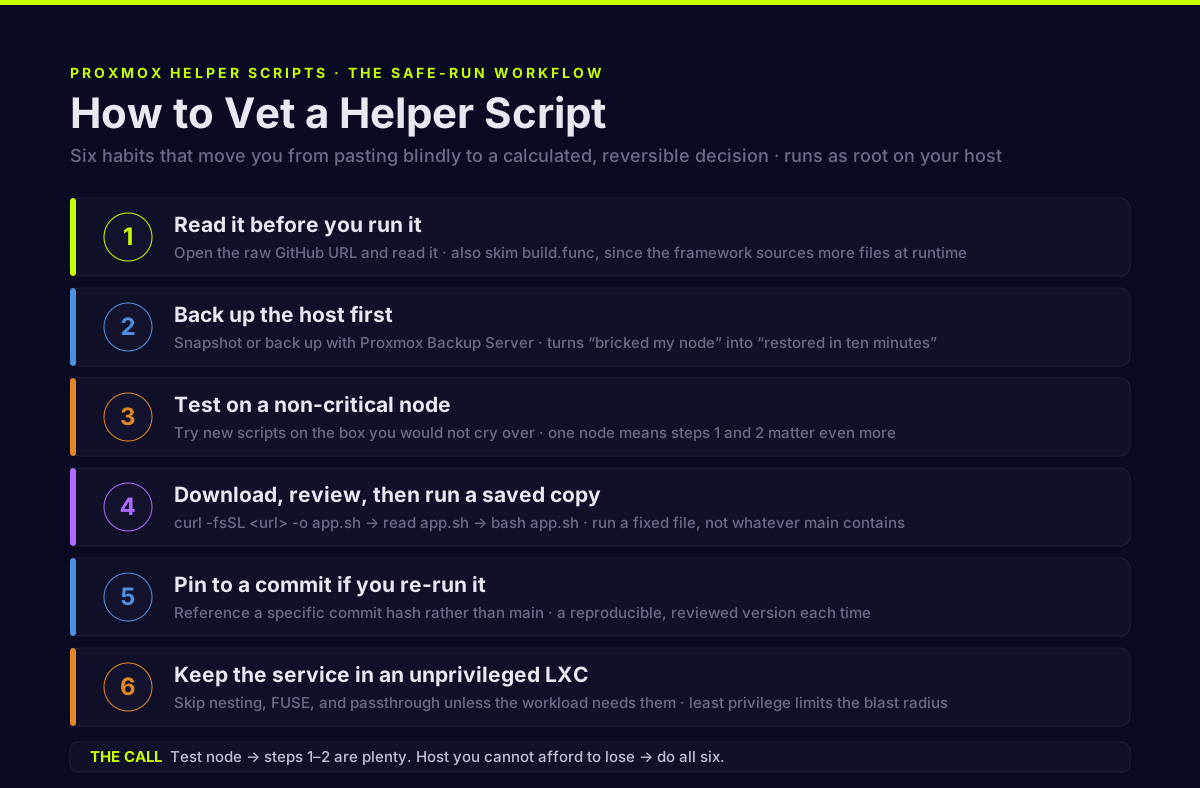
You do not have to choose between “paste blindly” and “never use them.” A few habits move you from gambling to a calculated, reversible decision:
- Read it before you run it. Open the raw GitHub URL the one-liner points at and actually read it. Remember the framework pulls in more files at runtime — so also skim
build.funconce to understand what the shared engine does. You are not auditing every line forever; you are confirming it does what it claims and noting that it sources remote code. - Back up the host first. Snapshot or back up the Proxmox node with Proxmox Backup Server before running anything new. This single step converts “a bad script bricked my node” into “I restored in ten minutes.”
- Test on a non-critical node. If you run more than one box, try new scripts on the one you would not cry over. If you run one node, that is even more reason to do steps 1 and 2.
- Download, review, then run a saved copy instead of piping straight to bash.
curl -fsSL <url> -o app.sh, readapp.sh, thenbash app.sh. Now you are running a fixed, reviewed file — not whatevermainhappens to contain at execution time. - Pin to a commit if you re-run it. If a script is part of your routine, reference a specific commit hash rather than
mainso you get a reproducible, reviewed version each time. - Keep the service in an unprivileged LXC where the app supports it, and do not flip on nesting, FUSE, or passthrough unless the workload actually needs them. Least privilege limits what a future problem can reach.
If that sounds like more friction than “paste this,” that is the trade. The scripts buy you speed; these habits buy back the safety you skipped. On a test node, steps 1–2 are plenty. On a host running things you care about, do all six.
When to use them — and when not to
| Situation | Verdict |
|---|---|
| Spinning up a throwaway service on a test node | Fine — read it, run it, move on |
| Learning Proxmox and what a clean LXC setup looks like | Great — but read the script so you learn what it did |
| Installing on your main node with data you care about | Only after a host backup + a read-through |
| Production / anything you cannot restore quickly | Prefer doing the install yourself, or run from a reviewed, pinned copy |
| You cannot or will not read a bash script at all | Reconsider — that is the user these workflows are riskiest for |
There is also a long-term argument worth taking seriously: the scripts are a fantastic accelerator and a poor teacher. As one user put it, “they are good for learning short term, but when you find yourself getting serious on a project, you’re better off learning to do it without the scripts.” Knowing how to create and configure an LXC container yourself — or set up a node from scratch — means you are never dependent on a third party’s root access to your hypervisor.
The verdict
The Proxmox helper scripts are not a scam, not malware, and not a mistake to use. They are a well-run, MIT-licensed, community-maintained project doing a genuinely useful thing. But “is it safe?” is the wrong shape of question. The accurate version is: “am I comfortable letting code fetched live from GitHub run as root on this specific host, and could I recover if it went wrong?”
On a test node, the answer is almost always yes — use them, and read them to learn. On a host you cannot afford to lose, make it a yes on purpose: read the script, understand that it pulls more code at runtime, back the node up first, and keep your containers least-privileged. Do that, and you get the ninety-second install without betting the homelab on it.
Sources
- community-scripts/ProxmoxVE repository and README (MIT license, “In memory of tteck,” root requirement): https://github.com/community-scripts/ProxmoxVE
misc/build.funcshared installer framework (runtime remote sourcing ofapi.func/core.func/error_handler.func): https://raw.githubusercontent.com/community-scripts/ProxmoxVE/main/misc/build.func- “Helper Scripts or Hidden Risks? The Ongoing Debate in the Proxmox Community” (trust, handover, vetting): https://www.mrplanb.com/blog/helper-scripts-hidden-risks-proxmox-community
- Proxmox forum: “How safe are the Updatable PVE Helper-Scripts”: https://forum.proxmox.com/threads/how-safe-are-the-updatable-pve-helper-scripts.174400/
Frequently asked questions
Are the community-scripts (tteck) Proxmox helper scripts safe to run?
Who maintains the Proxmox helper scripts now that tteck passed away?
Does reading the install one-liner’s script tell me everything it will do?
What is the safest way to run a Proxmox helper script?
Can a Proxmox helper script break or compromise my whole node?
Sources and corrections
- Last updated
- Methodology
- See our methodology for research and review standards.
- Update log
- 2026-08-14 — Refreshed the build.func evidence block, which had gone stale. The article quoted three verbatim
source <(curl -fsSL ...)/source <(wget -qO- ...)lines as the framework’s remote-code bootstrap. Re-read against the live source (https://raw.githubusercontent.com/community-scripts/ProxmoxVE/main/misc/build.func, 7,312 lines, fetched 2026-08-14) and those lines no longer exist: upstream refactored to a_bootstrap_sourcehelper that captures the download, aborts on an empty fetch, and verifies an expected function was defined (exit 115 on failure) - with an in-source comment stating the old process-substitution form hid the download exit code. The page now quotes the current loader and credits the hardening. The underlying claim is unchanged and re-verified: api.func, core.func and error_handler.func are still fetched from themainbranch at runtime and sourced as root, as are tools.func, install.func and the per-app installer under install/. - 2026-08-15 — Meta-audit correction to the 2026-08-14 build.func refresh. That update credited the new
_bootstrap_sourceloader and concluded “the current code fails closed instead” - which overstated the hardening on a page whose subject is exactly this risk. Re-read against the same live source (7,312 lines, re-fetched 2026-08-15): the fail-closed loader covers only the three bootstrap files (api.func, core.func, error_handler.func) at lines 117-120. The entry pointstart()at line 4113 still runssource <(curl -fsSL .../misc/tools.func), and the dev-mode MOTD path at line 5519 still sources install.func the same way - the exact process-substitution form the project’s own in-source comment at line 91 says “hides the download exit code.” The paragraph now states the hardening is partial and names where the old form survives.
- 2026-08-14 — Refreshed the build.func evidence block, which had gone stale. The article quoted three verbatim
- Corrections
- Spotted an error or a stale number? Email contact@techfuelhq.com. Confirmed corrections are added to the update log above.