 TechFuel HQ
By LK Wood IV · 2026-06-02 · ~13 min read · St. Louis County, MO
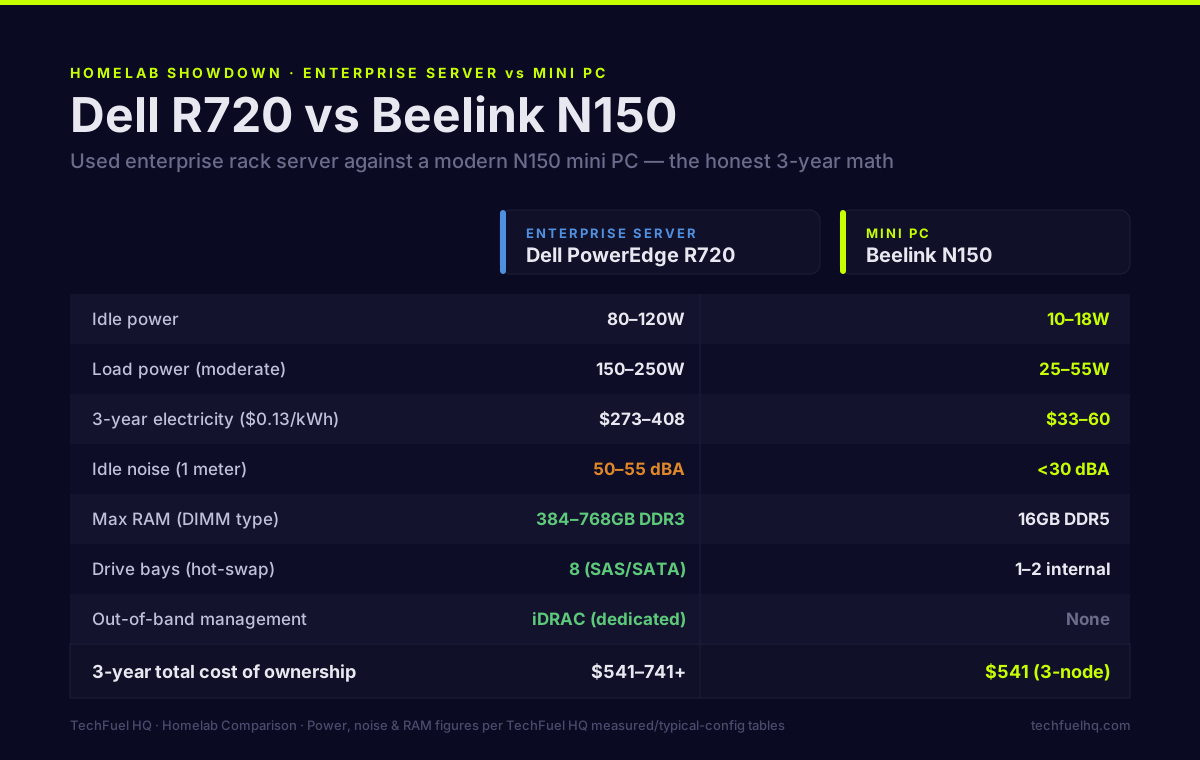
The used enterprise server path has a seductive pitch: a 2013 Dell R720 with 128GB RAM and 8 drive bays for $200. Versus a modern N150 mini PC with 16GB RAM for $160. The server sounds like an obvious win — until you look at what running it actually costs.
This is the comparison without the romanticization.
At a glance
Before the detailed breakdown, here is the head-to-head on the factors that actually decide it. Every figure below is drawn from the sections that follow — using the same reference machines, a used Dell R720 (1P, 8× HDD) against a modern Beelink N150-class mini PC.
| Factor | Used enterprise server (Dell R720) | Modern mini PC (Beelink N150) |
|---|---|---|
| Upfront cost | $200–400 | ~$160 |
| Idle power draw | 80–120W | 10–18W |
| Idle noise (1 m) | 50–55 dBA | 0–25 dBA |
| RAM ceiling | 384–768GB DDR3 RDIMM | 16GB DDR5 SO-DIMM |
| Expansion (drive bays) | 8–24 hot-swap | 1–2 internal |
| Resale driver | RAM density (DDR3 supply is finite) | Modern DDR5 platform |
| 3-year TCO ($0.13/kWh) | $541–741+ | $541 for a 3-node cluster |
The pattern is consistent all the way down: the server wins on RAM ceiling and drive bays, the mini PC wins on power, noise, and upfront cost, and the two land at a similar three-year total cost of ownership. The rest of this article is why each of those numbers is what it is.
The core tradeoff
Used enterprise servers (Dell PowerEdge R720/R730, HP DL380 Gen9, etc.) were designed to maximize compute density and reliability in enterprise data centers. They were NOT designed for:
- Quiet operation
- Energy efficiency at homelab-scale workloads
- Fitting in a living space or spare bedroom
Modern mini PCs (Beelink SEi12 Pro N150, Intel NUC 13 Pro, MINISFORUM UM series) were designed for:
- Low power consumption
- Silent operation
- A small footprint
These goals are in direct conflict on several dimensions. If you’re weighing more than these two options, the servers for a homelab overview maps all five server classes before you narrow to this head-to-head.
The detailed comparison
Power consumption (the biggest factor over time)
| Metric | Dell R720 (1P, 8× HDD) | Beelink N150 mini PC |
|---|---|---|
| Idle power | 80–120W | 10–18W |
| Load power (moderate) | 150–250W | 25–55W |
| Annual electricity (idle, $0.13) | $91–136 | $11–20 |
| 3-year electricity cost | $273–408 | $33–60 |
The difference in 3-year electricity is $240–375. A used R720 bought for $200 costs $440–575 to own for 3 years when you factor in electricity. At California rates ($0.28/kWh), add another $150+ over three years.
The N150 mini PC at $160 upfront + $33–60 electricity = $193–220 over 3 years. The mini PC is cheaper to own over any meaningful timeframe at typical electricity rates.
Model your specific setup in the Power & Cost Calculator.
Noise
Mini PCs under light homelab load: whisper quiet to silent. Most N100/N150 mini PCs under typical VM workloads run fans at 15–25% speed, measured below 30 dBA at 1 meter. Many run fanless at idle.
A Dell R720 at idle: 50–55 dBA at 1 meter. That’s the volume of a quiet conversation. At load: 70–80 dBA. Without a dedicated server room with acoustic isolation, this eliminates enterprise rack servers from any living space.
If you have a basement utility room, closet, or shed with a door, noise becomes manageable. If your homelab is in a bedroom, office, or shared living space, mini PCs win unconditionally on noise.
RAM capacity
This is where enterprise servers genuinely win.
| Platform | Max RAM | DIMM Type | Cost per 32GB (2026) |
|---|---|---|---|
| Dell R720 (E5-2600 v2) | 384–768GB | DDR3 RDIMM | ~$25–35 |
| Dell R730 (E5-2600 v4) | 768GB–3TB | DDR4 RDIMM | ~$15–25 |
| Beelink SEi12 N150 | 16GB | DDR5 SO-DIMM | ~$45–65 |
| MINISFORUM MS-01 | 96GB | DDR5 SO-DIMM | ~$100–150 |
If your homelab workload genuinely needs 128GB+ RAM — running many VMs, building a machine learning training environment, running large in-memory databases — enterprise servers deliver RAM at a fraction of the per-GB cost. A 4× 32GB DDR3 kit for an R720 is $50–80. The equivalent DDR5 for a consumer platform that supports that much RAM costs several hundred dollars.
The honest question: do you actually need 128GB? For most homelabs running 5–10 VMs and containers, 32–64GB is sufficient. The scenario where enterprise server RAM capacity is genuinely needed is narrower than server forums make it sound.
Expandability
| Feature | Enterprise rack server | Mini PC |
|---|---|---|
| PCIe ×16 slots | 2–6 (2U/4U) | 0–1 (via USB4 or M.2-to-PCIe) |
| Drive bays | 8–24 | 1–2 internal |
| 10GbE built-in | Common (dual-port) | Rare |
| Remote management (iDRAC/iLO) | Yes (dedicated port) | No (use Tailscale/KVM) |
| Hot-swap drives | Yes (SAS/SATA backplane) | No |
Enterprise servers genuinely win on expandability for specific use cases:
Storage density. If you need 8–24 drive bays for a large NAS, a used 4U enterprise chassis with a SAS backplane makes economic sense — it’s hard to match the per-drive-bay cost with a consumer alternative.
Remote management. Dell iDRAC and HP iLO give you out-of-band management: power on/off, BIOS access, virtual console, and OS install via virtual media — without being physically at the machine. Mini PCs don’t have this. For a server in a different location (basement, remote colocation), iDRAC is genuinely valuable.
PCIe expansion. If you need multiple PCIe cards (HBAs, 10GbE cards, capture cards), a 2U server has the slots. A mini PC typically has M.2 only.
The MINISFORUM MS-01 middle ground
The MS-01 is worth mentioning specifically: it’s a mini PC with 2× 10GbE SFP+, a PCIe ×4 slot (accessible with a riser), up to 96GB DDR5, and an Intel i9-12900H. It’s not cheap (~$450–600), but it delivers most of what makes enterprise servers attractive (PCIe expansion, 10GbE, ECC-adjacent RAM) without the noise and power floor.
For many homelabs, the MS-01 or similar prosumer SFF machines represent the rational middle ground between a $150 N100 mini PC and a loud, power-hungry rack server.
Who should buy what
Buy a modern mini PC if:
- Your homelab is in a living space (noise matters)
- You’re running fewer than 10 VMs/containers
- Your workloads don’t need more than 32–64GB RAM
- Electricity cost is a real concern
- You want a simple setup that “just works”
Buy a used enterprise server if:
- You have a dedicated server room or acoustic isolation
- You need 128GB+ RAM cheaply (research workloads, large databases)
- You need 8+ drive bays in a single chassis
- You want iDRAC/iLO for remote out-of-band management
- You’re running a storage cluster where hot-swap drives matter
- Power cost is secondary (you’re in a low-rate area or someone else is paying)
Both: A common advanced homelab setup runs a mini PC cluster for VMs/containers (quiet, efficient) alongside a used 4U enterprise server stripped of most drives and used as a cheap storage server (where noise is acceptable and RAM density matters).
The honest arithmetic for a 3-year ownership window
Dell R720 (1P, 8× HDD config):
- Hardware: $200–400
- Electricity ($0.13/kWh, 100W average): ~$341
- Cooling increase (server heat in your space): variable
- 3-year TCO: $541–741+
3× N150 mini PCs (cluster):
- Hardware: 3 × $160 = $480
- Electricity ($0.13/kWh, 15W average each): ~$61 total
- 3-year TCO: $541
The three mini PCs cost roughly the same over three years as a single R720, give you 3× the redundancy (any one node can fail without losing the cluster), consume 80% less power, and make no noise. They can’t touch the R720’s RAM ceiling or drive bay count — but for most homelab workloads, they don’t need to.
Running the power numbers for your specific setup? The Power & Cost Calculator lets you model each device individually. For mini PC recommendations, see Best Mini PCs for Homelab 2026, or price out the $800 used-parts Proxmox build if you’d rather assemble a box from second-hand components. Once your hardware is chosen, the ZFS on Proxmox guide covers pool setup, and the Proxmox VM Capacity Planner shows how much ZFS ARC headroom you have for VMs on each config.
Frequently asked questions
What's the best used enterprise server for a homelab in 2026?
How loud are enterprise servers for home use?
Is ECC RAM worth prioritizing for homelab use?
Can I put a modern GPU in a 2012-era rack server?
What drives the price of used rack servers?
Evidence ledger
- Last updated
- Methodology
- This homelab guide was written and edited by Lowell K. Wood IV in St. Louis County, MO. Specs, prices, commands, and version numbers are drawn from the official vendor, reseller, and project documentation current on the date above, and were verified before publishing. First-person hardware claims appear only where the article shows a verifiable artifact — a photo, receipt, or measurement — or links to the TechFuelHQ Open Bench Datasets. Every fact is human-verified against its cited source before publishing; AI assists with first-draft structure and source-gathering, not with the verdict. Full editorial standard: methodology.
- Update log
- 2026-07-03 — Last reviewed and updated.
- Corrections
- Spotted an error or stale price? Email hello@techfuelhq.com. Confirmed corrections are added to the update log above.