 TechFuel HQ
Same browser extension, same phone app — what changes is the server behind them. Bitwarden’s standard self-hosted deployment runs eleven Docker containers and documents 2GB minimum RAM plus 12GB storage; Vaultwarden is one Rust container on SQLite, MySQL or PostgreSQL, with no published hardware spec. Bitwarden lite splits the difference at one container, 200MB RAM.
By LK Wood IV · Published 2026-07-21 · Updated 2026-08-24 · ~10 min read · St. Louis County, MO
TL;DR · One client, three servers
- Vaultwarden and Bitwarden are not rival apps. You run the same official Bitwarden extension, desktop and mobile clients against a different backend.
- There are three server shapes, not two: Bitwarden standard (eleven Docker containers, documented 2GB minimum / 4GB recommended RAM, 12GB minimum storage), Bitwarden lite (1 container, 200MB RAM, SQLite, ARM), and Vaultwarden (1 Rust container, no published hardware spec at all).
- What you give up with Vaultwarden: SAML SSO, SCIM, custom roles, several enterprise policies, passkey login, and vendor support. What you gain for free: Emergency Access and Directory Connector support.
- Security is a trade, not a win: smaller surface and two published 2024 audits on one side, SOC 2 Type II / SOC 3 / ISO 27001 and yearly named third-party audits on the other. Those are vendor attestations — self-hosting does not inherit them.
- Running official clients against an unofficial backend is a standing commitment: Bitwarden does not guarantee the pairing, so pin your client versions, test updates before rolling them out, and keep a rollback path.
Note on sources: every figure below is pulled from vendor documentation, repository files or project wikis current as of 2026-07-20. Versions and requirements move; the Sources list at the bottom is the canonical set to re-check before you build.
The short version
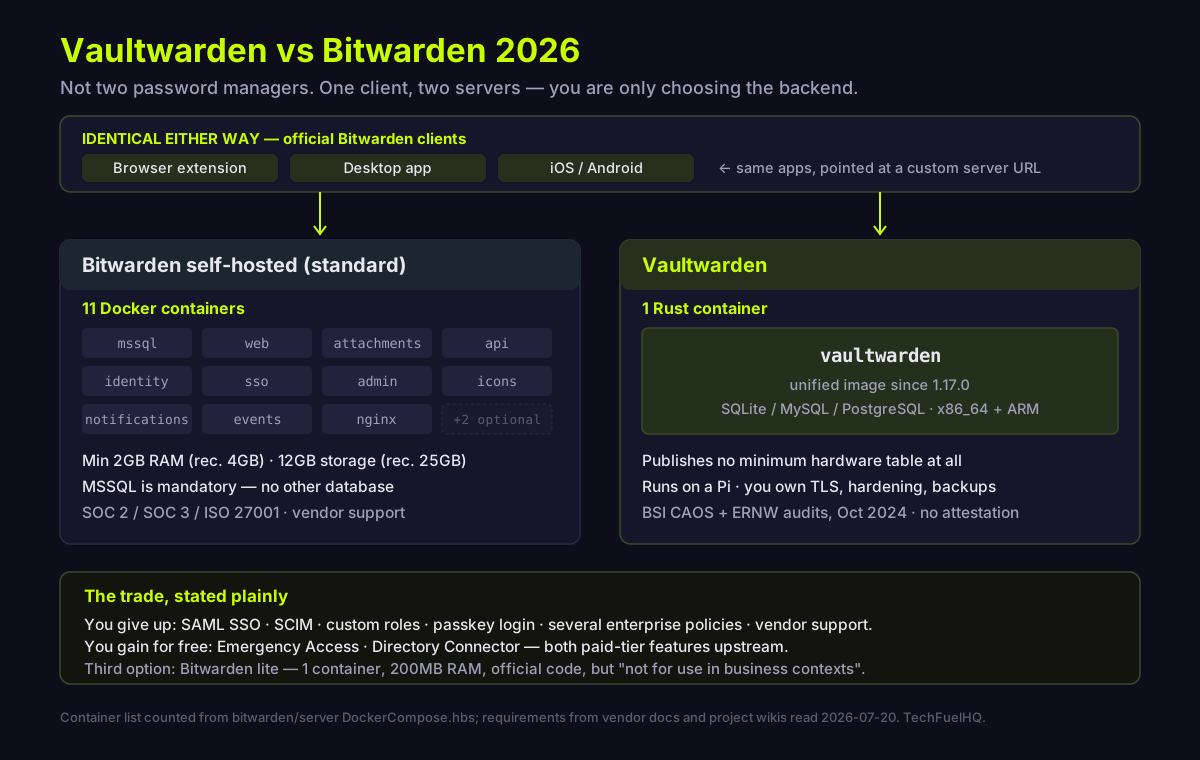
The reason the vaultwarden vs bitwarden question feels unanswerable on most sites is that it is framed wrong. These are not two password managers. Vaultwarden is described by its own README as “an alternative server implementation of the Bitwarden Client API, written in Rust and compatible with official Bitwarden clients” (README). You install the exact same Bitwarden browser extension and phone app in both cases. The only thing you are choosing is which server those clients sync against, and therefore what that server costs you in RAM, features, licensing and personal responsibility.
Same clients, different server
Hold this straight and everything else falls into place. Vaultwarden even ships a patched build of Bitwarden’s own web vault rather than writing its own, and the project states plainly it is “not associated with, endorsed by, or affiliated with Bitwarden, Inc.” with “no collaboration” between the two (Vaultwarden FAQs). Bitwarden’s side of that non-relationship is documented too: it “cannot guarantee that official clients will work perfectly with non-official servers,” and says its support may be limited in helping with client issues on a non-official server (Bitwarden hosting FAQs).
That cuts both directions. The Vaultwarden wiki warns that filing a client bug on a Bitwarden repository will most likely be closed on the grounds that they do not support alternative servers (client troubleshooting), and the README carries a bolded instruction to report everything to Vaultwarden instead, whatever client you are on. Choosing Vaultwarden means accepting that you are now the integration point between two projects that do not talk to each other.
That has a practical cost worth planning for rather than discovering. Client compatibility is not a contract — it is a property that has held well in practice because Vaultwarden tracks the client API closely, but nothing obliges Bitwarden to preserve it across a client or API change. Treat client updates the way you would treat any dependency you do not control: pin the versions your household actually runs, let a new browser-extension or mobile release sit for a few days before you push it to everyone, keep a Vaultwarden release you know works, and make sure your export is current before any upgrade on either side. None of that is onerous. It is simply the maintenance you took on in exchange for the single container.
The resource gap is the real decision
Bitwarden’s own blog says it directly: the lite route deploys a single container, where the standard deployment uses eleven different Docker containers (Bitwarden blog). Reading the current setup template, the eleven that blog post refers to are mssql (emitted only when the built-in SQL Server is enabled), web, attachments, api, identity, sso, admin, icons, notifications, events and nginx, plus two feature-flagged services, key-connector and scim (DockerCompose.hbs).
Documented minimums for that standard Linux deployment are an x64 1.4GHz processor, 2GB RAM and 12GB storage, with 2GHz dual core, 4GB RAM and 25GB recommended, on Docker Engine 26+ (install on-premise Linux). It ships an MSSQL Express image with a 10GB maximum database size, and a standard deployment can be pointed at an external database instead of the bundled one — but SQLite, PostgreSQL and MySQL/MariaDB are documented only for lite (lite docs).
Vaultwarden is one container, and since 1.17.0 a single unified image covers SQLite, MySQL and PostgreSQL, in Debian and slimmer Alpine variants across x86_64, armv6, armv7 and aarch64 (image guide). Here is the honest gap: Vaultwarden publishes no minimum hardware table at all. As of 2026-07-20 the wiki index carries no hardware-requirements page. The only numbers available are forum posts, and they should be labelled as such. Collaborator BlackDex suggested 2 vCPUs and 1GB of memory with storage sized to attachments, and noted that in theory Vaultwarden can run on well under 100MB by itself (forum). In a separate discussion the same collaborator put a single core at “probably fine” without heavy load, one user reported 512MB working, and another warned that 1GB “could become a problem” if you build the container yourself (discussion 2903). Treat those as community opinion, not specification.
Practically, that footprint is why Vaultwarden lands on a Pi or a small node next to everything else. If you are sizing that box, the same reasoning we used for picking a mini PC for Home Assistant applies to any small always-on server, and our Vaultwarden on Proxmox setup guide walks the LXC-and-reverse-proxy build end to end.
Head to head
| Dimension | Bitwarden self-hosted (standard) | Bitwarden lite | Vaultwarden |
|---|---|---|---|
| Containers | 11 base (+2 conditional: key-connector, scim) | 1 | 1 |
| Min RAM (documented) | 2GB (rec. 4GB) | 200 MB | not documented |
| Min storage (documented) | 12GB (rec. 25GB) | 1GB | not documented |
| Min CPU (documented) | x64 1.4GHz (rec. 2GHz dual core) | not stated | not documented |
| Database | MSSQL (bundled Express or external) | MSSQL / PostgreSQL / SQLite / MySQL-MariaDB | SQLite / MySQL / PostgreSQL |
| ARM / Raspberry Pi | no — x64 required | yes | yes (multi-arch) |
| Vendor stance on business use | no personal-use restriction stated | “not for use in business contexts” | individuals, families, smaller organizations |
| SCIM | yes (Teams/Enterprise) | n/a | not documented as supported |
| SSO | yes (Enterprise, /bitwarden_license) | n/a | OIDC only, master password still required |
| Emergency Access | premium / paid org only | premium | included |
| Vendor compliance attestations | SOC 2 Type II, SOC 3, ISO 27001, HIPAA | same | none claimed |
| Audits | annual third-party, named firms 2018–2025 | same | BSI CAOS (v1.30.3, Oct 2024), ERNW pentest (Oct 2024) |
| License | AGPL-3.0 + Bitwarden License for /bitwarden_license | same | AGPL-3.0 |
| Latest verified version | v2026.8.0 (2026-08-19) | same repo | 1.37.2 (2026-08-22) |
Version data is from the GitHub release APIs for bitwarden/server and dani-garcia/vaultwarden.
That SSO row is part of a wider pattern. Bitwarden lists SSO integration under its Enterprise plan at $6 per user per month billed annually, which puts it among the eleven self-hostable apps in our self-hosted SSO tax tracker that keep single sign-on behind a paid tier — with Vaultwarden’s free OIDC as the community answer.
What you actually give up
Vaultwarden’s supported list is longer than most comparisons admit: organization vaults, groups, collections, event logs, attachments, TOTP, Bitwarden Send, trash, master password re-prompt, personal API keys, 2FA via email, Duo, YubiKey, FIDO2 WebAuthn and authenticator apps, WebSocket live sync, admin account recovery, and a subset of enterprise policies (wiki Home).
The gaps are specific. Login with Passkeys, New Device Login Protection and the full Bitwarden Public API / Organization API key sit under “may be added over time,” with the public API only partially implemented. Custom roles and the require-SSO-authentication, vault-timeout and remove-individual-vault-export policies are “unlikely to be added without external contribution.” SSO is OpenID Connect only, with no SAML, and carries real caveats: “a master password will still be required and not controlled by the SSO,” signup is blocked when the provider reports an unverified email, and Auth0 is documented as not working because it “appear[s] not to follow the spec” (SSO wiki). Authentik is on the documented provider list, so if you already run our Authentik SSO build the OIDC path is realistic.
SCIM is the one to phrase carefully. It appears in neither the supported nor the not-implemented list, and no SCIM page appears in the wiki index as of 2026-07-20, so the correct statement is “not documented as supported,” not “explicitly unsupported.” On the official side, SCIM v2 and Directory Connector are both Teams/Enterprise features (SCIM, Directory Connector).
Two things run the other way. Emergency Access is included in Vaultwarden but is premium or paid-organization only on official Bitwarden (Emergency Access). Directory Connector is listed as supported against Vaultwarden despite being Teams/Enterprise-gated upstream. Maintainer jjlin’s summary of getting enterprise features free is “Some, but not all,” alongside a warning about third-party projects that bypass Bitwarden’s license checks: “it seems almost certain that they’re breaking the terms of Bitwarden’s licenses” (discussion 4132).
The licensing detail people miss
Self-hosting Bitwarden is free, but “some features must be unlocked in your self-hosted instance with a registered license file,” and that license file comes from the Bitwarden-hosted web app via a premium subscription or an organization owner (licensing). Only Families and Enterprise organizations can be imported to self-hosted servers, organizations must first be created in the cloud web vault for billing, and license sync requires globalSettings__enableCloudCommunication=true (self-host an organization). An installation ID and key from bitwarden.com/host are mandatory either way. At the source level, files under /bitwarden_license (Commercial.Core, SSO) are not AGPL and production use requires a paid subscription (LICENSE_FAQ). Vaultwarden is AGPL-3.0 throughout (repo metadata).
The security trade
Bitwarden’s white paper documents a dedicated security engineering team, SOC 2 Type II and SOC 3 renewed annually, ISO 27001, third-party reviews at least once per year, AES-CBC 256-bit with HMAC, and a PBKDF2 SHA-256 default of 600,000 iterations with optional Argon2id (white paper). HIPAA is claimed separately, with annual third-party audits against the Security Rule (compliance) — worth noting because the white paper itself does not mention it.
One thing to be clear about, because it is the most expensive misreading in this whole comparison: those are attestations about Bitwarden the vendor and its hosted service, not about your server. Standing up the official code on your own hardware does not make your deployment SOC 2 or ISO 27001 compliant, and it does not make it HIPAA compliant. Compliance follows the controls you operate and the scope an auditor agrees to — your encryption at rest, your access control, your logging, your business-associate agreements. What the official server buys you is a vendor with attestations you can reference and a support contract to point at. The audit scope is still yours to earn. The audit page names firms by year, including a 2025 cryptography report from the Applied Cryptography Group at ETH Zurich, 2025 mobile work by Unit 42, and multiple Cure53 engagements back to 2018 (audits).
Vaultwarden’s counter is a smaller surface and real audit history. Two published reviews from October 2024: the German BSI’s CAOS code audit of v1.30.3, and an ERNW penetration test that “identified 3 vulnerabilities, including an authentication bypass,” responsibly disclosed (audits wiki). Release 1.36.0 shipped fixes for SSO login CSRF, user and organization enumeration, SSO existing-user binding, and SSRF via the icon endpoint, and 1.37.0 (July 2026) followed with more: two further SSRF advisories on the icon endpoint, cross-organization cipher access, an organization-policy bypass on directory import, and a Send access-count issue (releases) — evidence of an active response process, not of an absence of bugs. Two currency notes if you are running this today. 1.37.0 is not optional if your clients are current: the maintainers state it “is required for support with clients with version 2026.7.0+.” And the patch releases are not optional either: 1.37.1 fixed the organization invites that 1.37.0 broke (plus an OpenSSL build issue affecting the Alpine images), and 1.37.2 (22 August 2026) is, in the maintainers’ words, “required for support with clients with version 2026.8.0+” (1.37.2 release). Pinning a password-manager server to a stale tag is the one place in a homelab where “if it works, don’t touch it” is the wrong instinct.
The burden shifts to you. The hardening guide states that Rocket’s built-in TLS is “intended for development use only” and not production-ready, so a reverse proxy is required for any public instance, and it recommends disabling registration, running containers as non-root, minimal volume mounts and fail2ban (hardening guide). One proxy gotcha: the WebSocket library does not honour X-Forwarded-For or Forwarded headers in any form (FAQs). Pick your proxy with that in mind — our Caddy vs Nginx Proxy Manager vs Traefik comparison covers the trade-offs. And take the README’s disclaimer literally: the project “cannot be held liable for any data loss,” and recommends regular backups. Encrypted offsite copies are the minimum bar for a password database — our restic setup walk-through is the fastest path there, and if you have not picked a tool yet, restic vs Borg vs Kopia settles it by where the backup lands.
Mobile push is the sneaky gotcha
Push notifications have worked since Vaultwarden 1.29.0, but they require an official Bitwarden installation ID and key from bitwarden.com/host, and they will not work with Bitwarden apps installed from F-Droid, Neo Store or other alternative stores, because those builds ship without Firebase Messaging support. The client also needs firebaseinstallations.googleapis.com reachable, apps connected before v1.30.2 must clear data or reinstall, and EU and US regions need different relay and identity URIs (push wiki). If your reason for self-hosting is to stay off Google services, that constraint deserves to be in the decision, not discovered afterward.
Run Vaultwarden if / run official Bitwarden if
Run Vaultwarden if you are one person, a family, or a small team; your hardware is a mini PC, a Pi or a modest VM; you want SQLite and a single container; you want Emergency Access without a subscription; and you accept full ownership of TLS, hardening, updates and backups. The project scopes itself the same way, targeting “individuals, families, and smaller organizations.” Community sizing is unremarkable at this scale — one contributor reported it running well on a Raspberry Pi and put 25 users comfortably inside its range, for a workload that mostly idles between syncs (forum).
Run official Bitwarden (standard) if you need SAML SSO, SCIM provisioning, custom roles, Key Connector, vendor support, or a compliance answer for an auditor; if you can supply 4GB RAM and 25GB storage comfortably; and if you would rather pay for a license file than own the incident. The community framing matches — the recurring argument for the official server is simply preferring to let Bitwarden maintain the infrastructure (Bitwarden forums).
Consider Bitwarden lite if you want the official codebase on Vaultwarden-class hardware: 1 container, at least 200MB RAM, 1GB storage, SQLite or PostgreSQL or MySQL, ARM supported. The catch is written into the docs: lite “is intended for personal use and home-labs, not for use in business contexts.”
What competing guides skip (our angle)
Four things almost never make it into other comparisons.
First, Bitwarden lite narrows the old resource argument for personal use. Most articles still compare Vaultwarden against the eleven-container stack, which has not been the only official option for a while. For a homelab, 1 container at 200MB is a genuinely competitive official answer. It does not erase the case for Vaultwarden, though — lite is scoped out of business use by its own docs, it does not close the Emergency-Access-for-free gap, and Vaultwarden still carries the broader multi-arch story. What changes is that “eleven containers” is no longer a reason on its own.
Second, the “Vaultwarden has never been audited” claim is stale. It traces to a 2022 community post and is contradicted by the 2024 BSI and ERNW work. Repeating it in 2026 is simply wrong.
Third, Vaultwarden’s own scope statement contradicts its feature list. The wiki says development of features “mainly useful to larger organizations (e.g., single sign-on, directory syncing, etc.) is not a priority” while the same page lists OIDC SSO and Directory Connector as implemented. Read that as positioning and prioritization, not as a current feature gap.
Fourth, one Bitwarden doc inconsistency is worth flagging rather than papering over. The self-hosting page says only Families and Enterprise organizations can be imported to self-hosted servers, yet Teams is listed as eligible for both SCIM and Directory Connector. We could not resolve that from the docs, so treat Teams self-hosting as unverified and confirm with Bitwarden before planning around it. We also verified no pricing figures for this article, so none appear here.
Related reading
- Vaultwarden on Proxmox: full setup guide
- Self-hosted SSO with Authentik
- Authelia vs Authentik: which self-hosted SSO
- Caddy vs Nginx Proxy Manager vs Traefik
- Automated offsite backups with restic
- restic vs Borg vs Kopia: which backup tool
- Best mini PC for Home Assistant — the sizing logic for any small always-on box
Sources
- https://bitwarden.com/blog/new-deployment-option-for-self-hosting-bitwarden/
- https://bitwarden.com/blog/lightweight-and-flexible-bitwarden-lite-self-host-deployment/
- https://raw.githubusercontent.com/bitwarden/server/main/util/Setup/Templates/DockerCompose.hbs
- https://raw.githubusercontent.com/bitwarden/server/main/LICENSE_FAQ.md
- https://bitwarden.com/help/install-on-premise-linux/
- https://bitwarden.com/help/install-on-premise-manual/
- https://bitwarden.com/help/install-and-deploy-lite/
- https://bitwarden.com/help/self-host-bitwarden/
- https://bitwarden.com/help/self-host-an-organization/
- https://bitwarden.com/help/licensing-on-premise/
- https://bitwarden.com/help/hosting-faqs/
- https://bitwarden.com/help/directory-sync/
- https://bitwarden.com/help/about-scim/
- https://bitwarden.com/help/emergency-access/
- https://bitwarden.com/help/bitwarden-security-white-paper/
- https://bitwarden.com/help/is-bitwarden-audited/
- https://bitwarden.com/compliance/
- https://api.github.com/repos/bitwarden/server/releases/latest
- https://raw.githubusercontent.com/dani-garcia/vaultwarden/main/README.md
- https://api.github.com/repos/dani-garcia/vaultwarden
- https://api.github.com/repos/dani-garcia/vaultwarden/releases/latest
- https://github.com/dani-garcia/vaultwarden/releases
- https://github.com/dani-garcia/vaultwarden/wiki
- https://raw.githubusercontent.com/wiki/dani-garcia/vaultwarden/Home.md
- https://github.com/dani-garcia/vaultwarden/wiki/FAQs
- https://github.com/dani-garcia/vaultwarden/wiki/Audits
- https://github.com/dani-garcia/vaultwarden/wiki/Hardening-Guide
- https://github.com/dani-garcia/vaultwarden/wiki/Which-container-image-to-use
- https://github.com/dani-garcia/vaultwarden/wiki/Enabling-SSO-support-using-OpenId-Connect
- https://raw.githubusercontent.com/wiki/dani-garcia/vaultwarden/Bitwarden-clients-troubleshooting.md
- https://raw.githubusercontent.com/wiki/dani-garcia/vaultwarden/Enabling-Mobile-Client-push-notification.md
- https://github.com/dani-garcia/vaultwarden/discussions/4132
- https://github.com/dani-garcia/vaultwarden/discussions/4580
- https://github.com/dani-garcia/vaultwarden/discussions/2903
- https://vaultwarden.discourse.group/t/hardware-requirements/3273
- https://vaultwarden.discourse.group/t/cpu-ram-recommendations-for-vaultwarden/1566
- https://community.bitwarden.com/t/bitwarden-vs-vaultwarden/15382
- https://community.bitwarden.com/t/can-a-self-hosted-instance-provide-free-account-hosting/40993
Frequently asked questions
What is the difference between Bitwarden and Vaultwarden server?
Is Vaultwarden safe to use?
Does Vaultwarden work with official Bitwarden apps?
What does Vaultwarden not support?
Can I migrate from Vaultwarden to Bitwarden?
Which should I self-host?
Evidence ledger
- Last updated
- Methodology
- This homelab guide was written and edited by Lowell K. Wood IV in St. Louis County, MO. Specs and prices verified against vendor and project documentation current on the date above. Full editorial standard: methodology.
- Update log
- 2026-08-22 — Version row re-checked against the GitHub release APIs (retrieved 2026-08-22): Bitwarden server v2026.7.2 -> v2026.8.0 (2026-08-19); Vaultwarden 1.37.1 -> 1.37.2 (2026-08-22), whose release notes state it is required for clients on 2026.8.0+. The currency paragraph now carries that requirement alongside the 1.37.0 / 2026.7.0+ one. No verdict changed.
- 2026-08-14 — Refreshed the version row and security-currency paragraph against the GitHub release APIs. Bitwarden server v2026.6.2 -> v2026.7.2 (2026-08-05); Vaultwarden 1.36.0 -> 1.37.1 (2026-07-29). Added the 1.37.0 security advisories and two facts a self-hoster needs: 1.37.0 is required for clients on 2026.7.0+, and 1.37.1 fixes organization invites that 1.37.0 broke.
- Corrections
- Spotted an error or a stale number? Email hello@techfuelhq.com. Confirmed corrections are added to the update log above.