 TechFuel HQ
By LK Wood IV · 2026-06-10 · ~11 min read · St. Louis County, MO
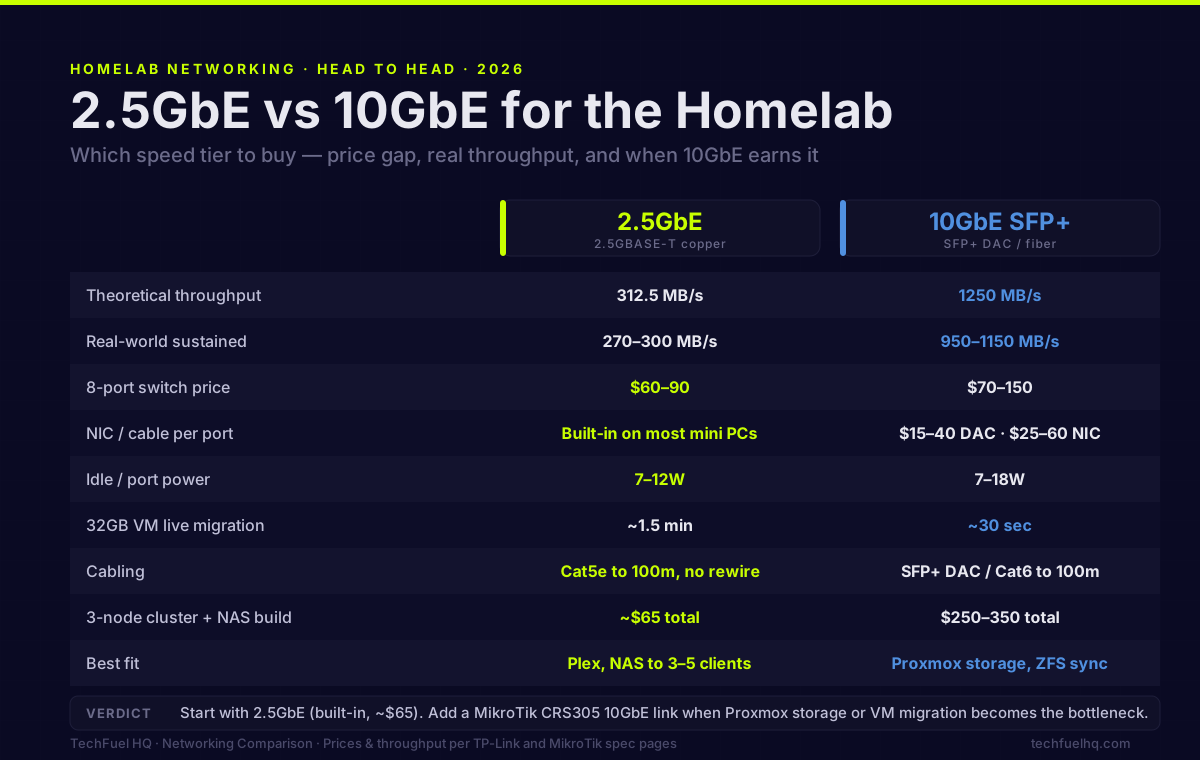
The networking speed question used to be simple: 1GbE was everywhere, 10GbE was expensive enterprise gear. In 2026, 2.5GbE is in most homelab mini PCs and NAS units, and 10GbE has dropped enough that the decision between them is a real tradeoff rather than a price-no-object question.
Here’s where each speed tier actually makes a difference and where you’re buying more than you need.
The speed-cost tradeoff in 2026
Prices have shifted significantly over the past 3 years:
| Speed | Switch (8-port) | NIC per port | Power |
|---|---|---|---|
| 1GbE | $15–30 | Built-in on everything | 3–8W |
| 2.5GbE | $60–90 (unmanaged) | Built-in on most mini PCs | 7–12W |
| 10GbE (copper) | $80–150 (4–5 port) | $25–60 per add-on NIC | 8–18W |
| 10GbE (SFP+) | $70–120 (4–5 port) | $15–40 DAC cable | 7–12W |
MikroTik’s CRS305-1G-4S+IN (4× SFP+ 10GbE + 1GbE management, ~$100) changed the 10GbE homelab calculus in 2022 and remains a top pick. But 2.5GbE switch prices have caught up — you can now get 8× 2.5GbE unmanaged for $65, making the per-port price comparable.
What each speed tier actually delivers in practice
1GbE (125 MB/s theoretical)
Real-world sustained: 110–115 MB/s for large sequential transfers between two 1GbE endpoints.
When 1GbE is the bottleneck:
- Single 4K Blu-ray Remux (~80 Mbps) over a network: comfortably within 1GbE
- NFS mount with a single client doing large file transfers: saturates 1GbE quickly
- VM live migration for a 32GB RAM VM: ~4 minutes on 1GbE
- Multiple clients hitting a NAS simultaneously: starts hitting the ceiling with 2–3 clients on large files
2.5GbE (312.5 MB/s theoretical)
Real-world sustained: 270–300 MB/s between two 2.5GbE endpoints.
When 2.5GbE is sufficient:
- NAS serving media to 3–5 clients simultaneously without transcoding
- Single-VM NFS mount for daily homelab work
- VM live migration: ~1.5 minutes for 32GB VM (3× faster than 1GbE)
- Git large file pushes, backup transfers, Docker image pulls
When 2.5GbE starts showing limits:
- Proxmox VM migration when you want it to be fast (not just faster)
- NFS for multiple VMs doing simultaneous heavy IO (database benchmark, video editing)
- Backup server receiving multiple concurrent streams
10GbE SFP+ (1250 MB/s theoretical)
Real-world sustained: 950–1150 MB/s between two 10GbE endpoints with direct-attach copper (DAC) cables or SFP+ transceivers.
When 10GbE is the right call:
- Proxmox storage network: VMs running on NFS/iSCSI, multiple nodes competing for NAS bandwidth
- VM live migration at scale: 32GB VM in under 30 seconds
- ZFS replication between nodes: transfer large snapshots quickly
- Multiple simultaneous clients doing high-throughput IO
When 10GbE is more than you need:
- Plex/Jellyfin serving to 1–3 clients (2.5GbE handles it)
- Light homelab work with occasional large transfers (2.5GbE handles it)
- Internet connection under 1Gbps (upstream bandwidth is the limit, not local LAN)
Those real-world MB/s figures set the ceiling, but your actual transfer time also depends on the drives at each end. To estimate it for a given file size and link, run the numbers through the network transfer time calculator — it flags when a slow disk, not the network, is the real bottleneck.
Hardware that ships with each speed
2.5GbE is now the baseline for homelab-grade hardware:
- Beelink SEi12 Pro, GTi14 Ultra: 2.5GbE built-in
- Synology DS923+, DS1522+: 1GbE built-in but 2.5GbE PCIe addon available
- MINISFORUM UM890, MS-01: 2.5GbE or 2× 10GbE built-in
10GbE is in higher-end platforms:
- MINISFORUM MS-01: 2× 10GbE SFP+ + 2× 2.5GbE built-in
- Dell PowerEdge R720/R730: dual 10GbE SFP+ via Intel X520/X540
- Network cards: Intel X550-T2 ($80–120), MikroTik MT Cards, Chelsio T520 (used, ~$30)
The specific Proxmox cluster case
For a 3-node Proxmox cluster:
Storage traffic (VMs reading/writing to shared NAS via NFS or iSCSI) is the primary throughput concern. With 3 VMs each doing moderate IO simultaneously, 1GbE saturates quickly. 2.5GbE gives reasonable headroom for most homelab workloads. 10GbE eliminates storage network as a bottleneck.
Live migration — moving a running VM from node A to node B — transfers the VM’s RAM contents over the network. On 1GbE: 32GB VM = ~4 minutes. On 2.5GbE: ~1.5 minutes. On 10GbE: ~30 seconds. If you migrate VMs frequently (maintenance, load balancing), 10GbE is noticeably better. For occasional migrations, 2.5GbE is fine.
Corosync cluster heartbeat — the cluster quorum communication — uses trivial bandwidth. 1GbE is more than enough; the spec requires low latency, not high throughput. Don’t use your 10GbE link for corosync — use a dedicated 1GbE link for heartbeat isolation.
Recommendation for a 3-node cluster:
- Budget-first: 2.5GbE throughout, upgrade storage link to 10GbE later when you feel the bottleneck
- Performance-first: 10GbE SFP+ for the storage/migration network, 1GbE for management
The MikroTik CRS305 argument
The MikroTik CRS305-1G-4S+IN ($95–110) gives 4× SFP+ 10GbE ports at 9W idle. This has been the de facto homelab 10GbE switch recommendation since 2022 for good reason:
- 4× SFP+ ports: enough for 3 Proxmox nodes + 1 NAS
- DAC cables ($5–10 each) connect SFP+ to SFP+ ports in mini PCs that have them
- For mini PCs with 2.5GbE only: a 10GbE PCIe NIC ($30–50 used) + SFP+ DAC solves it
- 9W idle: barely registers on electricity bills
The cost to connect a 3-node cluster + NAS to the CRS305:
- CRS305: $100
- 4× DAC or SFP+ transceivers: $30–50 total
- 4× PCIe NICs (if mini PCs lack SFP+): $120–200
- Total: $250–350 for full 10GbE connectivity
Versus 2.5GbE for the same setup:
- TP-Link TL-SG108-M2 (8-port 2.5GbE): $65
- Nothing else — most mini PCs have 2.5GbE built-in
- Total: $65
The 10GbE premium is real. Whether 250 MB/s of additional headroom is worth $185–285 depends on your workload.
My actual recommendation
Start with 2.5GbE. If your mini PCs already have 2.5GbE built-in (most do now), a $65 8-port 2.5GbE switch gives you 2.5× the bandwidth of 1GbE for almost nothing. This handles most homelab storage workloads comfortably.
Add 10GbE when you feel the limit. Proxmox cluster storage, VM migration, or NAS throughput that’s visibly slow tells you when 2.5GbE is the bottleneck. The MikroTik CRS305 + DAC cables is a clean upgrade path — add the switch, add NICs to nodes as needed, keep the 2.5GbE switch for client devices.
The full 10GbE homelab networking deep-dive is at the 10GbE budget networking guide — that article covers switch selection, NIC options, and cabling in more depth.
Running the numbers on power consumption for your networking gear? The Power & Cost Calculator shows what adding a MikroTik CRS305 (9W idle) adds to your annual electricity bill.
Frequently asked questions
Can I run 2.5GbE on existing Cat5e cabling?
What switches support 2.5GbE without breaking the budget?
Does a Proxmox cluster need 10GbE?
Is 2.5GbE worth upgrading to if I'm on 1GbE?
What's the latency difference between 2.5GbE and 10GbE?
Evidence ledger
- Last updated
- Methodology
- This networking guide was written and edited by Lowell K. Wood IV in St. Louis County, MO. Specs, prices, commands, and version numbers are drawn from the official vendor, reseller, and project documentation current on the date above, and were verified before publishing. First-person hardware claims appear only where the article shows a verifiable artifact — a photo, receipt, or measurement — or links to the TechFuelHQ Open Bench Datasets. Every fact is human-verified against its cited source before publishing; AI assists with first-draft structure and source-gathering, not with the verdict. Full editorial standard: methodology.
- Update log
- 2026-06-10 — Last reviewed and updated.
- Corrections
- Spotted an error or stale price? Email hello@techfuelhq.com. Confirmed corrections are added to the update log above.