 TechFuel HQ
By LK Wood IV · 2026-06-16 · ~9 min read · St. Louis County, MO
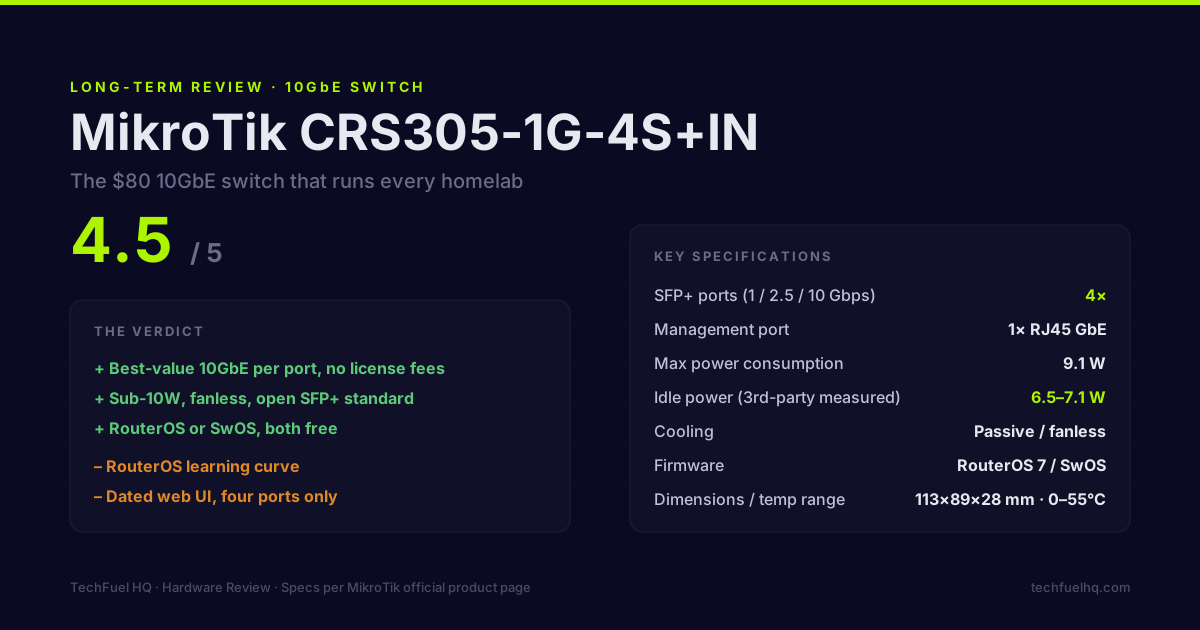
Rating: 4.5 / 5
The CRS305 is the switch that comes up in every homelab 10GbE conversation, consistently, because nothing else at its price point makes as much sense. Four SFP+ ports, one 1GbE copper management port, a MikroTik-documented idle draw of 6.5–7.1W, and an $80–100 street price with no software subscription fees. That’s the case for it.
The case against: RouterOS has a learning curve that surprises people coming from consumer switches, and the web interface looks like it was designed in 2009 (it was). These are real considerations, not negligible footnotes.
Still deciding whether 10GbE is even worth it over 2.5GbE for your homelab? Start with 2.5GbE vs 10GbE: which to buy — this review assumes you’ve already landed on 10GbE.
Here’s the full picture.
What you’re actually buying
Hardware:
- 4× SFP+ ports at 1/2.5/10 Gbps
- 1× RJ45 Gigabit Ethernet (management)
- Desktop/rack mount (no ears included, MikroTik sells a bracket kit)
- External 24V passive PoE power supply (included)
- No fan — passively cooled chassis
Firmware options:
- RouterOS 7 (default): full networking OS with Winbox GUI, CLI, web interface
- SwOS: simplified switch-mode firmware, browser-only, for pure Layer 2 operation
Published specs (MikroTik product page, accessed 2026-06):
- Max power consumption: 9.1W
- Idle power: 6.5–7.1W (measured by third parties; MikroTik doesn’t publish idle separately)
- Dimensions: 113 × 89 × 28 mm (fits on a shelf, not just in a rack)
- Operating temperature: 0–55°C
Who this switch is for
The CRS305 makes sense if:
You have 2-4 machines that need 10GbE connectivity. The sweet spot: two mini PCs + a NAS. Three SFP+ ports cover all three devices, the fourth port goes to your router or another switch for uplink.
Your runs are under 5 meters. Passive DAC cables (SFP+ Direct Attach Copper) work perfectly at this distance, cost $15–20 each, draw less than 0.5W, and have zero transceiver compatibility issues on the CRS305.
You care about power consumption. 7W total for a 10GbE switch is exceptional. The QNap QSW-308S (8× SFP+) pulls 20–25W. The Ubiquiti USW-Pro-Max 16 (16-port 10GbE) pulls 30–40W. The CRS305 is the most efficient 10GbE switch option in 2026 at its port count.
You don’t need PoE on the 10G ports. SFP+ ports don’t do PoE. If you need PoE (for APs, cameras, phones), you need a separate switch — the CRS305 is pure data.
Setup path: SwOS for most homelab users
When the switch arrives, it runs RouterOS. For a pure homelab switch (no routing), SwOS is the better choice — it’s a simpler web UI that does exactly what you need.
Switch to SwOS:
- Connect a laptop to the 1GbE management port via RJ45
- Set your laptop’s IP to 192.168.88.2 /24 (the CRS305 defaults to 192.168.88.1)
- Navigate to 192.168.88.1 in a browser → log in with admin/no-password
- Go to System → RouterBOOT → Boot OS → select SwOS → Apply → reboot
After reboot, access 192.168.88.1 in a browser — you’re now in SwOS. The interface shows all ports and lets you configure VLANs, aggregation, and mirror ports from a single page.
VLAN setup in SwOS — for a typical homelab with separate IoT and trusted VLANs:
- In SwOS → VLANs tab: add VLAN IDs (e.g., 10 for trusted, 20 for IoT, 99 for management)
- For each port: set VLAN mode (access or trunk), tagged VLANs (for trunk ports to router/Proxmox), and default VLAN ID (for access ports)
- Port 5 (the 1GbE copper port) becomes the management interface
Full VLAN config walkthrough is in the VLANs for the Homelab guide.
The RouterOS path: more power, more complexity
If you want the CRS305 to handle routing alongside switching — running DHCP for your LAN, NAT, or acting as a firewall — RouterOS is appropriate. RouterOS on the CRS305 supports:
- Full L3 routing between subnets
- Firewall rules (stateful, connection tracking)
- DHCP server with static leases
- OSPF and BGP (yes, on this $80 switch)
- Traffic shaping and queuing
The Winbox desktop application (Windows/Mac/Linux via Wine) is the most ergonomic way to configure RouterOS — it connects directly over Layer 2 MAC address, so you can configure the switch even if you mess up the IP settings. The web interface is functional but slow. The CLI via SSH is identical to Cisco-style IOS if you’re used to that workflow.
Realistic use case for RouterOS: a 2-node homelab where the CRS305 handles both 10GbE switching between nodes and routes traffic from a DSL/cable modem to the nodes without a separate router box. Not a configuration I’d recommend for complex VLANs or firewall rules — OPNsense on a mini PC handles that better — but it works for minimal setups.
Power draw in practice
The published 9.1W max and community-measured 6.5–7.1W idle figures hold up. In a typical homelab setup with two DAC-connected nodes active:
- Idle (switch powered, no traffic): 6.5–7W
- Active traffic (NAS backup, file transfers): 7–8W
- Max under sustained load: ~8.5W (consistent with the published 9.1W ceiling)
At $0.13/kWh running 24/7, the CRS305 adds ~$8/year to your electricity bill. It’s not a consideration. Compare to a used Cisco SG350-28 at 35–50W for a 28-port managed switch — the Cisco costs $35–50/year in electricity for a homelab with 8 active ports.
What the CRS305 doesn’t do well
Port count. Four SFP+ ports means four 10GbE connections plus the 1GbE management. If you need 6+ 10GbE devices, you’re looking at the CRS309-1G-8S+ (8× SFP+, ~$180) or the CRS312-4C+8XG (mixed copper + SFP+, ~$280).
PoE. None. The SFP+ standard doesn’t carry DC power. If your homelab includes Unifi APs, IP cameras, or VoIP phones that need PoE, add a dedicated PoE switch for those devices — a $35 TP-Link TL-SG108PE handles 8 PoE devices at up to 64W total PoE budget.
RouterOS UI. If you’ve never used MikroTik equipment, RouterOS feels like it predates every modern network management interface. The Winbox application has been the primary configuration tool for 20 years and it shows. Winbox works, it’s stable, and the MikroTik documentation is comprehensive — but expect 30–60 minutes of learning before a typical VLAN configuration feels natural.
No SFP (1GbE SFP) ports. The CRS305’s four ports are SFP+ only. You can plug standard 1GbE SFP modules into SFP+ ports — they negotiate down — but the module costs money and uses a 10GbE slot. The CRS305 is optimized for 10GbE devices.
Price and where to buy
Street price: $80–100 USD as of mid-2026. Check MikroTik’s authorized distributor page for the nearest warehouse-stocked source — resellers in the US include Baltic Networks, Streakwave, and Winncom. Amazon carries it but usually at $95–110 and sold through third parties.
There’s no used market pricing consideration with MikroTik the way there is with Cisco — MikroTik hardware holds value because there’s no licensing distinction between new and used units (RouterOS is perpetually licensed to the hardware, not an account).
Verdict
The CRS305-1G-4S+IN is the correct answer for most homelab 10GbE setups in 2026. The four SFP+ ports cover the typical 2–3 node + NAS topology, the passive cooling and 7W idle make it the most power-efficient 10GbE option at its port count, and the open SFP+ standard means no vendor module lock-in.
RouterOS has a learning curve, but it’s a one-time investment — once you’ve configured your VLAN and port setup, you set it and forget it. The CRS305 doesn’t need firmware updates more than a couple of times per year, and MikroTik’s release cadence is methodical rather than aggressive.
Buy it. If you outgrow four SFP+ ports, the CRS309 is the natural upgrade.
For the full 10GbE homelab setup — NIC selection, DAC vs. fiber, and three budget tiers — see the 10GbE Homelab Networking guide. For VLAN configuration on this switch (and integration with OPNsense + Proxmox), the VLANs for the Homelab guide has exact commands for MikroTik SwOS. The Homelab Networking Gear Under $200 roundup puts this switch in context alongside routers and wireless APs.
Frequently asked questions
Is the MikroTik CRS305 a router or a switch?
What SFP+ modules work with the CRS305?
Can the CRS305 do VLANs?
What's the difference between RouterOS and SwOS on the CRS305?
How does the CRS305 compare to the Netgear GS305EP for homelab use?
Evidence ledger
- Last updated
- Methodology
- This networking guide was written and edited by Lowell K. Wood IV in St. Louis County, MO. Specs, prices, commands, and version numbers are drawn from the official vendor, reseller, and project documentation current on the date above, and were verified before publishing. First-person hardware claims appear only where the article shows a verifiable artifact — a photo, receipt, or measurement — or links to the TechFuelHQ Open Bench Datasets. Every fact is human-verified against its cited source before publishing; AI assists with first-draft structure and source-gathering, not with the verdict. Full editorial standard: methodology.
- Update log
- 2026-06-16 — Last reviewed and updated.
- Corrections
- Spotted an error or stale price? Email hello@techfuelhq.com. Confirmed corrections are added to the update log above.