 TechFuel HQ
This is the 4K rig I actually run: a Ryzen 7 7800X3D with an RTX 5080 on AM5, plus the memory, storage, cooling and power supply that let a 4K card behave like one. The two headline parts come to roughly $1,570, and the complete build lands between $2,500 and $2,900.
By LK Wood IV · 2026-06-19 · ~15 min read · St. Louis County, MO
Some links below are Amazon affiliate links; if you buy through them TechFuel HQ may earn a small commission at no extra cost to you. As an Amazon Associate I earn from qualifying purchases. Commissions never influence which products get recommended — see our disclosure.

This is the rig I actually run, priced as a build you can put together today. A Ryzen 7 7800X3D paired with an RTX 5080, on AM5, with the memory, storage, cooling, and power supply that make a 4K card behave like one. The headline parts (CPU and GPU) come to about $1,570 in June 2026; the full build lands in the $2,500 to $2,900 range depending on the RTX 5080 model you choose and where the 2026 memory and storage shortage has prices parked the week you buy.
I am writing this one differently from a spec-sheet build. The GPU benchmarks below are not lifted off a launch slide or paraphrased from a YouTube video. They are first-party numbers I measured on my own ASUS ROG Astral RTX 5080 OC, on this exact 7800X3D platform, and published in full in the open bench dataset. Where I lean on someone else’s testing for broader context, I name the source. That is the whole point of this site.
If you want the framework behind every choice here rather than the receipt, the how to choose a PC build guide walks the decision in order. This article is the high-end worked example.
Who this build is for (and who it isn’t)
This is a 4K build. If you game on a 1440p monitor, you are overpaying for a card you cannot fully use, and the $1,500 RTX 5060 Ti 1440p build is the better receipt for you. The 5080 earns its price on a 4K panel — a 4K 144Hz monitor or a 4K OLED — where its raw output and DLSS 4 Multi-Frame Generation have somewhere to go.
It is also a build for people who want one machine that does more than game. The 16GB of GDDR7 and 32-64GB of system RAM mean this same box runs local AI models, handles 4K video work, and doubles as a serious workstation. If pure gaming is the only goal and budget is tight, you do not need to be here — the 5080 is a want, not a need, above 1440p.
The one-line verdict: for 4K high-to-ultra gaming with real headroom for ray tracing and AI work, a 7800X3D + RTX 5080 is the build that makes sense in 2026 — provided you buy the 7800X3D and not the pricier 9800X3D, because at 4K you will not feel the difference.
The parts list with June 2026 prices
Every price below is a real US price I confirmed in June 2026, with a source. Two line items — RAM and storage — are caught in a genuine 2026 price spike driven by AI demand draining the DRAM and NAND supply, so I have given those as ranges and told you where to check live pricing. Tax is not included. The “as tested” column is the exact part on my bench; the recommended column is the sensible buy if you are building fresh.
| Part | Recommended (build fresh) | As tested (my rig) | Price (June 2026) |
|---|---|---|---|
| CPU | AMD Ryzen 7 7800X3D (8C/16T, AM5) | Ryzen 7 7800X3D | ~$320 |
| GPU | RTX 5080 16GB (standard AIB) | ASUS ROG Astral RTX 5080 OC | $1,250+ |
| Motherboard | B650E ATX (PCIe 5.0, Wi-Fi) | ASUS ROG STRIX B650-A Gaming WiFi | ~$180-200 |
| RAM | 32GB DDR5-6000 CL30 (2×16GB) | 64GB DDR5-6000 (2×32GB) | $120-400 |
| Storage | 2TB PCIe Gen4 NVMe | Samsung 970 EVO Plus 1TB (PCIe 3.0, owned) | $200-285 |
| Cooler | 360mm AIO, or a good air tower | NZXT Kraken 360 | $110-200 |
| PSU | 850W ATX 3.1, 80+ Gold | EVGA SuperNOVA 1000 GT (1000W) | $110-130 |
| Case | Dual-chamber or mesh mid-tower | HYTE Y60 | $150 |
| OS | Windows 11 Home | Windows 11 Home | ~$40 |
| Total (recommended) | ~$2,500-2,900 |
A few notes on the line items that matter.
CPU — Ryzen 7 7800X3D (~$320). This is the value gaming chip, and the reason this build does not waste money (Ryzen 7 7800X3D on Amazon). Tom’s Hardware tracked it dropping to $319, an all-time low and $20 below its previous low, and VideoCardz logged it at $324.99 around the same time. Call it $320-340 depending on the day. The longer case for it over the 9800X3D is in the 7800X3D vs 9800X3D upgrade guide and the 7800X3D long-term review; the short version is in the benchmark section below.
GPU — RTX 5080 16GB ($1,250 and up). MSRP is $999 for the Founders Edition, but in June 2026 the cheapest in-stock new card on Best Value GPU’s tracker was $1,249, with standard models clustering in the $1,300-$1,450 band and premium variants like my ASUS ROG Astral OC running up toward $1,900. Buy a standard dual- or triple-fan card in the $1,250-$1,350 range; the premium models buy you a quieter cooler and a small factory overclock, not a different tier of performance. My own ROG Astral RTX 5080 review measures exactly how much that factory OC is worth (about 2-3% for free), and the answer is: not enough to pay a $500 premium for.
Motherboard — B650E, ~$180-200. My bench runs an ASUS ROG STRIX B650-A. For a fresh build I would spec a B650E board for the PCIe 5.0 x16 slot, which lets a future GPU run at full Gen5 bandwidth. Current ASUS B650E listings sit around $180-190 on Best Buy and Micro Center. B650E is the no-regret choice: it takes the 7800X3D today and any AM5 chip through Zen 6 with a BIOS update.
RAM — 32GB DDR5-6000 CL30, $120-400. This is the line that hurts in 2026. A memory shortage tied to AI infrastructure demand has sent DDR5 prices up several-fold (the full breakdown of why): Tom’s Hardware’s RAM price tracker and TweakTown’s reporting that 64GB of DDR5-6000 now costs more than a PlayStation 5 tell the story. A solid value 32GB kit can still be found near $120-150; name-brand CL30 kits run $300-540. Buy 32GB (2×16GB) at DDR5-6000 CL30 for the AM5 sweet spot — I run 64GB only because I keep VMs and local models resident, which is the one case where more RAM actually earns its price. Check PCPartPicker for the live number the week you buy; this is the single most volatile part in the build.
Storage — 2TB PCIe Gen4 NVMe, $200-285. Same crisis, different chips. NAND prices are climbing for the same AI-demand reason, and Tom’s Hardware’s SSD price tracker shows drives that were $150 now sitting near $285. Get a 2TB Gen4 drive with DRAM and a five-year warranty — Gen5 runs hotter and costs more for gains you will not feel in games. My bench drive is an older 1TB; on a 4K rig where modern installs run 150GB each, 2TB is the floor.
Cooler — 360mm AIO or a good air tower, $110-200. The 7800X3D is a 120W-TDP part that draws only 60-90W in games — a quality dual-tower air cooler handles it silently and is the cheaper, no-pump-to-fail choice. I run an NZXT Kraken 360 because the LCD looks right behind glass and I had it on the bench; the NZXT Kraken Core 360 RGB lists at $129.99. Match the cooler to the chip, not to the GPU — the 5080 cools itself.
PSU — 850W ATX 3.1, $110-130. Fully modular, ATX 3.1, with the native 12V-2x6 connector so the 5080 plugs in without an adapter daisy-chain. The NZXT C850 Gold and Cooler Master MWE Gold 850 V3 both land near $90-120. I run a 1000W EVGA SuperNOVA because I have had a supply die mid-game and now overbuy, but the measured draw (below) says 850W is correct.
Case — dual-chamber or mesh mid-tower, ~$150. I run a HYTE Y60 at $149.99. It is a beautiful case with one real warning: the panoramic glass design makes GPU clearance tight, and a thick triple-fan 5080 needs checking against the spec before you buy. A simpler high-airflow mesh tower is the safer pick if you do not want to fuss with clearance.
4K gaming benchmarks: first-party numbers on this exact rig
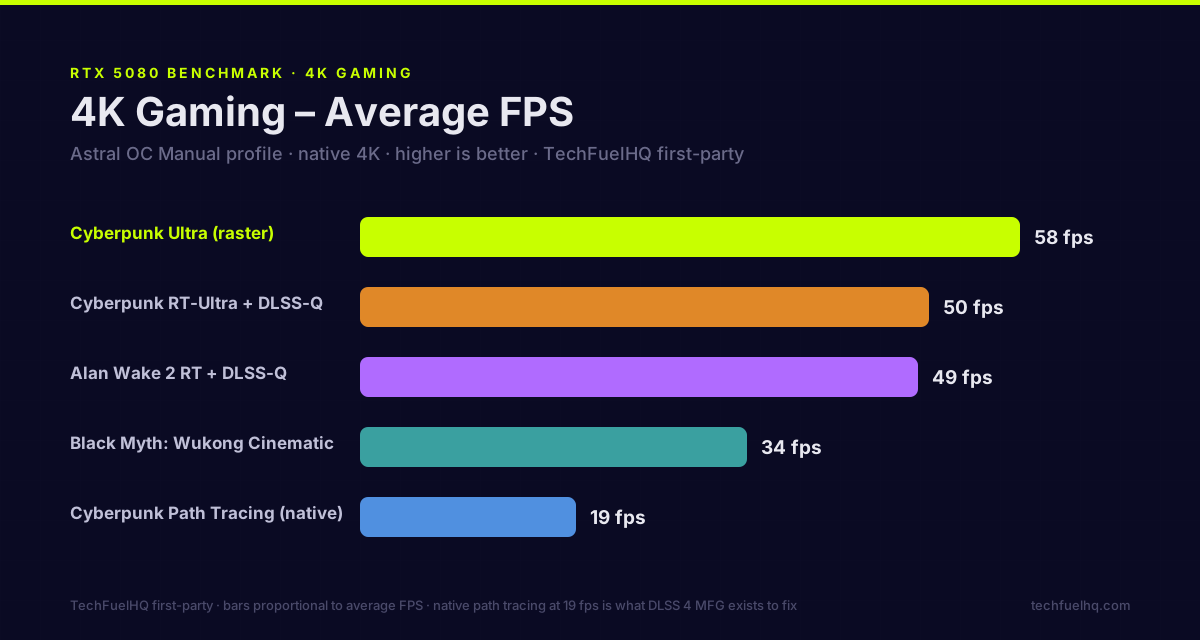
Here is where this build article earns its keep. The numbers in this table were measured by me, on my own ASUS ROG Astral RTX 5080 OC running on this 7800X3D platform, captured with HWiNFO64 logging and published in full — with 1% lows, methodology, and the raw dataset files — in the open bench dataset. These are demanding, ray-tracing-forward titles, run at native 4K, because that is where a 5080 either holds up or doesn’t.
| Game (4K) | Avg FPS | 1% Low | Settings |
|---|---|---|---|
| Cyberpunk 2077 | 58 | 49 | Ultra, raster, no upscaling |
| Cyberpunk 2077 | 50 | 41 | RT-Ultra + DLSS 4 Quality |
| Cyberpunk 2077 | 19 | 15 | Path Tracing, native, no DLSS |
| Alan Wake 2 | 49 | 38 | RT + DLSS 4 Quality |
| Black Myth: Wukong | 34 | 27 | Cinematic preset |
The 1% lows run about 80-85% of the average across the rasterized and DLSS-Quality passes, which is a healthy frame-time consistency profile — no stutter, just a steady floor. The exception is native path tracing (19/15), where the card is bottlenecked so hard that the average frame and the slowest frame are basically the same. That is what 4K path tracing without upscaling looks like on any card short of a 5090, and it is exactly the problem DLSS 4 exists to solve.
DLSS 4 Multi-Frame Generation: what makes 4K path tracing playable
The single most important chart for a Blackwell card is what happens to that unplayable 19 FPS path-traced run when you turn on DLSS 4. These are my measured numbers on Cyberpunk 2077 at 4K with RT Overdrive (path tracing), including the PC latency at each step, because frame generation is worthless if it adds the input lag back:
| Mode | FPS | PC Latency |
|---|---|---|
| Native path tracing (no DLSS, no FG) | 19 | 95 ms |
| DLSS 4 Quality (no frame gen) | 40 | 45 ms |
| + Multi-Frame Gen 2× | 90 | 55 ms |
| + Multi-Frame Gen 4× | 135 | 62 ms |
The story holds up under measurement. DLSS Quality alone more than doubles the frame rate and halves the latency, because Reflex is scheduling a smaller render workload. Stacking MFG 2× doubles the frame rate again for a 10ms latency cost, and MFG 4× lands at a smooth 135 FPS while latency stays well below the native baseline. Across the full ladder, frame rate climbs about 7× and the input lag never gets worse than where it started. That is the actual experience of path-traced 4K on a 5080: native is a slideshow, DLSS 4 turns it into a smooth, responsive game.
How the 5080 sits in the broader 4K picture
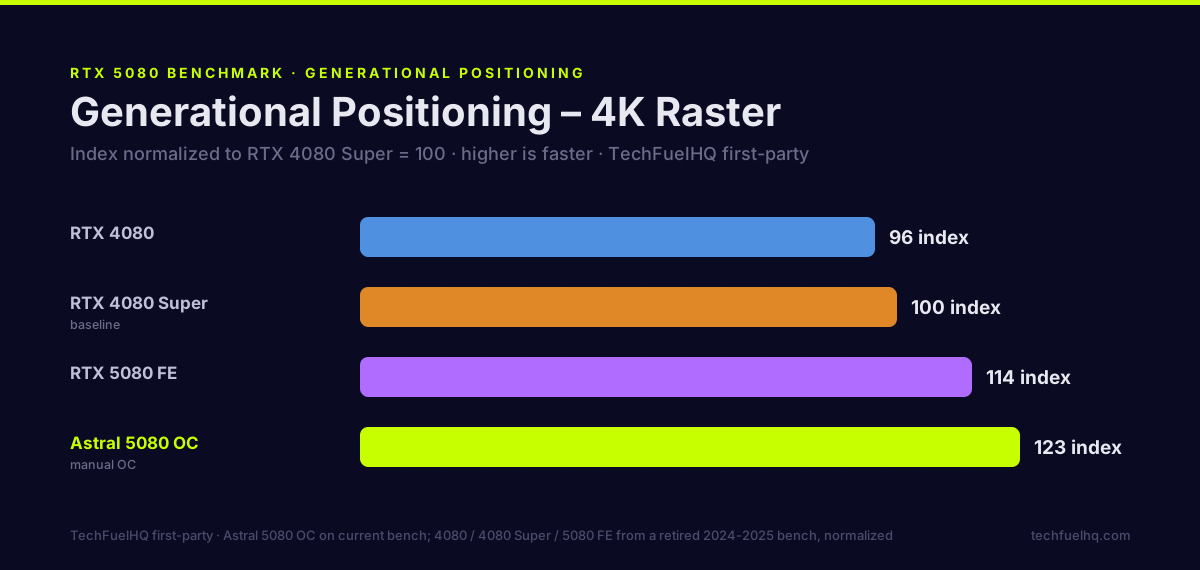
My dataset is deliberately RT-heavy. For breadth across a wider raster suite, published testing fills in the rest. KitGuru’s review found that “at 4K the gains over the 4080 Super do get slightly wider, with the 5080 now 13% faster on average,” while it “still lags behind the RTX 4090 by 15%.” That third-party +13%-over-the-4080-Super figure is a near-exact match for my own first-party generational index, which put the 5080 Founders Edition at 114 against a 4080 Super baseline of 100 (+14%) — two independent measurements landing in the same place. The takeaway: the 5080 is comfortably a 4K card in raster, mid-100s FPS in most mainstream titles, a notch behind the much pricier 4090, and the DLSS 4 ladder above is what extends that to the heaviest ray-traced games.
Do you actually need the 9800X3D? (The question the SERP skips)
Search “RTX 5080 build” and most results pair it with a Ryzen 7 9800X3D. That is the default, and for a 4K build it is the wrong default for most people.
At 4K, the GPU is the bottleneck in nearly every game. The CPU sets up frames and then waits on the 5080 to draw them. Published reviews from Digital Foundry, Gamers Nexus, and Hardware Unboxed consistently place the 9800X3D about 10-20% ahead of the 7800X3D in CPU-limited 1080p testing — but as I cover in the full 7800X3D vs 9800X3D breakdown, that gap shrinks to roughly 2-5% at 4K, because both chips spend their time GPU-bound. You are paying a $150-180 premium for the 9800X3D to recover a few frames you will not see on a 4K panel.
The 9800X3D is the right call in two cases: you also game at 1080p competitively at very high refresh, or you run heavy production workloads (the Zen 5 chip is meaningfully faster in Blender and compilation). If production is the larger half of that job, the comparison to read is 9950X3D vs 9800X3D, where the 16-core chip buys a large multi-core lead without costing meaningful gaming performance. For a build whose entire reason to exist is 4K gaming, the 7800X3D is the chip, and the money saved goes further as a 2TB-to-4TB storage bump or a better monitor.
Power: what this build actually pulls
This is the part people guess at. Here is what I measured, not what a box claims. On my own card, board power ran 266-340W in games and topped out near 360W under a sustained stress load, with brief transient spikes into the 500-600W range — the spikes are why a quality ATX 3.1 supply matters more than a big wattage number. The 7800X3D adds well under 100W under a gaming load. That puts real sustained system draw around 450-500W.
An 850W ATX 3.1 unit covers that with clean headroom for the transient spikes and a future GPU upgrade, which is why it is the recommended part even though I personally run 1000W. Do not eyeball it — run your exact components through the PSU wattage calculator for a sized recommendation, and if you want to know what the rig costs to run, the power cost calculator turns that wattage into a monthly electric bill. For the record, the 5080 is also strikingly efficient for its performance: KitGuru measured it averaging about 306W at 4K, just 6W above the 4080 Super it comfortably outruns.
Build notes from my own bench
A few specifics from running this platform that the spec sheet will not tell you.
Memory speed on AM5. My kit is rated DDR5-6000 but I run it at 5800. Getting DDR5 fully stable at its rated speed on AM5 can be a fight, and after a weekend of BIOS tuning I dropped to 5800 and stopped. In actual gaming the difference is 1-2 FPS. Set EXPO, confirm it boots stable, and do not lose a weekend chasing the last 200 MHz.
GPU clearance in a glass case. The HYTE Y60’s panoramic glass makes for a gorgeous build and a tight fit. When I had a thick RTX 4080 in here previously, the front glass panel would not seat. Measure your specific 5080 model’s length and thickness against the case spec before you order — a triple-fan OC card is a real clearance risk in dual-chamber cases. The PC builder tool checks case-clearance and PSU compatibility as you pick parts.
The 12V-2x6 connector. Seat the power cable into the 5080 fully before you slot the card, and confirm the click. The connector is short and stiff, and given the 500-600W transient spikes this card produces, a partially-seated connector is the one failure you do not want. Use the native ATX 3.1 cable, not a third-party adapter.
Undervolt the GPU. The 5080 responds well to a light undervolt — you can shave board power and temperature with no measurable FPS loss. I cover the exact curve in the RTX 5080 undervolt guide; it is the single best 20 minutes you can spend after the build is done.
Cheaper and pricier alternatives
This build is one point on a line, not the only answer.
- Step down to 1440p (~$1,500): if you are not on a 4K panel, the $1,500 RTX 5060 Ti 1440p build is the recommendation: same no-regret philosophy, a card sized correctly for 1440p, and a much smaller bill.
- The same platform, a smaller GPU: the 7800X3D + B650 + DDR5-6000 base here is the right foundation at several price points. Drop to an RTX 5070 Ti and you have a strong entry-4K build for a few hundred less; the GPU is the only part that changes.
- Build it yourself, priced live: the budget builder sorts parts by what you can actually spend, and the PC builder checks compatibility as you swap. Component pricing in 2026 moves weekly — use the tools rather than trusting any static total, including this one.
Verdict
For 4K gaming in 2026, a 7800X3D + RTX 5080 is the build that makes sense — fast enough to drive a 4K panel at high-to-ultra, efficient enough to live in a quiet case, and flexible enough to run local AI and creative work as a second job. The two decisions that keep the bill in check are buying the 7800X3D instead of the 9800X3D (you will not feel the difference at 4K) and buying a standard RTX 5080 instead of a $1,900 premium variant (you are paying for a cooler, not a tier).
The only thing working against it in 2026 is the memory and storage shortage, which has turned RAM and NVMe into the line items most likely to move your total. Everything else is stable, the GPU is a genuine 4K card, and the numbers above are real — measured on the rig in front of me, with the full dataset published so you can check my work.
Related on TechFuel HQ
- How to Choose Your PC Build: CPU, GPU, PSU, RAM (2026)
- The $1,500 RTX 5060 Ti 1440p Build
- Ryzen 7 7800X3D vs 9800X3D: Should You Upgrade?
- ASUS ROG Astral RTX 5080 OC Review · First-Party Bench Dataset
- The $1,000 Local AI Workstation on an RTX 5080
- A rig like this runs the most demanding games, but they need their anti-cheat happy: Easy Anti-Cheat fix guide and Star Citizen performance & troubleshooting.
- PC Builder · PSU Wattage Calculator · Power Cost Calculator
Sources
- TechFuelHQ first-party bench dataset — ASUS ROG Astral RTX 5080 OC (4K benchmarks, 1% lows, power, DLSS 4 MFG) — https://techfuelhq.com/data/gpu/rog-astral-rtx-5080-oc-2026-06-09/
- Tom’s Hardware Ryzen 7 7800X3D all-time-low price — https://www.tomshardware.com/pc-components/one-of-amds-best-gaming-cpus-hits-an-all-time-low-price-ryzen-7-7800x3d-on-sale-for-less-than-usd320
- VideoCardz Ryzen 7 7800X3D price — https://videocardz.com/newz/amd-ryzen-7-7800x3d-drops-to-324-99-ryzen-7-9850x3d-now-25-cheaper
- Best Value GPU RTX 5080 price tracker — https://bestvaluegpu.com/history/new-and-used-rtx-5080-price-history-and-specs/
- KitGuru RTX 5080 review (4K performance + power) — https://www.kitguru.net/components/graphic-cards/dominic-moass/nvidia-rtx-5080-review-efficiency-gains-but-a-performance-letdown/all/1/
- Tom’s Hardware RAM price tracker 2026 — https://www.tomshardware.com/pc-components/ram/ram-price-index-2026-lowest-price-on-ddr5-and-ddr4-memory-of-all-capacities
- Tom’s Hardware SSD price tracker 2026 — https://www.tomshardware.com/pc-components/ssds/ssd-price-tracking-2026-lowest-price-on-every-m-2-ssd
- TweakTown 64GB DDR5 price reporting — https://www.tweaktown.com/news/109033/its-official-64gb-of-ddr5-6000-ram-now-costs-way-more-than-a-playstation-5-console/index.html
- Newegg 80+ Gold PSU roundup 2026 — https://www.newegg.com/insider/best-80-plus-gold-power-supplies-for-high-end-pc-builds-in-2026/
- HYTE Y60 store listing — https://hyte.com/store/y60
Frequently asked questions
Is the Ryzen 7 7800X3D enough for an RTX 5080 at 4K, or do I need the 9800X3D?
What PSU do I need for a 7800X3D and RTX 5080?
How much does a 7800X3D + RTX 5080 4K build cost in 2026?
Is 16GB of VRAM enough for 4K gaming on the RTX 5080?
Can this build run local AI models as well as games?
Sources and corrections
- Last updated
- Methodology
- See our methodology for research and review standards. This is the exact rig I run; the benchmarks are first-party numbers measured on my own 7800X3D and RTX 5080, published in the linked open bench dataset.
- Update log
- 2026-09-14 — Page updated.
- Corrections
- Spotted an error or a stale number? Email contact@techfuelhq.com. Confirmed corrections are added to the update log above.