 TechFuel HQ
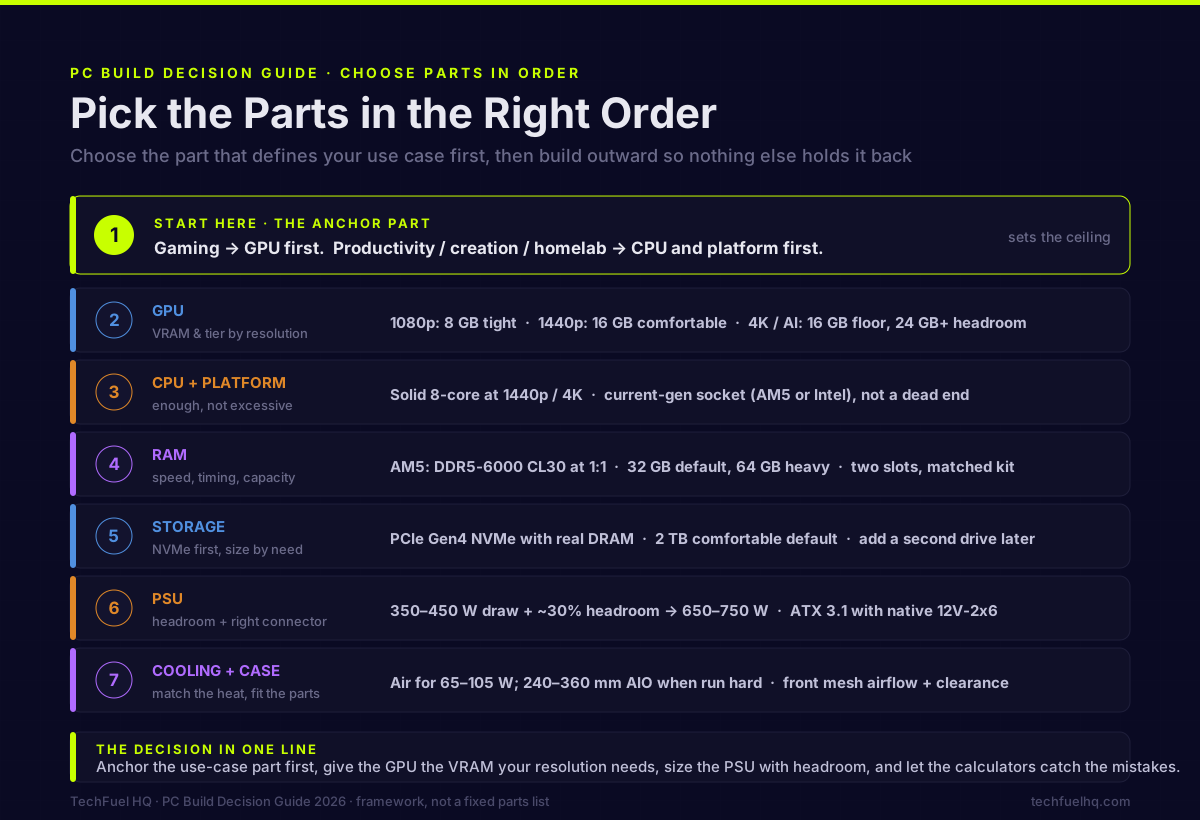
Choosing parts is about deciding in the right order, not memorising model numbers. Get the order wrong and you overspend on one component while bottlenecking another. Start from the resolution and frame rate you actually want, let that set the graphics card, and let the card constrain processor, memory, and power supply in turn.
Picking PC parts is less about memorizing models and more about making the right decisions in the right order. Get the order wrong and you over-spend on one part while bottlenecking another. This guide walks the decision the way I actually make it — what to choose first, how each component constrains the others, and where to let a calculator do the math instead of guessing. It’s framework, not a fixed parts list; for a concrete example, the $1,500 RTX 5060 Ti build puts every choice here into one real receipt.
Start with the part that defines your use case
Every build has one component that sets the ceiling, and you choose it first:
- Gaming → start with the GPU. It decides your resolution and frame rate and usually eats the largest share of the budget. Everything else supports it.
- Productivity / creation / homelab → start with the CPU and platform. Core count, PCIe lanes, and memory capacity drive those workloads more than the GPU does.
Pick that anchor part to fit your real target — the resolution you play at, the software you run — then build outward so nothing else holds it back.
GPU: match VRAM and tier to your resolution
The GPU question is really two questions: how much raw performance, and how much VRAM.
- 1080p: an entry card is fine; 8 GB still works but is getting tight in new titles at high textures.
- 1440p: the mainstream target in 2026. 16 GB is the comfortable amount — enough that VRAM stops being the bottleneck and the GPU itself becomes the limit.
- 4K / local AI: 16 GB is the floor; 24 GB+ buys real headroom for textures and models.
When two cards sit at a similar price, the one with more VRAM usually ages better — texture and model sizes only grow. For a worked comparison at the mid-range, see the RTX 5060 Ti vs RX 9060 XT 1440p showdown.
CPU and platform: enough, not excessive
Match the CPU to the GPU and resolution rather than buying the biggest chip on the shelf. At 1440p and 4K the GPU is almost always the limit, so a solid current-gen 8-core is plenty; chasing a flagship CPU there is wasted money that belongs in the GPU. A faster or 3D V-Cache CPU earns its keep at 1080p and in CPU-bound esports titles.
On platform: in 2026, prefer a current-gen socket (AMD’s AM5 or the current Intel socket) over a dead-end one, so a CPU upgrade later doesn’t mean a new board. A mid-range board that takes a future higher-end chip with a BIOS update is the no-regret choice.
RAM: speed, timing, and capacity
For AM5, the established sweet spot is DDR5-6000 CL30 at a 1:1 memory-to-fabric clock — push the speed higher and the controller often drops to a 2:1 ratio that gives the gain back. Capacity in 2026:
- 32 GB (2×16): the default for gaming and light creative work.
- 64 GB: heavy multitasking, VMs, or running local LLMs alongside everything else.
Populate two slots with a matched kit, not four, for the cleanest high-speed stability. If you are still deciding between those tiers, how much RAM you actually need in 2026 walks through 16 vs 32 vs 64 GB by use case, and the DDR5 buying guide covers speeds and timings in depth.
Storage: NVMe first, capacity by need
A PCIe Gen4 NVMe with real DRAM is the right boot/game drive in 2026 — Gen5 runs hotter and costs more for gains you won’t feel in games. Size by what you actually store: 1 TB is a tight minimum, 2 TB is the comfortable default, and you can add a second drive later. Note that NAND prices have been volatile, so buy the capacity you need now rather than over-buying on a spike.
PSU: size with headroom, get the right connector
This is the part people guess at and shouldn’t. Add up your components’ real draw (the GPU and CPU dominate), then add ~30% headroom for spikes, efficiency, and a future upgrade. A typical mid-range build pulls 350–450 W under load, which puts a quality 650–750 W unit in the right range — the extra isn’t for today, it’s so a future GPU doesn’t force a PSU swap.
In 2026, buy an ATX 3.1 / PCIe 5.1 supply with the native 12V-2x6 connector so modern cards plug in without adapters. Rather than eyeball it, run your exact parts through the PSU wattage calculator for a sized recommendation with headroom built in.
Cooling and case: match the heat, fit the parts
For most CPUs in the 65–105 W class, a good dual-tower air cooler is quiet, cheap, and has no pump to fail. Step up to a 240–360 mm AIO only for a high-TDP chip run hard, a case with poor air clearance, or the aesthetic. The case itself is a real decision, not an afterthought: prioritize front mesh airflow, GPU and cooler clearance, and enough room for cable management. A pretty case that cooks the parts is the wrong case.
Let the tools do the math
Three calculators on the site exist so you don’t have to guess the numbers:
- PC Builder — pick parts and it checks socket, PSU, and case-clearance compatibility as you go.
- PSU Wattage Calculator — enter your components, get a sized supply with headroom.
- Budget Builder — sort gear by what you can actually spend and balance the build to your budget.
The decision in one line
Choose the part that defines your use case first, match everything else to it, give the GPU the VRAM it needs for your resolution, size the PSU with headroom and the right connector, and let the calculators catch the mistakes before you buy. When you want to see it all assembled into a real receipt, the $1,500 RTX 5060 Ti 1440p build is the worked example. For the high-end version of the same framework at 4K, the $2,500 RTX 5080 + 7800X3D 4K build is the worked example one tier up.
Sources
- AMD AM5 platform / EXPO memory guidance — https://www.amd.com/en/products/processors/desktops/ryzen.html
- Intel ATX / power-supply design guides — https://www.intel.com/content/www/us/en/products/docs/power-supplies/atx-design-guide.html
- JEDEC DDR5 standard (JESD79-5) — https://www.jedec.org/standards-documents/docs/jesd79-5d
- PCI-SIG (PCIe / 12V-2x6 connector standards) — https://pcisig.com/
Frequently asked questions
What PC component should I choose first?
How much VRAM do I need in 2026?
What PSU wattage do I actually need?
What DDR5 speed and capacity should I buy for AM5?
Air cooler or AIO liquid cooler?
How do I avoid a CPU or GPU bottleneck?
Sources and corrections
- Last updated
- Methodology
- See our methodology for research and review standards.
- Update log
- 2026-09-14 — Page updated.
- Corrections
- Spotted an error or a stale number? Email contact@techfuelhq.com. Confirmed corrections are added to the update log above.