 TechFuel HQ
By LK Wood IV · Published 2026-06-19 · Updated 2026-09-08 · ~10 min read · St. Louis County, MO
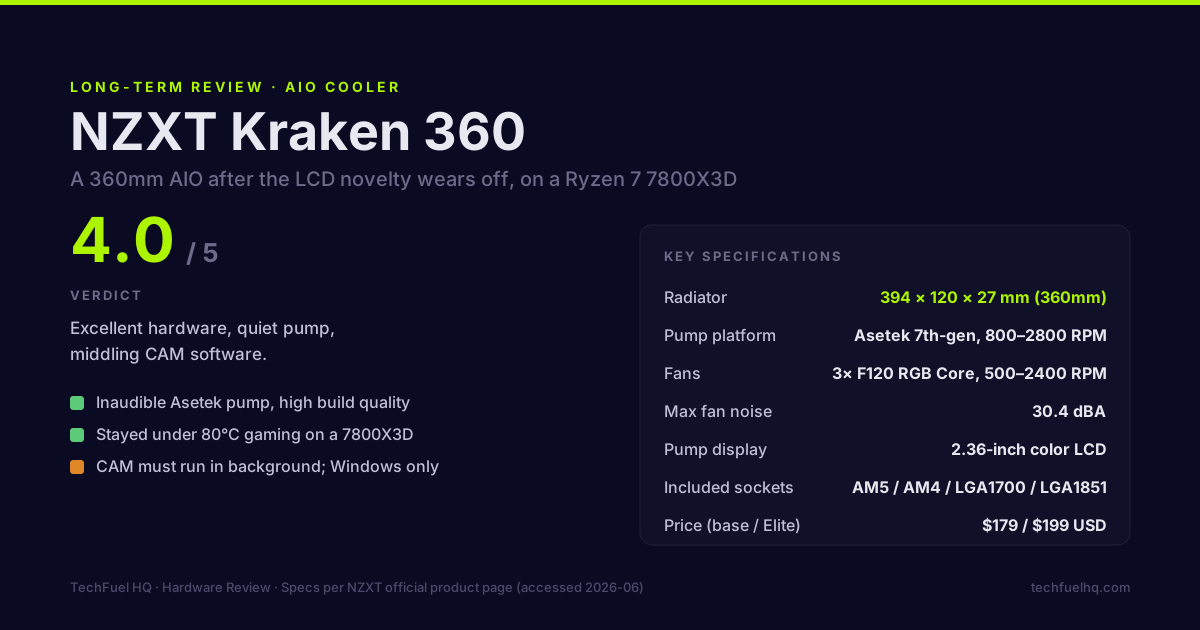
Rating: 4.0 / 5
I ran the NZXT Kraken 360 on a Ryzen 7 7800X3D inside a ROG STRIX B650-A build for an extended period before moving on to a different configuration. This isn’t a first-day review — it’s what happens after the novelty of the LCD display wears off and you start noticing the software.
The short answer: the Kraken 360 is a well-built, genuinely quiet 360mm AIO with a smooth installation and good thermals. NZXT CAM is the only meaningful problem, and it’s a real one if you care about background processes.
What NZXT ships
The exact unit: this review covers the classic Kraken 360 with the 1.54-inch LCD pump display (the RL-KR360-W1 generation). Worth knowing before you shop: NZXT has since relaunched the Kraken line under a Core / Plus / Elite naming scheme, so a 2026 search for “Kraken 360” returns the newer SKUs rather than the exact unit reviewed here. The pump platform (Asetek 7th-gen) and radiator carry over, but confirm the current product page matches the model you’re buying — the display tier is the thing that changes between SKUs.
Hardware (per NZXT product page, accessed 2026-06):
- Radiator: 394 × 120 × 27 mm (360mm), aluminum
- Pump head: 1.54-inch color LCD display (the Elite upsizes it to 2.36 inches)
- Fans: 3× NZXT F120 RGB Core (120mm, 500–2400 RPM, 30.4 dBA max)
- Pump: Asetek 7th-generation, 800–2800 RPM
- TDP claim: NZXT rates the Kraken 360 for “up to 500W+TDP” (internal testing methodology — treat as relative, not absolute)
- Included socket brackets: AM5, AM4, LGA1700, LGA1851
Price (at time of purchase): $179 USD for the base Kraken 360 / $199 USD for the Kraken Elite 360.
Installation on AM5
Straightforward, but the stock AMD bracket must come out first — that’s the only extra step over an older platform install.
- Remove the stock AMD cooler bracket: four screws, retained from behind by a plastic backplate
- Install the NZXT backplate from the rear of the motherboard
- Thread in the four AM5 standoffs finger-tight, then snug with a small wrench
- Apply thermal paste (I use a pea-sized dot of MX-6; NZXT includes their own TIM which is adequate)
- Press the Kraken head onto the CPU, align the spring-loaded screws with the standoffs, and tighten cross-pattern
Radiator orientation: front intake (pulling cool air from outside the case through the radiator and pushing warm air into the case) or top exhaust (radiator exhausts hot air out the top of the case). For a build with a strong GPU producing heat inside the case, top exhaust is the better choice — it removes the heat without recirculating it past the radiator. The ROG STRIX B650-A’s layout (standard ATX) accommodates top-mount 360mm without clearance issues.
Total time: 10 minutes with the motherboard out of the case. If you’re doing a full build, it’s the first cooler part to install (backplate goes on before the board goes into the case).
Thermals on a 7800X3D
The Ryzen 7 7800X3D is a different thermal challenge than a high-TDP chip like the Ryzen 9 7950X or Intel i9-14900KS. Its 3D V-Cache stacks SRAM on top of the CPU die, which creates a thermal constraint: AMD’s own thermal throttle limit is 89°C on the 3D V-Cache tier. Above that, the chip reduces clock speeds to protect the cache.
The practical consequence: the 7800X3D benefits from a cooler that keeps it below 89°C under gaming load, but it doesn’t produce the kind of sustained 250–300W loads that stress-test premium AIOs. At the ~162W package ceiling that 1.35 x AMD’s published 120W Default TDP implies, a 240mm AIO can keep it under the throttle threshold. A 360mm AIO gives more temperature headroom.
In my build — ROG STRIX B650-A, B650 chipset power delivery, HYTE Y60 with its airflow configuration — the 7800X3D stayed under 80°C during sustained gaming sessions with the fans at a curve that maxed at 1700 RPM. Under Cinebench R23 multi-core sustained for 10 minutes, it peaked at 84°C and maintained stable clocks. I did not observe thermal throttling during normal gaming workloads.
For independent sustained thermal measurements on the Kraken 360 across multiple CPU platforms, GamersNexus publishes AIO cooler reviews with controlled methodology — their data on Asetek 7th-gen performance is the benchmark I compare against.
NZXT CAM: the weak link
CAM is NZXT’s proprietary software for controlling the pump, fans, and LCD. The functionality is solid — you can create custom fan curves, set up display pages showing CPU/GPU temp and usage, customize the ARGB ring, and monitor system stats.
The problem: CAM needs to run in the background for any of the display and RGB functionality to work. It’s an Electron-based application, which means on startup it uses more RAM and CPU than feels appropriate for a peripheral-control utility.
What CAM requires:
- Background process (~150 MB RAM, periodic CPU spikes on startup)
- Login to an NZXT account for full feature access (offline mode limits some display options)
- Windows only with full functionality; Linux has no native support
What works without CAM: basic pump and fan operation at defaults. The LCD shows the NZXT logo or a built-in temperature readout based on the pump head’s internal thermistor. Fans run at a built-in speed curve.
For a Windows gaming machine where CAM runs at startup and stays resident, this is a non-issue — you set it up once and forget it. For a build dual-booting Linux, or for someone who doesn’t want background software, the CAM dependency is a genuine negative.
ASUS Armory Crate and Corsair iCUE have the same pattern. NZXT CAM is not worse than the competition in this category — it’s just that all of them have this problem.
Pump and fan noise
The pump: inaudible with the side panel on at any point during normal operation. I could not isolate it from case fan noise. This matches the behavior of Asetek 7th-gen units generally — the pump is not the noise concern with this cooler.
The fans: at default NZXT curves, the F120 RGB Core fans are quiet at light loads (under 1200 RPM) and audible under load when they spin up toward 2000+ RPM. The 30.4 dBA spec at max RPM is accurate in a controlled environment — in a room with normal ambient noise, the fans become noticeable above about 1800 RPM.
Custom curve I settled on: 800 RPM at 40°C, 1200 RPM at 60°C, 1600 RPM at 70°C, 1800 RPM max. At these speeds the fans are inaudible from 1 meter away with the case side on, and thermal performance on the 7800X3D was unchanged — a 360mm radiator at 1800 RPM is more than adequate for that ~162W ceiling.
Build quality
Physical build quality is high. The radiator finish, pump head housing, and fan blade consistency are noticeably better than budget AIOs. The braided tubing has a solid feel and didn’t kink or stiffen over time. The LCD display glass is flush and scratch-resistant. The F120 fans have a consistent spin-up behavior and no blade wobble or grinding.
The only quality concern: the thermal paste pad that ships pre-applied on the Asetek head. I remove it and apply my own paste. The included pad performs adequately but unevenly — depending on how the head seats, coverage can be inconsistent. This is an Asetek packaging issue, not specific to NZXT.
Price and alternatives
At $179 for the base Kraken 360, the value proposition is reasonable for the build quality and thermals. Comparable options:
| Cooler | Size | Key differentiator | Street price |
|---|---|---|---|
| NZXT Kraken 360 | 360mm | LCD display, premium finish | ~$179 |
| Corsair iCUE H150i Elite LCD XT | 360mm | Infinity mirror LCD | ~$200 |
| DeepCool LT720 | 360mm | No LCD, lower price | ~$110 |
| be quiet! Pure Loop 360 | 360mm | Near-silent fans, no RGB | ~$130 |
| Thermalright Frozen Prism 360 | 360mm | Best price-to-thermal | ~$65 |
The Thermalright Frozen Prism 360 (no LCD, basic ARGB ring) competes on thermals at less than half the Kraken’s price. If the LCD display is not important to you, the Thermalright is a harder value to ignore. GamersNexus measured the Frozen Prism 360 as a top-tier thermal performer for its price class.
The Kraken 360 is worth the premium over the Thermalright if:
- You want the display for at-a-glance CPU/GPU monitoring without opening software
- Build aesthetics matter and the NZXT industrial design fits the case
- CAM running in the background is not a concern
Verdict
The Kraken 360 does what an AIO cooler is supposed to do: it keeps a demanding CPU cool, does it quietly, and doesn’t require setup beyond the initial configuration. On the 7800X3D, it’s more cooler than needed — the chip doesn’t push the AIO anywhere near its limits — which means there’s headroom for future platform upgrades if you build around it.
The LCD display is genuinely useful, not a gimmick. Having CPU temp and GPU temp visible on the pump head without opening a monitoring app is the kind of ambient information that actually gets used. The display implementation is good; the CAM software that drives it is adequate.
If you’re pricing AIOs for a 7800X3D specifically: a 240mm AIO is sufficient for that chip at any normal fan curve. The 360mm gives more headroom and flexibility. If you’re building around a higher-TDP chip like the Ryzen 9 7950X or Intel i9 series, the 360mm starts being necessary rather than optional.
Rating: 4.0/5 — Excellent hardware, middling software. The LCD earns the premium if you want it. The base Kraken 360 at its price is solid but has stiff competition from non-LCD alternatives at half the cost.
For the full build this cooler shipped in, the ROG STRIX B650-A review covers the motherboard. The PC Builder tool checks CPU-to-motherboard compatibility and GPU length against case clearance. Check the cooler separately. Confirm the Kraken’s socket bracket and radiator fit in the cooler and case specifications.
Frequently asked questions
Does the NZXT Kraken 360 fit AM5?
Is NZXT CAM required to run the Kraken 360?
How loud is the Kraken 360 under load?
Does the Kraken 360 use Asetek?
How does the Kraken 360 compare to the Kraken Elite 360?
Evidence ledger
- Last updated
- Methodology
- See our methodology for research and review standards. Long-term notes from the Kraken 360 on my own 7800X3D; the thermals and pump-noise impressions are first-hand.
- Update log
- 2026-09-08 — Corrected the PC Builder promotion: the tool does not select coolers or check their socket brackets and clearance. Cooler mounting and radiator fit require separate specification checks.
- 2026-08-23 — PPT provenance (site audit 2026-08-23, finding SITE-11). The 162W PPT figure was stated on this page as a manufacturer rating with no citation. amd.com publishes “Default TDP 120W” for both the Ryzen 7 7800X3D and the 9800X3D (both product pages fetched 2026-08-23, HTTP 200) and publishes no PPT figure at all. 162W is the standard AM5 socket ceiling of 1.35 x TDP, which is our derivation rather than an AMD number, and every mention on this page now says so.
- 2026-08-22 — Byline date corrected. Adding ‘Published/Updated’ to a date-only byline was right (B7), but the value was not: the entire 2026-08-22 change to this file was the byline itself, a lastmod bump, and a ledger note recording that no technical claim changed. Dating an update to the day you wrote the date is circular. The last commit that actually changed this page’s rendered content is cc66d111 on 2026-08-19, so that is the date it now carries.
- 2026-08-22 — Gold-standard citation audit. Byline carried no Updated date while the page had taken body corrections on 2026-08-13 and 2026-08-18; it now states Published and Updated. No technical claim changed. Open item for the next pass: the hardware block cites ‘NZXT product page, accessed 2026-06’ with no URL, and NZXT has since relaunched the line under Core/Plus/Elite names, so that citation needs a live URL and a re-check.
- 2026-08-13 — Replaced the shared build photo with the frame that actually shows the Kraken’s pump LCD and hoses; caption rewritten to describe exactly what is visible.
- Corrections
- Spotted an error or a stale number? Email hello@techfuelhq.com. Confirmed corrections are added to the update log above.