 TechFuel HQ
By LK Wood IV · Published 2026-06-19 · Updated 2026-09-08 · ~11 min read · St. Louis County, MO
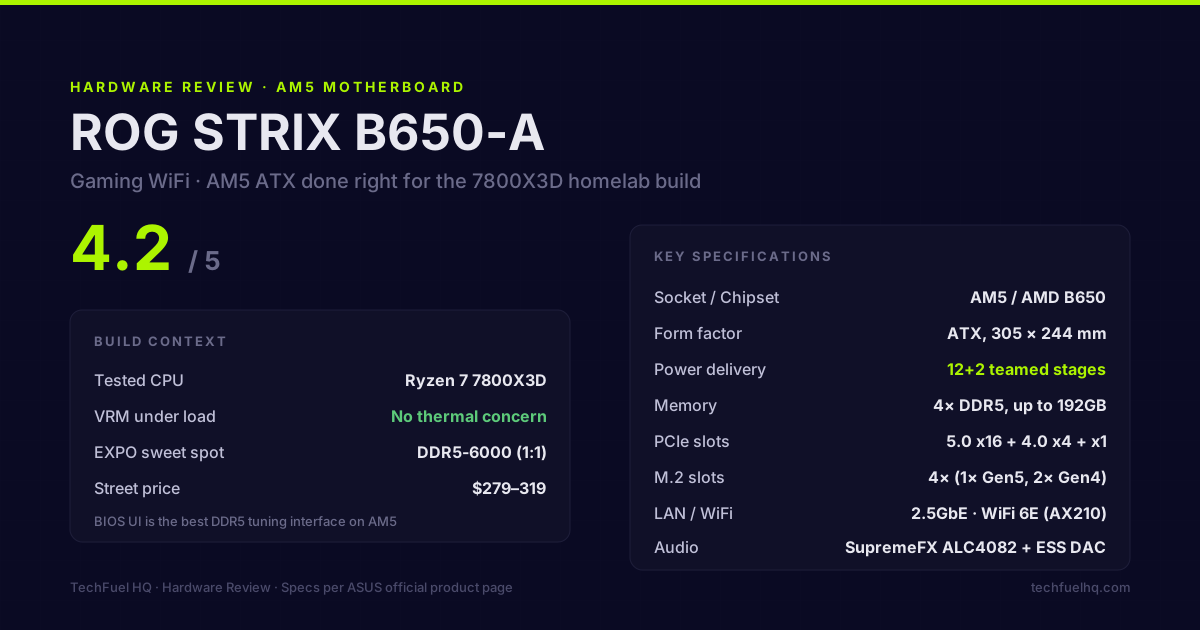
Rating: 4.2 / 5
The ROG STRIX B650-A was the board I ran under a Ryzen 7 7800X3D in my primary build for an extended period. It’s an ATX AM5 board at a price point ($279–319 at time of purchase) that competes against X670 non-E boards rather than budget B650M options. This review reflects real-world use rather than a synthetic first-look.
Specs from ASUS product page
(Per ASUS ROG STRIX B650-A product page, accessed 2026-06.)
- Socket: AM5 (LGA1718)
- Chipset: AMD B650
- Form factor: ATX (305 × 244 mm)
- Memory: 4× DDR5 DIMM, dual-channel, up to 192GB (unofficial Samsung B-die boards go higher), up to DDR5-8000+ OC
- Power delivery: 12+2 teamed power stages
- PCIe slots: PCIE_x16_1 (PCIe 4.0 x16, CPU), second x16-length slot (PCIe 4.0 x4 from the chipset, shares bandwidth with M.2_3), 2× PCIe 4.0 x1
- M.2 slots: 3× (M.2_1 PCIe 5.0 x4, M.2_2 PCIe 4.0 x4, M.2_3 PCIe 4.0 x4 — shares bandwidth with the second x16-length slot)
- USB (rear I/O): 2× USB 3.2 Gen 2x2 (20 Gbps), 2× USB 3.2 Gen 2 (10 Gbps), 2× USB 3.2 Gen 1 (5 Gbps), 2× USB 2.0; 1× USB 3.2 Gen 2 Type-C
- LAN: Intel I226-V (2.5 GbE)
- WiFi: Intel AX210 (WiFi 6E, Bluetooth 5.3)
- Audio: SupremeFX ALC4082, SABRE9018Q2C DAC
- Display output: HDMI 2.1, DisplayPort 1.4 (for integrated graphics / APU use)
Power delivery for the 7800X3D
The B650-A’s 12+2 teamed power delivery is more than the 7800X3D requires. AMD publishes a 120W Default TDP for the chip and no PPT figure of its own; at the usual AM5 socket ceiling of 1.35 x TDP that is about 162W, a derivation of ours rather than an AMD rating. Typical gaming loads run closer to 100–130W. The 12+2 configuration means the 7800X3D’s power draw is split across enough phases that no single phase runs hot.
Under sustained Cinebench R23 multi-core loads (which push the 7800X3D to its sustained limits), the VRM heatsink on the B650-A stayed below the concerning threshold. Under normal gaming loads — which is what the 7800X3D is built for — the power delivery was a non-event. For an X3D chip, B650 power delivery is sufficient by a wide margin.
If you’re considering this board for a 7950X or 7900X (AMD’s higher-TDP flagship chips), the 12+2 teamed stages are adequate but the thermal situation gets tighter under sustained AVX workloads. The B650-A is not the wrong choice for those chips, but the premium X670E boards have more headroom.
DDR5 tuning with EXPO
EXPO (AMD’s equivalent to Intel’s XMP for DDR5) posted first-time with my own DDR5-6000 kit, and the board’s QVL covers the common DDR5-6000/6400 CL30–32 families from Corsair, G.Skill, and Kingston. Enable EXPO in BIOS → Ai Tweaker → Ai Overclock Tuner.
ASUS’s Ai Tweaker UI is the best RAM timing interface on any AM5 board. Subtimings are individually accessible with descriptions, the memory training log is readable, and the BIOS saves manual overrides reliably across reboots. X670E Extreme boards have more advanced Curve Optimizer tools, but for DDR5 tuning at the EXPO profile level, the B650-A is equivalent.
One note: DDR5-6000 is the sweet spot for Ryzen 7000/9000 series. AMD’s memory controller in AM5 chips runs best with EXPO profiles at DDR5-6000 (1:1 fabric ratio). DDR5-6400 and above often requires loosening subtimings to maintain stability, and the bandwidth gain over 6000 is minimal. The B650-A’s memory training handles 6000 EXPO kits first-boot; 6400+ EXPO kits sometimes need a training cycle.
PCIe layout for homelab and multi-device builds
The slot layout matters more than it sounds. Most ATX AM5 boards have:
- Slot 1: PCIe 4.0 x16 (GPU)
- Slot 2: PCIe 4.0 x4 (second card, labeled as x16)
- Slot 3: PCIe 4.0 x1
For a build pairing a primary GPU with a 10GbE NIC (Mellanox ConnectX-3, Intel X550, etc.), the B650-A’s PCIE_x16_2 at PCIe 4.0 x4 is sufficient — a 10GbE NIC saturates at under 10 Gbps bidirectional, which is well within the ~64 Gbps raw ceiling of PCIe 4.0 x4. No bandwidth limitation exists in practice.
For a build running a GPU plus a PCIe 4.0 x4 NVMe expansion card (adding SSD slots for a NAS-style build), same logic applies.
One limitation: PCIE_x16_2 shares bandwidth with M.2 slot 3. When a card is installed in PCIE_x16_2, M.2 slot 3 may disable depending on the configuration. Check the ASUS manual for the sharing rules before planning a build that uses both simultaneously.
BIOS quality
BIOS quality is where ASUS earns its premium over competing B650 boards. The ROG STRIX B650-A shipped with BIOS 1404 and received updates through the 2400-series by 2026. Key positives:
- EXPO implementation: reliable first-boot memory training, no repeated failed boots
- Fan control: per-header curves, temperature source selectable per header (CPU package, CPU socket, VRM, etc.)
- POST time: about 25–30 seconds cold boot with DDR5-6000 EXPO kit — slightly longer than B550 era but normal for DDR5 training
- Secure Boot: fully compatible with Windows 11 and easy to configure for Linux dual-boot
Negatives:
- AI Overclocking (AiO, ASUS’s automated OC): marketing feature. The AI overclock profiles apply preset PBO values that you can configure manually in 10 minutes. It’s not generating novel configurations; it’s selecting from a table.
- BIOS interface at 4K: the ASUS BIOS does not scale to 4K monitors cleanly when connected during POST. It renders at a fixed resolution that looks blurry on large displays. This is an industry-wide problem, not B650-A-specific, but it’s annoying on a 4K setup.
Build quality and I/O
The rear I/O shield is integrated into the board — no separate I/O plate to install, which is now standard on premium boards. The included 2× USB 3.2 Gen 2×2 (20 Gbps) ports are useful for fast external SSDs; not something every B650 board includes.
The M.2 Shield (thermal covers for the M.2 slots) are well-designed — tool-less removal for slots 2 and 3, single-screw removal for slot 1. Drive installation is easier than any previous AM4 board I’ve used with non-standard M.2 retention mechanisms.
Audio (SupremeFX ALC4082 + ESS SABRE DAC): noticeably better than the typical Realtek implementation. Negligible noise floor for the headphone amplifier out of the rear audio jack. If you’re running a DAC externally (USB or optical), this doesn’t matter — but for a build where you occasionally plug headphones directly into the PC, the B650-A’s onboard audio is better than you’d expect from a gaming board.
What ASUS got wrong
Aura Sync RGB: the addressable RGB headers (2× ARGB) and standard RGB header work fine, but Aura Sync — ASUS’s software for coordinating RGB across components — is another background-process-heavy utility like NZXT CAM. If you’re not invested in RGB coordination across an ASUS ecosystem, the Aura Sync software is usable only at startup and then killed.
Fan header placement: the CPU fan header and CPU OPT header are both at the top of the board near the CPU socket. Three of the chassis fan headers are at the bottom of the board. Routing cables from bottom case fans to bottom-board headers is fine, but routing the AIO pump (which goes to CPU OPT) down from a top-mounted radiator means cable management gets complicated in some cases.
Quantity of bundled connectors: the B650-A ships with ARGB splitter cables and fan extension cables but no M.2 drive screws. If you plan to populate all three M.2 bays with 2280 drives, confirm each bay’s mounting screw is present before build day.
Versus the competition
At the B650 ATX tier ($200–320):
| Board | Key differentiator | Street |
|---|---|---|
| ASUS ROG STRIX B650-A | 12+2 teamed VRM, best BIOS UI, WiFi 6E | ~$280 |
| MSI MAG B650 TOMAHAWK | 16+2+1 VRM, more fan headers, no WiFi | ~$210 |
| Gigabyte B650 AORUS Elite AX | Solid VRM, onboard WiFi, slightly lower build quality | ~$220 |
| ASRock B650E Taichi | Premium build, 24+2+1 VRM, Thunderbolt 4 | ~$340 |
The MSI TOMAHAWK is the strongest value competition — its 16+2+1 VRM has higher total thermal capacity than the B650-A’s 12+2 teamed configuration (though both handle the 7800X3D without strain), and its fan header count is higher. The TOMAHAWK trades the B650-A’s BIOS quality and WiFi inclusion for lower cost.
For a homelab builder where BIOS stability and RAM tuning reliability matter, the B650-A justifies its premium over the TOMAHAWK. For a dedicated gaming build where BIOS tinkering is minimal, the TOMAHAWK at $60 less is harder to argue against.
Verdict
The ROG STRIX B650-A is the right board if you’re building an AM5 ATX system with a Ryzen 7 7800X3D and want reliable EXPO memory training, good power delivery, and ASUS’s BIOS — which remains the best DDR5 tuning interface on any AM5 platform. The WiFi 6E inclusion and premium I/O (20 Gbps USB) add value without requiring you to buy a more expensive X670 board.
It’s not perfect — Aura Sync is unavoidable if you use ARGB headers, the fan header placement requires cable routing decisions, and the AI overclocking marketing overstates what the feature actually does. But the fundamentals are strong, and a board you can trust to boot reliably with a loaded DDR5 kit is worth something.
Rating: 4.2/5. Recommended for AM5 ATX builds pairing a 7000/9000-series CPU with a 360mm AIO and DDR5-6000 memory. The BIOS alone is worth the premium over budget B650 boards.
The NZXT Kraken 360 review covers the cooler this board ran under. For a full system build around the 7800X3D platform, the PC Builder tool checks CPU socket and chipset compatibility, DDR memory type, estimated PSU headroom, motherboard case fit and GPU length. Check slot layout in the board manual. The tool does not validate DIMM population or PCIe slot allocation. For repurposing this class of hardware as a Proxmox server when upgrading, the repurpose gaming PC guide covers the full Proxmox setup from an existing desktop.
Frequently asked questions
Does the ROG STRIX B650-A support the Ryzen 7 7800X3D?
How many M.2 slots does the ROG STRIX B650-A have?
Is the B650 chipset enough for a 7800X3D or do I need X670E?
Does the B650-A support WiFi 6E?
What is the PCIe layout for a GPU plus a 10GbE NIC?
Evidence ledger
- Last updated
- Methodology
- See our methodology for research and review standards. The B650-A here is the board I ran under a 7800X3D in my primary build – an owner’s long-term account, not a synthetic first-look.
- Update log
- 2026-09-08 — Corrected the PC Builder promotion: its RAM check covers DDR memory type, not DIMM-slot population, and it does not check PCIe slot allocation. Those checks remain in the motherboard manual.
- 2026-08-23 — PPT provenance (site audit 2026-08-23, finding SITE-11). The 162W PPT figure was stated on this page as a manufacturer rating with no citation. amd.com publishes “Default TDP 120W” for both the Ryzen 7 7800X3D and the 9800X3D (both product pages fetched 2026-08-23, HTTP 200) and publishes no PPT figure at all. 162W is the standard AM5 socket ceiling of 1.35 x TDP, which is our derivation rather than an AMD number, and every mention on this page now says so.
- 2026-08-22 — Byline date corrected. Adding ‘Published/Updated’ to a date-only byline was right (B7), but the value was not: the entire 2026-08-22 change to this file was the byline itself, a lastmod bump, and a ledger note recording that no technical claim changed. Dating an update to the day you wrote the date is circular. The last commit that actually changed this page’s rendered content is cc66d111 on 2026-08-19, so that is the date it now carries.
- 2026-08-22 — Gold-standard citation audit. Byline carried no Updated date while the ledger held three 2026-08 corrections; it now states Published and Updated. No technical claim changed. Open item for the next pass: the spec block cites ‘ASUS ROG STRIX B650-A product page, accessed 2026-06’ with no URL, so it fails the two-bucket rule on its face.
- 2026-08-14 — Added the missing BIOS-flash safety gate at the point of instruction (back up first; do not shut down or reset mid-flash), sourced to ASUS EZ Flash 3 instructions which state both requirements verbatim. No technical claim changed.
- 2026-08-13 — Replaced the shared build photo with the side-profile frame of the board’s slot area in use; caption rewritten to describe exactly what is visible.
- 2026-08-13 — Corrected the PCIe/M.2 layout against the ASUS specification page: the x16 slot is PCIe 4.0 (not 5.0) and the board has three M.2 slots (not four). Spec card updated to match.
- 2026-06-19 — Published.
- Corrections
- Spotted an error or a stale number? Email hello@techfuelhq.com. Confirmed corrections are added to the update log above.