 TechFuel HQ
Node Exporter on each Proxmox node publishes CPU, RAM, disk, and network metrics at port 9100, Prometheus scrapes those targets every 15 seconds and writes them to its local TSDB at 15-day retention, and Grafana on port 3000 reads that Prometheus at http://prometheus:9090 to draw dashboard 1860. Put the TSDB on NVMe; Prometheus is write-intensive.
By LK Wood IV · 2026-06-05 · ~14 min read · St. Louis County, MO
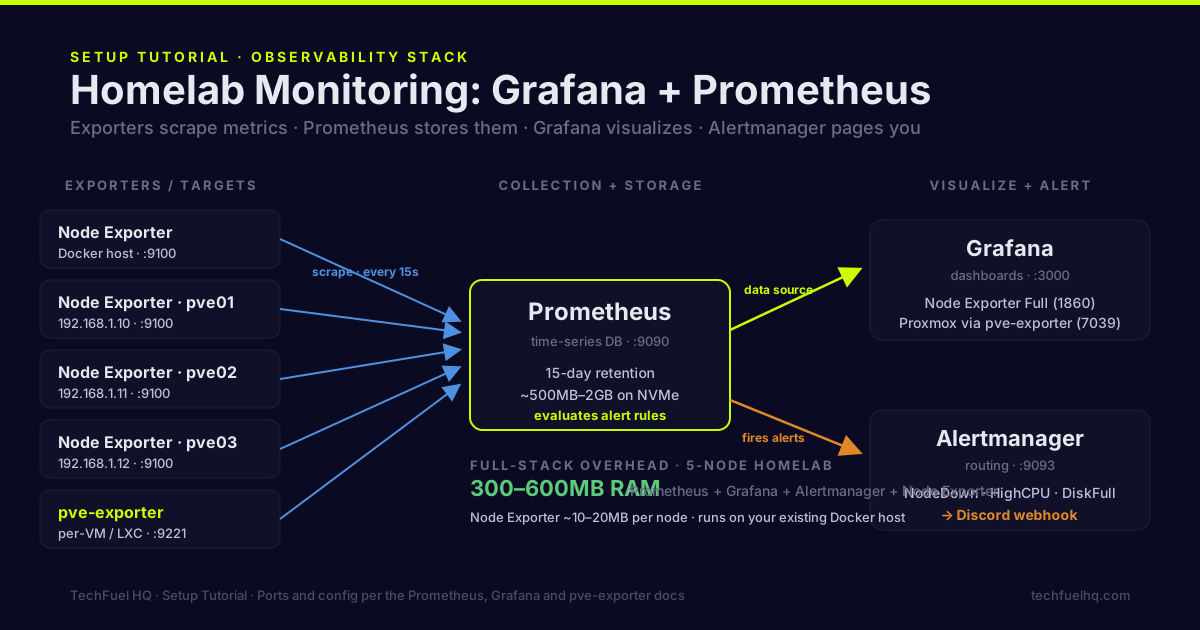
Uptime Kuma tells you when a service is down. Grafana + Prometheus tells you why it went down, what the CPU was doing three hours before it crashed, which disk is filling up, and which VM is hammering the network. They solve different problems. This guide sets up the full observability stack (new to the two tools and unsure what each does? Start with Grafana vs Prometheus explained).
What each component does
Prometheus is a time-series database and scraping engine. You define scrape targets (exporters running on each machine), and Prometheus polls them every 15–60 seconds, storing the metrics. It handles the data collection and storage.
Grafana is the dashboard layer. It connects to Prometheus as a data source, and you build (or import) dashboards that visualize the metrics as graphs, gauges, and tables.
Node Exporter is a Prometheus exporter that runs on Linux machines and exposes system metrics: CPU per-core, RAM, disk IO, filesystem usage, network throughput. One process, ~15MB RAM, runs on every machine you want to monitor.
Alertmanager handles alert routing. Prometheus evaluates alert rules, fires alerts to Alertmanager, and Alertmanager sends them to your preferred notification channel (Slack, Discord, PagerDuty, email, Telegram).
Stack setup with Docker Compose
All components run in Docker containers on your existing Docker host. Create the monitoring stack directory:
mkdir -p /opt/stacks/monitoring/{prometheus,grafana,alertmanager}
cd /opt/stacks/monitoring
Prometheus configuration:
# /opt/stacks/monitoring/prometheus/prometheus.yml
global:
  scrape_interval: 15s
  evaluation_interval: 15s

rule_files:
  - "alerts.yml"

alerting:
  alertmanagers:
    - static_configs:
        - targets: ["alertmanager:9093"]

scrape_configs:
  # Monitor the Prometheus instance itself
  - job_name: "prometheus"
    static_configs:
      - targets: ["localhost:9090"]

  # Monitor the Docker host
  - job_name: "node-docker-host"
    static_configs:
      - targets: ["node-exporter:9100"]
    relabel_configs:
      - target_label: instance
        replacement: "docker-host"

  # Remote Proxmox nodes — install node_exporter on each
  - job_name: "proxmox-nodes"
    static_configs:
      - targets:
          - "192.168.1.10:9100"    # pve01
          - "192.168.1.11:9100"    # pve02
          - "192.168.1.12:9100"    # pve03
    relabel_configs:
      - source_labels: [__address__]
        target_label: instance
Alert rules:
# /opt/stacks/monitoring/prometheus/alerts.yml
groups:
  - name: homelab
    rules:
      - alert: NodeDown
        expr: up == 0
        for: 2m
        labels:
          severity: critical
        annotations:
          summary: "Node {{ $labels.instance }} is down"

      - alert: HighCPU
        expr: 100 - (avg by(instance)(rate(node_cpu_seconds_total{mode="idle"}[5m])) * 100) > 85
        for: 10m
        labels:
          severity: warning
        annotations:
          summary: "CPU usage over 85% on {{ $labels.instance }}"

      - alert: DiskAlmostFull
        expr: (node_filesystem_avail_bytes{fstype!~"tmpfs|fuse.lxcfs"} / node_filesystem_size_bytes) * 100 < 15
        for: 5m
        labels:
          severity: warning
        annotations:
          summary: "Disk {{ $labels.mountpoint }} on {{ $labels.instance }} has {{ $value | printf \"%.0f\" }}% free"

      - alert: HighRAMUsage
        expr: (1 - node_memory_MemAvailable_bytes / node_memory_MemTotal_bytes) * 100 > 90
        for: 5m
        labels:
          severity: warning
        annotations:
          summary: "RAM usage over 90% on {{ $labels.instance }}"
Alertmanager configuration:
# /opt/stacks/monitoring/alertmanager/alertmanager.yml
global:
  resolve_timeout: 5m

route:
  group_by: ['alertname', 'instance']
  group_wait: 10s
  group_interval: 10m
  repeat_interval: 12h
  receiver: 'discord'

receivers:
  - name: 'discord'
    discord_configs:
      - webhook_url: 'https://discord.com/api/webhooks/YOUR-WEBHOOK-URL'
        title: '{{ .GroupLabels.alertname }}'
        message: '{{ range .Alerts }}{{ .Annotations.summary }}{{ end }}'
Replace the Discord webhook URL with your own. Alertmanager also supports Slack, PagerDuty, Telegram, email, and many others — see the Alertmanager docs for other receivers.
Docker Compose file:
# /opt/stacks/monitoring/docker-compose.yml
services:
  prometheus:
    image: prom/prometheus:latest
    container_name: prometheus
    ports:
      - "9090:9090"
    restart: unless-stopped
    volumes:
      - ./prometheus:/etc/prometheus
      - prometheus_data:/prometheus
    command:
      - '--config.file=/etc/prometheus/prometheus.yml'
      - '--storage.tsdb.path=/prometheus'
      - '--storage.tsdb.retention.time=15d'
      - '--web.enable-lifecycle'
    networks:
      - monitoring
      - proxy

  grafana:
    image: grafana/grafana:latest
    container_name: grafana
    ports:
      - "3000:3000"
    restart: unless-stopped
    volumes:
      - grafana_data:/var/lib/grafana
    environment:
      GF_SECURITY_ADMIN_PASSWORD: "change-this-password"
      GF_USERS_ALLOW_SIGN_UP: "false"
    networks:
      - monitoring
      - proxy

  alertmanager:
    image: prom/alertmanager:latest
    container_name: alertmanager
    restart: unless-stopped
    volumes:
      - ./alertmanager:/etc/alertmanager
    networks:
      - monitoring

  node-exporter:
    image: prom/node-exporter:latest
    container_name: node-exporter
    restart: unless-stopped
    pid: host
    volumes:
      - /proc:/host/proc:ro
      - /sys:/host/sys:ro
      - /:/rootfs:ro
    command:
      - '--path.procfs=/host/proc'
      - '--path.sysfs=/host/sys'
      - '--path.rootfs=/rootfs'
      - '--collector.filesystem.mount-points-exclude=^/(sys|proc|dev|host|etc)($$|/)'
    networks:
      - monitoring

volumes:
  prometheus_data:
  grafana_data:

networks:
  monitoring:
    driver: bridge
  proxy:
    external: true
Start the stack:
cd /opt/stacks/monitoring
docker compose up -d
Install Node Exporter on each Proxmox node
On every machine you want to monitor (Proxmox hosts, NAS, etc.):
# Download and install Node Exporter
NODE_EXPORTER_VERSION="1.8.2"
wget https://github.com/prometheus/node_exporter/releases/download/v${NODE_EXPORTER_VERSION}/node_exporter-${NODE_EXPORTER_VERSION}.linux-amd64.tar.gz
tar xzf node_exporter-*.tar.gz
mv node_exporter-*/node_exporter /usr/local/bin/
Create a systemd service:
# /etc/systemd/system/node_exporter.service
[Unit]
Description=Prometheus Node Exporter
After=network.target

[Service]
User=nobody
ExecStart=/usr/local/bin/node_exporter
Restart=on-failure

[Install]
WantedBy=multi-user.target
systemctl enable --now node_exporter
# Verify it's up
curl -s http://localhost:9100/metrics | head -5
Add the node’s IP to your Prometheus prometheus.yml scrape config under proxmox-nodes, then reload Prometheus:
curl -X POST http://localhost:9090/-/reload
Proxmox-specific monitoring with pve-exporter
Node Exporter monitors the Proxmox host OS. For per-VM and per-LXC metrics (CPU, RAM, disk per VM), use pve-exporter:
pip3 install prometheus-pve-exporter

# Create a config file
mkdir -p /etc/pve_exporter
cat > /etc/pve_exporter/pve.yml << 'EOF'
default:
  user: pve-monitor@pve
  password: "strong-password-here"
  verify_ssl: false
EOF
Create the Proxmox API user:
pveum user add pve-monitor@pve
pveum passwd pve-monitor@pve
pveum aclmod / -user pve-monitor@pve -role PVEAuditor
Run pve-exporter as a systemd service and add it to your Prometheus scrape config:
  - job_name: "pve"
    static_configs:
      - targets:
          - "192.168.1.10:9221"    # pve-exporter running on monitoring host
    metrics_path: /pve
    params:
      module: [default]
      cluster: ["1"]
      node: ["1"]
Grafana setup
- Open Grafana at
http://monitoring-host:3000(or via NPM atgrafana.yourdomain.com) - Log in with admin / your configured password
- Add a data source: Configuration → Data Sources → Add → Prometheus → URL:
http://prometheus:9090
Import dashboards:
Grafana’s dashboard library at grafana.com/grafana/dashboards has ready-made dashboards for Node Exporter.
Import these by ID (Dashboards → Import → enter ID):
- 1860 — Node Exporter Full (the definitive node metrics dashboard)
- 10229 — Node Exporter for Prometheus Dashboard
- 7039 — Proxmox via Prometheus (pve-exporter dashboard)
After import, set the data source to your Prometheus instance. Dashboard 1860 immediately shows:
- CPU usage over time per core
- RAM used, available, cached, buffered
- Disk IO (reads/writes per second)
- Filesystem usage with trend
- Network traffic per interface
Building a custom alert for disk space
The alert in the alerts.yml above fires when any filesystem drops below 15% free. This is a broad catch. For a homelab with a NAS that’s intentionally at 95% capacity (by design), you’d get false alerts. Refine it:
      - alert: DiskAlmostFull
        expr: |
          (node_filesystem_avail_bytes{
            fstype!~"tmpfs|fuse.lxcfs",
            mountpoint!~"/boot.*|/run.*"
          } / node_filesystem_size_bytes) * 100 < 15
          and
          node_filesystem_size_bytes > 10 * 1024^3
        for: 5m
        labels:
          severity: warning
        annotations:
          summary: "Disk {{ $labels.mountpoint }} at {{ printf \"%.0f\" $value }}% free on {{ $labels.instance }}"
The node_filesystem_size_bytes > 10 * 1024^3 filter only fires the alert for filesystems larger than 10GB — excluding tiny boot partitions and tmpfs mounts that are supposed to be “full.”
What to monitor beyond nodes
Docker containers. cAdvisor exports per-container CPU, memory, and network metrics to Prometheus. Add it to your Docker Compose stack and import the cAdvisor dashboard (ID: 14282).
UPS status. If you’re running NUT (Network UPS Tools) for your UPS, nut-exporter exposes battery charge, load percentage, and estimated runtime to Prometheus. Alert when battery drops below 50% and you have warning time before the power problem becomes a shutdown problem. Not sure how much runtime your UPS actually gives you? The UPS Runtime Calculator estimates runtime at load before you wire up monitoring.
SMART disk health. smartmon-textfile is a shell script that runs smartctl and outputs Prometheus text format. Run it as a cron job and Node Exporter picks it up via the textfile collector. Alert when reallocated sector count is non-zero.
Proxmox backup job status. PBS exposes a metrics endpoint — or you can write a simple exporter that checks PBS backup job last-run status via the API and exposes a gauge. Alert when last backup is older than 25 hours.
Resource overhead
The full monitoring stack (Prometheus + Grafana + Alertmanager + Node Exporter) on a 5-node homelab:
- Prometheus RAM: 150–300MB (grows with time series count and retention period)
- Grafana RAM: 80–150MB
- Alertmanager RAM: 20–40MB
- Node Exporter per node: 10–20MB
Total: 300–600MB for the monitoring infrastructure. Cheap. The 15-day Prometheus retention stores approximately 500MB–2GB of metrics data for 5 nodes at 15-second scrape intervals — fit it on an NVMe, not an HDD (Prometheus is write-intensive).
Using Docker for this stack? The Docker Compose Starter Stack covers the baseline services (NPM, Portainer, Uptime Kuma) that complement this monitoring setup.
Sources
- Prometheus Overview – official docs on the pull-based scraping model, time-series storage, and exporter ecosystem.
- Prometheus Alertmanager – official docs on alert grouping, routing, and notification receivers.
- Grafana documentation – official docs for adding a Prometheus data source and importing dashboards.
- Prometheus Node Exporter – official repository for the Linux hardware and OS metrics exporter on port 9100.
- prometheus-pve-exporter – official repository for the Proxmox VE exporter covering per-VM and per-LXC metrics.
Frequently asked questions
How much RAM does the Grafana + Prometheus stack use?
Can I monitor Proxmox specifically with Prometheus?
Is Grafana Cloud a better alternative to self-hosting?
What's the difference between Prometheus and InfluxDB for homelab monitoring?
How do I monitor Windows machines with Prometheus?
Evidence ledger
- Last updated
- Methodology
- This tutorial was written and edited by Lowell K. Wood IV in St. Louis County, MO. Specs, prices, commands, and version numbers are drawn from the official vendor, reseller, and project documentation current on the date above, and were verified before publishing. First-person hardware claims appear only where the article shows a verifiable artifact — a photo, receipt, or measurement — or links to the TechFuelHQ Open Bench Datasets. Every fact is human-verified against its cited source before publishing; AI assists with first-draft structure and source-gathering, not with the verdict. Full editorial standard: methodology.
- Update log
- 2026-07-25 — Last reviewed and updated.
- Corrections
- Spotted an error or stale price? Email hello@techfuelhq.com. Confirmed corrections are added to the update log above.