 TechFuel HQ
Without Tika and Gotenberg, DOCX, XLSX and PPTX files ingest with no searchable text at all. PDFs are safe: the consume folder polls every 60 seconds, Redis queues the job, Tesseract OCRs 8-12 seconds per page on an Intel N100, and a financial/ subdirectory becomes a tag. PostgreSQL holds the metadata.
By LK Wood IV · 2026-06-12 · ~14 min read · St. Louis County, MO
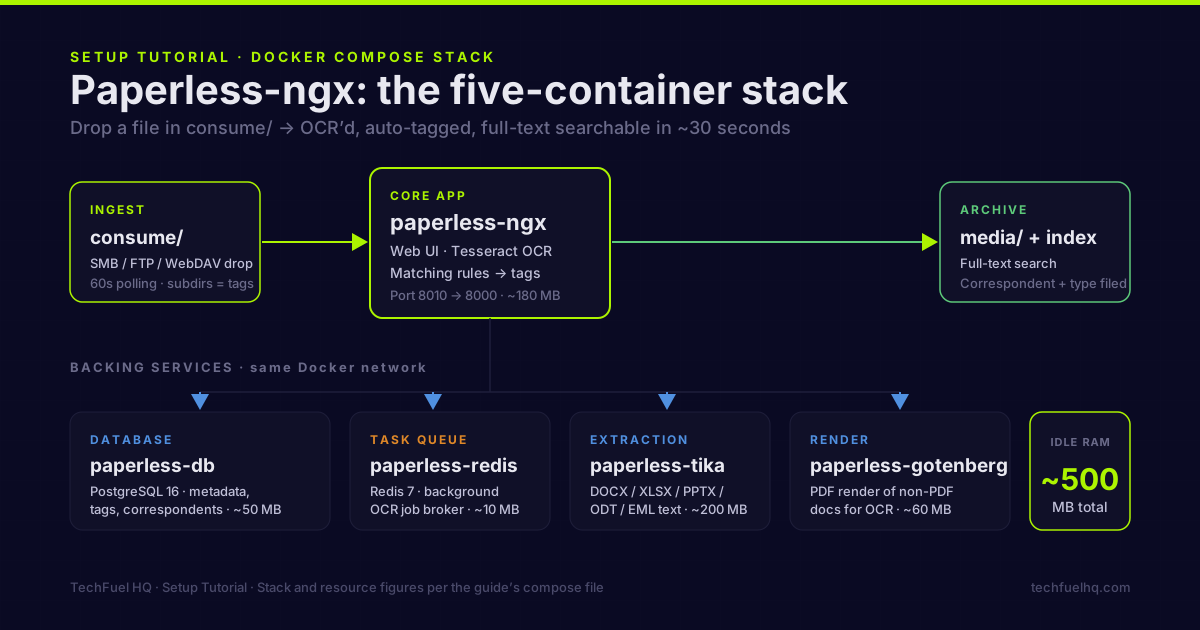
Drop a scanned PDF into a folder. Thirty seconds later it’s OCR’d, tagged, searchable by full text, and automatically filed under the correspondent that sent it. That’s Paperless-ngx working correctly. It is the paper half of a personal archive; the web half — saving articles so their text lives on your disk rather than on someone’s server — belongs to a self-hosted read-it-later app.
Getting there requires the full compose stack — not just the Paperless container. The official docs make Tika and Gotenberg optional. Treat them as required: without them, any non-PDF file that hits your consume folder will ingest silently with zero searchable text. This guide builds the complete stack from scratch.
The full stack
Paperless-ngx is not a single container. For production use you need five services:
| Container | Role |
|---|---|
paperless-ngx | Core app, web UI, OCR processing |
paperless-db | PostgreSQL — document metadata, tags, correspondents |
paperless-redis | Task queue for background OCR jobs |
paperless-tika | Document text extraction (Word, Excel, PowerPoint, ODT) |
paperless-gotenberg | PDF rendering of non-PDF documents for OCR |
Redis is the task broker — without it, OCR runs in-process and blocks the UI during large imports. Tika and Gotenberg together cover the full document format surface. PostgreSQL is required; SQLite write-locks under concurrent access.
Directory layout
Create this before writing any compose files:
mkdir -p /opt/paperless/{consume,data,db,export,media}
consume/— drop documents here for auto-processingdata/— Paperless application data (classification models, search index)export/— output ofdocument_exportercommand for backupsmedia/— archived original files and thumbnails
Docker Compose
This block is for a new installation. The official PostgreSQL image changed its default layout in PostgreSQL 18: mount /var/lib/postgresql, with database files under 18/docker. The resulting host path here is /opt/paperless/db/18/docker.
Already using the earlier block? Stop before changing the mount. Keep every existing data directory and Docker volume. From the working database, check SHOW data_directory; and inspect the container’s mounts to locate the actual cluster, then make a logical dump. Restore that dump into a separate PostgreSQL 18 instance using the corrected mount and verify Paperless there before switching. A mount edit is not a database migration; pointing at an empty path can initialize a different cluster. Follow the image’s upgrade guidance when changing PostgreSQL major versions.
services:
  paperless-db:
    image: postgres:18
    container_name: paperless-db
    restart: unless-stopped
    environment:
      POSTGRES_DB: paperless
      POSTGRES_USER: paperless
      POSTGRES_PASSWORD: CHANGE_THIS_PASSWORD
    volumes:
      - /opt/paperless/db:/var/lib/postgresql
    healthcheck:
      test: ["CMD-SHELL", "pg_isready -U paperless"]
      interval: 10s
      timeout: 5s
      retries: 5

  paperless-redis:
    image: valkey/valkey:9-alpine
    container_name: paperless-redis
    restart: unless-stopped
    command: redis-server --save 60 1 --loglevel warning

  paperless-tika:
    image: docker.io/apache/tika:3.3.1.0   # the image the official compose uses as of 2026-08-22
    container_name: paperless-tika
    restart: unless-stopped

  paperless-gotenberg:
    image: gotenberg/gotenberg:8
    container_name: paperless-gotenberg
    restart: unless-stopped
    command:
      - gotenberg
      - --chromium-disable-javascript=true
      - --chromium-allow-list=file:///tmp/.*

  paperless:
    image: ghcr.io/paperless-ngx/paperless-ngx:3.0.5
    container_name: paperless
    restart: unless-stopped
    depends_on:
      paperless-db:
        condition: service_healthy
      paperless-redis:
        condition: service_started
      paperless-tika:
        condition: service_started
      paperless-gotenberg:
        condition: service_started
    ports:
      - "8010:8000"
    volumes:
      - /opt/paperless/data:/usr/src/paperless/data
      - /opt/paperless/media:/usr/src/paperless/media
      - /opt/paperless/consume:/usr/src/paperless/consume
      - /opt/paperless/export:/usr/src/paperless/export
    environment:
      PAPERLESS_REDIS: redis://paperless-redis:6379
      PAPERLESS_DBENGINE: postgresql   # required on v3; v2 inferred it from PAPERLESS_DBHOST
      PAPERLESS_DBHOST: paperless-db
      PAPERLESS_DBNAME: paperless
      PAPERLESS_DBUSER: paperless
      PAPERLESS_DBPASS: CHANGE_THIS_PASSWORD
      PAPERLESS_TIKA_ENABLED: 1
      PAPERLESS_TIKA_ENDPOINT: http://paperless-tika:9998
      PAPERLESS_TIKA_GOTENBERG_ENDPOINT: http://paperless-gotenberg:3000
      PAPERLESS_URL: https://paperless.yourdomain.com
      PAPERLESS_SECRET_KEY: CHANGE_THIS_SECRET_KEY
      PAPERLESS_TIME_ZONE: America/Chicago
      PAPERLESS_OCR_LANGUAGE: eng
      PAPERLESS_CONSUMER_POLLING_INTERVAL: 60   # renamed from PAPERLESS_CONSUMER_POLLING in v3
      PAPERLESS_CONSUMER_RECURSIVE: 1
      PAPERLESS_CONSUMER_SUBDIRS_AS_TAGS: 1
      USERMAP_UID: 1000
      USERMAP_GID: 1000
Three values require changes before starting:
PAPERLESS_DBPASSandPOSTGRES_PASSWORD— must match, must not be the defaultPAPERLESS_SECRET_KEY— generate withopenssl rand -hex 32PAPERLESS_URL— the URL you’ll access Paperless from (used for CSRF protection)PAPERLESS_TIME_ZONE— your local timezone (see IANA timezone list)PAPERLESS_OCR_LANGUAGE— three-letter Tesseract language code;engfor English,deufor German,frafor French,spafor Spanish
First-run setup
cd /opt/paperless
docker compose up -d

# Create the admin user
docker compose exec paperless python3 manage.py createsuperuser
Follow the prompts for username, email, and password. Then access the UI at http://your-host-ip:8010.
Reverse proxy with Nginx Proxy Manager
Port 8010 is fine for local access. For a proper subdomain (paperless.yourdomain.com) with SSL, add an NPM proxy host pointing to your Paperless container’s port 8000.
In NPM:
- Add Proxy Host →
paperless.yourdomain.com→ Forward topaperless:8000(or your host IP:8010) - Enable SSL with Let’s Encrypt
- Advanced tab — add these headers:
proxy_set_header X-Forwarded-Proto https;
proxy_set_header X-Forwarded-For $proxy_add_x_forwarded_for;
client_max_body_size 50M;
The client_max_body_size 50M is necessary for uploading large scanned documents through the web UI. Without it, large PDFs return 413 errors.
Full NPM setup is in the Nginx Proxy Manager guide.
Subdirectory-to-tag mapping
The compose file includes PAPERLESS_CONSUMER_SUBDIRS_AS_TAGS: 1. This means if you create subdirectories inside the consume folder, files dropped there get automatically tagged with that folder name:
consume/
  financial/      → documents tagged "financial"
  medical/        → documents tagged "medical"
  insurance/      → documents tagged "insurance"
  tax/            → documents tagged "tax"
This is the fastest way to build an organized archive from the start — your scanner or phone app can save to the right subfolder and the tag appears automatically.
Auto-tagging with matching rules
After the initial setup, configure correspondents and document types via the Admin panel (Settings → Correspondents and Document Types) or through the main UI.
A matching rule checks the OCR’d text and applies metadata automatically. Examples that work well:
Correspondent: Chase Bank
- Matching algorithm: Any word
- Match:
Chase,JPMorgan - Auto-assign correspondent: Chase Bank
- Auto-assign tag: financial
Correspondent: IRS
- Matching algorithm: Any word
- Match:
Internal Revenue Service,Department of the Treasury,IRS - Auto-assign correspondent: IRS
- Auto-assign tag: tax, federal
Document type: Insurance
- Matching algorithm: Any word
- Match:
policy number,deductible,premium,coverage - Auto-assign document type: Insurance Policy
Once these rules exist, every document that hits the consume folder gets correspondent and type assignment without you touching it. The payoff compounds: after six months, your Paperless library is fully organized with zero manual filing.
Supported file types
Files Paperless-ngx handles with the full Tika + Gotenberg stack:
| Format | Handling |
|---|---|
| PDF (native text) | Extracted directly |
| PDF (scanned image) | Tesseract OCR |
| JPEG, PNG, TIFF | Tesseract OCR |
| DOCX, ODT | Tika text extraction + Gotenberg render |
| XLSX, ODS | Tika text extraction |
| PPTX, ODP | Tika text extraction + Gotenberg render |
| HTML | Gotenberg render + OCR |
| TXT, CSV | Direct text import |
| EML (email export) | Tika parsing |
Without Tika and Gotenberg, everything above PDF/image fails silently.
Performance and resource usage
At idle with no active processing:
| Container | Idle RAM |
|---|---|
| paperless-ngx | ~180 MB |
| paperless-db (PostgreSQL) | ~50 MB |
| paperless-redis | ~10 MB |
| paperless-tika | ~200 MB |
| paperless-gotenberg | ~60 MB |
| Total | ~500 MB |
During OCR of a 10-page scanned PDF: the Paperless container CPU spikes to 80–100% on one core for 5–15 seconds per document. OCR is CPU-bound. On an Intel N100, single-document OCR takes about 8–12 seconds per page. A multi-core machine processes documents faster because background task workers scale with CPU count.
For bulk imports (100+ documents), set PAPERLESS_TASK_WORKERS to match your core count:
PAPERLESS_TASK_WORKERS: 4 # For a 4-core host
Back up your archive
Paperless-ngx backup strategy has two components:
1. PostgreSQL database dump
docker compose exec -T paperless-db pg_dump -U paperless paperless \
  > /opt/paperless/export/paperless-$(date +%Y%m%d).sql
2. Document export (optional but useful)
The document_exporter command writes all archived documents plus a manifest JSON to your export directory:
docker compose exec paperless document_exporter /usr/src/paperless/export
This export is human-readable and self-contained — if you need to rebuild Paperless from scratch, the exporter output plus a fresh database is enough to restore everything including tags, correspondents, and custom fields.
Schedule both to run nightly via a cron job or systemd timer, then send the output to off-site storage. The restic off-site backup guide covers sending these exports to Backblaze B2 automatically.
What to back up:
| Path | Contents | Required for restore |
|---|---|---|
/opt/paperless/media/ | Original document files + thumbnails | Yes |
/opt/paperless/data/ | Classification models, search index | Yes |
paperless-$(date).sql | Database dump | Yes |
/opt/paperless/export/ | Human-readable document export | Optional but recommended |
Scanning workflow that works
The consume folder approach works best when your scanner can write directly to it over the network. Two reliable paths:
Network scanner with SMB/FTP support: configure the scanner to save to a Samba share backed by the consume directory. On Linux, a simple smb.conf entry makes /opt/paperless/consume accessible as \\server\paperless-consume.
Mobile scanning: apps like Microsoft Lens, Adobe Scan, or Genius Scan save to any cloud storage or network share. Point them at an SMB or WebDAV share backed by the consume folder. Alternatively, use Nextcloud as the intermediary — Nextcloud can watch a folder and copy files to the consume directory via an automation. The Nextcloud AIO setup guide covers the WebDAV configuration.
Manual drop: for documents you already have digitally, drag them into the consume directory via scp, a mounted SMB share, or the Nextcloud interface.
Upgrading Paperless-ngx
Pin the major version tag (3) rather than latest to avoid breaking changes across major versions:
image: ghcr.io/paperless-ngx/paperless-ngx:3.0.5
To upgrade to a new minor release:
docker compose pull
docker compose up -d
Paperless runs database migrations automatically on startup. No manual migration step needed for minor version upgrades. For major version bumps, read the release notes first. v3.0.0 (released 2026-07-22) made PAPERLESS_DBENGINE mandatory for PostgreSQL, renamed PAPERLESS_CONSUMER_POLLING to PAPERLESS_CONSUMER_POLLING_INTERVAL, dropped the positional arguments of pre/post-consume scripts, removed API v1 and document encryption, and decoupled the OCR settings from archive-file generation — the v3 migration guide lists every renamed and removed setting (checked 2026-08-22). The compose above already carries the v3 names.
Common problems
Documents ingested but no searchable text: Tika or Gotenberg is not reachable. Check docker logs paperless for connection errors to paperless-tika:9998 or paperless-gotenberg:3000. Both containers must be running before Paperless starts.
413 Request Entity Too Large: NPM’s default body size limit is too low. Add client_max_body_size 50M; to your NPM proxy host’s Advanced configuration.
CSRF verification failed: PAPERLESS_URL is set incorrectly. It must match the exact URL you access in the browser — including the scheme (https://), domain, and no trailing slash.
OCR’d text looks garbled: wrong language set. English documents being OCR’d with German (deu) will produce garbage. Check PAPERLESS_OCR_LANGUAGE matches your document language. Multiple languages are supported with a + separator: eng+deu for bilingual archives.
Consumer not picking up files: check that the consume volume mount in the compose file points to the right host path. Use docker compose exec paperless ls /usr/src/paperless/consume to confirm the container sees the files you dropped.
For the broader self-hosted stack this lives in, the 12 best self-hosted apps guide covers how Paperless-ngx fits alongside Immich, Nextcloud, and Vaultwarden. For file sync to mobile so you can scan from your phone, the Nextcloud AIO setup guide covers WebDAV and folder sync configuration. For off-site backups of your document archive, the restic backup guide handles the export-to-B2 pipeline. The Docker Compose starter stack covers the monitoring and reverse proxy layer that Paperless runs alongside.
Sources
- Paperless-ngx GitHub – official project repository for the document management app, Docker images, and configuration.
- Gotenberg Documentation – official docs for the PDF rendering service Paperless uses for non-PDF formats.
- Apache Tika – official project site for the text and metadata extraction toolkit behind Office-file parsing.
- Tesseract OCR Documentation – official manual for the OCR engine and the language codes used by PAPERLESS_OCR_LANGUAGE.
Frequently asked questions
What database should Paperless-ngx use — PostgreSQL or SQLite?
Do I need Tika and Gotenberg containers?
How does the consume folder work?
Can I import my existing scanned PDFs?
What is a Paperless-ngx ‘correspondent’?
Does Paperless-ngx work with a scanner?
Evidence ledger
- Last updated
- Methodology
- See our methodology for research and review standards.
- Update log
- 2026-09-08 — Corrected the PostgreSQL 18 mount from /var/lib/postgresql/data to /var/lib/postgresql, matching the official image default PGDATA under 18/docker. Added a stop-and-preserve migration note for existing installations and non-TTY dump output. Official image README checked 2026-09-08; no existing database was moved and no full Paperless restore was performed.
- Corrections
- Spotted an error or a stale number? Email hello@techfuelhq.com. Confirmed corrections are added to the update log above.