 TechFuel HQ
Because qm migrate requires a cluster, standalone hosts have three routes. qm remote-migrate moves a guest directly using an API token created on the target, the only live option, but it is experimental and refuses guests holding snapshots. Offline it fails with cannot migrate from storage type lvmthin to zfspool. vzdump plus qmrestore --unique crosses storage types instead.
Most homelabs aren’t clusters — they’re one Proxmox box, maybe two, running independently. (If you’d rather build an actual cluster with live migration and high availability instead, Proxmox clustering and HA is the guide for that path.) So when you buy new hardware and need to move your VMs and containers over, the cluster-only qm migrate command doesn’t apply. The good news: you don’t need a cluster. There are three supported ways to move a guest between standalone Proxmox hosts, and this guide covers the exact commands and the pitfalls for each — drawn from the official qm/pct manpages and Proxmox’s backup documentation.
Keep the source until the destination is verified. Whichever method you use, don’t delete the original guest until the new one boots, networks, and works. Every method below leaves you a fallback if you don’t rush the cleanup.
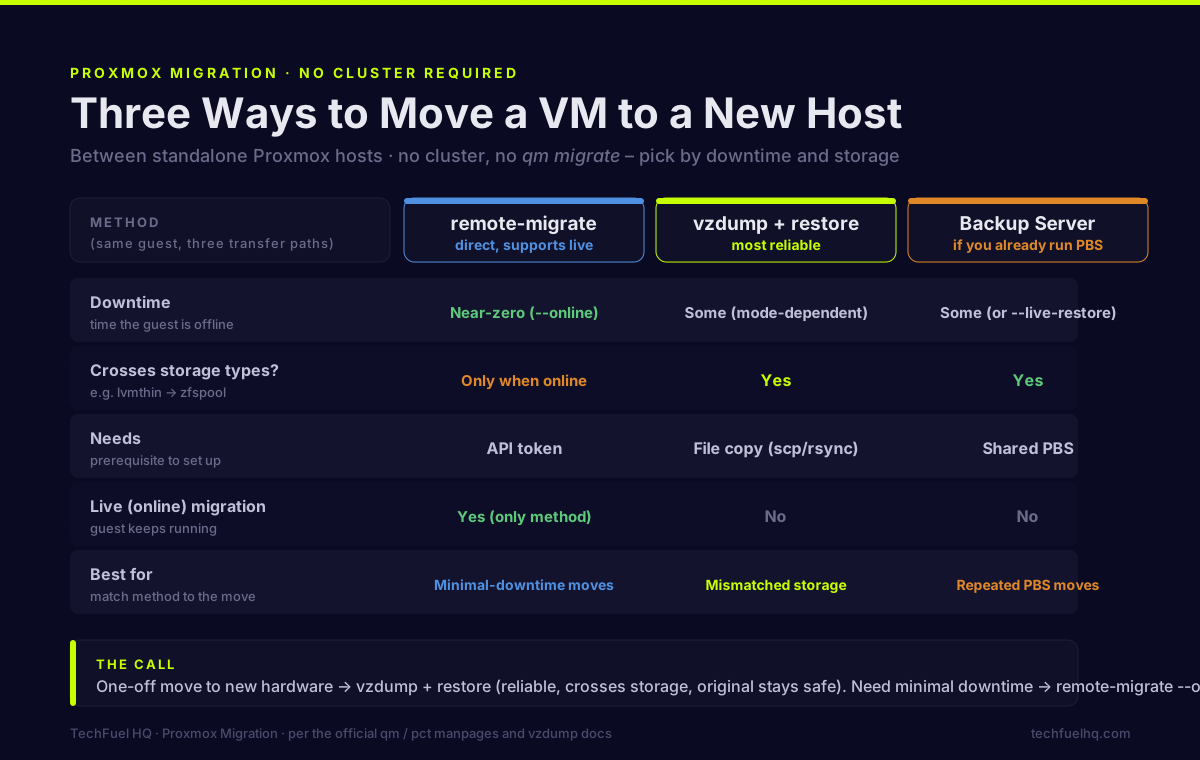
The three methods at a glance
| Method | Downtime | Crosses storage types? | Needs | Best for |
|---|---|---|---|---|
qm/pct remote-migrate | Near-zero (with --online) | Only when online | API token | Minimal-downtime moves |
vzdump + qmrestore | Some (mode-dependent) | Yes | File copy (scp/rsync) | Most moves; mismatched storage |
| Proxmox Backup Server | Some (or --live-restore) | Yes | Shared PBS | If you already run PBS |
Method 1: qm remote-migrate (direct, supports live)
This transfers a guest straight from one host to another, authenticated by an API token. It’s the only no-cluster method that supports live (online) migration, but Proxmox still labels it an EXPERIMENTAL feature (it landed in PVE 7.3, November 2022). Treat it as CLI-only and test before trusting it with something critical.
Syntax (VM):
qm remote-migrate <vmid> [<target-vmid>] <target-endpoint> \
  --target-bridge <bridge> --target-storage <storage> [OPTIONS]
The <target-endpoint> is:
apitoken=PVEAPIToken=user@realm!token=SECRET,host=ADDRESS[,fingerprint=FP][,port=PORT]
A real example (move VM 134 to become VM 205 on pve-dest, live):
qm remote-migrate 134 205 \
  'apitoken=PVEAPIToken=root@pam!migrate_token=abc123,host=pve-dest,fingerprint=D4:9A:3F:...:CD' \
  --target-bridge vmbr0 --target-storage local-lvm --online
Useful options: --online (live-migrate a running VM), --delete (remove the source after success), --bwlimit. For containers, use pct remote-migrate with the same form plus --restart (it restarts the CT on the destination). Passing the special value 1 to --target-bridge/--target-storage maps each source item to a same-named target (identity mapping).
Set up the API token on the target host: Datacenter → API Tokens → Add, user root@pam. Either turn off Privilege Separation (full account access) or keep it on and grant the token the Administrator role on path / (Datacenter → Permissions → Add → API Token Permission). Get the fingerprint with:
openssl x509 -fingerprint -sha256 -noout -in /etc/pve/nodes/$(hostname)/pve-ssl.pem
The two big limitations: remote-migrate can’t move a guest that has snapshots (delete them first, or use backup/restore), and offline migration can’t cross storage types — you’ll hit cannot migrate from storage type lvmthin to zfspool. The workaround is to migrate while the VM is running (online storage migration can change storage type), or use Method 2.
Method 2: vzdump + qmrestore / pct restore (most reliable)
This is the storage-agnostic workhorse: back the guest up, copy the file, restore it on the new host. It works across mismatched storage types where remote-migrate refuses.
On the source:
vzdump 777 --mode snapshot --compress zstd --dumpdir /var/lib/vz/dump
--mode snapshot is the default and avoids downtime; use --mode stop for maximum consistency (more downtime). zstd is the fast modern compressor. You get a vzdump-qemu-777-….vma.zst (VM) or vzdump-lxc-777-….tar.zst (container).
Copy it to the new host:
rsync -avP /var/lib/vz/dump/vzdump-qemu-777-*.vma.zst root@pve-dest:/var/lib/vz/dump/
On the new host — restore (VM, then container):
qmrestore /var/lib/vz/dump/vzdump-qemu-777-*.vma.zst 500 --storage local-lvm --unique
pct restore 600 /var/lib/vz/dump/vzdump-lxc-777-*.tar.zst --storage local-lvm
Pick a free target VMID (or pass --force to overwrite an existing one), set --storage to a pool that exists on the new host, and use --unique to assign a fresh MAC so two copies don’t fight on the network.
Method 3: Proxmox Backup Server (if you already run it)
If you run PBS for 3-2-1 backups, it doubles as a migration path. Add the same PBS as storage on the new host (Datacenter → Storage → Add → Proxmox Backup Server), then select the guest’s backup in the storage tree and Restore, or use qmrestore/pct restore against the PBS-backed storage. PBS deduplicates and only transfers changed chunks, so it’s efficient for repeated moves, and --live-restore (PBS only) boots the VM immediately while the data restores in the background. One catch: for encrypted backups you must supply the same encryption key on the new host or the restore fails.
The pitfalls that bite
- Storage-type mismatch. Offline remote-migrate can’t cross types (lvmthin → zfspool). Use online migration or vzdump+restore with the right
--storage. - Bridge naming. The new host must have the bridge the guest expects (
vmbr0), or you map it with--target-bridge. A guest that boots onto a non-existent bridge comes up with no network. - VMID conflicts. If the target ID is taken, pick a new target VMID, or use
--force(overwrite) /--unique(fresh MAC) deliberately. - Snapshots block remote-migrate. Delete them first or take the backup/restore route.
Which should you use?
For a one-off move to new hardware, use vzdump + restore — it’s the most reliable, crosses storage types, and leaves the original safe. For minimal downtime on a running service, use remote-migrate --online, accepting its experimental status and testing first. If you already run PBS, restoring from it is the least extra work. Whatever you choose, keep the source guest until the destination is verified — and if you’re moving because you’re rebuilding a host, read the PVE 8→9 upgrade gotchas before you reinstall.
Sources
- Proxmox
qmmanual (remote-migrate syntax): https://pve.proxmox.com/pve-docs/qm.1.html - Proxmox
pctmanual (container migration/restore): https://pve.proxmox.com/pve-docs/pct.1.html - Proxmox vzdump documentation: https://pve.proxmox.com/pve-docs/chapter-vzdump.html
- Proxmox Backup and Restore wiki: https://pve.proxmox.com/wiki/Backup_and_Restore
Frequently asked questions
Can you migrate a Proxmox VM without a cluster?
What is the qm remote-migrate command syntax?
<vmid> [<target-vmid>] <target-endpoint> --target-bridge <bridge> --target-storage <storage> [OPTIONS]. The target-endpoint is apitoken=PVEAPIToken=user@realm!token=SECRET,host=ADDRESS[,fingerprint=FP]. Add --online to migrate a running VM live, and --delete to remove the source VM after success. For containers it’s pct remote-migrate with the same form plus --restart. Note: Proxmox still labels remote-migrate an EXPERIMENTAL feature (added in PVE 7.3).Why does my Proxmox migration fail with ‘cannot migrate from storage type lvmthin to zfspool’?
--storage pointing at the new pool, which is storage-agnostic. Snapshots also block remote-migrate; delete them first or use the backup/restore route.How do I move a Proxmox VM with vzdump and qmrestore?
<vmid> --mode snapshot --compress zstd --dumpdir /path. Copy the resulting .vma.zst (VM) or .tar.zst (LXC) to the new host with scp or rsync. On the new host: qmrestore <archive> <new-vmid> --storage <storage-that-exists-here> for a VM, or pct restore <new-vmid> <archive> --storage <storage> for a container. Add --unique to assign a fresh MAC and avoid network conflicts.Do I need an API token to migrate between Proxmox hosts?
What’s the safest way to move a Proxmox guest to new hardware?
Sources and corrections
- Last updated
- Methodology
- See our methodology for research and review standards.
- Update log
- 2026-09-14 — Page updated.
- Corrections
- Spotted an error or a stale number? Email contact@techfuelhq.com. Confirmed corrections are added to the update log above.