 TechFuel HQ
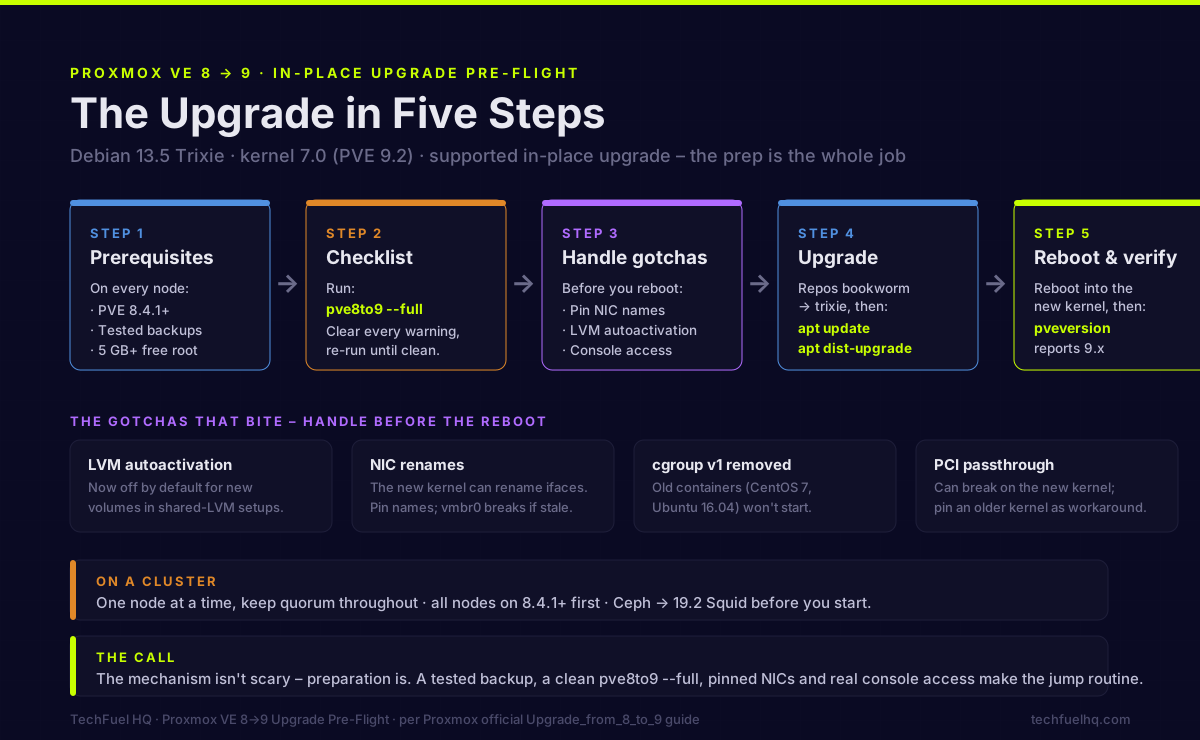
The Proxmox VE 8 to 9 upgrade is an officially supported in-place upgrade: get every node to 8.4.1+, run pve8to9 --full until clean, take a tested backup, switch repositories from Debian bookworm to trixie, then apt dist-upgrade and reboot. Today it lands you on 9.2 (kernel 7.0). PVE 8 support ended 2026-08.
By LK Wood IV · Published 2026-06-17 · Updated 2026-08-24 · ~8 min read · St. Louis County, MO
Proxmox VE 9 has been out since August 2025, and the current release — 9.2, built on Debian 13.5 “Trixie” with Linux kernel 7.0 — is what a fresh in-place upgrade from 8 lands you on today. The 8-to-9 in-place upgrade is officially supported. It is also a real version jump, not a point release, and it ships a handful of breaking changes that can leave a node off the network or refusing to boot if you walk in unprepared.
The clock on it has run out: Proxmox VE 8’s end of standard support is 2026-08, i.e. now, and its Debian 12 “Bookworm” base reached security-support end in 2026-07. This is the pre-flight guide: what to check before you start, the gotchas that actually bite, and the upgrade steps themselves — built from Proxmox’s official Upgrade_from_8_to_9 documentation and the issues the community has reported hitting. The mechanism is not scary. The preparation is the whole job.
Back up first, always. Proxmox’s own guidance is blunt: “A valid and tested backup is always required before starting the upgrade process.” If you take one thing from this page, take that.
The short version
- Get every node to PVE 8.4.1 or later first.
- Run
pve8to9 --fulland clear every warning before touching repositories. - Back up all VMs/containers (ideally a tested 3-2-1 backup) and make sure you have IPMI or physical console access.
- Switch repos from
bookwormtotrixie,apt update && apt dist-upgrade, reboot into the new kernel (7.0 on the current 9.2). - On a cluster: one node at a time, keep quorum, Ceph to Squid first.
- Expect possible NIC renames and LVM autoactivation changes — handle them before you reboot.
What you’re actually upgrading to
When you point your repositories at Trixie and run apt dist-upgrade, APT installs the current Proxmox VE 9 packages — you don’t get to choose 9.0. As of mid-2026 that means you land directly on Proxmox VE 9.2 (released May 21, 2026), not the original 9.0 from August 2025. The stack underneath you becomes:
- Debian 13.5 “Trixie” and Linux kernel 7.0 (up from the 6.14 that shipped with 9.0)
- QEMU 11.0, LXC 7.0, ZFS 2.4
- Ceph Tentacle 20.2 as the new default for hyperconverged clusters, with Squid 19.2 still available (you still upgrade existing Ceph to Squid before the PVE jump — see the cluster section)
The headline 9.2 additions over 9.0 are a dynamic load balancer that migrates guests across a cluster from live CPU/RAM utilization while respecting your HA rules, native WireGuard and BGP in the SDN stack, and custom CPU model management in the web UI. None of this changes the upgrade procedure — but it’s worth knowing you jump straight to the current release, and that the newer kernel is what drives the NIC-rename and PCI-passthrough gotchas further down.
Before you touch anything
The prerequisites from the official guide:
- Be on PVE 8.4.1+ on every node. The
pve8to9checklist ships in the latest 8.4 packages. - Tested backups of every guest. Test a restore in a lab if you can.
- At least 5 GB free on the root filesystem (10+ GB recommended) for the package transition.
- Console access that isn’t the web GUI. Use IPMI/iKVM or a physical console, or SSH inside
tmux/screen— never the GUI’s noVNC console, which dies with the services mid-upgrade. - Ceph users: upgrade Ceph to 19.2 Squid before upgrading Proxmox.
- Co-installed Proxmox Backup Server: upgrade PBS to version 4 first.
Run the checklist: pve8to9 --full
Before changing a single repository line, run:
pve8to9 --full
It flags common incompatibilities — repository state, LVM, boot configuration, known package conflicts — but it does not fix anything for you. Work through every warning, then run it again until it’s clean. This one command prevents the majority of failed upgrades.
The gotchas that actually bite
These are the changes most likely to cause a bad day. Most are easy to handle if you handle them before the reboot.
LVM autoactivation is now off by default
On Proxmox 9, LVM autoactivation is disabled by default for new logical volumes in shared-LVM setups. Existing volumes keep their old behavior, but this trips people on shared storage. There’s a migration helper at /usr/share/pve-manager/migrations/pve-lvm-disable-autoactivation, and some LVM thin pools need a manual repair afterward:
lvconvert --repair pve/data
Network interfaces can get renamed
The newer kernel can recognize additional NIC hardware features, which changes the predictable interface name. If your vmbr0 bridge points at the old name, the host boots with no network. Proxmox ships pve-network-interface-pinning to lock your current names in place — run it before the upgrade, and keep console access handy just in case.
If you run a Ceph Full Mesh with post-up /usr/bin/systemctl restart frr.service, that line will deadlock on 9 — switch it to a conditional restart.
Boot and systemd changes
- Remove the
systemd-bootmeta-package whereproxmox-boot-toolmanages booting (the upgrade notes call this out). - GRUB on LVM in UEFI mode can fail to install; the fix is
[ -d /sys/firmware/efi ] && apt install grub-efi-amd64. /etc/sysctl.confis no longer honored by systemd-sysctl — move any custom kernel tunables into/etc/sysctl.d/<NN>-name.conf.
Containers, passthrough, and migration
- cgroup v1 is removed. Containers running systemd older than 230 (CentOS 7, Ubuntu 16.04) won’t start — migrate those guests first.
- PCI passthrough can break on the newer kernel (first widely reported on 6.14; the current 9.2 ships kernel 7.0). If a passthrough VM misbehaves, the known workaround is pinning an older kernel until it’s resolved.
- Live migration between different CPU vendors (Intel↔AMD) can leave guests unresponsive — plan maintenance windows accordingly.
- NVIDIA vGPU needs driver ≥570.158.02 (GRID 18.3+); Veeam is incompatible with QEMU machine version ≥10.0.
Known failure after upgrading: a Windows VM that won’t boot. Since the kernel-7.0 rollout on 9.2, Windows guests running SeaBIOS with MBR disks have been reported failing with
0xc0000001, and OVMF guests dropping to the UEFI boot menu. If that’s where you’ve landed, don’t reinstall anything — the signature-by-signature fixes (kernel pin, boot-path repair, UEFI conversion) are in Windows VM won’t boot after the Proxmox 9 upgrade.
The upgrade itself
Once pve8to9 --full is clean and you’ve handled the gotchas above:
- Migrate guests off the node you’re about to upgrade (on a cluster).
- Point repositories at Trixie. Switch
bookworm→trixieacross your APT sources and the Proxmox repo (the deb822.sourcesformat is recommended on 9). Update Ceph repos to Squid/trixie if applicable. - Upgrade:
Answer the config-file prompts deliberately — forapt update apt dist-upgrade/etc/lvm/lvm.confthe maintainer version is recommended; for/etc/default/grub, diff it if you’ve customized it. - Reboot into the new kernel — required (the current 9.2 ships kernel 7.0). Reboot even if you were already running a 6.x kernel on 8; the 9 kernel is rebuilt against the new compiler and ABI. Then confirm:
Hard-refresh the web UI (Ctrl+Shift+R) so you’re not staring at a cached 8.x interface.pveversion # should report 9.x
If you run a cluster
- All nodes on 8.4.1+ before you start.
- One node at a time, maintaining quorum throughout. Upgrade, reboot, confirm it rejoins healthy, then move on.
- Ceph → 19.2 Squid first for hyperconverged setups.
- HA groups are deprecated in favor of HA rules; the migration happens automatically once every node is on 9.0. If HA acts up, check
journalctl -eu pve-ha-crm.
If you lean on community automation for cluster nodes, give the helper-scripts safety guide a read first — running anything as root mid-migration deserves the same caution.
Verdict: upgrade now, or wait?
If your Proxmox 8 setup is doing its job and you don’t need anything specific in 9, waiting for a point release you trust is perfectly reasonable — let the edge cases settle. What changed: PVE 8’s end of standard support is 2026-08, so as of this month “wait” has run out of road. Being a release behind on a homelab is fine; sitting on an unsupported, unpatched hypervisor is a different call. The 9.2 line is mature and is where supported installs now live.
When you do upgrade, the deciding factor isn’t timing, it’s preparation: a tested backup, a clean pve8to9 --full, pinned NIC names, real console access, and a read of the official release notes for your hardware. The upgrades that go sideways are almost always the ones that skipped the checklist — old GPUs, PCI passthrough, and shared-LVM storage are the usual suspects. Do the pre-flight, keep a solid backup you can fall back to, and the jump to 9 is routine.
Sources
- Proxmox VE official upgrade guide — Upgrade from 8 to 9: https://pve.proxmox.com/wiki/Upgrade_from_8_to_9
- Proxmox VE roadmap / 9.x release notes: https://pve.proxmox.com/wiki/Roadmap
- Proxmox VE support lifecycle and end-of-life dates (FAQ): https://pve.proxmox.com/wiki/FAQ
- Proxmox VE 9.2 release announcement (Debian 13.5, kernel 7.0, dynamic load balancer, WireGuard SDN): https://proxmox.com/en/about/company-details/press-releases/proxmox-virtual-environment-9-2
- Proxmox forum — PVE 8 to 9 in-place upgrade reports: https://forum.proxmox.com/threads/pve-8-to-9-in-place-upgrade.170013/
Frequently asked questions
Is the in-place Proxmox VE 8 to 9 upgrade safe?
--full checklist and clear every warning, and have a tested backup before you start. The risk is not the upgrade mechanism; it is the handful of breaking changes (LVM autoactivation, NIC renaming, the new kernel) that can leave a node unbootable or off the network if you do not prepare for them.What are the biggest breaking changes in Proxmox VE 9?
--full to see which apply to your node.Will my network interface names change after upgrading to Proxmox 9?
Do I need to back up before the Proxmox 8 to 9 upgrade?
How do I upgrade a Proxmox cluster from 8 to 9?
Should I upgrade to Proxmox 9 right now or wait?
--full, pin NIC names, ensure console access, and read the official release notes for your exact hardware (old GPUs and PCI passthrough setups are the most common sources of trouble).When does Proxmox VE 8 reach end of life?
Which Proxmox VE 9 version do I get when I upgrade, and what is new?
Sources and corrections
- Last updated
- Methodology
- See our methodology for research and review standards.
- Update log
- 2026-08-25 — Added the known-failure callout for Windows guests that stop booting after the upgrade (0xc0000001 on SeaBIOS/MBR, OVMF boot-menu drops — reported on the forum and r/Proxmox since the 9.2 kernel-7.0 rollout), linking the new troubleshooting sibling articles/proxmox-9-windows-vm-not-booting-2026 from the guest-gotchas section and related:. That page owns the post-upgrade boot-failure diagnosis; this guide keeps owning the upgrade procedure.
- 2026-08-14 — Re-tensed every Proxmox VE 8 end-of-life reference. The page was written while 2026-08 was a future deadline and framed it that way throughout – ‘wait a few weeks, not indefinitely’, ‘plenty of runway … before the cutoff’, ‘upgrade searches are climbing through the summer’, and a support-clock graphic whose you-are-here marker read ‘Jul 2026’ above a footer promising ‘a hard deadline a few weeks out’. Read on 2026-08-14 that deadline is now, so the advice to keep waiting had inverted into telling readers to stay on an unsupported hypervisor. Proxmox’s official support lifecycle table (pve.proxmox.com/wiki/FAQ, retrieved 2026-08-14) lists VE 8 as Debian 12 Bookworm, first release 2023-06, Debian EOL 2026-07, Proxmox EOL 2026-08. The EOL date itself was correct and is unchanged; only the tense, the wait-it-out advice, and the graphic’s now-marker moved.
- Corrections
- Spotted an error or a stale number? Email contact@techfuelhq.com. Confirmed corrections are added to the update log above.