 TechFuel HQ
Hourly 24, daily 30, monthly 12 - those /etc/sanoid/sanoid.conf values are retention counts, not intervals, enforced by a sanoid.timer that fires every 15 minutes on Proxmox VE 8. Templates attach per dataset; syncoid then replicates incrementally over SSH at 03:00, and a zfs clone of the arrived snapshot proves the restore works.
By LK Wood IV · 2026-06-02 · ~10 min read · St. Louis County, MO
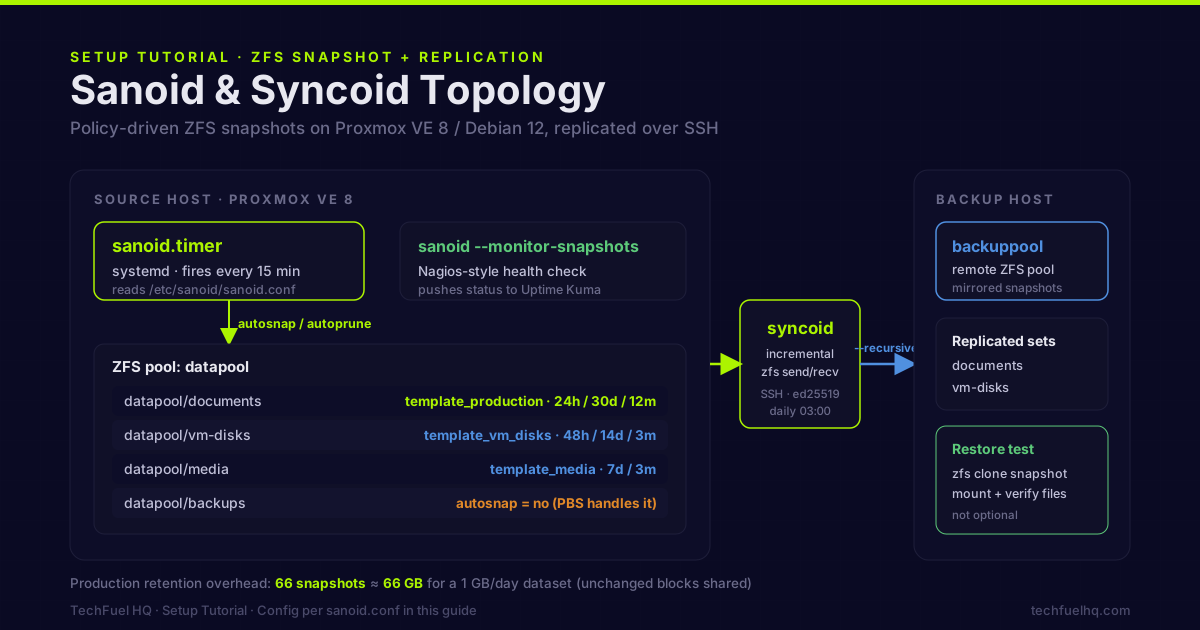
ZFS snapshots are instant, zero-cost at creation time (they only consume space as data changes), and a critical part of a storage strategy. But ZFS doesn’t automate them — you need a policy engine. Sanoid is that engine. Syncoid adds replication to a second ZFS pool, either locally or over SSH.
This guide covers both: Sanoid for snapshot automation with retention policies, Syncoid for encrypted replication.
Prerequisites
- A ZFS pool already set up — see the ZFS on Proxmox guide if you’re starting from scratch
- Debian 12 / Proxmox VE 8 host (the commands apply to any Debian-based system with ZFS)
- For Syncoid replication: SSH access to a destination host with a ZFS pool
Step 1: Install Sanoid
Sanoid is in the Debian 12 repositories:
apt update && apt install -y sanoid
On Proxmox VE (which is Debian-based), Sanoid installs cleanly. The package installs:
/usr/sbin/sanoid— the snapshot management daemon/usr/sbin/syncoid— the replication tool (separate binary, same package)/etc/sanoid/sanoid.conf— the policy config file- A systemd timer that runs Sanoid every 15 minutes
Step 2: Configure snapshot policies
Edit the config file:
nano /etc/sanoid/sanoid.conf
Template-based configuration — Sanoid uses templates to define retention policies, then you apply templates to datasets:
# /etc/sanoid/sanoid.conf

# --- Templates ---
# Define retention policies once, reuse across datasets

[template_production]
  # Retention counts — how many snapshots of each type Sanoid keeps.
  # A value of N means "keep the N most recent snapshots of this type",
  # not "take one every N hours" — Sanoid prunes down to the count.
  frequently = 0     # No sub-hourly snapshots
  hourly = 24        # Keep 24 hourly snapshots (last 24 hours)
  daily = 30         # Keep 30 daily snapshots (last month)
  weekly = 0         # No separate weekly retention
  monthly = 12       # Keep 12 monthly snapshots (last year)
  yearly = 0         # No yearly retention

  # When should Sanoid take each type?
  # (Sanoid runs every 15min; it takes a snapshot when the time has passed
  #  since the last one of that type)
  autosnap = yes
  autoprune = yes

[template_media]
  # Media changes rarely — weekly + monthly is enough
  frequently = 0
  hourly = 0
  daily = 7
  weekly = 0
  monthly = 3
  yearly = 0
  autosnap = yes
  autoprune = yes

[template_vm_disks]
  # Frequently-changing VM data — more hourly retention
  frequently = 0
  hourly = 48        # Last 48 hours at hourly granularity
  daily = 14
  weekly = 0
  monthly = 3
  yearly = 0
  autosnap = yes
  autoprune = yes

# --- Datasets ---
# Apply templates to your ZFS datasets

[datapool/vm-disks]
  use_template = vm_disks

[datapool/media]
  use_template = media

[datapool/backups]
  # Don't snapshot the PBS backup datastore — PBS handles its own versioning
  autosnap = no
  autoprune = no

[datapool/documents]
  use_template = production
Replace datapool with your pool name. List your pools and datasets with:
zfs list -r
Recursive datasets. To apply a policy to a dataset and all of its children with a single stanza, add recursive = yes. To snapshot only the children (not the parent dataset itself), add process_children_only = yes. This is the clean way to cover a nested tree like datapool/vm-disks/vm-100, datapool/vm-disks/vm-101 without listing each one:
[datapool/vm-disks]
  use_template = vm_disks
  recursive = yes             # applies vm_disks policy to every child dataset
On the retention numbers. Each value (hourly = 24, daily = 30, monthly = 12) is a retention count — the number of snapshots of that type Sanoid keeps before pruning the oldest. It is not an interval. Sanoid takes one snapshot of each enabled type per period (one per hour for hourly, one per day for daily) and prunes the type down to its configured count on every run when autoprune = yes. The frequently key adds sub-hourly snapshots at the interval set by frequent_period (default 15 minutes); it is set to 0 here because hourly granularity is enough for most homelab datasets.
Step 3: Enable and test the systemd timer
Sanoid ships with a systemd service and timer. On Proxmox VE 8 (Debian 12), the timer is installed but not enabled by default:
# Enable and start the timer
systemctl enable --now sanoid.timer

# Verify the timer is active
systemctl status sanoid.timer

# Manually trigger a run to test
systemctl start sanoid.service

# Check output
journalctl -u sanoid.service -n 50
After a successful run, verify snapshots were created:
zfs list -t snapshot -r datapool/documents
You should see snapshots named like datapool/documents@sanoid_2026-05-03_14:00:00_hourly.
Step 4: Monitor snapshot health
Sanoid includes a monitoring command that outputs Nagios-compatible status:
sanoid --monitor-snapshots
This checks whether recent snapshots exist and whether the latest snapshot is within the expected age. The output is:
OK: all monitored datasets have recent snapshots
Or, if a dataset has missed snapshots:
CRITICAL: datapool/documents: no daily snapshot in the last 25 hours
Integrate with Uptime Kuma push monitoring:
Add to a cron job or systemd override:
#!/bin/bash
# /usr/local/bin/sanoid-health-check.sh
STATUS=$(sanoid --monitor-snapshots 2>&1)
if echo "$STATUS" | grep -q "^OK"; then
  curl -s "https://uptime.yourdomain.com/api/push/YOUR_PUSH_KEY?status=up&msg=Sanoid+OK"
else
  curl -s "https://uptime.yourdomain.com/api/push/YOUR_PUSH_KEY?status=down&msg=$(python3 -c 'import urllib.parse,sys; print(urllib.parse.quote(sys.stdin.read().strip()))' <<< "$STATUS")"
fi
chmod +x /usr/local/bin/sanoid-health-check.sh
echo "*/30 * * * * root /usr/local/bin/sanoid-health-check.sh" >> /etc/crontab
Step 5: Syncoid replication
Syncoid replicates datasets from a source ZFS pool to a destination ZFS pool. The destination can be:
- A second pool on the same host (local backup copy)
- A remote host over SSH
- A Proxmox Backup Server node with a ZFS datastore
One-time setup — SSH key auth to the destination:
# On the source host, generate a key for the root user (or a dedicated sanoid user)
ssh-keygen -t ed25519 -f /root/.ssh/sanoid_id -N ""

# Copy to the destination host
ssh-copy-id -i /root/.ssh/sanoid_id.pub root@backup-host
Test a manual replication:
# Replicate datapool/documents to backuppool/documents on a remote host
syncoid --recursive \
  datapool/documents \
  root@backup-host:backuppool/documents
The --recursive flag replicates all child datasets. Syncoid automatically finds the most recent common snapshot between source and destination and sends only the incremental delta.
Push vs pull — which host runs the command. The example above is a push: it runs on the source and sends to a remote destination (localdataset user@host:remotedataset). You can also pull, which runs on the backup host and reads from the remote source (user@host:remotedataset localdataset). Pull is the safer topology for a dedicated backup server: the backup box holds the only SSH key that can reach the source, so a compromise of the source host cannot reach in and delete the backups.
# PULL: run this ON the backup host. It reads datapool/documents from the
# production host and writes it to backuppool/documents locally.
syncoid --recursive \
  root@prod-host:datapool/documents \
  backuppool/documents
Whether you push or pull, Syncoid resolves the incremental automatically — the direction only changes which machine initiates the SSH connection and holds the key.
First replication note: The first run sends the entire dataset — this can take significant time for large pools. Run it manually first to verify the connection and transfer rate before scheduling.
Schedule Syncoid with systemd:
Create a systemd service:
# /etc/systemd/system/syncoid-replicate.service
[Unit]
Description=Syncoid ZFS Replication
Requires=network-online.target
After=network-online.target

[Service]
Type=oneshot
ExecStart=/usr/sbin/syncoid --recursive datapool/documents root@backup-host:backuppool/documents
ExecStartPost=/usr/sbin/syncoid --recursive datapool/vm-disks root@backup-host:backuppool/vm-disks
Create the timer:
# /etc/systemd/system/syncoid-replicate.timer
[Unit]
Description=Run Syncoid replication daily

[Timer]
OnCalendar=*-*-* 03:00:00
Persistent=true

[Install]
WantedBy=timers.target
Enable:
systemctl daemon-reload
systemctl enable --now syncoid-replicate.timer
Step 6: Verify replicated snapshots
On the destination host, confirm snapshots arrived:
# On backup-host
zfs list -t snapshot -r backuppool/documents | tail -10
You should see snapshots with Sanoid’s naming convention, matching what’s on the source.
Test a restore from a replicated snapshot:
# On backup-host: clone a snapshot to a test dataset
zfs clone backuppool/documents@sanoid_2026-05-03_00:00:00_daily backuppool/restore-test

# Mount it and verify content
zfs set mountpoint=/mnt/restore-test backuppool/restore-test

# Check files
ls /mnt/restore-test

# Clean up
zfs destroy backuppool/restore-test
This step is not optional. Snapshots that can’t be mounted and read are not useful backups. Run restore tests when you first set this up and periodically afterward.
Retention math
For a dataset that changes 1GB/day, with the production template (24 hourly, 30 daily, 12 monthly):
| Snapshot type | Count | Total additional space |
|---|---|---|
| Hourly (24h window) | 24 | ~24 GB |
| Daily (30d window) | 30 | ~30 GB |
| Monthly (12m window) | 12 | ~12 GB |
| Total overhead | 66 | ~66 GB |
Space is additive only for the data that changed between snapshots — unchanged blocks are shared. A dataset that changes 1 GB/day but has 100 GB of static content costs ~66 GB for a year of snapshots, not 66× 100 GB.
ZFS compression applies to snapshot data as well as live data. If your data compresses at 1.5:1, snapshot overhead compresses proportionally.
Sanoid snapshots protect against accidental deletion and filesystem corruption within a single pool — but a snapshot on the same pool is not one of your 3-2-1 backup copies; it dies with the pool. For off-machine protection (fire, hardware failure), combine with Syncoid replication to a second physical host or restic to Backblaze B2. The ZFS on Proxmox setup guide covers the pool creation that Sanoid manages.
Sources
- Sanoid and Syncoid project repository – the official source for the snapshot policy daemon and the zfs send/recv replication wrapper, including config syntax and templates.
- OpenZFS zfs-snapshot(8) manual page – documents the underlying native snapshot command Sanoid automates.
- Proxmox VE wiki: ZFS on Linux – official Proxmox guidance on running ZFS pools on the Debian-based host this guide targets.
Frequently asked questions
What is Sanoid and why do I need it for ZFS?
How is Sanoid different from Proxmox Backup Server for ZFS?
What does Syncoid do that 'zfs send | zfs recv' doesn't?
Can I replicate to a non-ZFS destination?
How often should ZFS snapshots run?
Evidence ledger
- Last updated
- Methodology
- This tutorial was written and edited by Lowell K. Wood IV in St. Louis County, MO. Specs, prices, commands, and version numbers are drawn from the official vendor, reseller, and project documentation current on the date above, and were verified before publishing. First-person hardware claims appear only where the article shows a verifiable artifact — a photo, receipt, or measurement — or links to the TechFuelHQ Open Bench Datasets. Every fact is human-verified against its cited source before publishing; AI assists with first-draft structure and source-gathering, not with the verdict. Full editorial standard: methodology.
- Update log
- 2026-07-25 — Last reviewed and updated.
- Corrections
- Spotted an error or stale price? Email hello@techfuelhq.com. Confirmed corrections are added to the update log above.